
Web Application Architecture: Components, Layers and Models
Web application architecture defines how different components of a web application interact, including clients, servers, databases, and APIs. It includes layers such as presentation, business logic, and data access, and follows patterns like MVC, monolithic, microservices, and serverless architectures.
Web Application Architecture: Components, Layers and Models
Web application architecture is the structural blueprint that defines how the different components of a web application interact with each other. It encompasses everything from the user interface in the browser to the servers, databases, and external services that power the application. A well-designed architecture ensures that an application is scalable, maintainable, secure, and performant.
To understand web application architecture properly, it helps to be familiar with the client-server model, HTTP protocol, and web servers.
What Is Web Application Architecture?
Web application architecture is the fundamental structure of a web application. It defines how the application's components are organized, how they communicate, and how data flows between them. Good architecture is invisible to users but essential for building applications that can grow, change, and remain reliable over time.
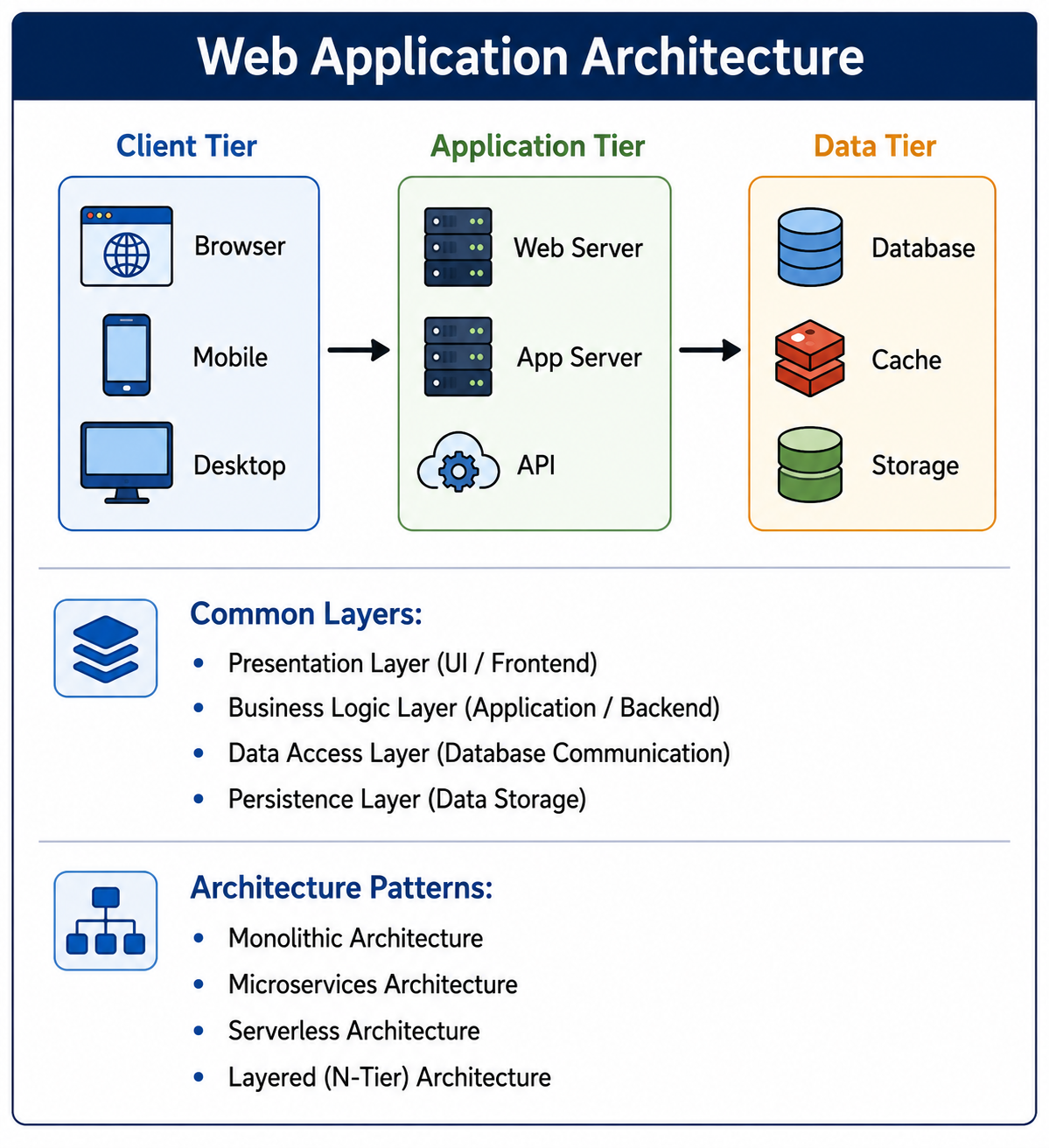
- Client Tier: The user-facing part of the application, typically running in a web browser or mobile application. Responsible for presenting the user interface and handling user interactions.
- Application Tier: The server-side part containing business logic, processing requests, and coordinating between the client and data storage. Also called the logic tier or middleware.
- Data Tier: Storage and management of application data, including databases, file storage, and caching systems.
- Infrastructure: The underlying hardware and software supporting the application, including servers, networks, and load balancers.
Core Components of Web Application Architecture
Client or Frontend
The client is what users interact with directly. It runs in the user's browser or on their device. The frontend sends requests to the backend, processes responses, and updates the user interface accordingly. Modern frontends are often built with frameworks like React, Angular, or Vue.js.
Web Server
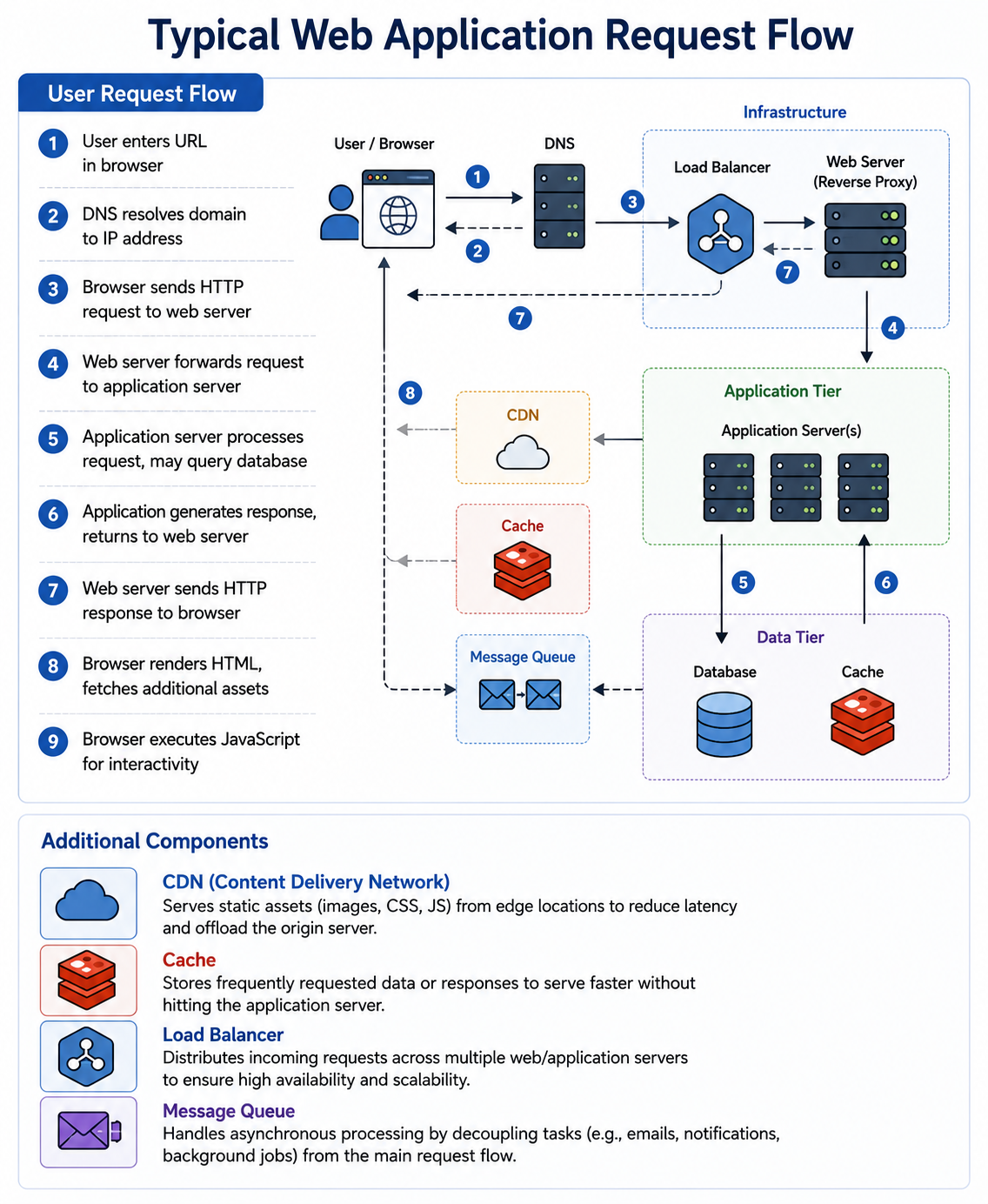
The web server receives HTTP requests from clients and serves static content like HTML, CSS, JavaScript, and images. For dynamic content, it forwards requests to the application server. Popular web servers include Nginx and Apache. This is covered in detail in our web server guide.
Application Server
The application server executes the business logic of the application. It processes requests, interacts with databases, and generates dynamic responses. Application servers host backend code written in languages like Java, Python, Node.js, PHP, or Ruby.
Database
The database stores application data persistently. It can be relational like PostgreSQL and MySQL, or non-relational like MongoDB and Redis. The application server queries the database to retrieve or modify data based on user requests.
Cache
A cache stores frequently accessed data in memory for faster retrieval. Caches reduce database load and improve response times. Common caching systems include Redis and Memcached. HTTP caching also occurs at the browser and CDN level.
Content Delivery Network
A CDN distributes static assets to servers around the world, serving content from locations closer to users. This reduces latency and offloads traffic from the origin server. CDN architecture is explained in our CDN guide.
Load Balancer
A load balancer distributes incoming traffic across multiple servers to prevent any single server from becoming overloaded. It improves availability and scalability. Learn more in our load balancing guide.
Message Queue
Message queues enable asynchronous communication between services. A service can publish a message to a queue, and another service processes it later. This decouples services and improves resilience.
Common Architectural Layers
Presentation Layer
The presentation layer is responsible for user interaction. It handles rendering the user interface, capturing user input, and presenting data from the backend. In web applications, this layer runs primarily in the browser. It includes HTML for structure, CSS for styling, and JavaScript for behavior.
Business Logic Layer
The business logic layer contains the core functionality of the application. It processes user requests, applies business rules, performs calculations, and orchestrates data flow. This layer is also called the domain layer or application layer. It should be independent of both the user interface and data storage details.
Data Access Layer
The data access layer abstracts database interactions. It provides methods for querying and modifying data without exposing database-specific details to the business logic. This layer handles connection management, query execution, and mapping database results to application objects.
Persistence Layer
The persistence layer is the actual data storage. It includes databases, file systems, and other storage mechanisms. This layer is responsible for durable storage of application data, ensuring data survives application restarts and server failures.
Web Application Architecture Patterns
Monolithic Architecture
In a monolithic architecture, all components of the application, including user interface, business logic, and data access, are built and deployed as a single unit. Monoliths are simple to develop initially but become difficult to scale and maintain as they grow. This pattern is compared to microservices in our microservices guide.
- Advantages: Simple to develop, easy to deploy, straightforward testing, good performance for moderate scale.
- Disadvantages: Tight coupling, difficult to scale individual components, large codebase challenges, slow deployment cycles.
Layered or N-Tier Architecture
Layered architecture separates concerns into distinct layers, such as presentation, business, and data. Each layer has a specific responsibility and communicates only with adjacent layers. Three-tier architecture, where presentation, application, and data are separate, is the most common form.
- Advantages: Separation of concerns, easier testing per layer, ability to replace one layer independently.
- Disadvantages: Can introduce unnecessary overhead, layers may become tightly coupled over time.
Microservices Architecture
Microservices architecture breaks an application into small, independent services that communicate over a network. Each service focuses on a specific business capability and can be developed, deployed, and scaled independently. This pattern is covered in depth in our microservices guide.
- Advantages: Independent deployment and scaling, technology diversity, team autonomy, fault isolation.
- Disadvantages: Distributed system complexity, operational overhead, data consistency challenges.
Serverless Architecture
Serverless architecture allows developers to run code without managing servers. The cloud provider automatically handles infrastructure, scaling, and billing based on actual usage. Functions as a Service (FaaS) is the most common serverless pattern, where small functions run in response to events.
- Advantages: No server management, automatic scaling, pay-per-execution cost model, reduced operational overhead.
- Disadvantages: Cold start latency, vendor lock-in, limited execution duration, debugging complexity.
Event-Driven Architecture
In event-driven architecture, components communicate by producing and consuming events. When something happens, an event is published. Other components that care about that event react accordingly. This pattern enables loose coupling and real-time responsiveness.
- Advantages: Loose coupling, excellent scalability, real-time processing, resilience.
- Disadvantages: Complex debugging, eventual consistency, message ordering challenges.
Service-Oriented Architecture
SOA is an architectural style where services are provided to other components through a communication protocol, typically over a network. It is a broader concept than microservices, often involving an enterprise service bus for communication.
| Architecture | Deployment | Scaling | Complexity | Best For |
|---|---|---|---|---|
| Monolithic | Single unit | Whole application | Low | Small applications, simple projects |
| Layered N-Tier | Single or multiple units | Per layer | Moderate | Traditional enterprise applications |
| Microservices | Many independent services | Per service | High | Large, complex systems with many teams |
| Serverless | Individual functions | Automatic per function | Moderate to high | Event-driven workloads, variable traffic |
The Model-View-Controller Pattern
MVC is a design pattern that separates an application into three interconnected components. It is widely used in web frameworks like Django, Ruby on Rails, Laravel, and Spring MVC. The MVC pattern is fundamental to many web applications.
Model
The model represents the application's data and business logic. It directly manages the data, logic, and rules of the application. The model is independent of the user interface and responds to requests for data from the controller.
View
The view is the user interface of the application. It displays data from the model to the user and sends user commands to the controller. Views are typically HTML templates that render data dynamically.
Controller
The controller handles user input, updates the model accordingly, and selects the appropriate view for response. It acts as an intermediary between the view and the model.
Modern Web Application Architecture Patterns
Single Page Application
In an SPA, the entire application runs in the browser after the initial page load. Subsequent interactions are handled by JavaScript that calls APIs in the background, updating the page without full reloads. SPAs provide a more fluid user experience. Learn more in our SPA vs MPA guide.
Progressive Web App
PWAs are web applications that provide native app-like experiences. They can work offline, send push notifications, and be installed on a user's device. PWAs use service workers to cache resources and provide reliable performance. This is covered in our Progressive Web Apps guide.
JAMstack
JAMstack stands for JavaScript, APIs, and Markup. It is an architecture for building fast, secure websites by pre-rendering pages at build time and serving them from a CDN. Dynamic functionality is handled by JavaScript calling reusable APIs.
Backend for Frontend
BFF is a pattern where a dedicated backend is created for each specific frontend client, such as web, mobile, or desktop. Each BFF provides exactly the data and API shape that its client needs, simplifying frontend development.
Scalability Strategies
Vertical Scaling
Vertical scaling means adding more power to an existing server, such as more CPU, RAM, or faster storage. It is simple but has limits and can be expensive. Eventually, you cannot add more resources to a single machine.
Horizontal Scaling
Horizontal scaling means adding more servers to distribute the load. It is more complex but offers virtually unlimited scalability. Load balancers distribute traffic across the server pool. Horizontal scaling is essential for large web applications.
Database Scaling
Databases are often the bottleneck in web applications. Common database scaling strategies include read replicas for distributing read traffic, database sharding for partitioning data across multiple databases, and database caching for reducing query load.
Security Considerations in Web Architecture
Security must be built into web application architecture, not added afterward. Key security components include:
- Web Application Firewall: Filters and monitors HTTP traffic to block malicious requests.
- Authentication and Authorization: Verifies user identity and controls access to resources, covered in our authentication vs authorization guide.
- TLS Encryption: Encrypts data in transit between client and server, explained in our SSL/TLS guide.
- Input Validation: Validates all user input to prevent injection attacks like SQL injection and XSS.
- Security Headers: HTTP headers like CSP and HSTS that instruct browsers to enforce security policies, covered in our security headers guide.
- API Rate Limiting: Limits request rates to prevent abuse, explained in our rate limiting guide.
Architectural Best Practices
- Separate Concerns: Keep presentation, business logic, and data access in distinct layers. This improves maintainability and testability.
- Design for Failure: Assume components will fail and build resilience. Use patterns like circuit breakers and bulkheads.
- Keep Services Stateless: Stateless services scale more easily because any request can go to any server. Store session state in external caches when needed.
- Use Caching Strategically: Cache at multiple levels, browser cache, CDN, application cache, and database cache. Invalidate caches appropriately.
- Implement Observability: Build in logging, metrics, and tracing from the start. You cannot fix what you cannot see. Learn more in our distributed tracing guide.
- Automate Deployments: Use CI/CD pipelines for reliable, repeatable deployments. Infrastructure as Code for environment management.
- Design APIs Carefully: Version APIs from the start. Use appropriate HTTP methods and status codes. Document APIs thoroughly.
- Plan for Evolution: Architecture is not static. Build flexibility for future changes. Avoid premature optimization.
Common Architectural Anti-Patterns
- Big Ball of Mud: A system with no discernible structure, where components are tangled and dependencies are chaotic.
- Stovepipe System: Isolated components that could share functionality but do not, leading to duplication.
- Distributed Monolith: A system that looks like microservices but is deployed as a monolith, with tight coupling between services that should be independent.
- Inner Platform Effect: Reimplementing platform features within the application instead of using existing tools.
- Vendor Lock-In: Building architecture that depends on proprietary features, making future migration difficult.
- Over-Engineering: Adding unnecessary complexity for anticipated needs that never materialize.
Choosing the Right Architecture
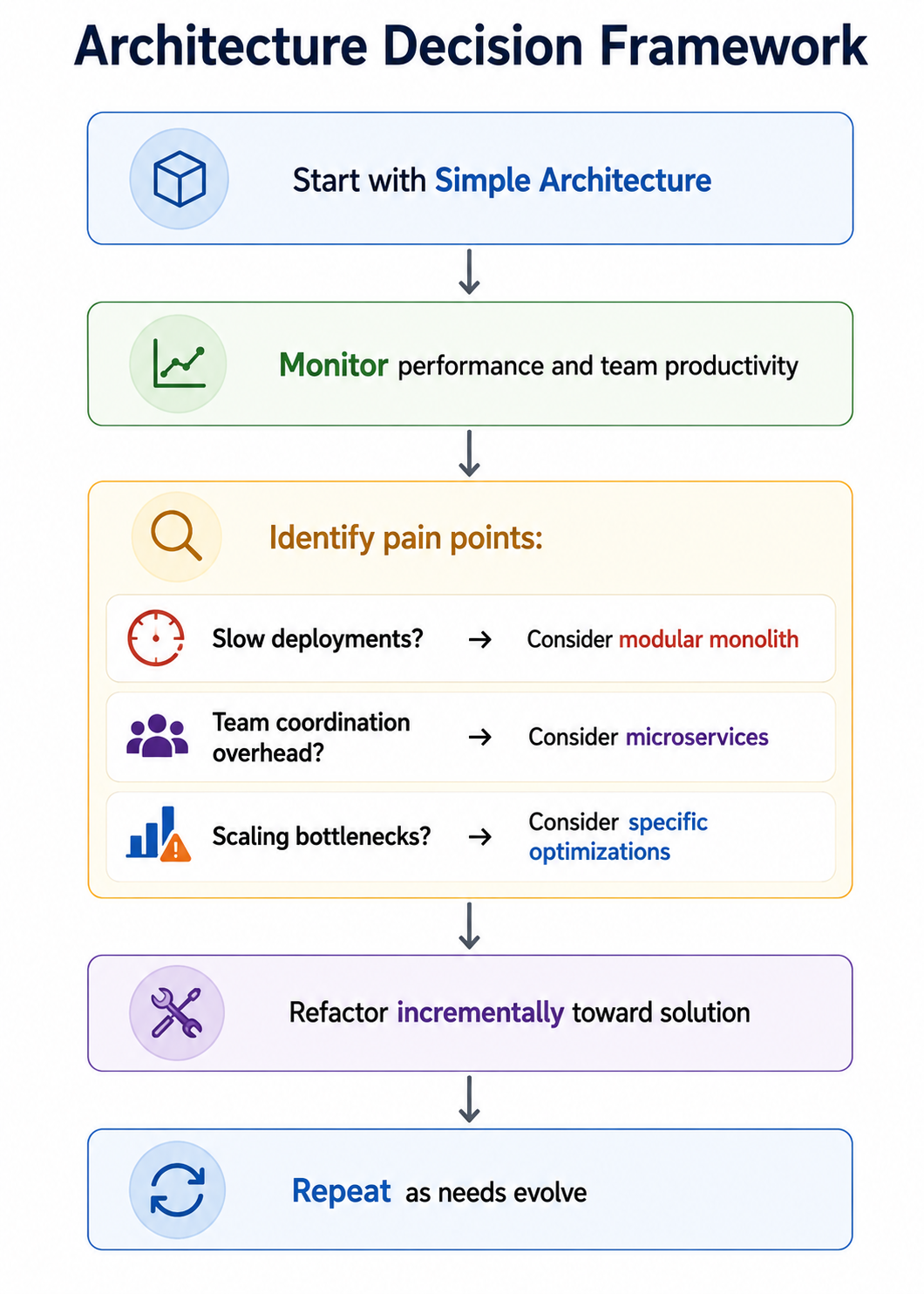
There is no single best architecture for all applications. The right choice depends on many factors. A small internal tool might do well with a simple monolithic architecture. A large consumer application with millions of users likely needs microservices or a well-architected modular monolith.
- Team Size and Experience: Smaller teams often succeed better with simpler architectures like monoliths. Larger teams can handle the complexity of microservices.
- Expected Scale: If you expect massive growth, plan for horizontal scalability from the start. If scale is modest, start simple.
- Development Velocity: Monoliths are faster to develop initially. Microservices enable faster parallel development at scale.
- Operational Capability: Microservices require significant operational investment. Do you have the expertise to manage distributed systems?
- Time to Market: Start with the simplest architecture that can work. You can always refactor as needs evolve.
Frequently Asked Questions
- What is the difference between web application architecture and software architecture?
Software architecture is a broader term covering all software systems. Web application architecture is a specific type of software architecture focused on web-based applications, including considerations like HTTP, browsers, and network communication. - Should I start with microservices or a monolith?
Start with a monolith for most new projects. It is simpler to develop, test, and deploy. As the application grows and pain points emerge, gradually migrate pieces to microservices using the strangler pattern. Starting with microservices introduces unnecessary complexity for most new projects. - What is the difference between three-tier and MVC architecture?
Three-tier architecture separates presentation, application logic, and data storage into physical tiers or layers. MVC is a pattern within the presentation tier that separates the user interface into Model, View, and Controller. They operate at different levels and can be used together. - How important is caching in web architecture?
Caching is extremely important for performance and scalability. Proper caching can reduce database load by orders of magnitude and dramatically improve response times. Every web application should implement caching at appropriate levels: browser cache, CDN, application cache, and database cache. - What is the role of an API gateway in web architecture?
An API gateway is a single entry point for all client requests. It handles request routing, authentication, rate limiting, logging, response aggregation, and protocol translation. In microservices architectures, the API gateway is an essential component that clients interact with instead of individual services. - What should I learn next after web application architecture?
After mastering web application architecture, explore microservices architecture in depth, cloud deployment strategies, Infrastructure as Code, CI/CD pipelines, and system design for large-scale applications.