
CI/CD Pipelines: Continuous Integration and Continuous Deployment
CI/CD pipelines automate the process of building, testing, and deploying software. Continuous Integration merges code changes frequently and runs automated tests. Continuous Delivery or Deployment automates the release process.
CI/CD Pipelines: Continuous Integration and Continuous Deployment
CI/CD stands for Continuous Integration and Continuous Delivery (or Continuous Deployment). It is a software development practice that automates the process of building, testing, and deploying code changes. Instead of manually running tests and deploying software, CI/CD pipelines run automatically every time a developer pushes code, providing immediate feedback and enabling teams to release software faster and more reliably.
Before CI/CD, developers would write code for weeks or months, then spend days integrating changes, fixing merge conflicts, and running tests manually before a stressful, error-prone release. CI/CD replaces this with small, frequent changes that are automatically tested and deployed, catching problems early when they are cheap to fix. To understand CI/CD properly, it is helpful to be familiar with Git workflow, branching strategies, and cloud deployment.
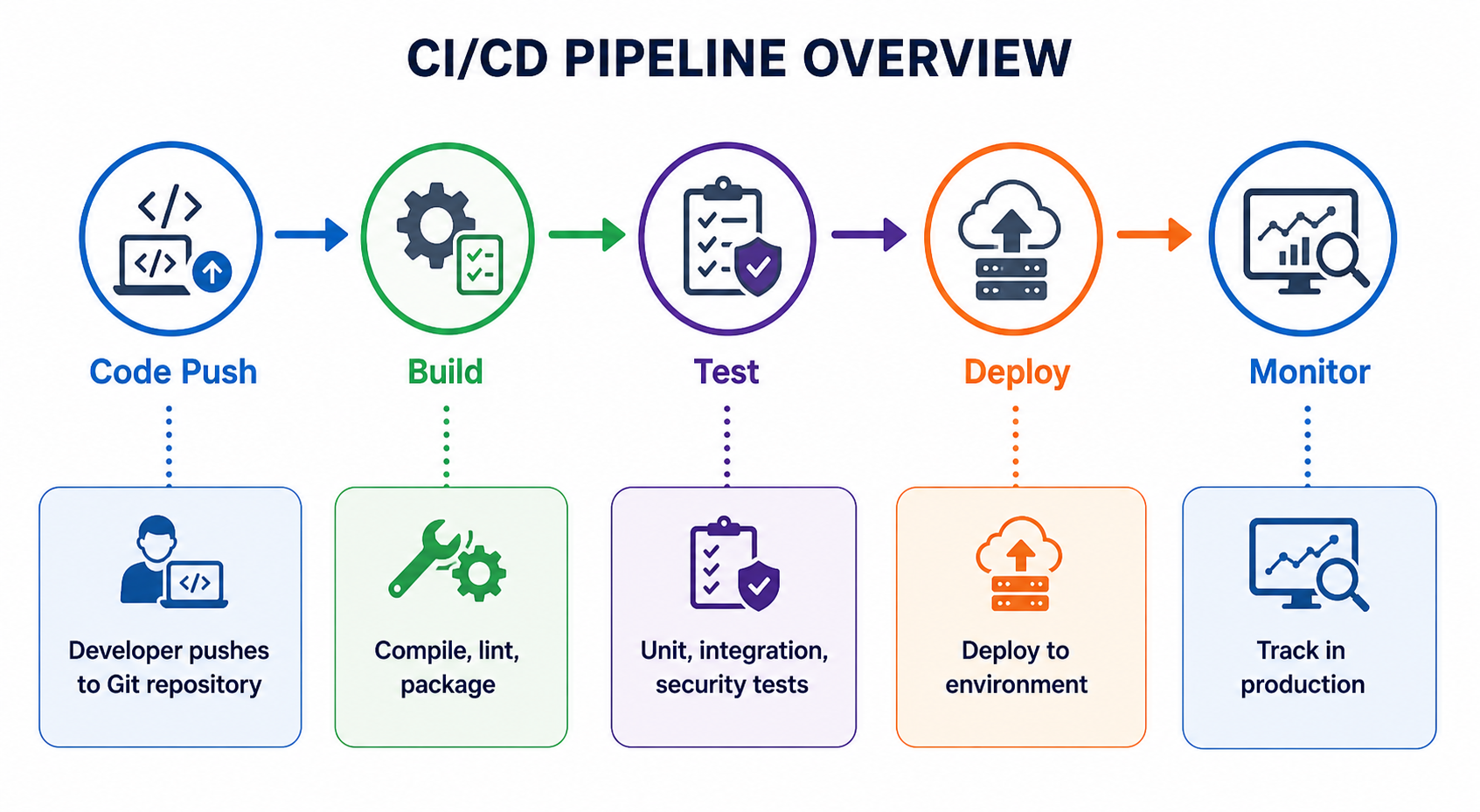
What Is Continuous Integration (CI)
Continuous Integration is the practice of merging all developer working copies to a shared mainline several times a day. Each merge triggers an automated build and test process, giving developers immediate feedback on whether their changes broke anything.
- Frequent merges: Developers merge code to main at least daily, often multiple times per day.
- Automated builds: Every merge triggers an automated build to compile and package the code.
- Automated tests: Unit tests, integration tests, and other automated checks run on every build.
- Fast feedback: Developers know within minutes if their change broke something.
- Fix broken builds immediately: The team stops all work until the build is fixed.
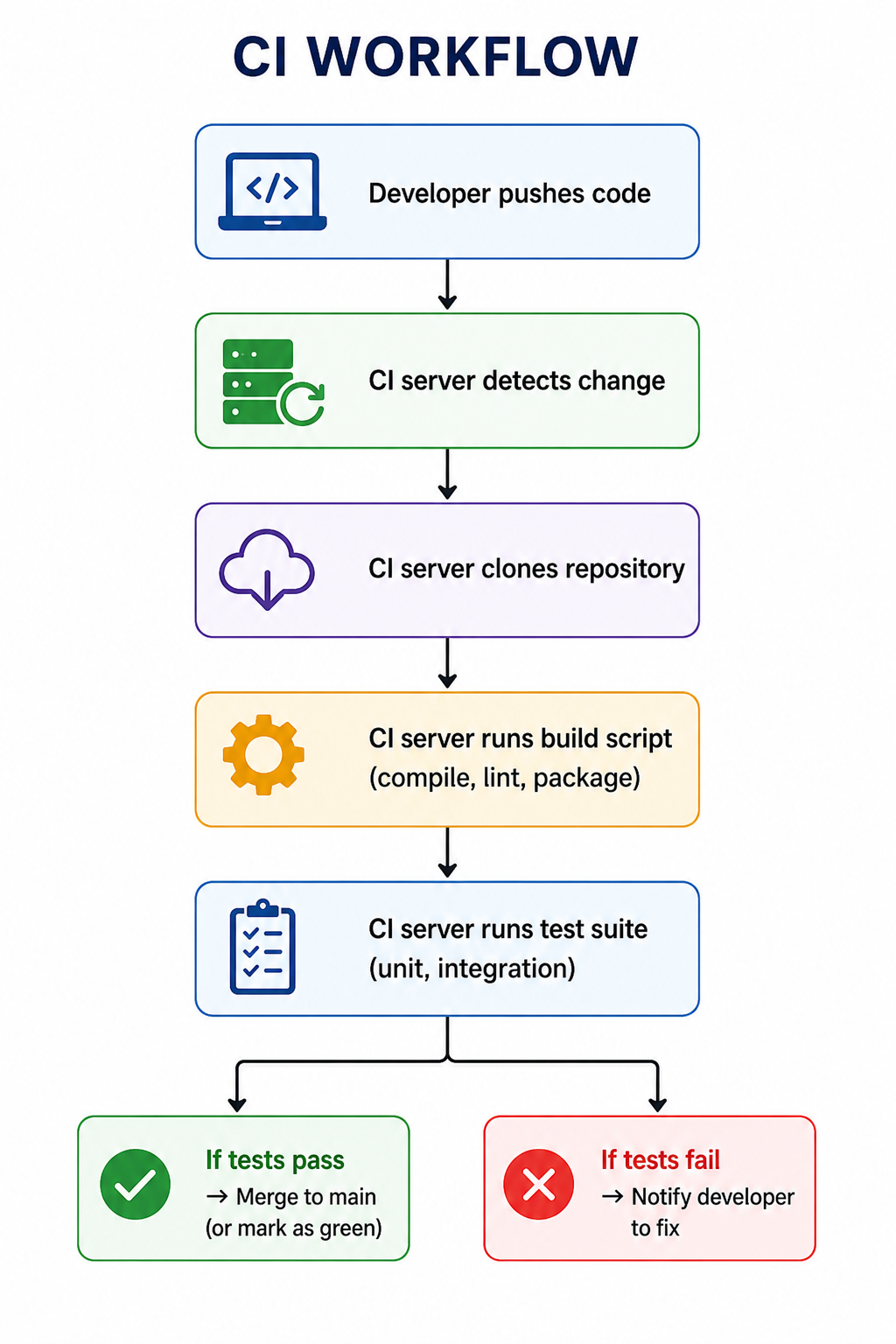
What Is Continuous Delivery (CD)
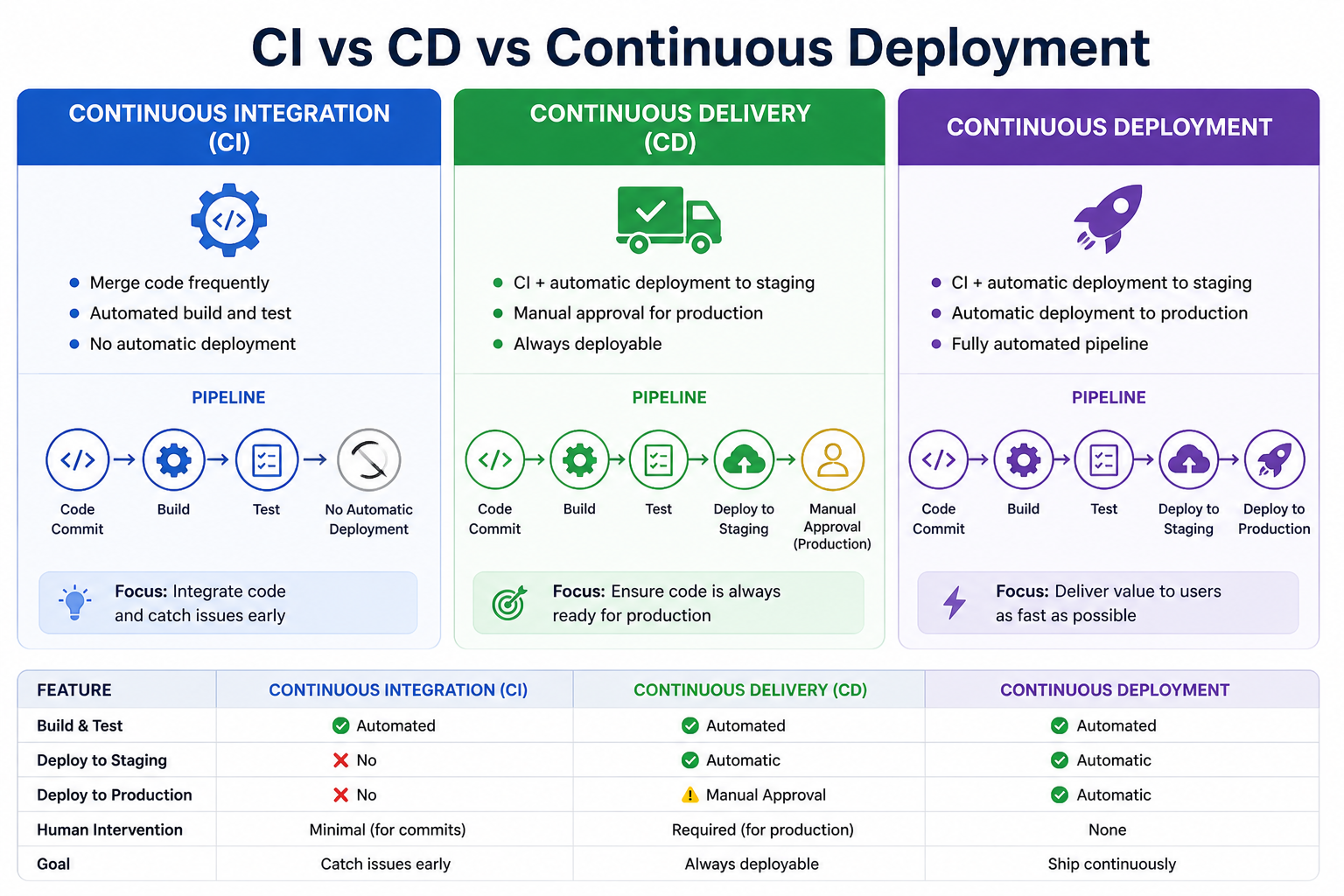
Continuous Delivery extends CI by automatically deploying every successful build to a staging or production-like environment. The software is always in a deployable state, but the actual deployment to production is triggered manually.
- Automated deployment to staging: Every successful build deploys automatically to a staging environment.
- Manual production trigger: Deployment to production requires a manual approval.
- One-click deployment: Any version can be deployed to production with a single click.
- Release on demand: You decide when to release, but the software is always ready.
What Is Continuous Deployment
Continuous Deployment takes CD one step further. Every change that passes all stages of the production pipeline is deployed to production automatically, without human intervention.
- Fully automated: No manual approval for production deployment.
- Multiple deploys per day: Teams can deploy dozens of times per day.
- Requires high confidence: Only works with excellent test coverage and monitoring.
- Instant feedback: Developers see their changes in production within minutes.
Benefits of CI/CD Pipelines
- Faster time to market: Automate manual processes, deploy more frequently, release features faster.
- Higher quality: Catch bugs early when they are cheap to fix. Automated tests run on every change.
- Reduced risk: Small, frequent deployments are less risky than large, infrequent releases.
- Better developer productivity: No manual testing or deployment scripts. Immediate feedback on changes.
- Consistent process: The same pipeline runs for every change. No variation between environments.
- Faster recovery: When a bug slips through, rollback is fast because changes are small.
- Improved collaboration: Teams trust the pipeline and feel safe merging changes frequently.
CI/CD Pipeline Stages
A typical CI/CD pipeline consists of several stages, each performing specific tasks. Stages run sequentially, and if any stage fails, the pipeline stops and reports the failure.
1. Source Stage
The pipeline triggers when code is pushed to the repository. The CI server fetches the latest code and prepares for the build.
2. Build Stage
The code is compiled, dependencies are installed, and artifacts are created. This stage may also include linting and code style checks.
3. Test Stage
Automated tests run against the built code. This includes unit tests, integration tests, security scans, and performance tests.
4. Package Stage
The tested code is packaged into a deployable artifact such as a Docker container, JAR file, or ZIP archive. Artifacts are stored in a registry.
5. Deploy Stage
The artifact is deployed to one or more environments (development, staging, production). This stage may include database migrations and configuration updates.
6. Verify Stage
Post-deployment tests verify that the deployment was successful. This includes smoke tests, health checks, and canary analysis.
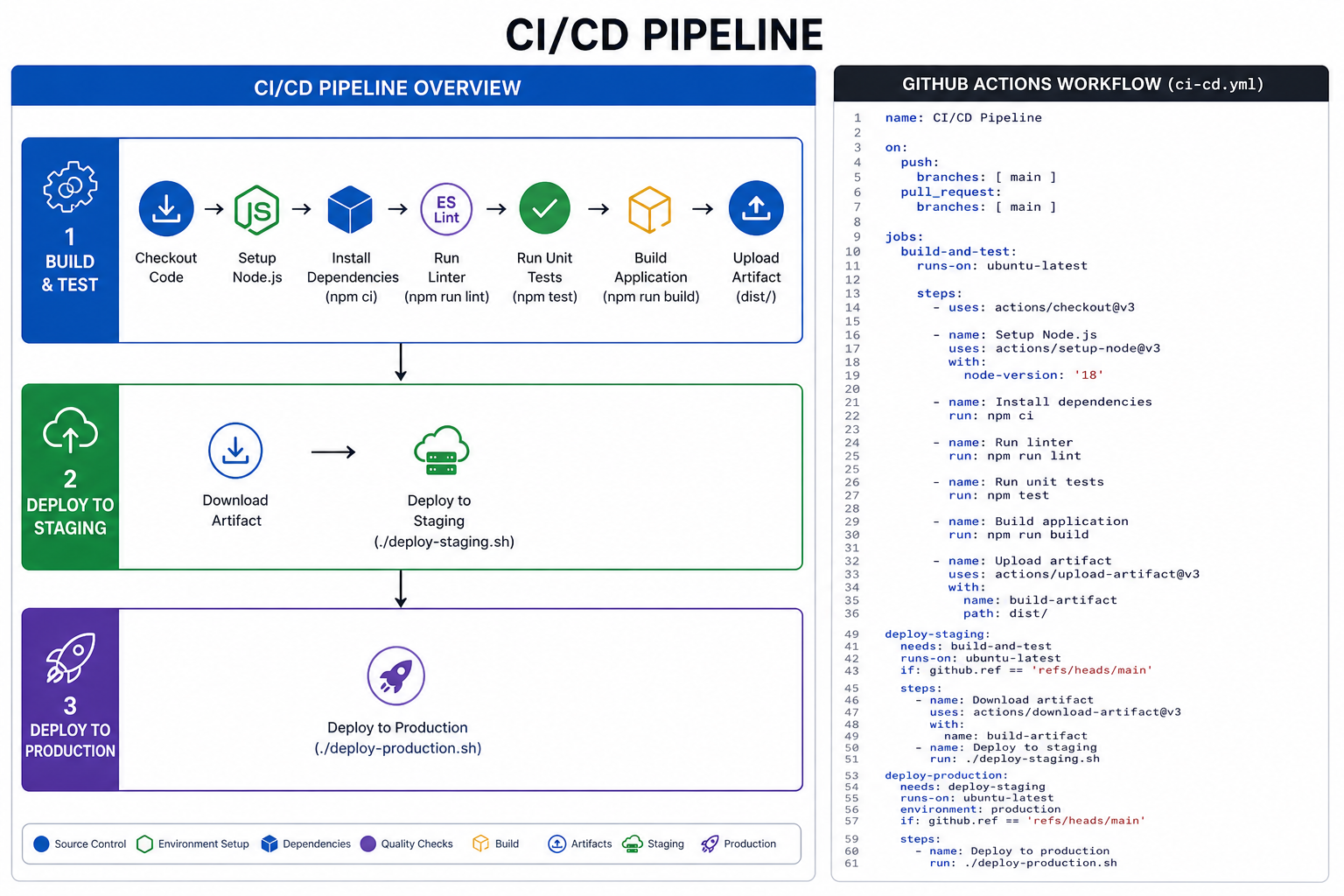
Example GitHub Actions pipeline (YAML)
Popular CI/CD Tools
| Tool | Type | Best For |
|---|---|---|
| GitHub Actions | Cloud (free for public repos) | GitHub users, integrated with GitHub ecosystem |
| GitLab CI | Cloud or self-hosted | GitLab users, built-in DevOps platform |
| Jenkins | Self-hosted (open source) | Customizable pipelines, existing infrastructure |
| CircleCI | Cloud or self-hosted | Fast performance, ease of use |
| Azure Pipelines | Cloud or self-hosted | Microsoft ecosystem, Windows builds |
| Travis CI | Cloud | Open source projects, simplicity |
CI/CD Best Practices
- Keep pipelines fast: Long pipelines discourage frequent commits. Aim for under 10 minutes.
- Run tests in parallel: Split tests across multiple machines to reduce execution time.
- Fail fast: Run fastest tests first. Fail immediately on critical errors.
- Use immutable artifacts: Build once, deploy many times. Do not rebuild for each environment.
- Version control pipeline configuration: Store pipeline configuration in the repository with the code.
- Secure secrets: Use built-in secret management. Never hardcode credentials.
- Monitor pipeline health: Track success rates, duration, and failure causes.
- Fix broken builds immediately: Do not ignore failing pipelines. Stop and fix.
Common CI/CD Pipeline Stages in Detail
| Stage | Typical Commands | Purpose |
|---|---|---|
| Lint | eslint, pylint, rubocop | Enforce code style and catch syntax errors |
| Unit Test | jest, pytest, rspec | Test individual functions and components | Integration Test | supertest, behave, cucumber | Test interactions between components |
| Security Scan | snyk, bandit, trivy | Detect vulnerabilities in dependencies |
| Build | npm run build, mvn package, docker build | Compile code into deployable artifact |
| Deploy | kubectl apply, aws s3 sync, heroku deploy | Push artifact to environment |
Common CI/CD Mistakes to Avoid
- Slow pipelines: Developers bypass slow pipelines or commit less frequently. Optimize test and build times.
- Flaky tests: Tests that fail intermittently erode trust in the pipeline. Fix or remove flaky tests.
- Ignoring failures: Teams that ignore red builds lose the benefits of CI. Fix failures immediately.
- Manual steps: Any manual step is an opportunity for error. Automate everything possible.
- Environment drift: Different environments with different configurations cause production surprises. Use infrastructure as code.
- Long-lived branches: Branches that live for weeks cause painful integrations. Merge daily.
- No rollback plan: Every deployment should have a tested rollback strategy.
Frequently Asked Questions
- What is the difference between Continuous Delivery and Continuous Deployment?
Continuous Delivery requires manual approval to deploy to production. Continuous Deployment deploys to production automatically without approval. Both have automated pipelines up to the deployment step. - Do I need CI/CD for my project?
Any project with more than one developer benefits from CI/CD. Even solo developers benefit from automated testing and deployment. Start simple and add stages as needed. - How do I start with CI/CD?
Start with a simple pipeline that runs tests on every push. Add build and deployment stages gradually. Use your Git hosting platform's built-in CI/CD (GitHub Actions, GitLab CI). - What is a build artifact?
A build artifact is the output of the build stage, such as a compiled binary, Docker image, or ZIP file. Artifacts are stored and reused across pipeline stages. - How do I handle database migrations in CI/CD?
Run migrations as part of the deployment stage before starting the new application version. Ensure migrations are backward compatible so rollback is possible. - What should I learn next after CI/CD pipelines?
After mastering CI/CD, explore containerization with Docker, Kubernetes orchestration, Infrastructure as Code (Terraform), and cloud deployment for complete DevOps practices.