
Client Server Model: How It Works
The foundation where a client requests data and a server responds.
Client-Server Model: The Foundation of Distributed Computing
The client-server model is the architectural pattern that powers the modern internet. It is a distributed computing framework that divides tasks between service providers called servers and service requesters called clients. When you browse a website, check email, use a mobile app, or stream a video, you are participating in a client-server interaction. The client asks for something, and the server responds with the requested data or service.
This separation of responsibilities is what makes modern applications scalable, maintainable, and secure. Servers handle the heavy lifting of data storage, business logic, and security. Clients focus on presenting information and collecting user input. Understanding the client-server model is essential for anyone building web applications, and it connects naturally to concepts like client model for the user-facing side, server model for the backend infrastructure, REST API design for communication between them, and HTTP protocol for the language they speak.
What Is the Client-Server Model
The client-server model is a computing architecture where one program (the client) requests services or resources from another program (the server). The server runs continuously, waiting for requests. Clients initiate connections and make requests as needed. This model allows multiple clients to access the same server resources simultaneously.
- Client: The requesting program. It sends requests and waits for responses. Examples: web browsers, mobile apps, desktop applications, API clients.
- Server: The providing program. It listens for requests, processes them, and sends back responses. Examples: web servers, database servers, file servers, application servers.
- Protocol: The set of rules governing communication between client and server. Examples: HTTP, HTTPS, FTP, SMTP, WebSocket.
- Request-Response Cycle: The fundamental pattern where client sends request and server sends response.
Client-server interaction flow
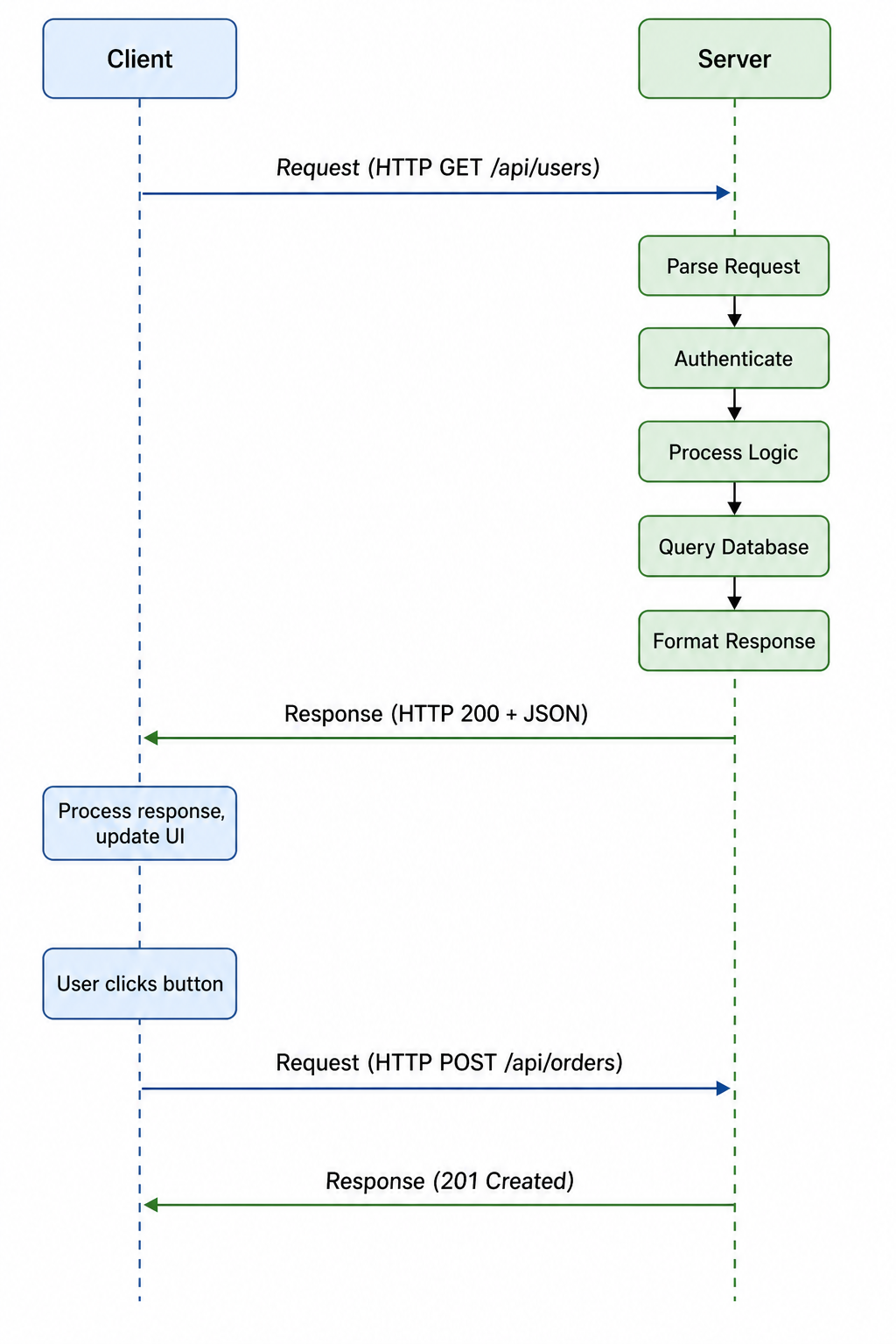
Why the Client-Server Model Matters
The client-server model is the foundation of virtually all networked applications. Its widespread adoption is due to several key advantages over other architectures.
- Centralized Data Management: Data is stored on servers, making backup, security, and consistency easier to manage across all clients.
- Scalability: Servers can be scaled horizontally by adding more machines or vertically by adding more resources to handle increasing load.
- Security: Sensitive logic and data remain on the server, protected from client-side tampering and inspection.
- Maintainability: Updates to the server affect all clients immediately without requiring client updates or installations.
- Resource Efficiency: Clients can be lightweight because the server handles the heavy processing and data storage.
- Multi-User Support: Multiple clients can access the same server resources simultaneously, enabling collaboration and shared data.
- Specialization: Different servers can be optimized for different tasks, creating efficient, focused services.
Key Components of Client-Server Architecture
Understanding the key components of client-server architecture helps you design and build better distributed systems.
Clients
Clients are the user-facing components of the architecture. They initiate communication, present data to users, and handle user interactions. Clients can be:
- Thick Clients: Perform significant processing locally. Examples: desktop applications, mobile apps.
- Thin Clients: Rely heavily on the server for processing. Examples: web browsers, terminal applications.
- Hybrid Clients: Balance processing between client and server. Examples: modern single-page applications, progressive web apps.
Servers
Servers are the service providers. They run continuously, listening for requests, processing them, and returning responses. Servers can be:
- Web Servers: Serve static content and handle HTTP requests (Nginx, Apache).
- Application Servers: Execute business logic and generate dynamic content (Node.js, Django, Rails).
- Database Servers: Store and retrieve data (PostgreSQL, MySQL, MongoDB).
- File Servers: Store and serve files (NFS, S3).
- Cache Servers: Store frequently accessed data for fast retrieval (Redis, Memcached).
Network
The network provides the communication channel between clients and servers. It handles data transmission, routing, and connection management. Key aspects include:
- Protocols: Rules for communication (HTTP, HTTPS, TCP, UDP).
- IP Addresses: Unique identifiers for devices on the network.
- Ports: Endpoints for specific services (80 for HTTP, 443 for HTTPS).
- DNS: Translates domain names to IP addresses.
Client-server architecture diagram
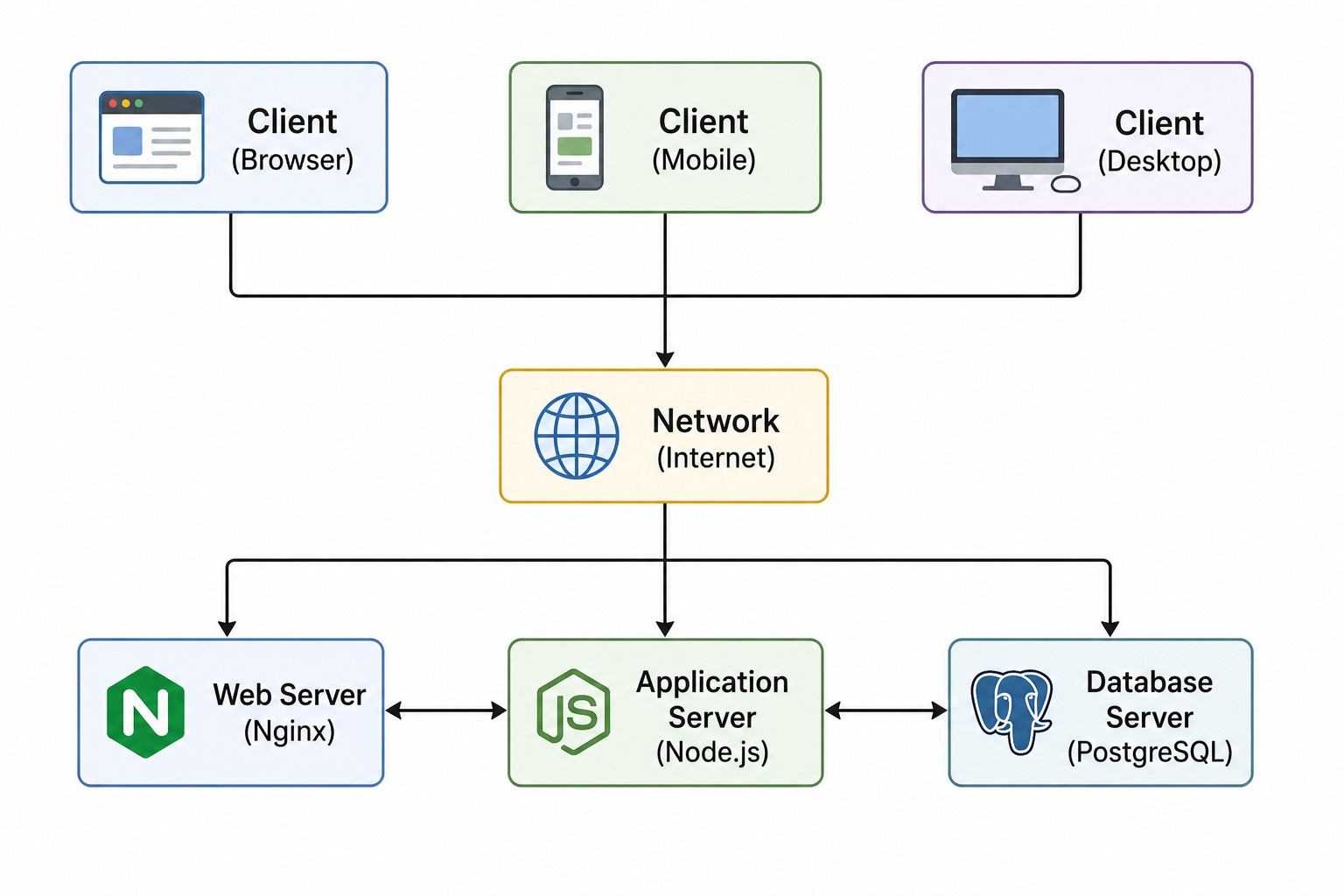
Communication Protocols
Protocols define how clients and servers communicate. The choice of protocol affects performance, reliability, and capabilities.
| Protocol | Layer | Characteristics | Use Cases |
|---|---|---|---|
| HTTP/HTTPS | Application | Request-response, stateless, text-based | Web browsing, REST APIs, web services |
| WebSocket | Application | Bidirectional, persistent, real-time | Chat, gaming, live updates, collaboration |
| TCP | Transport | Reliable, connection-oriented, ordered | Base protocol for HTTP, SSH, FTP |
| UDP | Transport | 那樣Unreliable, connectionless, fastVoIP, streaming, DNS, gaming | |
| FTP/SFTP | Application | File transfer, authenticated | Uploading/downloading files |
| SMTP | Application | Email sending, store-and-forward | Sending emails between servers |
HTTP request-response example
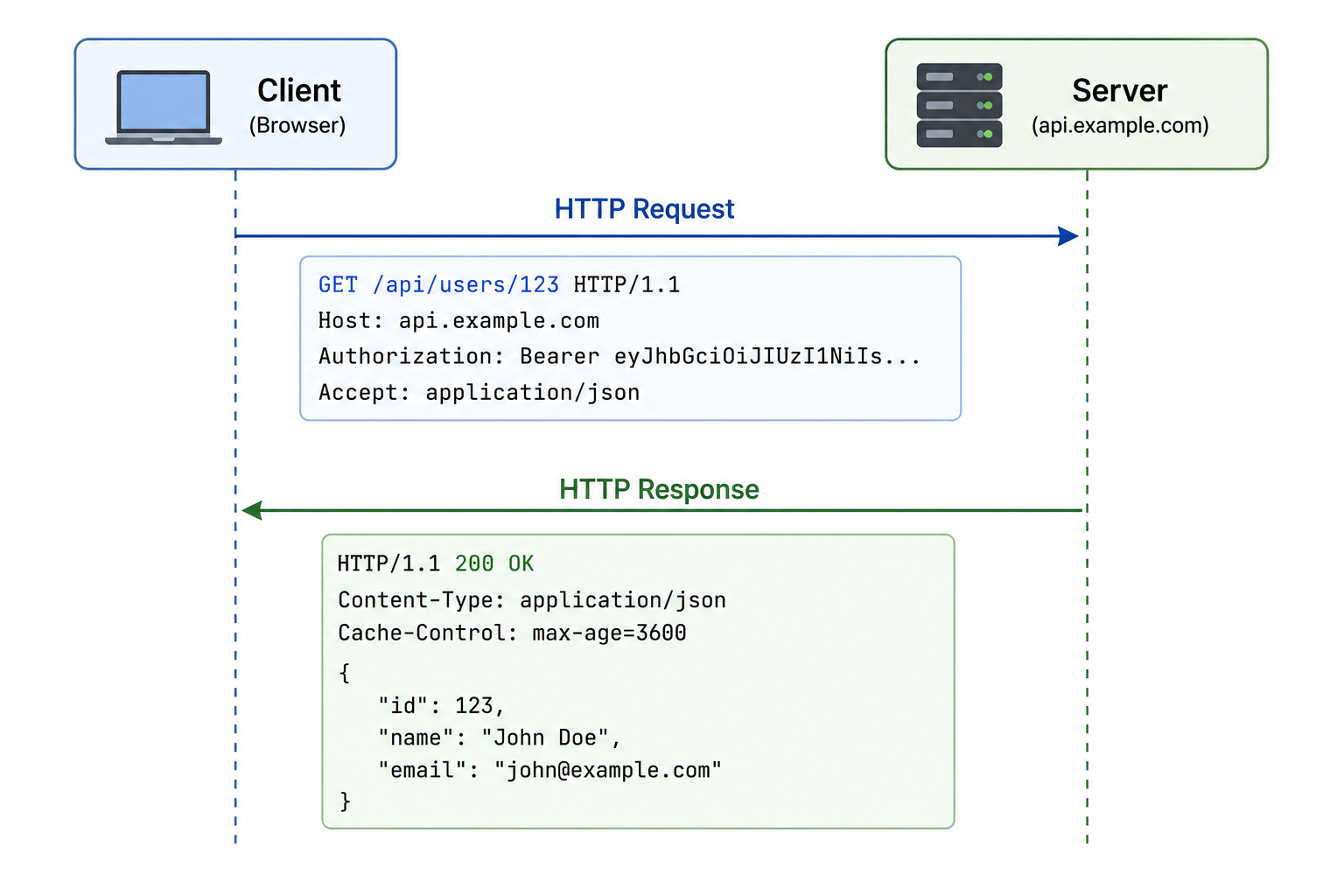
Communication Patterns
Clients and servers can communicate using different patterns depending on application requirements.
- Synchronous Request-Response: Client sends request and waits for response. Simple and predictable. Used in traditional web applications and REST APIs.
- Asynchronous Messaging: Client sends request and continues processing. Response arrives later via callback, promise, or event. Used in AJAX, modern web applications.
- Streaming: Continuous flow of data from server to client. Used in video streaming, real-time feeds.
- Publish-Subscribe: Clients subscribe to topics; server pushes updates when events occur. Used in notifications, chat rooms.
- Request-Response with Caching: Responses are cached to reduce server load and improve performance. Used in CDNs, browser caching.
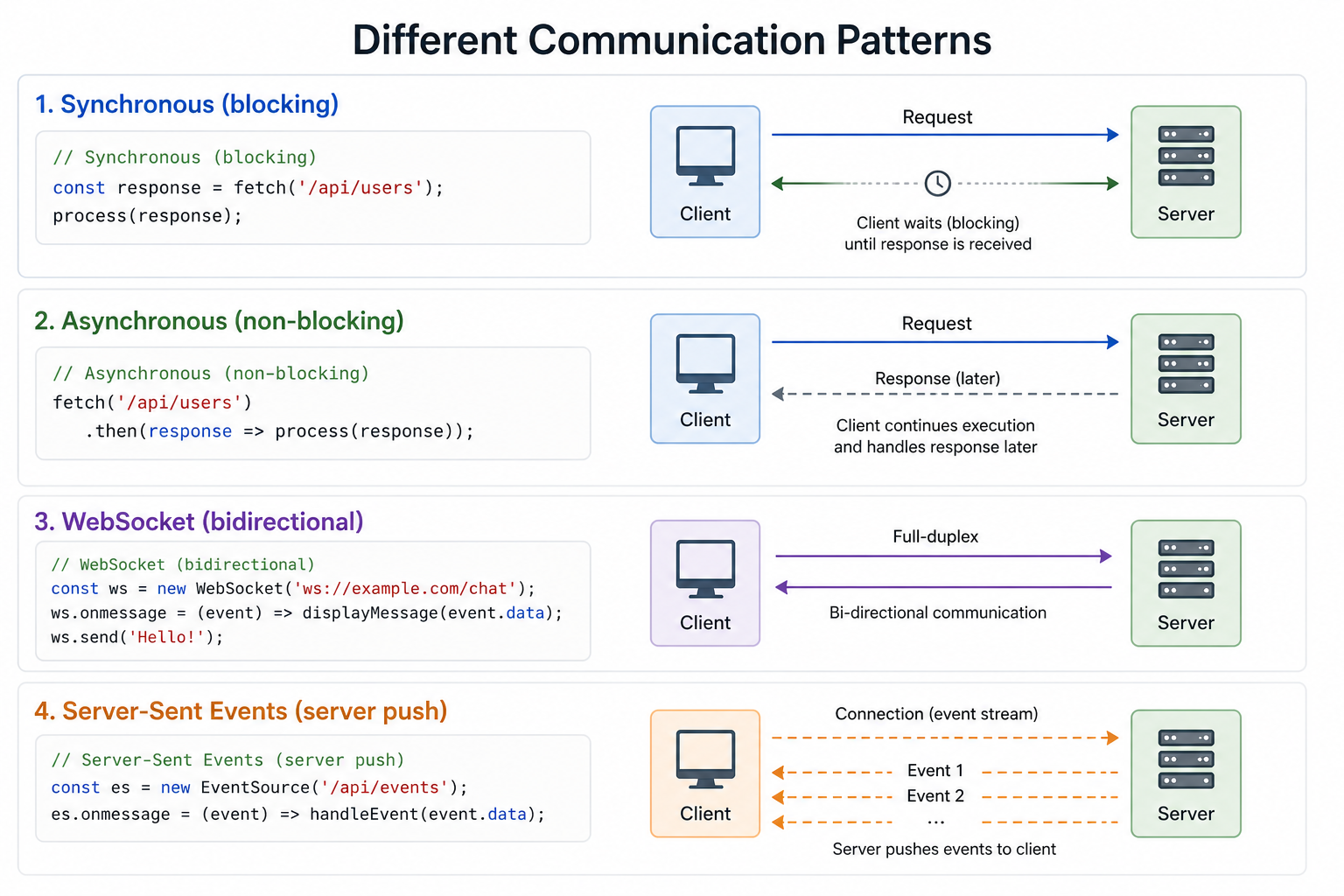
Client-Server vs Peer-to-Peer
The client-server model is often contrasted with peer-to-peer (P2P) architecture. Understanding the difference helps you choose the right approach for your use case.
| Feature | Client-Server | Peer-to-Peer (P2P) |
|---|---|---|
| Role Distribution | Fixed roles: servers provide, clients consume | All peers are equal; each can serve and consume |
| Scalability | Server can become a bottleneck; scaling requires adding servers | Naturally scales with number of peers; more peers = more resources |
| Centralization | Centralized control, single point of failure risk | Decentralized, more resilient, no single point of failure |
| Security | Easier to secure centralized servers | More complex security; trust issues between peers |
| Use Cases | Web applications, databases, email, enterprise software | File sharing (BitTorrent), blockchain, VoIP, content distribution |
Client-Server in Web Applications
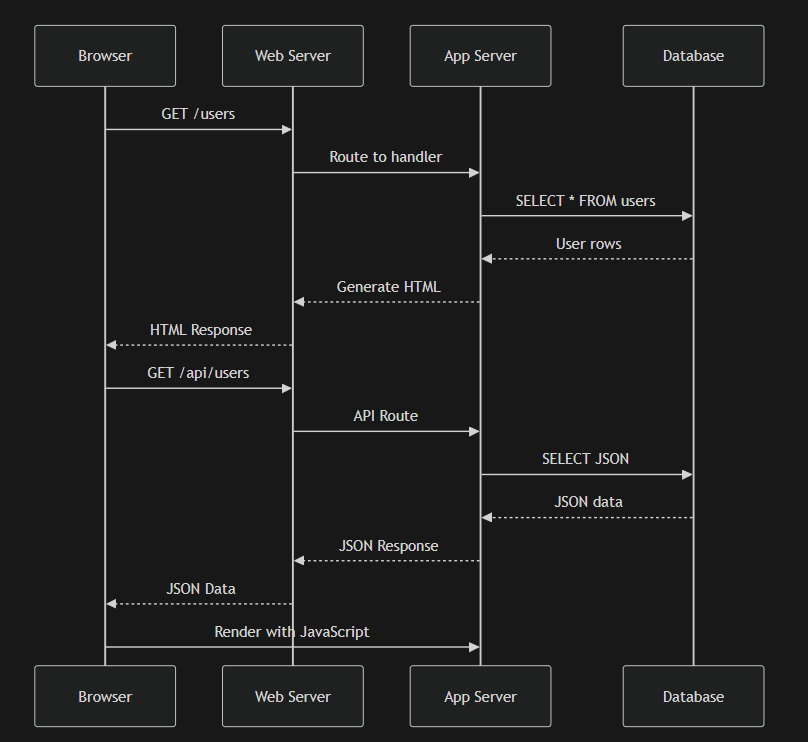
Web applications are the most common implementation of the client-server model. Understanding the flow helps you build better applications.
- User enters URL: Browser (client) resolves domain name via DNS.
- HTTP Request: Browser sends HTTP request to web server.
- Server Processing: Web server receives request, may pass to application server.
- Business Logic: Application server executes business rules, queries database.
- Response Generation: Server generates HTML or JSON response.
- Client Rendering: Browser receives response, renders HTML, loads resources (CSS, JS, images).
- JavaScript Execution: Client-side JavaScript runs, may make additional API calls.
- User Interaction: User interacts with page, triggering more requests.
Full web application request
Scaling Client-Server Systems
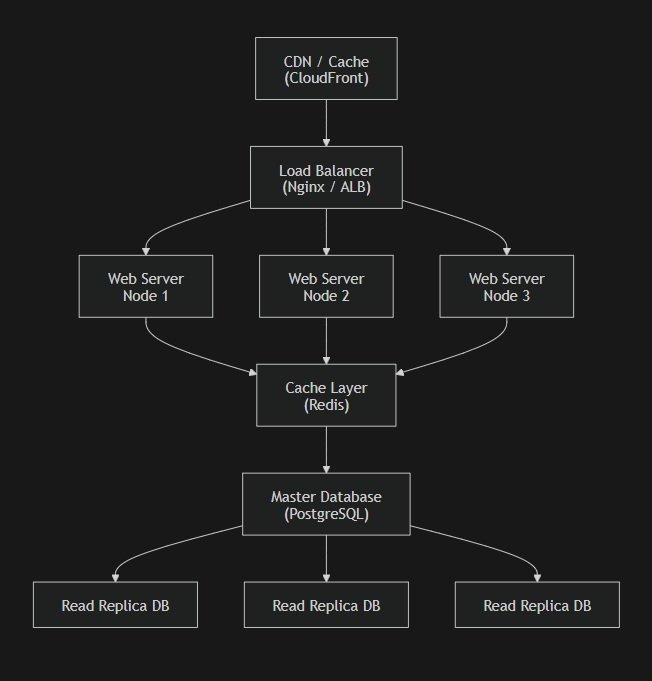
As applications grow, scaling becomes essential. Several strategies help client-server systems handle increasing load.
- Vertical Scaling: Adding more resources (CPU, RAM) to existing servers. Simple but has limits and single point of failure.
- Horizontal Scaling: Adding more servers to distribute load. Requires stateless design and load balancing.
- Load Balancing: Distributing requests across multiple servers using algorithms like round-robin, least connections, or IP hash.
- Caching: Storing frequently accessed data closer to clients (CDN, browser cache, server cache) to reduce server load.
- Database Replication: Creating copies of databases for read operations, reducing load on primary database.
- Database Sharding: Splitting data across multiple database servers based on a shard key.
- Microservices: Breaking monolith into independent services that can be scaled independently.
Scaled client-server architecture
Security in Client-Server Systems
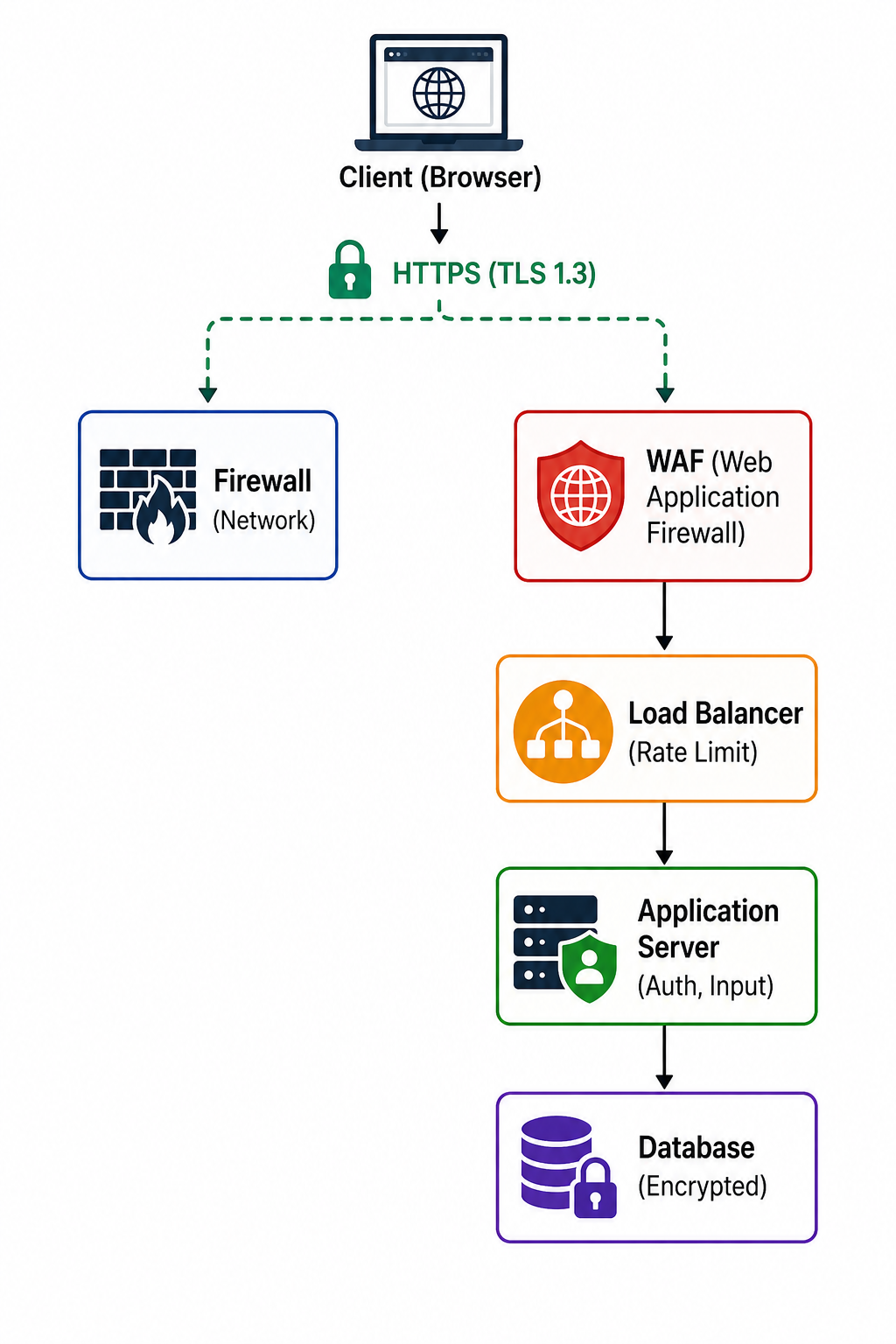
Security is critical in client-server architecture. Multiple layers of security protect data and ensure system integrity.
- Network Security: Firewalls, VPNs, network segmentation, DDoS protection.
- Transport Security: TLS/SSL (HTTPS) for encrypted communication between client and server.
- Authentication: Verifying client identity through passwords, tokens, certificates, or biometrics.
- Authorization: Controlling what authenticated clients can access (roles, permissions, ACLs).
- Input Validation: Validating and sanitizing all client input to prevent injection attacks.
- Rate Limiting: Preventing abuse by limiting request rates per client.
- Audit Logging: Recording access and changes for security monitoring and incident response.
Security layers in client-server
Common Client-Server Mistakes to Avoid
Even experienced architects make mistakes when designing client-server systems. Being aware of these pitfalls helps you build better systems.
- Chatty Interfaces: Too many small requests instead of batch operations, causing network overhead and poor performance.
- Over-fetching Data: Returning more data than clients need, wasting bandwidth and processing time.
- Under-fetching Data: Not providing enough data, causing clients to make multiple requests to get complete information.
- Stateful Servers: Storing session data on individual servers prevents horizontal scaling.
- No Error Handling: Failing to communicate errors clearly leaves clients unable to respond appropriately.
- Ignoring Latency: Not considering network latency when designing interactions leads to poor user experience.
- No Versioning: Breaking changes without versioning cause existing clients to fail.
- Single Point of Failure: Relying on one server without redundancy creates downtime risk.
Best Practices for Client-Server Architecture
Following these best practices helps you build client-server systems that are robust, scalable, and maintainable.
- Design for Failure: Assume servers can fail and networks can be unreliable. Implement retries, timeouts, and circuit breakers.
- Keep APIs Stateless: Store session data in external services, not on individual servers, to enable horizontal scaling.
- Use Caching Strategically: Cache at multiple levels (CDN, browser, server) to reduce latency and server load.
- Version Your APIs: Include version in URLs (e.g., /v1/users) to support backward compatibility and gradual upgrades.
- Implement Graceful Degradation: Design clients to function (even if limited) when servers are slow or unavailable.
- Monitor Everything: Track request rates, error rates, latency, and resource usage. Alert on anomalies.
- Use Asynchronous Patterns: For long-running operations, use asynchronous patterns with status endpoints or webhooks.
- Document Your API: Provide clear, up-to-date documentation with examples for all endpoints.
This is a sample JavaScript code snippet for learning purposes.
// Circuit Breaker pattern
class CircuitBreaker {
constructor() {
this.failures = 0;
this.state = 'CLOSED';
}

async call(fn) {
    if (this.state === 'OPEN') {
        throw new Error('Circuit open');
    }

    try {
        const result = await fn();
        this.reset();
        return result;
    } catch (err) {
        this.failures++;
        if (this.failures > 5) {
            this.state = 'OPEN';
            setTimeout(() => this.reset(), 60000);
        }
        throw err;
    }
}

reset() {
    this.failures = 0;
    this.state = 'CLOSED';
}


}

// Retry with exponential backoff
async function fetchWithRetry(url, retries = 3, delay = 1000) {
for (let i = 0; i < retries; i++) {
try {
return await fetch(url);
} catch (err) {
if (i === retries - 1) throw err;
await new Promise(resolve => setTimeout(resolve, delay * Math.pow(2, i)));
}
}
}
Frequently Asked Questions
- What is the difference between client-server and peer-to-peer architecture?
Client-server has fixed roles: servers provide services, clients consume them. Peer-to-peer has equal roles where each peer can both provide and consume. Client-server is easier to secure and manage; peer-to-peer is more resilient and scales naturally with users. - What is a three-tier architecture?
Three-tier architecture separates client-server systems into presentation tier (client), application tier (business logic), and data tier (database). This separation improves scalability, maintainability, and security. - What is the difference between thick and thin clients?
Thick clients perform significant processing locally (desktop apps). Thin clients rely heavily on the server for processing (web browsers). Modern applications often use hybrid approaches. - How do I choose between REST, GraphQL, and gRPC for client-server communication?
REST is simple and widely used for CRUD operations. GraphQL is ideal when clients need flexible data fetching. gRPC provides high-performance, typed communication for internal services. Choose based on your use case, team expertise, and performance requirements. - What is the difference between stateful and stateless servers?
Stateful servers store session data locally, tying clients to specific servers. Stateless servers store no client data, allowing any server to handle any request. Stateless designs are essential for horizontal scaling and high availability. - What should I learn next after understanding client-server architecture?
After mastering client-server fundamentals, explore REST API design for building server interfaces, HTTP protocol for understanding communication, client model for frontend architecture, and server model for backend infrastructure. Also study cloud deployment for modern hosting practices.
Conclusion
The client-server model is the architectural foundation of the modern internet. By separating responsibilities between clients that request services and servers that provide them, we create systems that are scalable, maintainable, and secure. This separation of concerns allows each component to evolve independently and specialize in its role.
From simple websites to complex enterprise applications, the client-server pattern underlies virtually every networked system we use. Understanding how clients and servers communicate, how to scale them, and how to secure them gives you the perspective needed to build applications that can grow from a handful of users to millions.
As you continue your journey, combine client-server knowledge with related topics like REST API design for building server interfaces, HTTP protocol for the language of the web, client model for frontend architecture, server model for backend infrastructure, and cloud deployment for modern hosting practices. Together, these skills form a complete foundation for building robust, scalable web applications.