
Containerization: Lightweight Application Packaging
Containerization packages software code with its dependencies into lightweight, portable containers that run consistently across any infrastructure. Containers share the host OS kernel, making them faster and more efficient than traditional virtual machines.
Containerization: Lightweight Application Packaging
Containerization is a method of packaging software code with all its dependencies, including libraries, binaries, configuration files, and other components needed to run, into a single lightweight executable unit called a container. These containers run consistently across any infrastructure, whether it is a developer's laptop, a test server, or a production cloud environment. This solves the classic "it works on my machine" problem that has plagued software development for decades.
The concept of containerization has existed for decades, but it gained widespread adoption with the release of Docker in 2013. Docker provided simple developer tools and a universal packaging approach that made containers accessible to mainstream developers. Today, containerization has become the de facto standard for cloud-native applications, with orchestration platforms like Kubernetes managing containers at scale. To understand containerization properly, it is helpful to be familiar with cloud deployment, microservices architecture, and CI/CD pipelines.
What Is Containerization
Containerization is a form of operating system virtualization that packages an application and its dependencies into an isolated environment called a container. Unlike traditional virtualization, containers do not bundle a full operating system. Instead, they share the host operating system kernel while maintaining isolation through Linux kernel features called namespaces and cgroups.
Traditional deployment: Install software directly on OS
Problem: Conflicts between applications, difficult to manage

Virtual Machine (VM): Each app gets its own OS
Problem: Heavy resource usage, slow startup

Container: Each app shares the host OS but stays isolated
Benefit: Lightweight, fast, portable across environments- Portable: Runs consistently on any platform or cloud
- Lightweight: Shares host OS kernel, no OS overhead
- Isolated: Each container runs independently of others
- Scalable: Easy to replicate and scale horizontally
- Fast: Starts in milliseconds, not minutes
How Containerization Works
Containers leverage several Linux kernel features to provide isolation while remaining lightweight.
| Technology | Purpose | Function |
|---|---|---|
| Namespaces | Process isolation | Gives each container its own view of the system, including processes, network, and filesystem |
| cgroups | Resource limits | Controls CPU, memory, and disk I/O per container |
| Union Filesystems | Layered storage | Enables image layering and copy-on-write |
Containers vs Virtual Machines
Containers and virtual machines are often compared because both provide isolation for applications. However, they achieve this isolation in fundamentally different ways, each with its own trade-offs.
Containers vs Virtual Machines
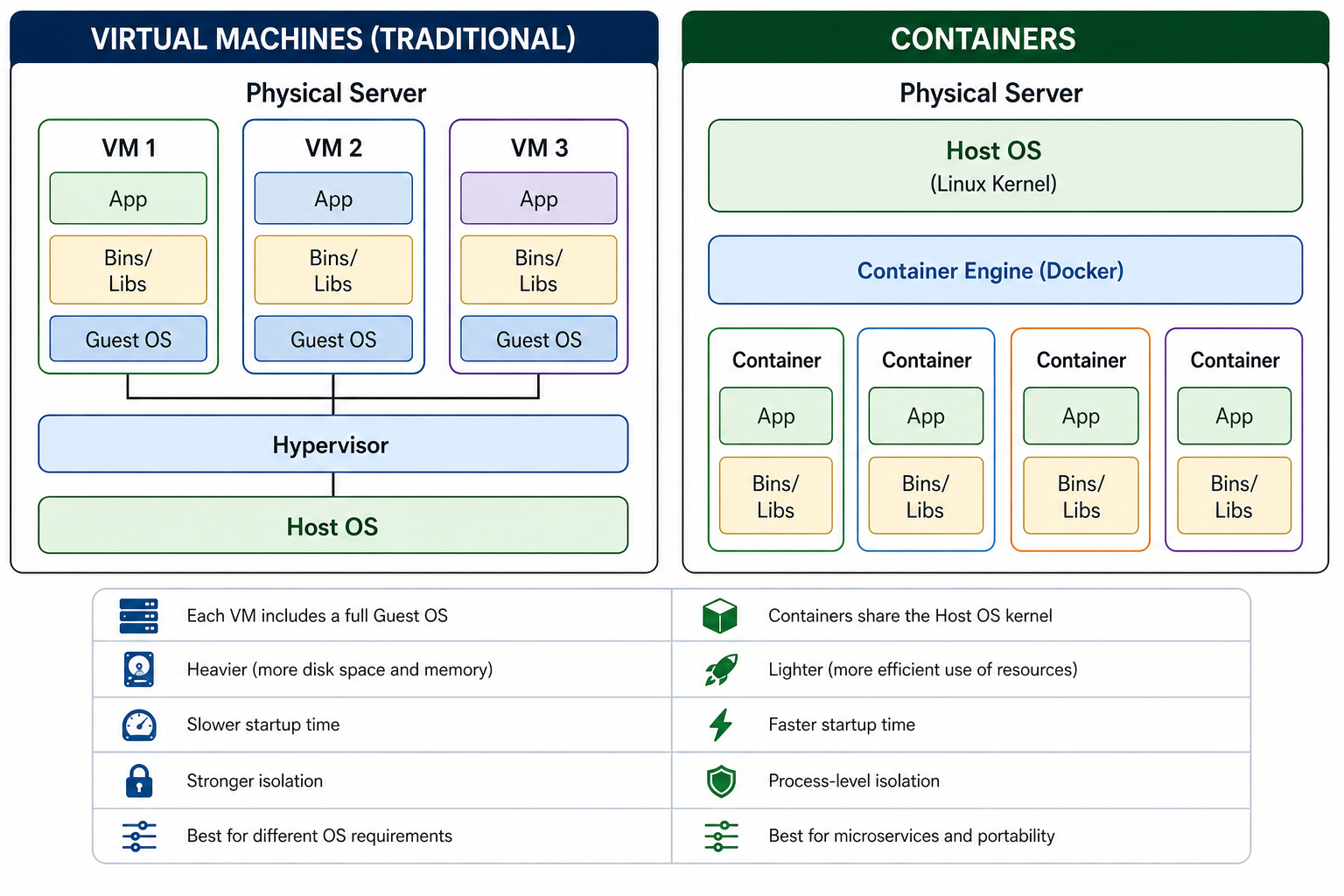
| Feature | Containers | Virtual Machines |
|---|---|---|
| Isolation Level | Process-level (OS sharing) | Hardware-level (hypervisor) |
| Operating System | Shares host OS kernel | Full guest OS per VM |
| Startup Time | Milliseconds | Seconds to minutes |
| Memory Overhead | Tens of MB | Hundreds of MB to GB |
| Density | 100+ per host | 10-15 per host |
| Security Boundary | Weaker (shared kernel) | Stronger (hardware isolation) |
| Best For | Microservices, cloud-native, CI/CD | Legacy workloads, strong isolation, multi-OS |
Core Docker Concepts
Docker is the most popular container platform, providing tools to build, ship, and run containers. Understanding its core concepts is essential for working with containers.
| Concept | Definition | Analogy |
|---|---|---|
| Docker Engine | Core client-server technology for building and running containers | The kitchen where containers are made |
| Docker Image | Read-only template with instructions for creating a container | A recipe or blueprint | Docker Container | Runnable instance of an image | The actual dish made from the recipe |
| Dockerfile | Text file with instructions for building an image | The recipe card itself |
| Docker Hub | Public registry for sharing Docker images | A cookbook library |
| Docker Compose | Tool for defining multi-container applications | The wiring diagram for a kitchen |
Benefits of Containerization
- Portability: A containerized application runs the same on a developer's laptop, a test server, and production cloud.
- Resource Efficiency: Containers share the host OS kernel, allowing many more containers than VMs to run on the same hardware.
- Consistency: Eliminates environment-related bugs by packaging everything the application needs.
- Isolation: Failures in one container do not affect others.
- Fast Startup: Containers start in milliseconds, enabling rapid scaling and deployment.
- DevOps Enablement: Containers integrate seamlessly into CI/CD pipelines.
- Microservices Support: Ideal for breaking monolithic applications into smaller, manageable services.
- Cloud-Agnostic: Avoid vendor lock-in by running containers across different cloud providers.
Container Orchestration: Kubernetes
While Docker handles individual containers, container orchestration manages containers at scale. Kubernetes is the leading orchestration platform, automating deployment, scaling, and operations of containers.
- Auto-scaling: Automatically adds or removes containers based on demand
- Load Balancing: Distributes traffic across containers
- Self-healing: Restarts failed containers automatically
- Rolling Updates: Updates applications without downtime
- Service Discovery: Containers find and communicate with each other
Common Containerization Use Cases
| Use Case | Why Containers? |
|---|---|
| Microservices | Each service runs in its own container; independently deployable and scalable |
| CI/CD Pipelines | Consistent build and test environments; fast spin-up and teardown |
| Application Modernization | Package legacy apps into containers to run in the cloud without rewriting |
| Multi-Cloud Deployment | Same container runs on AWS, Azure, or GCP without changes |
| Development Environments | Developers get identical environments; no more "works on my machine" |
Security Considerations
While containers offer many benefits, security should not be overlooked. Containers share the host kernel, so a kernel vulnerability could affect all containers on the same host.
- Use Trusted Base Images: Start from official or verified images
- Keep Images Updated: Regularly patch base images and dependencies
- Run as Non-Root: Avoid running containers with root privileges
- Minimize Image Size: Smaller images have fewer vulnerabilities
- Scan for Vulnerabilities: Use tools to scan images for known CVEs
- Use microVMs for Untrusted Code: For multi-tenant workloads, consider Kata Containers or Firecracker for hardware-level isolation
Common Containerization Mistakes to Avoid
- Storing Data Inside Containers: Containers are ephemeral; use volumes for persistent data
- Using Latest Tag: The "latest" tag makes version tracking difficult; use specific version tags
- Over-privileged Containers: Running as root increases security risks
- Ignoring Resource Limits: Without limits, one container can consume all host resources
- Putting Multiple Processes in One Container: Each container should run a single process; use multiple containers for multiple services
- No Orchestration for Production: Running containers manually in production is error-prone; use Kubernetes or similar tools
Frequently Asked Questions
- What is the difference between Docker and a container?
Docker is a platform for building and running containers. A container is the actual running instance of an image. Docker provides the tools; containers are what they create. - Are containers more secure than VMs?
Not by default. VMs provide stronger isolation because each VM has its own kernel. Containers share the host kernel, so a kernel vulnerability can affect all containers. For multi-tenant workloads with untrusted code, consider microVMs. - Can I run Windows containers on Linux?
No. Containers share the host OS kernel. Windows containers require a Windows host, and Linux containers require a Linux host. - What is the difference between Docker and Kubernetes?
Docker builds and runs containers. Kubernetes orchestrates containers across multiple machines, handling scaling, load balancing, and failover. - Do containers replace virtual machines?
No. Containers and VMs solve different problems. Most production deployments use both: VMs provide hardware isolation, and containers provide application packaging. - What should I learn next after containerization?
After mastering containerization, explore Docker basics, Kubernetes orchestration, microservices architecture, and CI/CD pipelines for complete containerized application deployment.
Conclusion
Containerization has revolutionized how applications are built, shipped, and deployed. By packaging code with its dependencies into lightweight, portable units, containers solve the classic "works on my machine" problem and enable consistent operation across any infrastructure. Compared to traditional virtual machines, containers offer faster startup times, higher density, and better resource efficiency.
Docker provides the essential tools for working with containers, while Kubernetes orchestrates them at scale. The benefits of containerization extend across the entire software development lifecycle from development to testing to production, making it a foundational technology for cloud-native applications and DevOps practices.
To deepen your understanding, explore related topics like Docker basics, Kubernetes orchestration, microservices architecture, and CI/CD pipelines for complete containerized application deployment.