
Authentication Mechanisms: Methods and Best Practices
Authentication mechanisms are methods used to verify a user’s identity. Common approaches include password-based login, multi-factor authentication (MFA), token-based systems like JWT, and third-party authentication using OAuth.
Authentication Mechanisms: Verifying User Identity
Authentication is the process of verifying the identity of a user, system, or application. It answers the question: "Who are you?" Authentication is the first line of defense for any secure application, ensuring that only legitimate users can access protected resources. Without proper authentication, any attacker could impersonate any user and gain unauthorized access to sensitive data.
Authentication mechanisms range from simple passwords to sophisticated multi-factor systems and biometric verification. Choosing the right authentication mechanism depends on your security requirements, user experience goals, and threat model. To understand authentication properly, it is helpful to be familiar with concepts like session management, cookies, web security fundamentals, and authorization.
What Is Authentication
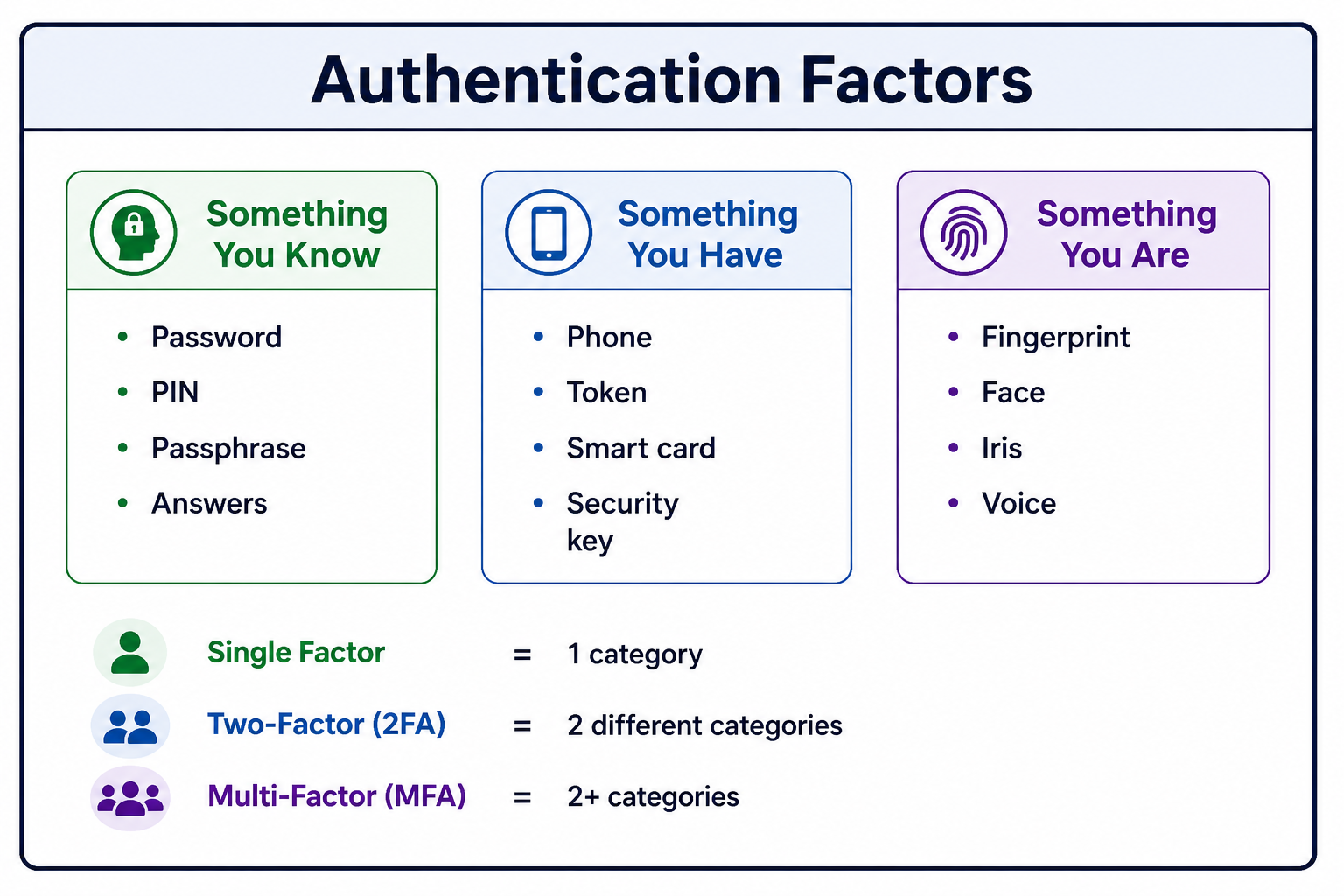
Authentication is the process of confirming that a user or system is who they claim to be. It relies on one or more of three factors: something you know (password), something you have (security token), or something you are (biometric). Strong authentication combines multiple factors.
- Something You Know: Password, PIN, security question answers, passphrase.
- Something You Have: Phone (SMS, authenticator app), hardware token, smart card, security key.
- Something You Are: Fingerprint, face recognition, iris scan, voice pattern, behavioral biometrics.
- Somewhere You Are: Location-based authentication (IP address, geolocation).
- Something You Do: Behavioral patterns (typing rhythm, mouse movements, gait).
Why Authentication Matters
Authentication is the foundation of application security. Without reliable authentication, no other security controls can be effective.
- Access Control: Authentication enables authorization decisions about what users can access.
- Accountability: Actions can be traced to specific authenticated users.
- Personalization: User-specific settings and preferences can be applied.
- Compliance: Regulations like GDPR, HIPAA, and PCI-DSS require strong authentication.
- Data Protection: Prevents unauthorized access to sensitive information.
- Fraud Prevention: Reduces risk of account takeover and identity theft.
- User Trust: Users trust systems that protect their accounts.
Password-Based Authentication
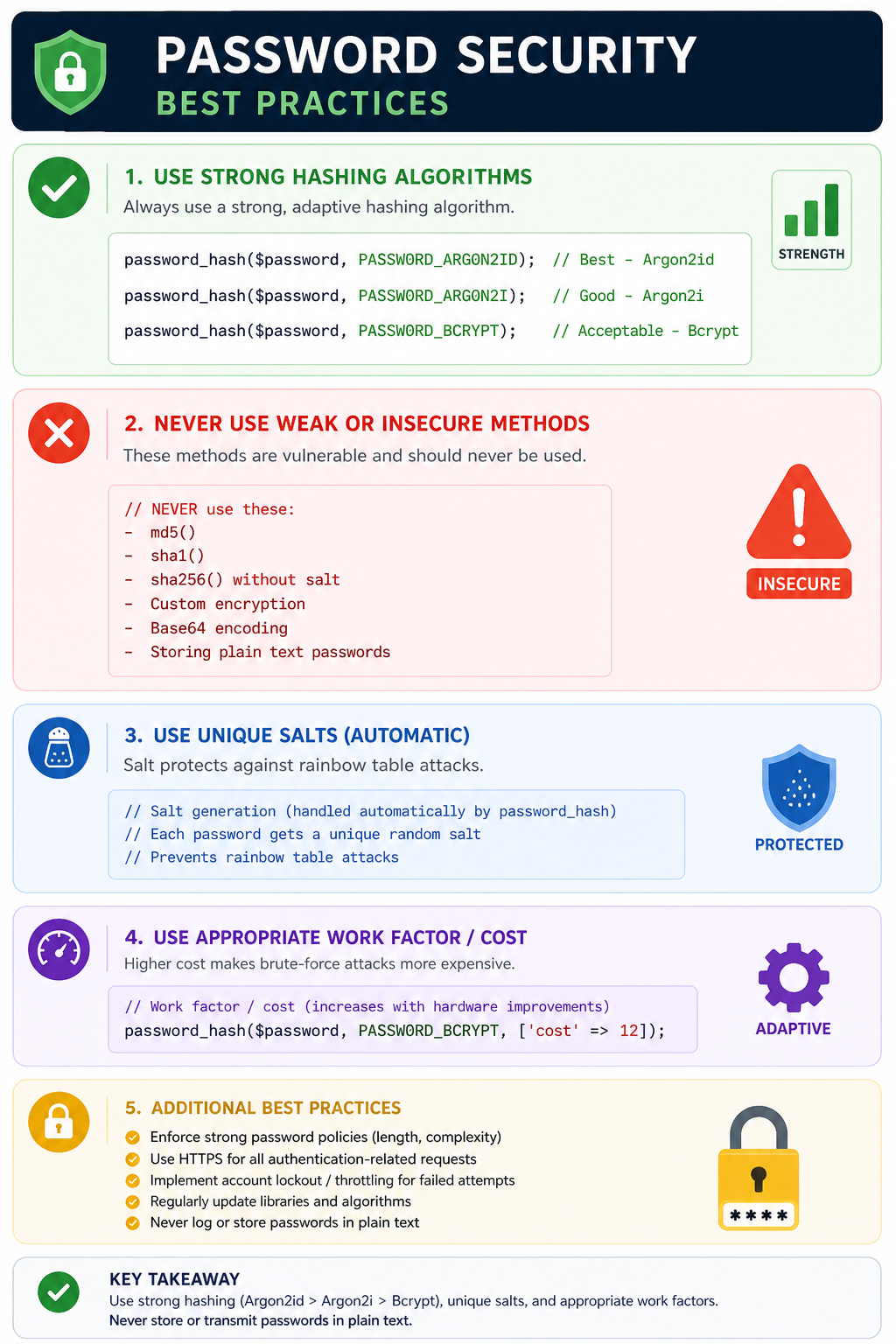
Password-based authentication is the most common authentication mechanism. Users provide a username and password, which the server verifies against stored credentials. Passwords are hashed and salted before storage to protect against data breaches.
Session-Based Authentication
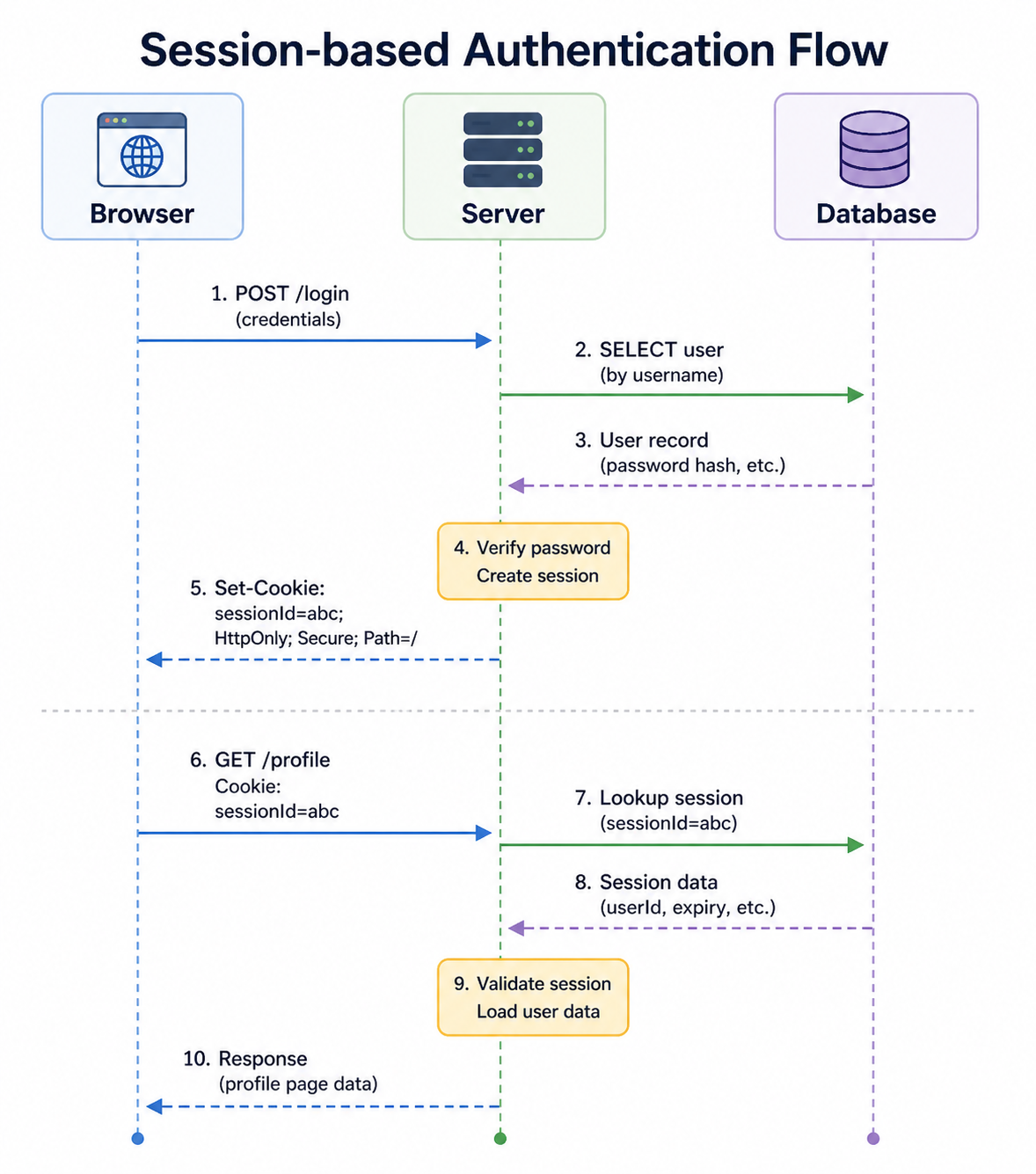
Session-based authentication is the traditional web authentication method. After successful login, the server creates a session and stores a session ID in a cookie. The session ID is sent with each subsequent request, identifying the authenticated user.
Token-Based Authentication (JWT)
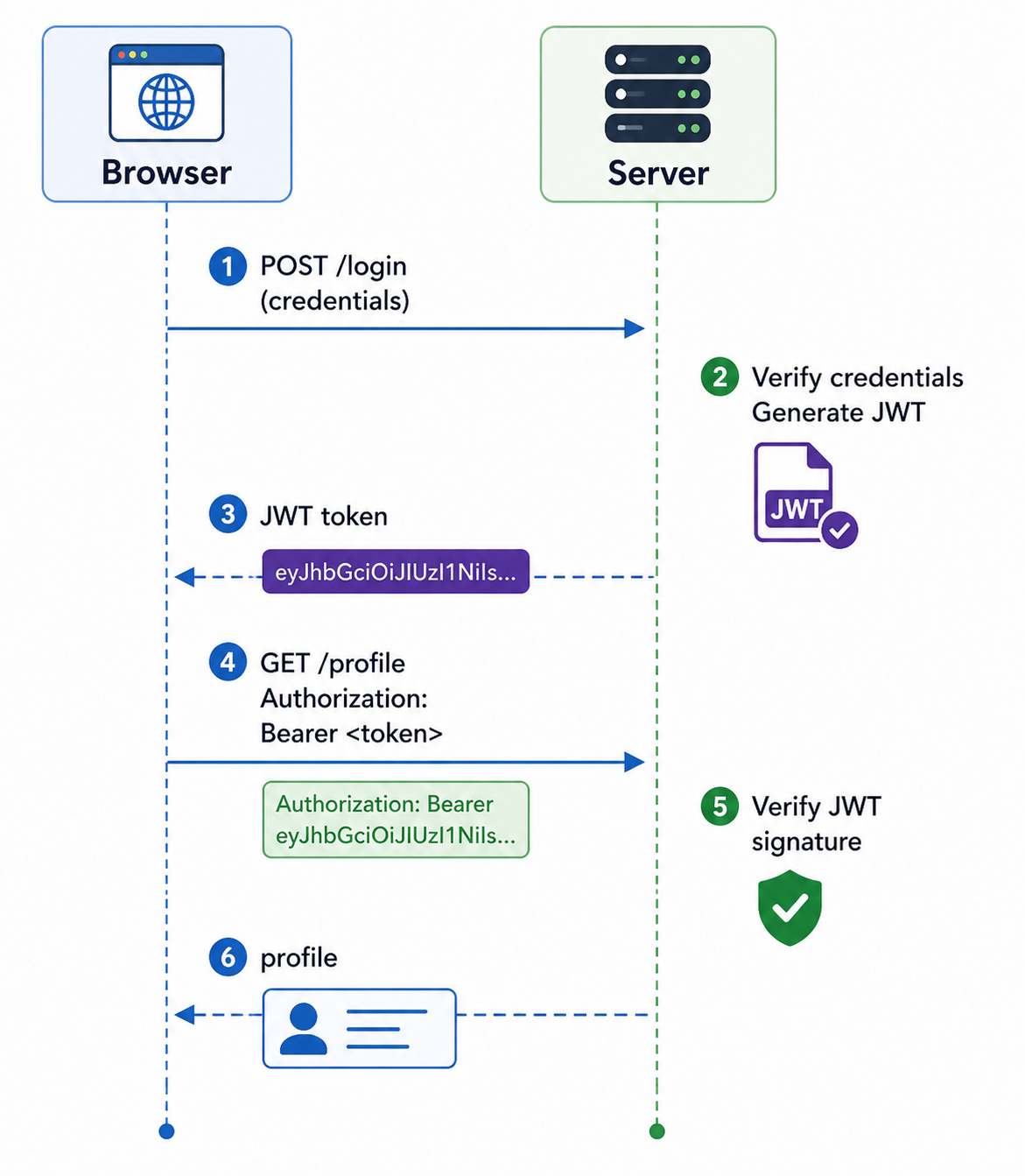
Token-based authentication uses cryptographically signed tokens (typically JSON Web Tokens - JWT) instead of server-side sessions. The token contains user information and is stored client-side, usually in localStorage or an HttpOnly cookie.
OAuth 2.0 and OpenID Connect
OAuth 2.0 is an authorization framework that allows third-party applications to obtain limited access to user data without exposing credentials. OpenID Connect (OIDC) is an authentication layer built on OAuth 2.0.
┌─────────┐     ┌─────────┐     ┌─────────┐     ┌─────────┐
│  User   │     │ Client  │     │  Auth   │     │Resource │
│         │     │  App    │     │ Server  │     │ Server  │
└────┬────┘     └────┬────┘     └────┬────┘     └────┬────┘
     │               │               │               │
     │ Click "Login  │               │               │
     │ with Google"  │               │               │
     │──────────────>│               │               │
     │               │ Redirect to   │               │
     │               │ auth server   │               │
     │               │──────────────>│               │
     │               │               │               │
     │<─── Login page────────────────│               │
     │               │               │               │
     │ Enter credentials             │               │
     │──────────────────────────────>│               │
     │               │               │               │
     │               │ Authorization │               │
     │               │ code          │               │
     │<──────────────│               │               │
     │               │               │               │
     │               │ Exchange code │               │
     │               │ for tokens    │               │
     │               │──────────────>│               │
     │               │               │               │
     │               │ Access token, │               │
     │               │ ID token      │               │
     │               │<──────────────│               │
     │               │               │               │
     │               │ Request user  │               │
     │               │ data with     │               │
     │               │ access token  │               │
     │               │──────────────────────────────>│
     │               │               │               │
     │               │ User profile  │               │
     │               │<──────────────────────────────│
│ │ │ │const passport = require('passport');
const GoogleStrategy = require('passport-google-oauth20');
passport.use(new GoogleStrategy({
clientID: process.env.GOOGLE_CLIENT_ID,
clientSecret: process.env.GOOGLE_CLIENT_SECRET,
callbackURL: "/auth/google/callback"
}, (accessToken, refreshToken, profile, done) => {
// Find or create user in database
User.findOrCreate({ googleId: profile.id }, (err, user) => {
return done(err, user);
});
}));
// Routes
app.get('/auth/google',
passport.authenticate('google', { scope: ['profile', 'email'] })
);
app.get('/auth/google/callback',
passport.authenticate('google', { failureRedirect: '/login' }),
(req, res) => {
res.redirect('/dashboard');
}
);Multi-Factor Authentication (MFA)
Multi-Factor Authentication (MFA) requires users to provide two or more verification factors from different categories. It significantly increases security because an attacker would need to compromise multiple authentication methods.
const speakeasy = require('speakeasy');
const QRCode = require('qrcode');

// Setup MFA for user
app.post('/setup-mfa', (req, res) => {
    const secret = speakeasy.generateSecret({
        name: `MyApp:${req.user.email}`
    });

    // Store secret temporarily or associate with user
    req.session.mfaSecret = secret.base32;

    // Generate QR code for authenticator app
    QRCode.toDataURL(secret.otpauth_url, (err, qrCode) => {
        res.json({ qrCode, secret: secret.base32 });
    });
});

// Verify MFA code
app.post('/verify-mfa', (req, res) => {
    const verified = speakeasy.totp.verify({
        secret: req.session.mfaSecret,
        encoding: 'base32',
        token: req.body.token
    });

    if (verified) {
        // Enable MFA for user
        // Store secret in database
        res.json({ success: true });
    } else {
        res.status(401).json({ error: 'Invalid code' });
    }
});

// Login with MFA
app.post('/login', async (req, res) => {
    const user = await authenticateUser(req.body);

    if (user && user.mfaEnabled) {
        // Store partial authentication in session
        req.session.partialAuth = user.id;
        res.json({ requiresMfa: true });
    } else if (user) {
        // Complete login
        req.session.userId = user.id;
        res.json({ success: true });
    }
});

app.post('/verify-mfa-login', (req, res) => {
    const verified = speakeasy.totp.verify({
        secret: user.mfaSecret,
        encoding: 'base32',
        token: req.body.token
    });

    if (verified) {
        req.session.userId = req.session.partialAuth;
        delete req.session.partialAuth;
        res.json({ success: true });
    } else {
        res.status(401).json({ error: 'Invalid code' });
    }
});
Biometric Authentication
Biometric authentication uses unique physical or behavioral characteristics to verify identity. It is increasingly common on mobile devices and modern laptops.
// Register biometric credential
async function registerBiometric() {
    const publicKeyCredentialCreationOptions = {
        challenge: new Uint8Array(32),
        rp: { name: "Example App", id: "example.com" },
        user: {
            id: new Uint8Array(16),
            name: "user@example.com",
            displayName: "John Doe"
        },
        pubKeyCredParams: [{ alg: -7, type: "public-key" }]
    };

    const credential = await navigator.credentials.create({
        publicKey: publicKeyCredentialCreationOptions
    });

    // Send credential to server
    await fetch('/register-biometric', {
        method: 'POST',
        body: JSON.stringify(credential),
        headers: { 'Content-Type': 'application/json' }
    });
}

// Login with biometric
async function loginWithBiometric() {
    const publicKeyCredentialRequestOptions = {
        challenge: new Uint8Array(32),
        allowCredentials: []
    };

    const assertion = await navigator.credentials.get({
        publicKey: publicKeyCredentialRequestOptions
    });

    // Send assertion to server for verification
    const response = await fetch('/login-biometric', {
        method: 'POST',
        body: JSON.stringify(assertion),
        headers: { 'Content-Type': 'application/json' }
    });

    if (response.ok) {
        window.location.href = '/dashboard';
    }
}
Authentication Best Practices
Following authentication best practices ensures your application is secure and provides a good user experience.
- Always Hash Passwords: Use strong, adaptive hashing algorithms (bcrypt, Argon2, PBKDF2). Never store plain text passwords.
- Implement Rate Limiting: Limit login attempts to prevent brute force attacks.
- Use Multi-Factor Authentication: Offer MFA for all users, require it for sensitive operations.
- Secure Session Management: Use HttpOnly, Secure, and SameSite cookie attributes. Regenerate session IDs after login.
- Implement Account Lockout: Temporarily lock accounts after multiple failed attempts (with careful implementation to avoid DoS).
- Send Security Notifications: Alert users about new logins, password changes, and other sensitive actions.
- Use Strong Password Policies: Enforce minimum length (12+ characters), allow all characters, check against breach databases.
- Implement Secure Password Reset: Use time-limited tokens sent via email, never send password in plain text.
- Log Authentication Events: Track successful and failed login attempts for security monitoring.
- Use HTTPS Everywhere: All authentication traffic must be encrypted.
const rateLimit = require('express-rate-limit');

// Limit login attempts
const loginLimiter = rateLimit({
    windowMs: 15 * 60 * 1000, // 15 minutes
    max: 5, // 5 attempts per window
    message: 'Too many login attempts. Please try again later.',
    keyGenerator: (req) => {
        // Rate limit by username AND IP
        return `${req.body.username}-${req.ip}`;
    }
});

app.post('/login', loginLimiter, async (req, res) => {
    // Authentication logic
});
Common Authentication Mistakes to Avoid
Even experienced developers make authentication mistakes. Being aware of these common pitfalls helps you build more secure systems.
- Storing Passwords in Plain Text: The most critical mistake. Always hash passwords.
- Weak Password Hashing: Using MD5, SHA1, or custom algorithms. Use bcrypt, Argon2, or PBKDF2.
- No Rate Limiting: Allows brute force attacks to guess passwords.
- Predictable Session IDs: Use cryptographically random session identifiers.
- Session Fixation Vulnerability: Regenerate session IDs after authentication.
- Missing HttpOnly Flag: Allows XSS attacks to steal session cookies.
- Missing Secure Flag: Allows session cookie theft over HTTP.
- Verbose Error Messages: "User not found" vs "Invalid password" gives attackers information.
- No Account Lockout: Allows unlimited brute force attempts.
- Insecure Password Reset: Weak tokens or predictable reset links.
Authentication vs Authorization
Authentication and authorization are often confused but serve different purposes. Understanding the distinction is crucial for building secure systems.
| Aspect | Authentication | Authorization |
|---|---|---|
| Question | Who are you? | What can you do? | Purpose | Verify identity | Grant or deny access |
| Timing | First (before authorization) | After (depends on authentication) | Examples | Password, biometric, token | Roles, permissions, ACLs |
| Failure Result | 401 Unauthorized | 403 Forbidden |
Frequently Asked Questions
- What is the difference between authentication and authorization?
Authentication verifies who you are (identity). Authorization determines what you can do (permissions). Authentication always comes before authorization. - What is the difference between session-based and token-based authentication?
Session-based stores session data on the server; token-based stores signed tokens on the client. Session-based is simpler to invalidate; token-based scales better for distributed systems. - What is JWT and when should I use it?
JWT (JSON Web Token) is a compact, URL-safe token format for representing claims. Use JWT for stateless APIs, microservices, and single-page applications where server-side sessions are impractical. - What is the difference between OAuth and OpenID Connect?
OAuth 2.0 is for authorization (access delegation). OpenID Connect is an authentication layer built on OAuth 2.0 that provides identity verification. Use OAuth for API access, OpenID Connect for user login. - How should I store JWT tokens?
Store JWTs in HttpOnly, Secure, SameSite cookies for web applications (prevents XSS). Use localStorage only if you understand XSS risks. Mobile apps can use secure storage. - What should I learn next after understanding authentication?
After mastering authentication, explore authorization for access control, session management for maintaining state, CSRF protection for securing sessions, and OAuth 2.0 for delegated access.
Conclusion
Authentication is the cornerstone of application security. It ensures that users are who they claim to be before granting access to protected resources. The right authentication mechanism depends on your security requirements, user experience goals, and threat model. Password-based authentication remains common but should be supplemented with multi-factor authentication for sensitive applications.
Modern authentication has evolved beyond simple passwords. Session-based authentication works well for traditional web applications. Token-based authentication (JWT) is preferred for APIs and distributed systems. OAuth 2.0 and OpenID Connect enable secure third-party access. Biometric authentication and security keys (WebAuthn) provide phishing-resistant authentication.
Regardless of the mechanism, following security best practices is essential: hash passwords properly, implement rate limiting, use secure session cookies, require MFA for sensitive operations, and always use HTTPS. Authentication is not a one-time implementation but requires ongoing maintenance, monitoring, and adaptation to emerging threats.
To deepen your understanding, explore related topics like authorization and access control, session management, OAuth 2.0, JSON Web Tokens (JWT), and WebAuthn and passkeys. Together, these skills form a complete foundation for building secure, user-friendly authentication systems.