
Cloud Deployment: How Applications Are Deployed in the Cloud
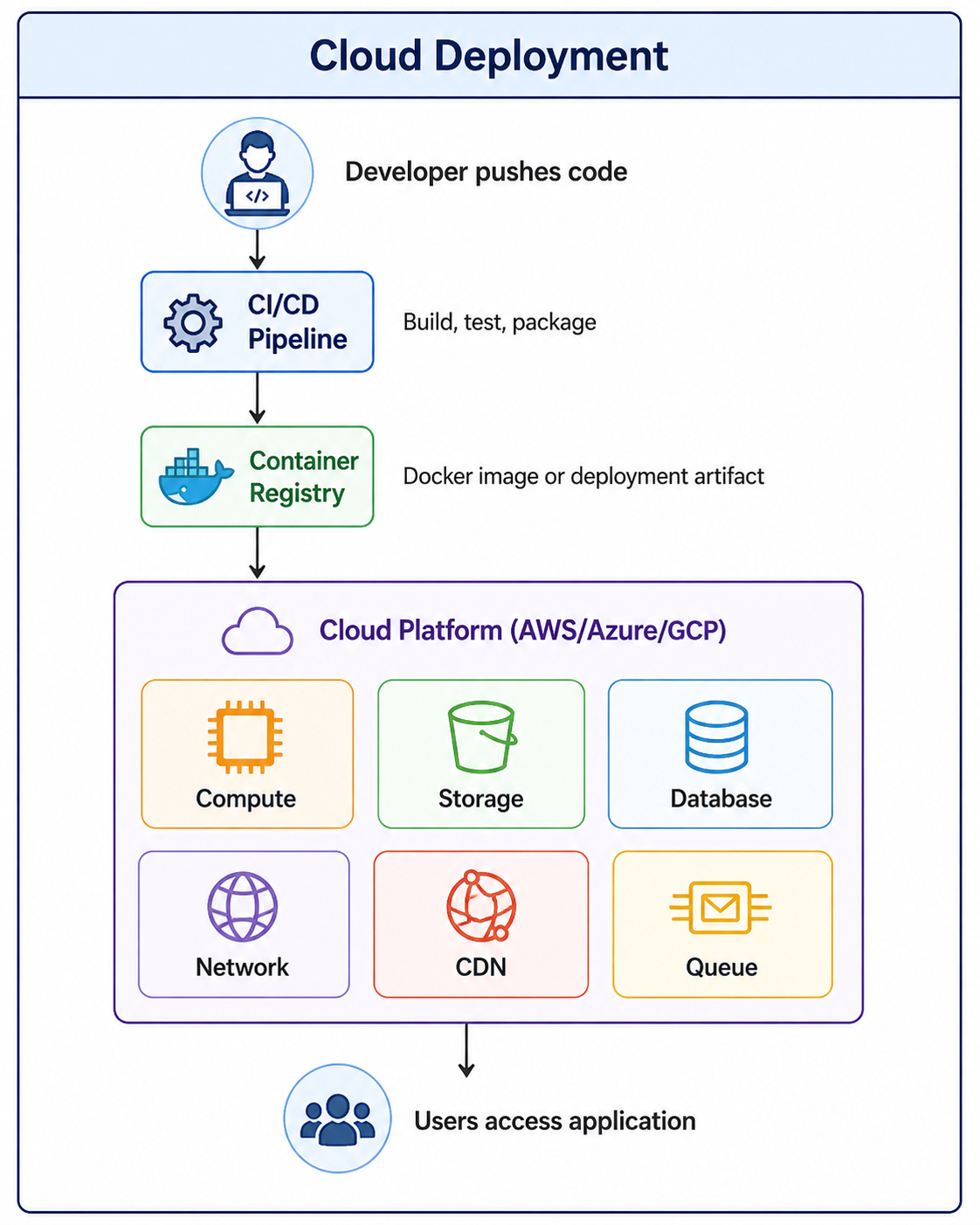
Cloud deployment is the process of deploying applications on cloud infrastructure instead of physical servers. It involves using services like virtual machines, containers, storage, and networking to build scalable and highly available applications.
Cloud Deployment: How Applications Are Deployed in the Cloud
Cloud deployment is the process of deploying applications on cloud infrastructure instead of traditional on-premise physical servers. Cloud computing has transformed how organizations build, deploy, and scale applications. Instead of purchasing hardware, setting up data centers, and managing physical servers, developers can use cloud platforms to provision resources on demand, pay only for what they use, and scale globally in minutes.
Cloud deployment involves using services like virtual machines, containers, serverless functions, storage systems, and networking to build scalable, highly available applications. Major cloud providers include Amazon Web Services (AWS), Microsoft Azure, Google Cloud Platform (GCP), and others. To understand cloud deployment properly, it is helpful to be familiar with concepts like server model, virtualization, containerization with Docker, and CI/CD pipelines.
What Is Cloud Deployment
Cloud deployment refers to the process of running an application on cloud infrastructure rather than on local servers or personal computers. It encompasses everything from selecting the right cloud provider and deployment model to configuring resources, deploying code, and managing operations.
- On-Demand Resources: Provision compute, storage, and networking resources as needed, paying only for what you use.
- Global Reach: Deploy applications in data centers around the world to serve users with low latency.
- Elastic Scaling: Automatically scale resources up or down based on demand.
- Managed Services: Use managed databases, message queues, caching, and other services without managing infrastructure.
- High Availability: Design applications that remain available even when individual components fail.
Why Cloud Deployment Matters
Cloud deployment offers significant advantages over traditional on-premise infrastructure, enabling organizations to move faster, scale more easily, and reduce costs.
- Cost Efficiency: Pay only for resources you use. No upfront hardware costs. Reduce waste from over-provisioning.
- Scalability: Scale from one user to millions without changing architecture. Auto-scaling handles demand spikes automatically.
- Global Reach: Deploy applications in regions worldwide. Serve users from nearby data centers for low latency.
- Reliability: Cloud providers offer high availability, disaster recovery, and redundancy across multiple availability zones.
- Speed to Market: Provision resources in minutes instead of weeks. Focus on code, not infrastructure.
- Managed Services: Use databases, caching, message queues, and AI services without managing servers.
- Security: Cloud providers invest heavily in security compliance and infrastructure protection.
Cloud Deployment Models
There are several cloud deployment models, each with different trade-offs between control, cost, and management responsibility.
| Model | Description | Best For |
|---|---|---|
| Public Cloud | Services offered over public internet, shared infrastructure | Startups, enterprises, applications with variable demand |
| Private Cloud | Dedicated infrastructure for single organization | Government, finance, healthcare, strict compliance requirements |
| Hybrid Cloud | Combination of public and private cloud | Organizations needing both control and scalability |
| Multi-Cloud | Using multiple public cloud providers | Avoiding vendor lock-in, redundancy, best-of-breed services |
| Community Cloud | Shared infrastructure for specific community | Government agencies, research institutions, industry consortia |
Public Cloud (AWS, Azure, GCP):
- Lower upfront costs (pay-as-you-go)
- Unlimited scalability
- Managed by cloud provider
- Shared infrastructure
- Best for most applications

Private Cloud (OpenStack, VMware):
- Higher upfront costs
- Limited to owned capacity
- Managed by organization
- Dedicated infrastructure
- Best for regulated industries

Hybrid Cloud:
- Combines both models
- Sensitive data in private cloud
- Bursting to public cloud for spikes
- Best for gradual cloud migration
Compute Services
Compute services provide the processing power to run your applications. Cloud providers offer several compute options, from traditional virtual machines to serverless functions.
Virtual Machines (IaaS)
Virtual machines are the most flexible compute option. You control the operating system, software, and configuration. You are responsible for patching and maintenance.
# Launch an EC2 instance
aws ec2 run-instances \
    --image-id ami-0c55b159cbfafe1f0 \
    --instance-type t3.micro \
    --key-name my-key \
    --security-group-ids sg-12345678 \
    --subnet-id subnet-12345678

# SSH into the instance
ssh -i my-key.pem ec2-user@ec2-54-123-45-67.compute-1.amazonaws.com

# Deploy application
scp -i my-key.pem app.jar ec2-user@ec2-54-123-45-67:/app/
ssh -i my-key.pem ec2-user@ec2-54-123-45-67 "java -jar /app/app.jar"
Containers (CaaS)
Containers package applications with their dependencies, ensuring consistency across environments. Container orchestration platforms like Kubernetes manage scaling and deployment.
# deployment.yaml
apiVersion: apps/v1
kind: Deployment
metadata:
  name: my-app
spec:
  replicas: 3
  selector:
    matchLabels:
      app: my-app
  template:
    metadata:
      labels:
        app: my-app
    spec:
      containers:
      - name: app
        image: myregistry/my-app:latest
        ports:
        - containerPort: 8080
        resources:
          requests:
            memory: "256Mi"
            cpu: "250m"
          limits:
            memory: "512Mi"
            cpu: "500m"

# Deploy to Kubernetes
kubectl apply -f deployment.yaml
kubectl expose deployment my-app --type=LoadBalancer --port=80 --target-port=8080
Serverless Functions (FaaS)
Serverless functions run code in response to events without managing servers. You pay only for execution time, and scaling is automatic.
// lambda function (Node.js)
exports.handler = async (event) => {
    console.log('Received event:', JSON.stringify(event, null, 2));

    const name = event.queryStringParameters?.name || 'World';

    const response = {
        statusCode: 200,
        headers: {
            'Content-Type': 'application/json'
        },
        body: JSON.stringify({
            message: `Hello, ${name}!`,
            timestamp: new Date().toISOString()
        })
    };

    return response;
};

# Deploy using AWS CLI
aws lambda create-function \
    --function-name hello-api \
    --runtime nodejs18.x \
    --role arn:aws:iam::123456789012:role/lambda-execution \
    --handler index.handler \
    --zip-file fileb://function.zip

# Create API Gateway endpoint
aws apigateway create-rest-api --name hello-api
Storage Services
Cloud storage services provide durable, scalable storage for files, backups, and application data.
- Object Storage: Store files, images, videos, backups (AWS S3, Azure Blob, GCS).
- Block Storage: Persistent disks for virtual machines (AWS EBS, Azure Managed Disks).
- File Storage: Shared file systems (AWS EFS, Azure Files).
- Archive Storage: Low-cost long-term storage for compliance and backups (AWS Glacier, Azure Archive).
# Create bucket
aws s3 mb s3://my-app-bucket --region us-east-1

# Upload files
aws s3 cp ./static-files/ s3://my-app-bucket/static/ --recursive

# Sync directory (only uploads changed files)
aws s3 sync ./build/ s3://my-app-bucket/ --delete

# Set bucket for static website hosting
aws s3 website s3://my-app-bucket/ --index-document index.html --error-document error.html

# Configure public read access
aws s3api put-bucket-policy --bucket my-app-bucket --policy file://policy.json
Database Services
Cloud providers offer both relational and NoSQL database services, with options for managed or self-managed deployments.
| Database Type | AWS | Azure | GCP |
|---|---|---|---|
| Relational | RDS (MySQL, PG, SQL Server) | Azure SQL, PostgreSQL | Cloud SQL |
| NoSQL (Document) | DynamoDB | Cosmos DB | Firestore, Bigtable |
| Cache | ElastiCache (Redis, Memcached) | Redis Cache | Memorystore |
| Data Warehouse | Redshift | Synapse Analytics | BigQuery |
# Create PostgreSQL database
aws rds create-db-instance \
    --db-instance-identifier my-database \
    --db-instance-class db.t3.micro \
    --engine postgres \
    --master-username admin \
    --master-user-password SecurePassword123 \
    --allocated-storage 20

# Connect to database
psql -h my-database.xxxxxx.us-east-1.rds.amazonaws.com \
     -U admin \
     -d postgres

# Automate backups
aws rds create-db-snapshot \
    --db-instance-identifier my-database \
    --db-snapshot-identifier my-database-backup-$(date +%Y%m%d)

# Read replica for scaling reads
aws rds create-db-instance-read-replica \
    --db-instance-identifier my-database-replica \
    --source-db-instance-identifier my-database
Networking Services
Cloud networking services connect your resources, control traffic, and provide secure access to your applications.
- Virtual Private Cloud (VPC): Isolated network environment for your resources.
- Load Balancers: Distribute traffic across multiple instances (ELB, ALB, NLB).
- Content Delivery Network (CDN): Cache content at edge locations for faster global delivery (CloudFront, Akamai).
- DNS: Domain name resolution (Route53, Cloud DNS).
- Firewalls: Security groups and network ACLs for traffic filtering.
- VPN and Direct Connect: Secure connections between on-premise and cloud.
# Create VPC
aws ec2 create-vpc --cidr-block 10.0.0.0/16 --region us-east-1

# Create subnets (public and private)
aws ec2 create-subnet --vpc-id vpc-12345678 --cidr-block 10.0.1.0/24
aws ec2 create-subnet --vpc-id vpc-12345678 --cidr-block 10.0.2.0/24

# Create Application Load Balancer
aws elbv2 create-load-balancer \
    --name my-alb \
    --subnets subnet-12345678 subnet-87654321 \
    --security-groups sg-12345678

# Create target group
aws elbv2 create-target-group \
    --name my-targets \
    --protocol HTTP \
    --port 80 \
    --vpc-id vpc-12345678

# Register instances with target group
aws elbv2 register-targets \
    --target-group-arn arn:aws:elasticloadbalancing:... \
    --targets Id=i-12345678 Id=i-87654321
Infrastructure as Code (IaC)
Infrastructure as Code is the practice of managing cloud resources using configuration files instead of manual processes. This enables version control, code review, and automated deployment of infrastructure.
# main.tf
provider "aws" {
    region = "us-east-1"
}

# VPC
resource "aws_vpc" "main" {
    cidr_block = "10.0.0.0/16"
    tags = {
        Name = "my-app-vpc"
    }
}

# EC2 instance
resource "aws_instance" "app" {
    ami           = "ami-0c55b159cbfafe1f0"
    instance_type = "t3.micro"
    subnet_id     = aws_subnet.main.id

    user_data = <<-EOF
        #!/bin/bash
        apt-get update
        apt-get install -y nginx
        systemctl start nginx
    EOF

    tags = {
        Name = "my-app-server"
    }
}

# Security group
resource "aws_security_group" "web" {
    name        = "web-sg"
    description = "Allow HTTP and SSH"
    vpc_id      = aws_vpc.main.id

    ingress {
        from_port   = 80
        to_port     = 80
        protocol    = "tcp"
        cidr_blocks = ["0.0.0.0/0"]
    }

    ingress {
        from_port   = 22
        to_port     = 22
        protocol    = "tcp"
        cidr_blocks = ["0.0.0.0/0"]
    }

    egress {
        from_port   = 0
        to_port     = 0
        protocol    = "-1"
        cidr_blocks = ["0.0.0.0/0"]
    }
}

# Deploy with Terraform
terraform init
terraform plan
terraform apply
CI/CD for Cloud Deployment
Continuous Integration and Continuous Deployment (CI/CD) pipelines automate the process of building, testing, and deploying applications to the cloud.
# .github/workflows/deploy.yml
name: Deploy to AWS

on:
  push:
    branches: [ main ]

jobs:
  deploy:
    runs-on: ubuntu-latest

    steps:
    - name: Checkout code
      uses: actions/checkout@v3

    - name: Setup Node.js
      uses: actions/setup-node@v3
      with:
        node-version: '18'

    - name: Install dependencies
      run: npm ci

    - name: Run tests
      run: npm test

    - name: Build application
      run: npm run build

    - name: Configure AWS credentials
      uses: aws-actions/configure-aws-credentials@v2
      with:
        aws-access-key-id: ${{ secrets.AWS_ACCESS_KEY_ID }}
        aws-secret-access-key: ${{ secrets.AWS_SECRET_ACCESS_KEY }}
        aws-region: us-east-1

    - name: Deploy to S3
      run: aws s3 sync ./build/ s3://my-app-bucket/ --delete

    - name: Invalidate CloudFront cache
      run: aws cloudfront create-invalidation --distribution-id E123456789 --paths "/*"
Common Cloud Deployment Mistakes to Avoid
Even experienced developers make mistakes when deploying to the cloud. Being aware of these common pitfalls helps you build more reliable, cost-effective applications.
- Over-Provisioning Resources: Using larger instances than needed wastes money. Start small and scale based on metrics.
- No Auto-Scaling: Fixed capacity either wastes resources during low traffic or fails during spikes. Implement auto-scaling.
- Ignoring Cost Management: Cloud costs can spiral without monitoring. Set budgets, alerts, and review usage regularly.
- Hardcoded Configuration: Hardcoding API keys, database URLs, or environment settings makes deployments fragile. Use environment variables and secrets management.
- No Infrastructure as Code: Manual configuration leads to inconsistent environments and disaster recovery challenges. Use Terraform, CloudFormation, or similar tools.
- Single Region Deployment: Deploying to one region creates a single point of failure. Use multiple availability zones or regions for high availability.
- No Monitoring or Logging: Without monitoring, you cannot detect issues or understand application behavior. Use CloudWatch, Datadog, or similar tools.
- Insufficient Security: Open ports, public S3 buckets, and weak IAM policies are common security gaps. Follow the principle of least privilege.
Cloud Provider Comparison
Each major cloud provider has strengths and weaknesses. Choosing the right provider depends on your specific requirements, existing expertise, and application needs.
| Provider | Strengths | Weaknesses |
|---|---|---|
| AWS | Most services, largest market share, mature, extensive documentation | Complexity, steep learning curve, pricing can be confusing |
| Azure | Enterprise integration, Microsoft stack (Windows, .NET), hybrid cloud | Services less mature than AWS, documentation can be inconsistent |
| GCP | Data analytics, AI/ML, Kubernetes expertise (GKE), competitive pricing | Fewer services than AWS, smaller ecosystem, less enterprise adoption |
| DigitalOcean | Simple, developer-friendly, predictable pricing | Fewer services, less global presence, limited enterprise features |
Frequently Asked Questions
- What is the difference between IaaS, PaaS, and SaaS?
IaaS (Infrastructure as a Service) provides virtual machines, storage, and networking. PaaS (Platform as a Service) provides runtime environments for applications. SaaS (Software as a Service) provides complete applications to end users. - How do I choose a cloud provider?
Consider pricing, service offerings, geographic regions, compliance requirements, existing team expertise, and integration with your existing tools. Many organizations start with one provider and add others as needed. - What is cloud migration?
Cloud migration is the process of moving applications, data, and workloads from on-premise infrastructure to the cloud. It often involves re-platforming, refactoring, or rebuilding applications to take advantage of cloud capabilities. - How do I estimate cloud costs?
Use cloud provider pricing calculators, analyze your expected usage patterns, and consider factors like data transfer costs, storage tiers, and reserved instance discounts. Start small and monitor actual costs. - What is the difference between scale up and scale out?
Scale up (vertical scaling) increases resources on a single server (more CPU, RAM). Scale out (horizontal scaling) adds more servers. Cloud applications typically scale out for better fault tolerance and cost efficiency. - What should I learn next after understanding cloud deployment?
After mastering cloud deployment fundamentals, explore containerization with Docker, Kubernetes orchestration, CI/CD pipelines, Infrastructure as Code, and cloud security best practices.
Conclusion
Cloud deployment has fundamentally changed how applications are built, deployed, and operated. By leveraging cloud infrastructure, organizations can focus on writing code rather than managing servers, scale globally in minutes, and pay only for what they use. The cloud offers unprecedented flexibility, from virtual machines to containers to serverless functions, allowing developers to choose the right abstraction level for each use case.
Successful cloud deployment requires understanding core concepts like compute, storage, networking, and databases, as well as best practices like Infrastructure as Code, CI/CD, and security. Cloud providers offer a vast ecosystem of services that can be combined to build sophisticated, scalable applications. The key is to start simple, monitor costs and performance, and gradually adopt more advanced services as needed.
As cloud computing continues to evolve, new services and capabilities emerge regularly. Staying current with cloud technologies is essential for modern developers. Whether you are deploying a simple website or a complex microservices architecture, the cloud provides the tools and services you need to succeed.
To deepen your understanding, explore related topics like containerization with Docker, Kubernetes orchestration, CI/CD pipelines, Infrastructure as Code with Terraform, and cloud security best practices. Together, these skills form a complete foundation for building and deploying modern cloud applications.