
Server Model: How Servers Process Requests
Defines how a server handles incoming requests (multi-threaded, event-driven, etc.).
Server Model: Understanding Server-Side Architecture
The server model represents the backbone of client-server architecture. Servers are powerful, centralized systems that provide services, manage resources, and handle business logic for multiple clients simultaneously. Unlike clients that initiate requests, servers run continuously, listening for incoming connections and responding to requests from browsers, mobile apps, and other clients.
Servers are responsible for data storage, security, business logic, and ensuring consistent operation across all users. Understanding the server model is essential for building applications that are secure, scalable, and reliable. To understand the server model properly, it is helpful to be familiar with concepts like client model for the counterpart, REST API design for server-client communication, and database ORM for server-to-database interaction.
What Is a Server
A server is a computer program or device that provides functionality for other programs or devices called clients. Servers run continuously, listening for requests, processing them, and returning responses. They are designed to handle multiple concurrent connections, manage resources efficiently, and maintain high availability.
- Web Server: Serves HTTP content (HTML, CSS, JavaScript) to web browsers.
- Application Server: Executes business logic and generates dynamic content.
- Database Server: Stores and retrieves data efficiently.
- File Server: Manages and serves files to clients.
- Mail Server: Handles email sending and receiving.
- DNS Server: Resolves domain names to IP addresses.
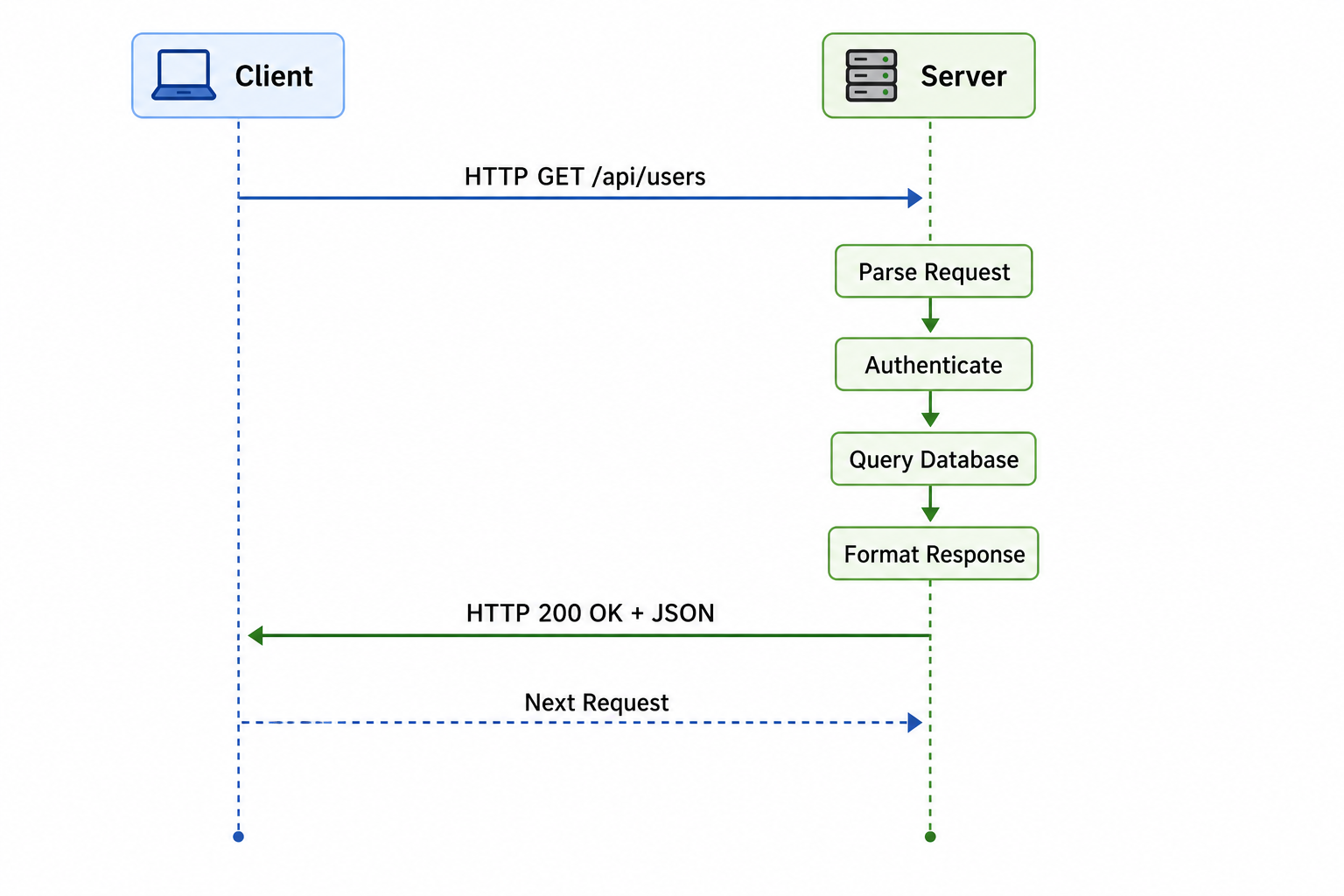
Server request handling flow
Why the Server Model Matters
Servers are the foundation of modern applications. They provide centralized control, security, and scalability that clients cannot achieve alone.
- Centralized Data Management: Data is stored in one place, making backup, consistency, and security easier to manage.
- Security: Sensitive logic and data remain on the server, protected from client-side tampering.
- Scalability: Servers can be scaled horizontally by adding more instances or vertically by increasing resources.
- Multi-User Support: Multiple clients can access the same server resources simultaneously.
- Consistent Logic: Business rules apply uniformly to all users regardless of client type.
- Resource Efficiency: Heavy processing happens on powerful servers, allowing clients to be lightweight.
Types of Servers
Different types of servers handle different responsibilities in an application architecture. Modern applications often use multiple specialized servers working together.
| Server Type | Purpose | Popular Examples |
|---|---|---|
| Web Server | Serves static content (HTML, CSS, JavaScript) and handles HTTP requests | Nginx, Apache, IIS, Caddy |
| Application Server | Executes application logic, processes business rules, generates dynamic content | Node.js, Tomcat, Gunicorn, Puma, uWSGI |
| Database Server | Stores, retrieves, and manages data with ACID compliance | PostgreSQL, MySQL, MongoDB, Redis, Cassandra |
| File Server | Stores and serves files for clients | NFS, SMB, AWS S3, MinIO |
| Cache Server | Stores frequently accessed data in memory for fast retrieval | Redis, Memcached, Varnish |
| Message Queue Server | Handles asynchronous communication between services | RabbitMQ, Apache Kafka, Amazon SQS |
| Mail Server | Handles email sending, receiving, and routing | Postfix, Sendmail, Microsoft Exchange |
| DNS Server | Resolves domain names to IP addresses | BIND, Cloudflare DNS, Amazon Route 53 |
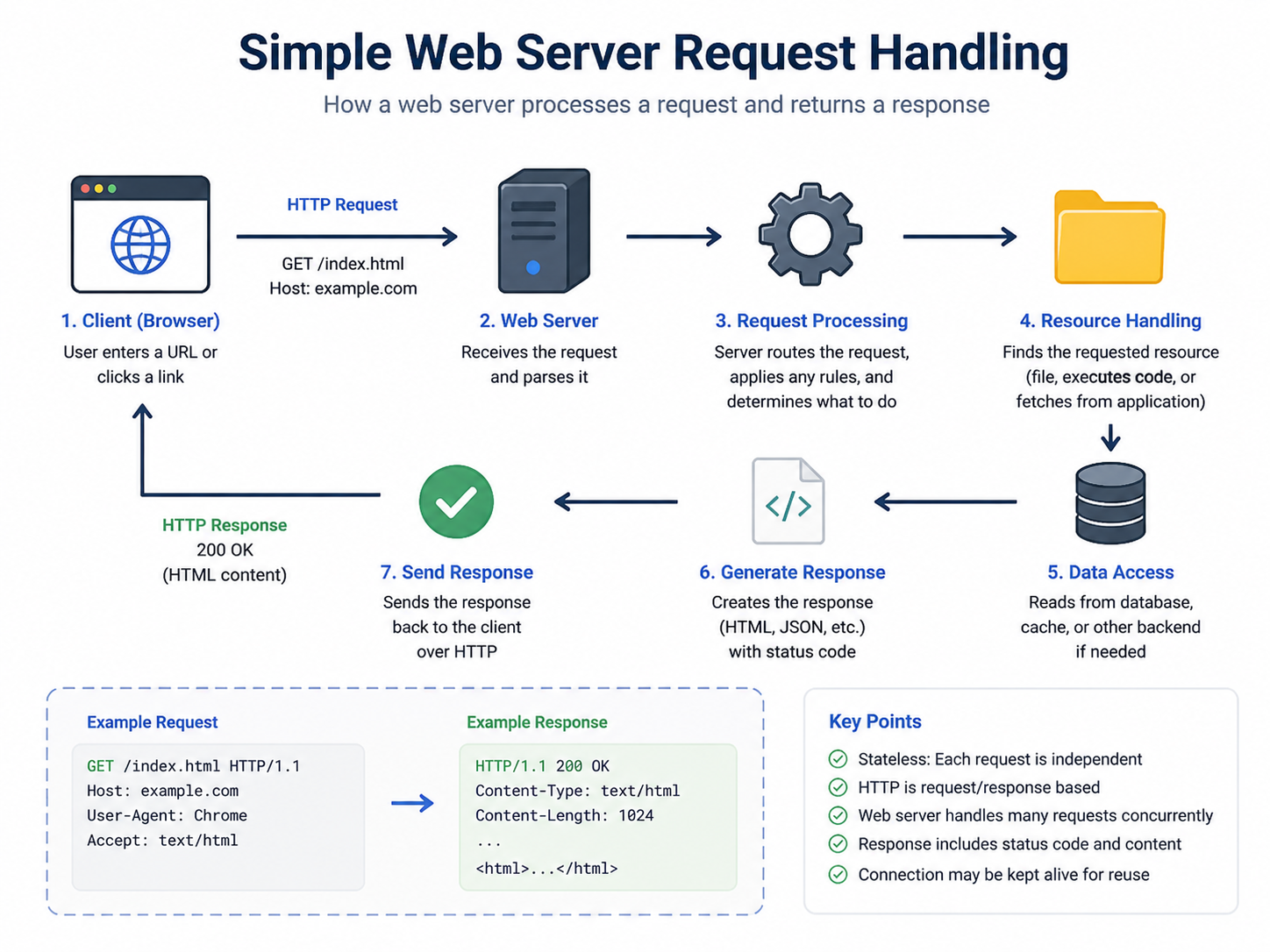
How Web Servers Work
A web server is the most common type of server most developers interact with. It handles HTTP requests from browsers and returns HTTP responses. Understanding web server operation is essential for deploying and maintaining web applications.
- Listen: The server listens on a port (usually 80 for HTTP, 443 for HTTPS) for incoming TCP connections.
- Accept: When a client connects, the server accepts the connection and reads the HTTP request.
- Parse: The server parses the HTTP request to determine the method, path, headers, and body.
- Route: The server determines how to handle the request (serve static file, proxy to application server, etc.).
- Process: The server executes the appropriate handler (may involve application logic, database queries, etc.).
- Respond: The server sends an HTTP response with status code, headers, and body.
- Close/Keep-Alive: The connection may close or remain open for subsequent requests.
Application Servers and Business Logic
While web servers handle static content and basic routing, application servers execute the dynamic business logic that makes web applications functional. They process user input, enforce business rules, interact with databases, and generate dynamic responses.
- Dynamic Content Generation: Application servers render templates, process forms, and execute business rules.
- Database Integration: They connect to database servers to persist and retrieve data using ORMs or raw queries.
- Authentication and Authorization: They verify user identities and enforce permission rules.
- Session Management: They track user state across multiple requests using sessions or tokens.
- Background Jobs: They handle asynchronous processing like email sending or report generation.
Database Servers
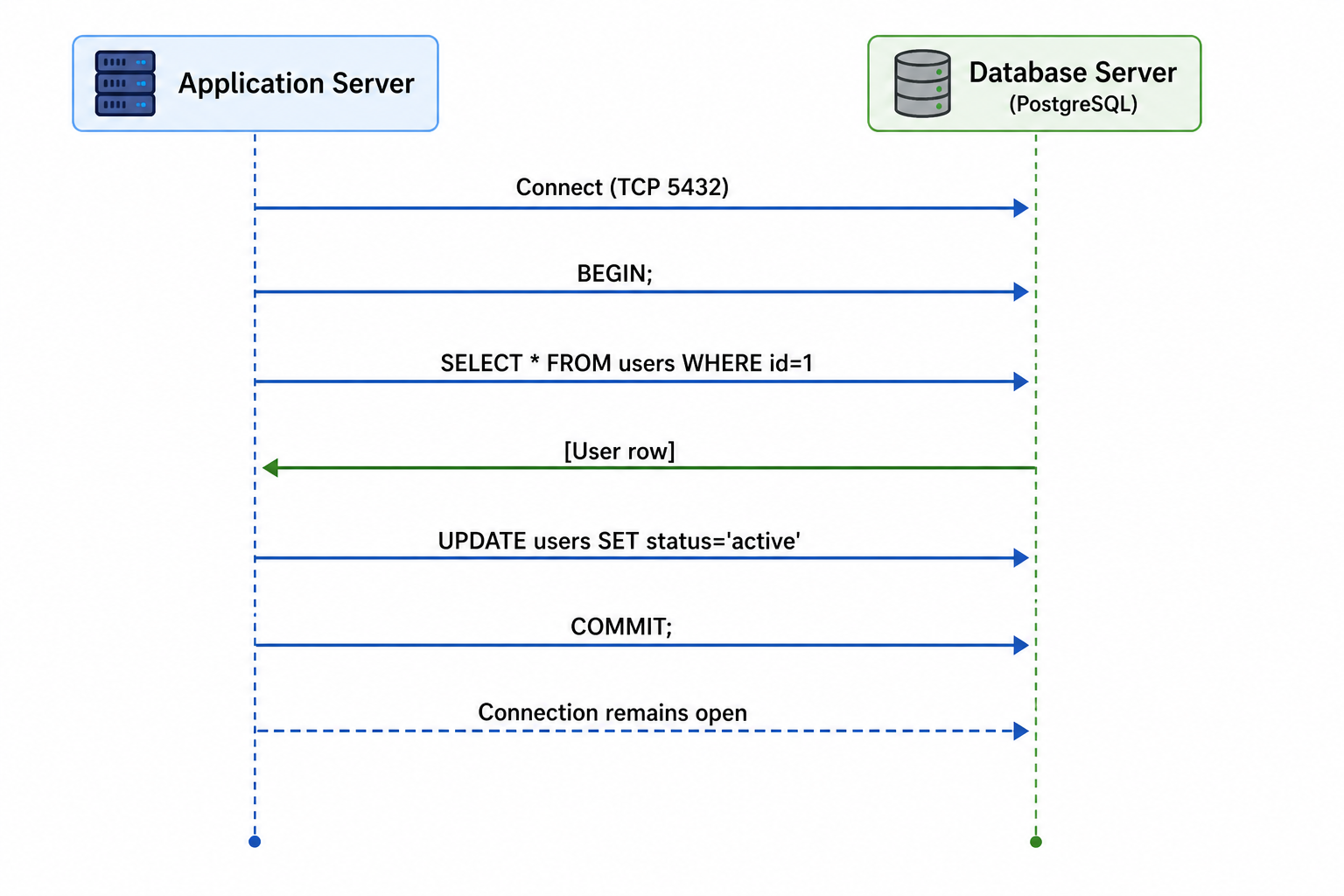
Database servers store and manage data persistently. They handle data storage, retrieval, updates, deletions, and enforce data integrity constraints. Most applications rely on at least one database server.
- Relational Databases: Organize data in tables with relationships (PostgreSQL, MySQL, SQL Server).
- NoSQL Databases: Store data in documents, key-value pairs, or graphs (MongoDB, Redis, Neo4j).
- Connection Pooling: Database servers manage connections efficiently to handle many concurrent clients.
- Query Optimization: They execute queries efficiently using indexes, query planners, and caching.
- ACID Compliance: Relational databases ensure Atomicity, Consistency, Isolation, and Durability.
Database server interaction pattern
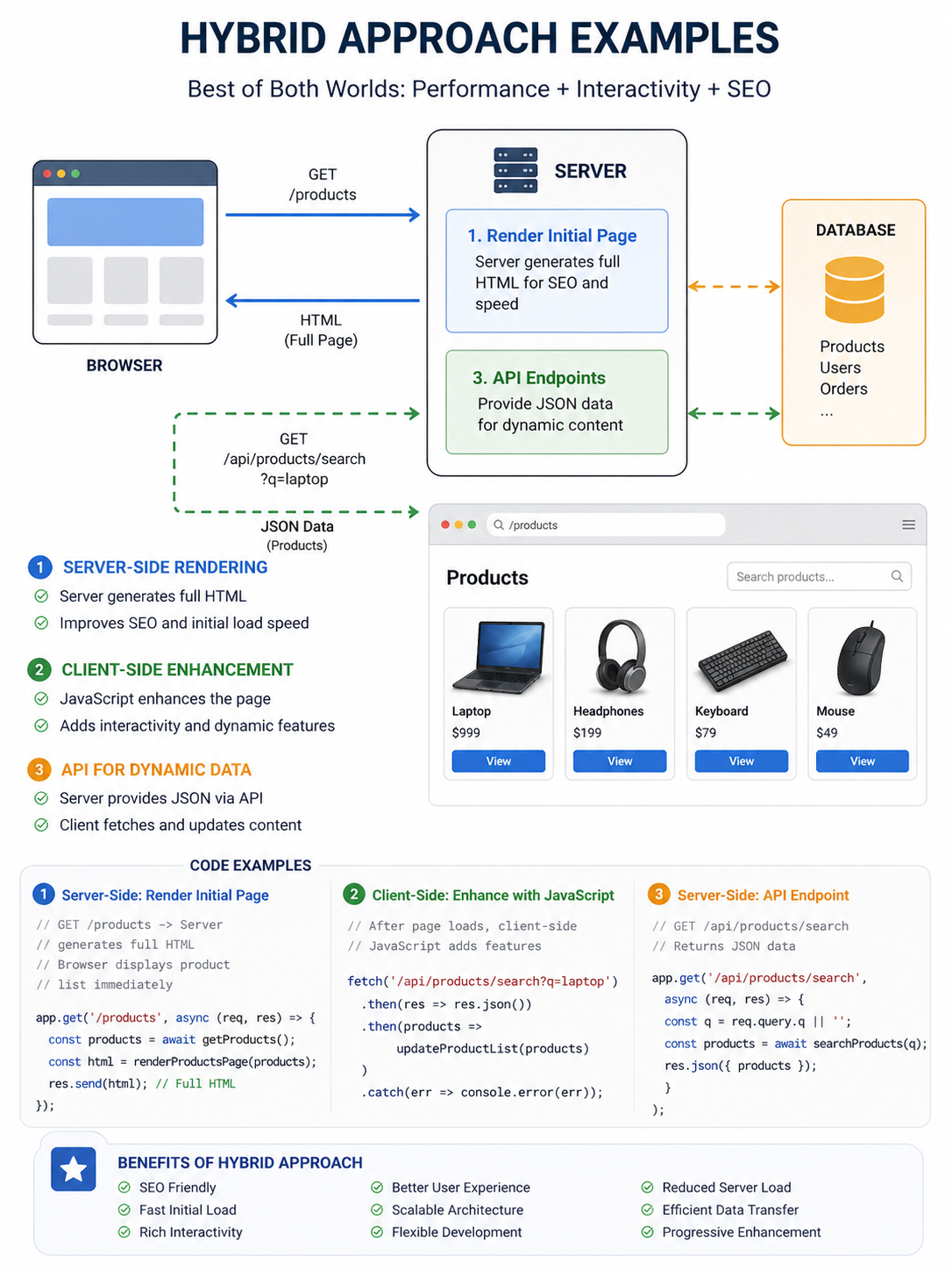
Server-Side vs Client-Side Processing
Decisions about where processing happens affect performance, security, and user experience. Understanding this balance helps you design better applications.
| Processing Location | Advantages | Disadvantages |
|---|---|---|
| Server-Side | Secure (logic hidden), consistent across clients, centralized control, works without client-side JavaScript | Higher server load, slower perceived response, requires network connection |
| Client-Side | Faster perceived response (no network round-trip), lower server load, rich interactivity, offline capable | Less secure (code exposed), inconsistent across browsers, may require more client resources |
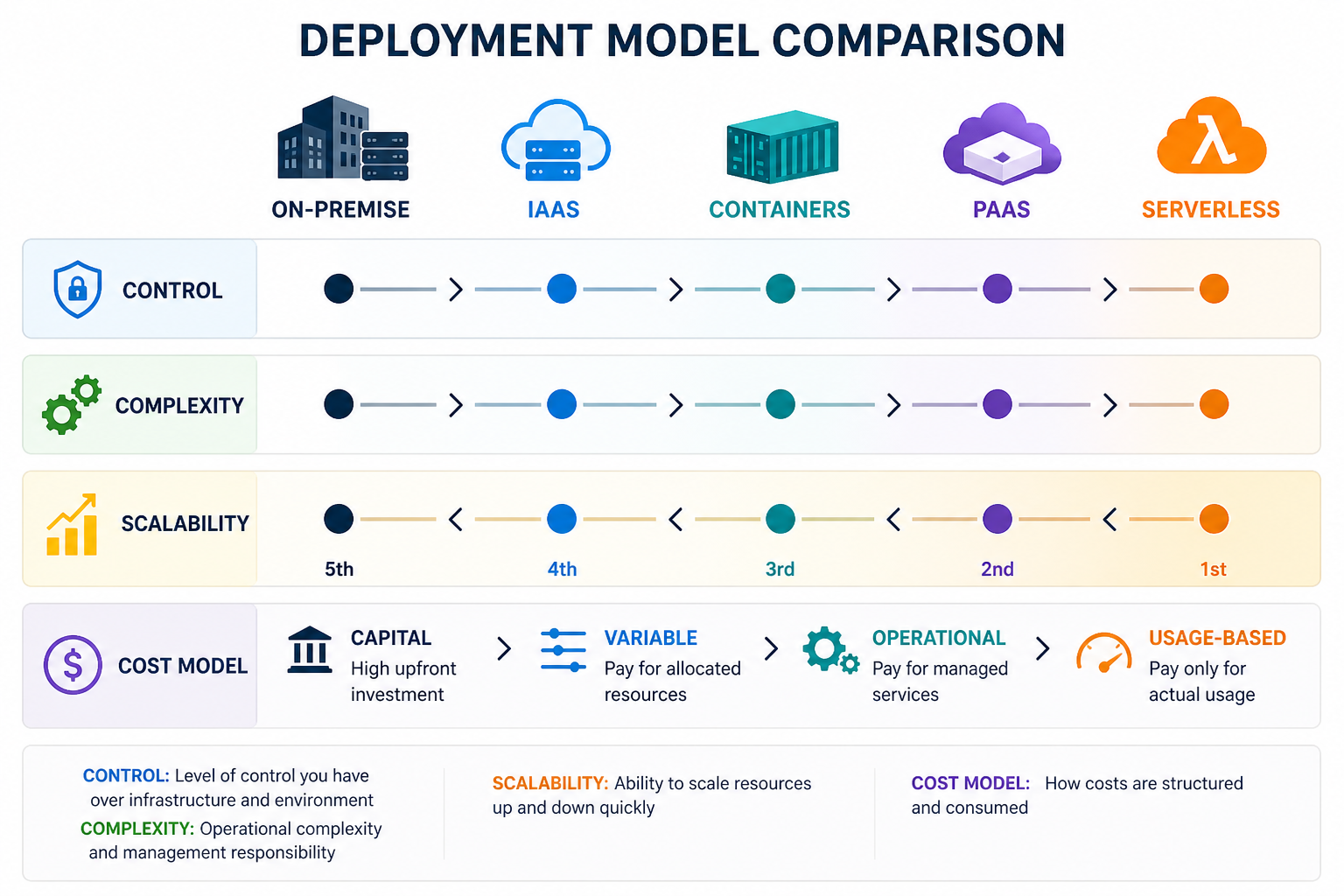
Server Deployment Models
How servers are deployed has evolved significantly. Different deployment models offer different trade-offs between control, scalability, and operational overhead.
- On-Premise: Servers physically located in your organization's data center. Full control but high operational overhead and capital expenditure.
- Infrastructure as a Service (IaaS): Virtual servers in the cloud (AWS EC2, Google Compute Engine). More flexible than on-premise, still requires management.
- Platform as a Service (PaaS): Managed application platforms (Heroku, Google App Engine, AWS Elastic Beanstalk). Less control but lower operations burden.
- Serverless: Function-as-a-Service (AWS Lambda, Cloud Functions, Azure Functions). No server management, pay-per-execution, auto-scaling.
- Containers: Isolated environments (Docker) deployed with orchestration (Kubernetes, Docker Swarm). Balance of control and portability.
Common Server Architectures
Several architectural patterns have emerged for structuring server-side applications. Each has strengths for different use cases and scales.
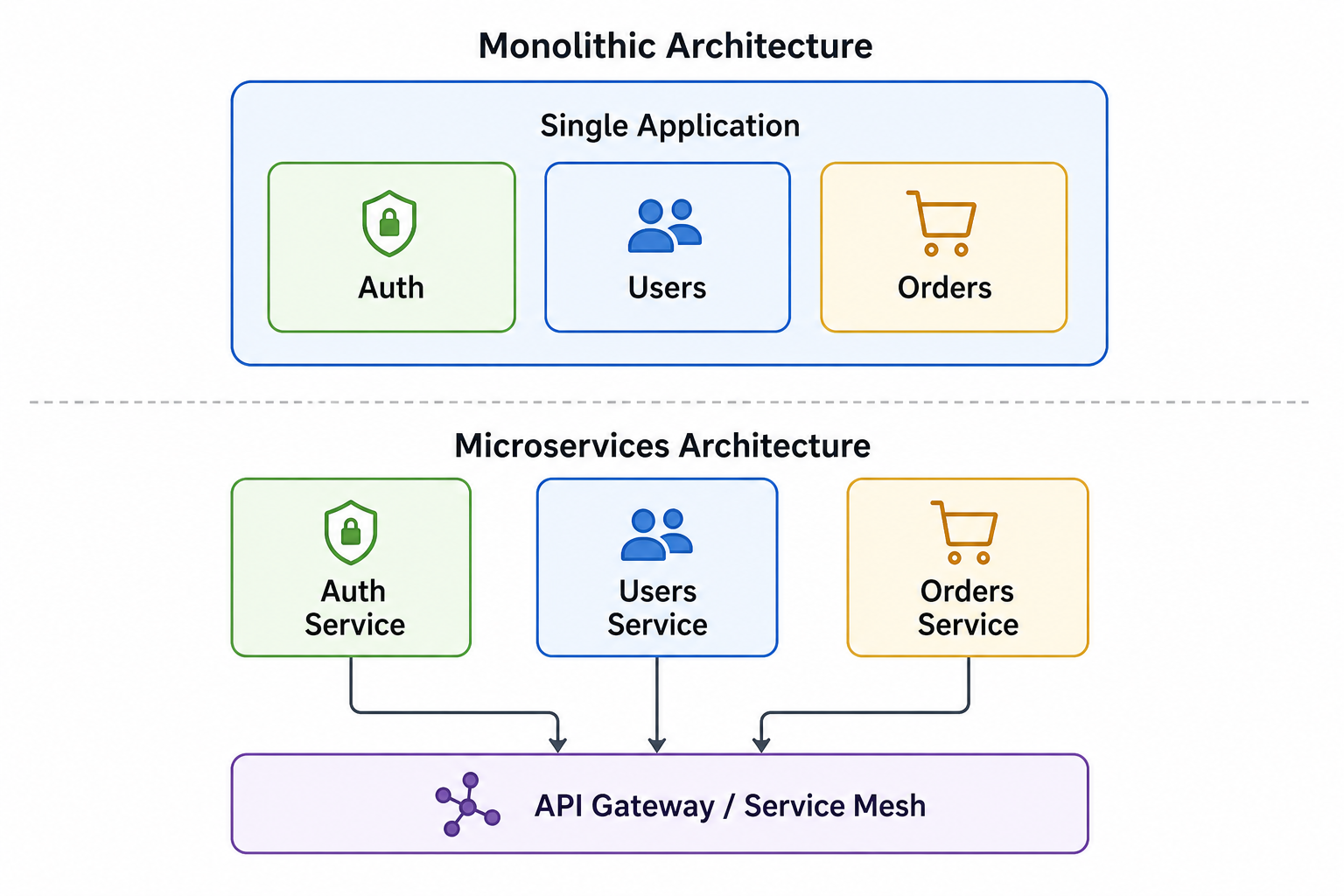
- Monolithic Architecture: All application components deployed as a single unit. Simple to develop, test, and deploy but harder to scale individual components.
- Layered Architecture: Organized into logical layers (presentation, business, data). Clean separation of concerns, easier to maintain.
- Microservices: Application broken into small, independent services. Highly scalable but operationally complex, requires service discovery and inter-service communication.
- Event-Driven Architecture: Services communicate through events. Good for asynchronous processing, decoupled components, real-time applications.
- Service-Oriented Architecture (SOA): Services communicate over a network with standardized protocols. Reusable services across applications.
Microservices vs Monolith visual
Load Balancing and Horizontal Scaling
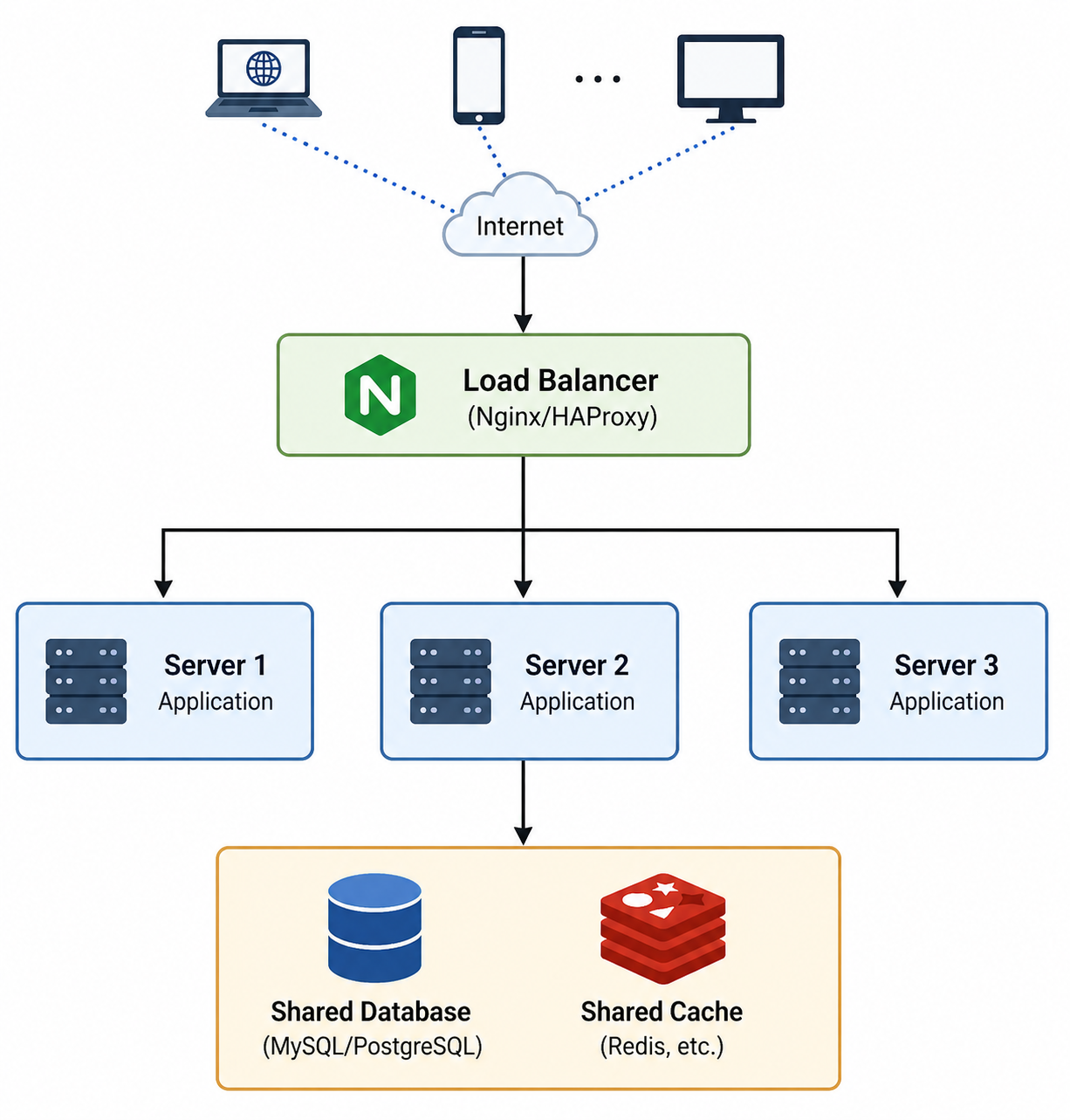
As applications grow, a single server becomes insufficient. Load balancing distributes traffic across multiple servers, enabling horizontal scaling and high availability.
- Load Balancer: Sits in front of servers, distributes incoming requests across them using algorithms like round-robin, least connections, or IP hash.
- Horizontal Scaling: Adding more servers to handle increased load. Provides redundancy and fault tolerance.
- Vertical Scaling: Adding more resources (CPU, memory, disk) to an existing server. Has limits and single point of failure.
- Stateless Design: Servers that don't store session data can be easily scaled horizontally.
- Health Checks: Load balancers periodically check server health and remove unhealthy instances from rotation.
Load balancing architecture
Server Security Best Practices
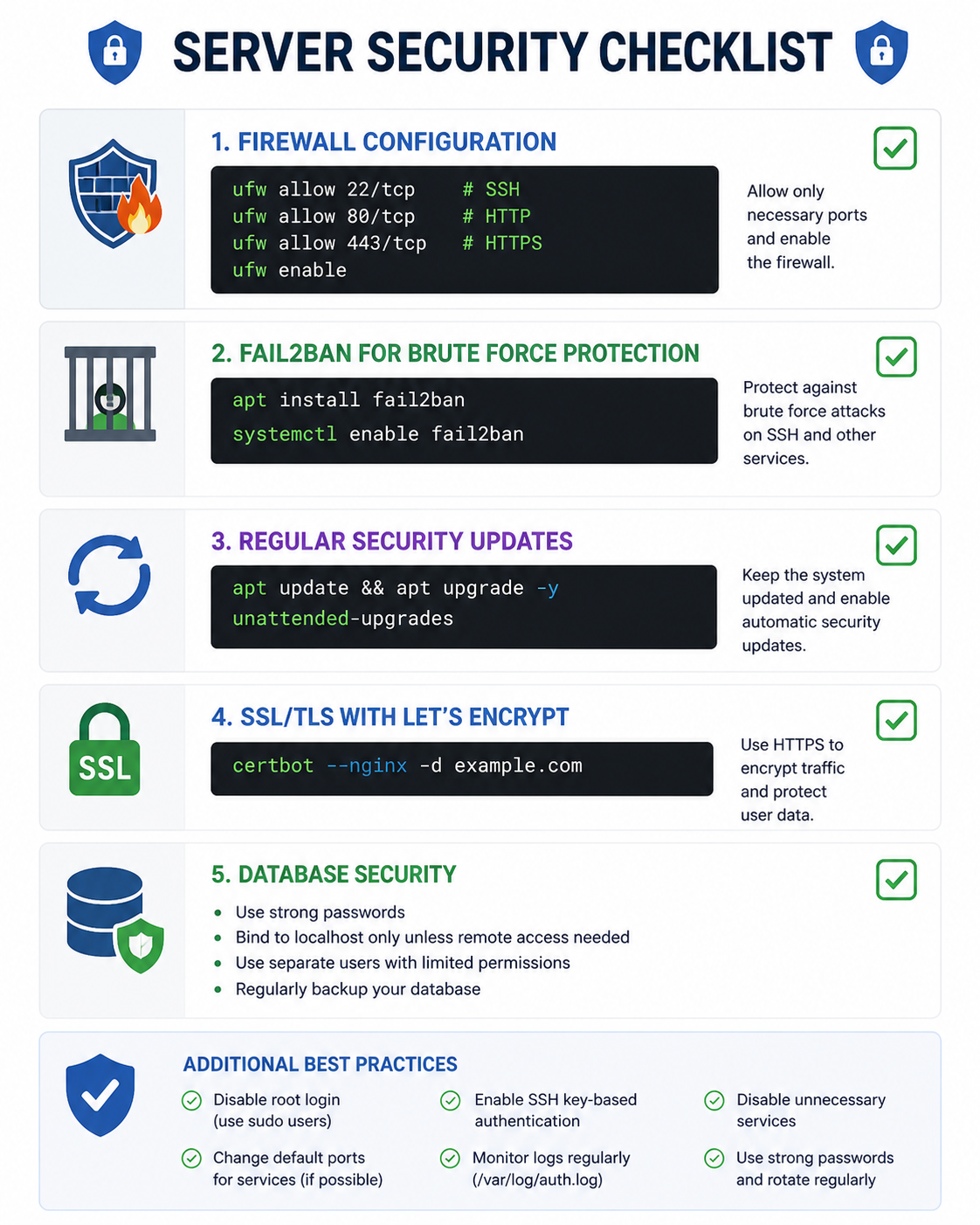
Servers are prime targets for attacks. Implementing security best practices is essential for protecting your application and user data.
- Principle of Least Privilege: Give servers and applications only the permissions they absolutely need.
- Keep Systems Updated: Regularly patch the operating system, web server, and application dependencies.
- Use HTTPS Everywhere: Encrypt all traffic between clients and servers with TLS/SSL certificates.
- Implement Rate Limiting: Protect against brute force attacks and denial of service by limiting request rates.
- Validate and Sanitize Input: Never trust client input. Validate on the server side to prevent injection attacks.
- Secure Configuration: Disable unused services, remove default credentials, follow security hardening guides.
- Monitor and Log: Implement comprehensive logging and monitoring to detect and respond to security incidents.
Common Server Mistakes to Avoid
Even experienced developers make mistakes when designing and deploying server architectures. Being aware of these common pitfalls helps you build more reliable systems.
- Stateful Servers: Storing session data on individual servers makes horizontal scaling impossible. Use external session stores like Redis.
- No Monitoring or Alerting: Without monitoring, you won't know when servers are failing or under stress until users complain.
- Single Point of Failure: Relying on one server means downtime when it fails. Use redundancy and load balancing.
- Ignoring Database Indexes: Missing indexes cause slow queries that become unbearable as data grows.
- No Backup Strategy: Servers fail. Data gets corrupted. Always have automated backups and disaster recovery plans.
- Over-Engineering: Starting with microservices when a monolith would work adds unnecessary complexity and operational overhead.
- Hardcoded Configuration: Hardcoding database credentials or API keys makes deployments fragile and insecure. Use environment variables.
Server Best Practices
Following these best practices helps you build server architectures that are reliable, scalable, and maintainable.
- Stateless Applications: Store session data in external services like Redis, not on individual servers.
- Health Checks: Configure load balancers to check server health and remove unhealthy instances from rotation.
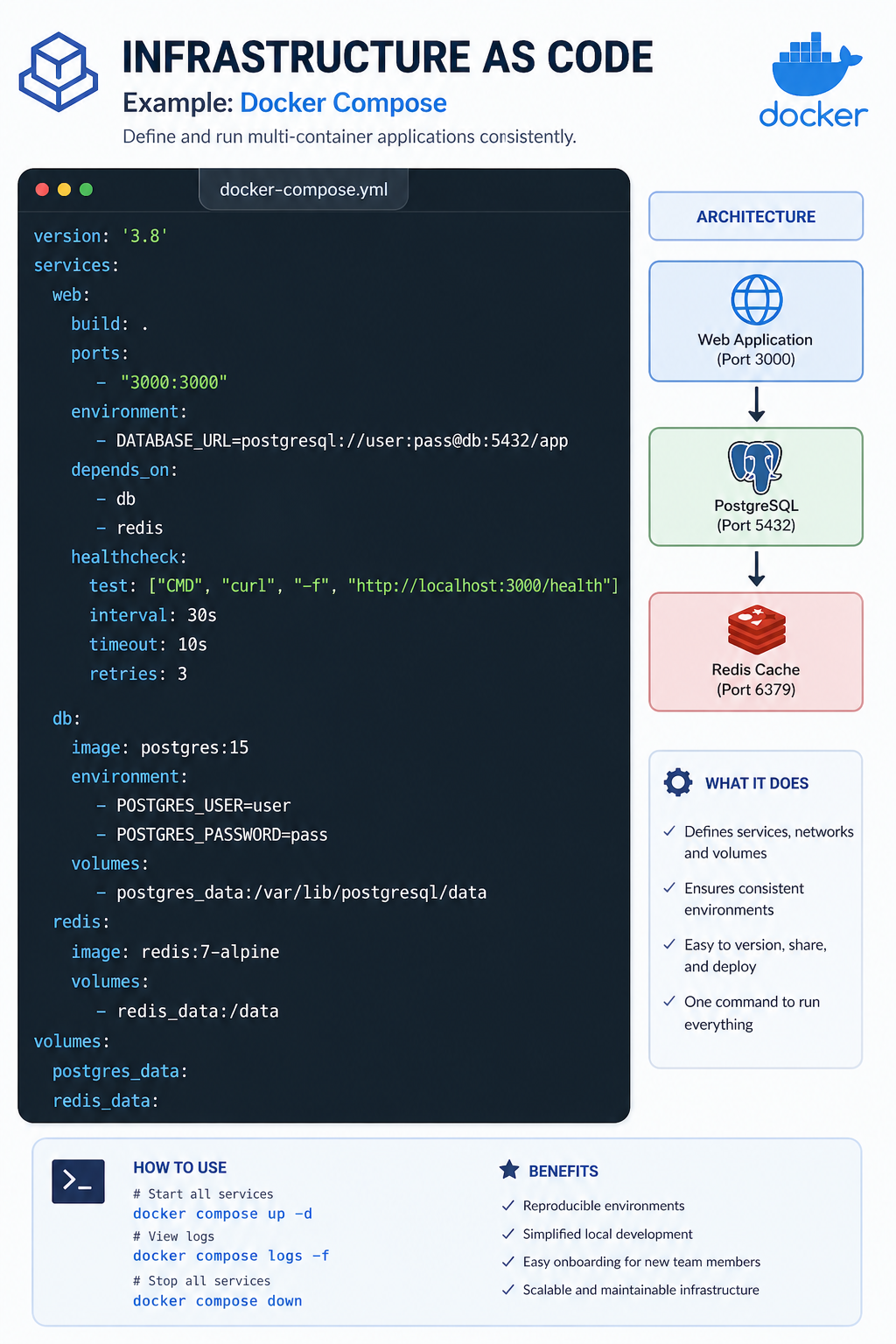
- Infrastructure as Code: Define server configurations in code (Terraform, CloudFormation, Ansible) for reproducibility and version control.
- Centralized Logging: Aggregate logs to a central system (ELK stack, Datadog, Splunk) for easier troubleshooting.
- Graceful Degradation: Design systems to fail gracefully when dependencies are unavailable. Implement circuit breakers and fallbacks.
- Security by Design: Implement security at every layer (network, application, data), not as an afterthought.
- Automate Deployments: Use CI/CD pipelines to ensure consistent, repeatable deployments with zero downtime.
- Performance Testing: Load test servers to understand limits and identify bottlenecks before they affect users.
Frequently Asked Questions
- What is the difference between a web server and an application server?
A web server primarily serves static content (HTML, CSS, images) and handles HTTP requests. It may also act as a reverse proxy. An application server executes business logic, generates dynamic content, and often communicates with databases. In modern architectures, the distinction blurs as application servers often include HTTP capabilities. - What is a reverse proxy?
A reverse proxy sits between clients and backend servers. It can load balance requests, cache responses, terminate SSL/TLS, compress responses, and hide internal server details. Nginx, HAProxy, and Apache are popular reverse proxies. - What is the difference between stateful and stateless servers?
Stateful servers store session data locally, making them difficult to scale horizontally. Stateless servers store no client data locally, allowing any server to handle any request. Stateless designs are essential for horizontal scaling and high availability. - How do I choose between monolithic and microservices architecture?
Start with a monolith for simplicity. As the application grows and teams expand, consider breaking into microservices when independent scaling, independent deployment, or team autonomy becomes valuable. Microservices add significant complexity and should be adopted when benefits outweigh costs. - What is the 12-factor app methodology?
The 12-factor app is a methodology for building software-as-a-service applications. It provides guidelines for declarative configuration, stateless processes, port binding, disposability, and other principles that make applications portable, scalable, and maintainable. - What should I learn next after understanding server models?
After mastering server fundamentals, explore REST API design for building server interfaces, database ORM for server-database interaction, cloud deployment for modern hosting, and containerization with Docker for consistent deployment environments.
The server model is the foundation of modern applications. Servers provide the centralized processing, data storage, and security that make scalable, multi-user applications possible. Understanding how servers work, from web servers to application servers to databases, gives you the perspective needed to build systems that can handle millions of users.
The journey from a single server running all components to a distributed system of specialized services is a progression many applications make as they grow. The key is to start with a solid foundation, understand your requirements, and evolve your architecture as needs change. Stateless designs, load balancing, automated deployments, and infrastructure as code are the tools that enable this evolution.
To deepen your understanding, combine server knowledge with related topics like REST API design for building server interfaces, database ORM for server-database interaction, cloud deployment for modern hosting practices, and containerization for consistent environments. Together, these skills form a complete foundation for building robust, scalable web applications.