
Authorization: Access Control
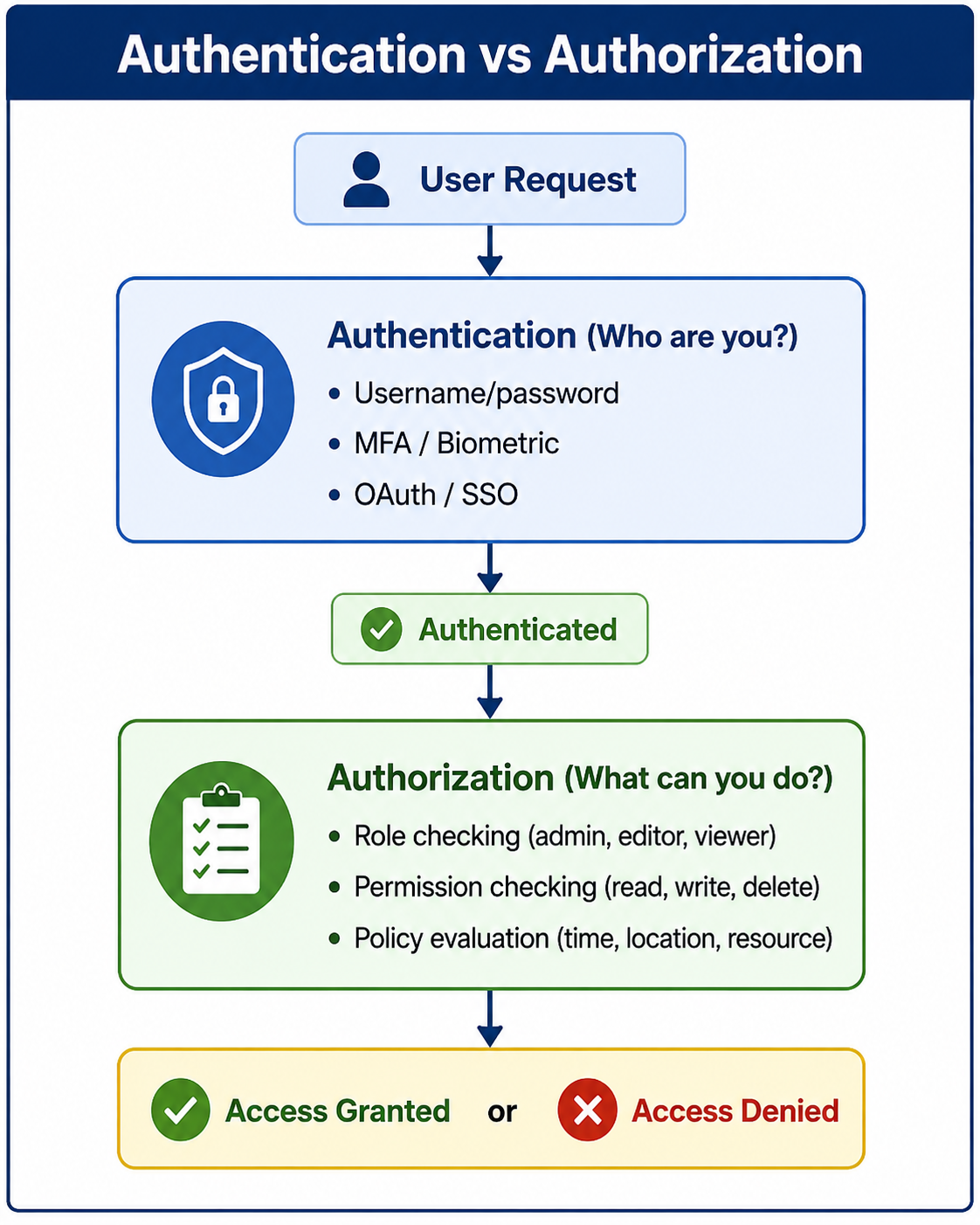
Authorization is the process of determining what an authenticated user is allowed to do. It controls access to resources based on roles, permissions, or policies after identity verification is complete.
Authorization: Access Control
Authorization is the process of determining what an authenticated user is allowed to do. While authentication answers "Who are you?", authorization answers "What can you do?" Once a user's identity is verified, authorization controls their access to resources, actions, and data based on predefined permissions, roles, or policies. Without proper authorization, authenticated users could access or modify data they should not see or change.
Authorization is a critical component of application security. It ensures that users can only perform actions and access data that their role or permission level permits. To understand authorization properly, it is helpful to be familiar with concepts like authentication mechanisms, web security fundamentals, session management, and security compliance.
What Is Authorization
Authorization is the security process that determines whether an authenticated user has permission to access a specific resource or perform a specific action. It happens after authentication and is enforced at every access attempt. Authorization answers questions like: Can this user view this page? Can this user edit this document? Can this user delete this record?
- Access Control: Determines who can access what resources.
- Permission-Based: Grants or denies specific actions (read, write, delete, execute).
- Post-Authentication: Authorization always follows successful authentication.
- Enforced at Every Request: Each access attempt is checked independently.
- Principle of Least Privilege: Users should have only the minimum permissions needed.
Why Authorization Matters
Authorization is essential for protecting sensitive data and ensuring that users can only perform actions appropriate for their role. Without proper authorization, any authenticated user could access any resource.
- Data Protection: Prevents unauthorized access to sensitive information.
- Least Privilege: Enforces the principle that users should have minimal necessary permissions.
- Compliance: Required by regulations like HIPAA, GDPR, and PCI-DSS for access control.
- Audit Trail: Authorization logs provide accountability for user actions.
- Segregation of Duties: Prevents users from having conflicting permissions (e.g., create and approve payments).
- Prevents Privilege Escalation: Stops users from gaining unauthorized access to higher-level functions.
- Multi-Tenancy: Ensures users can only access data within their organization or account.
Authorization Models
Several authorization models are used in modern applications. Choosing the right model depends on application complexity, scalability needs, and security requirements.
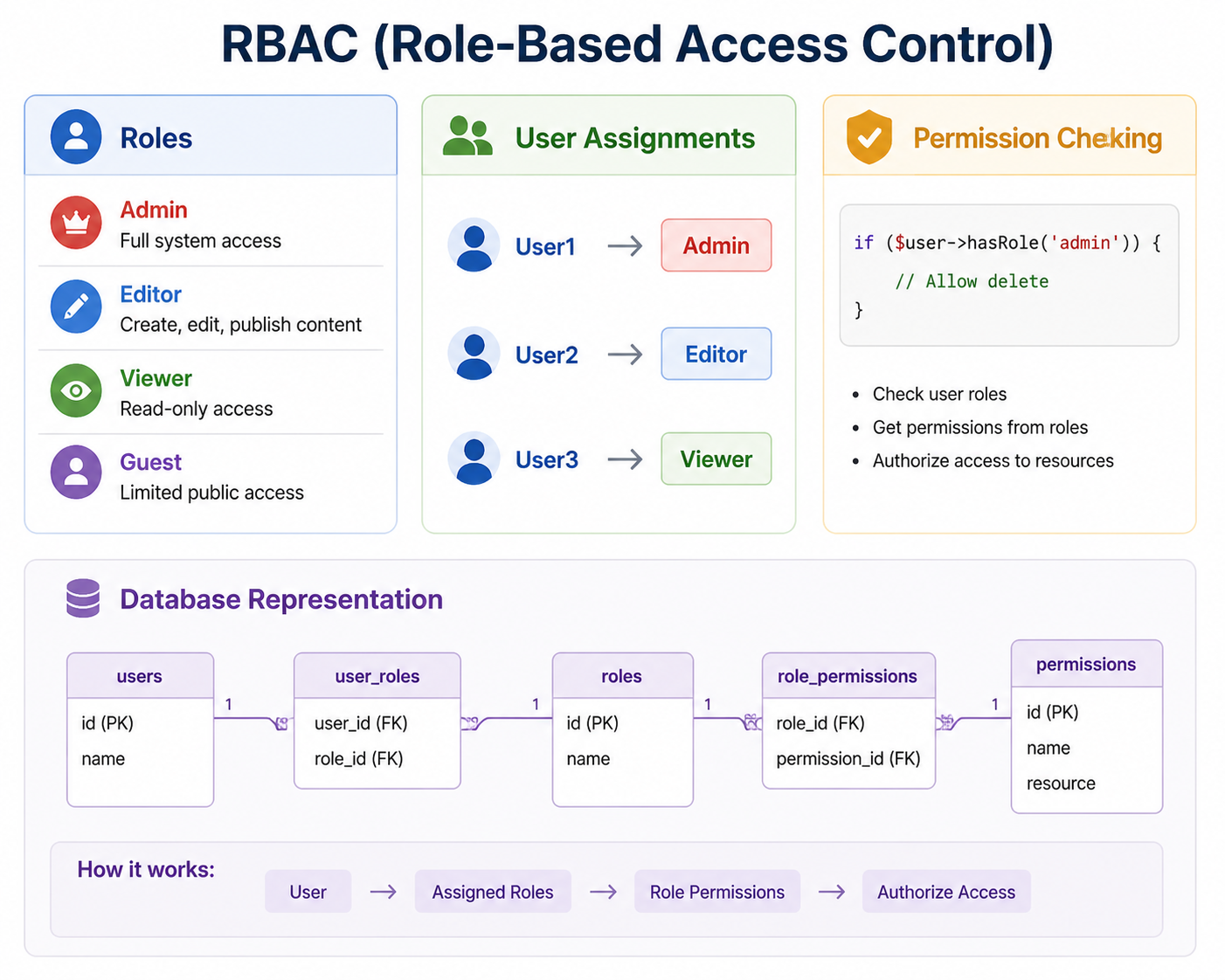
Role-Based Access Control (RBAC)
RBAC is the most common authorization model. Permissions are assigned to roles, and users are assigned to roles. This simplifies management by grouping permissions rather than assigning them individually. Learn more in our RBAC guide.
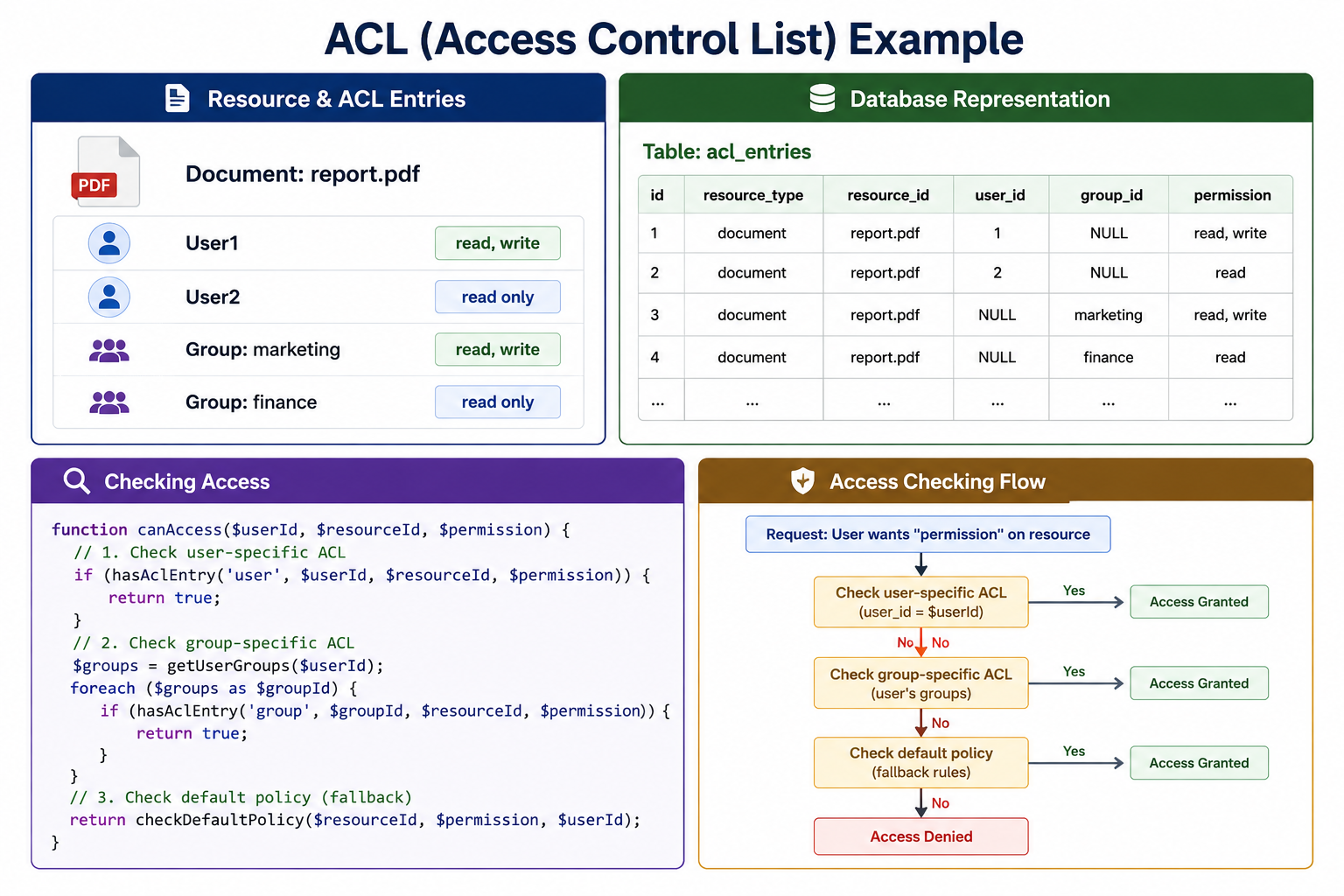
Access Control Lists (ACL)
ACL directly associates permissions with specific users or groups for specific resources. This provides fine-grained control but can become complex to manage at scale.
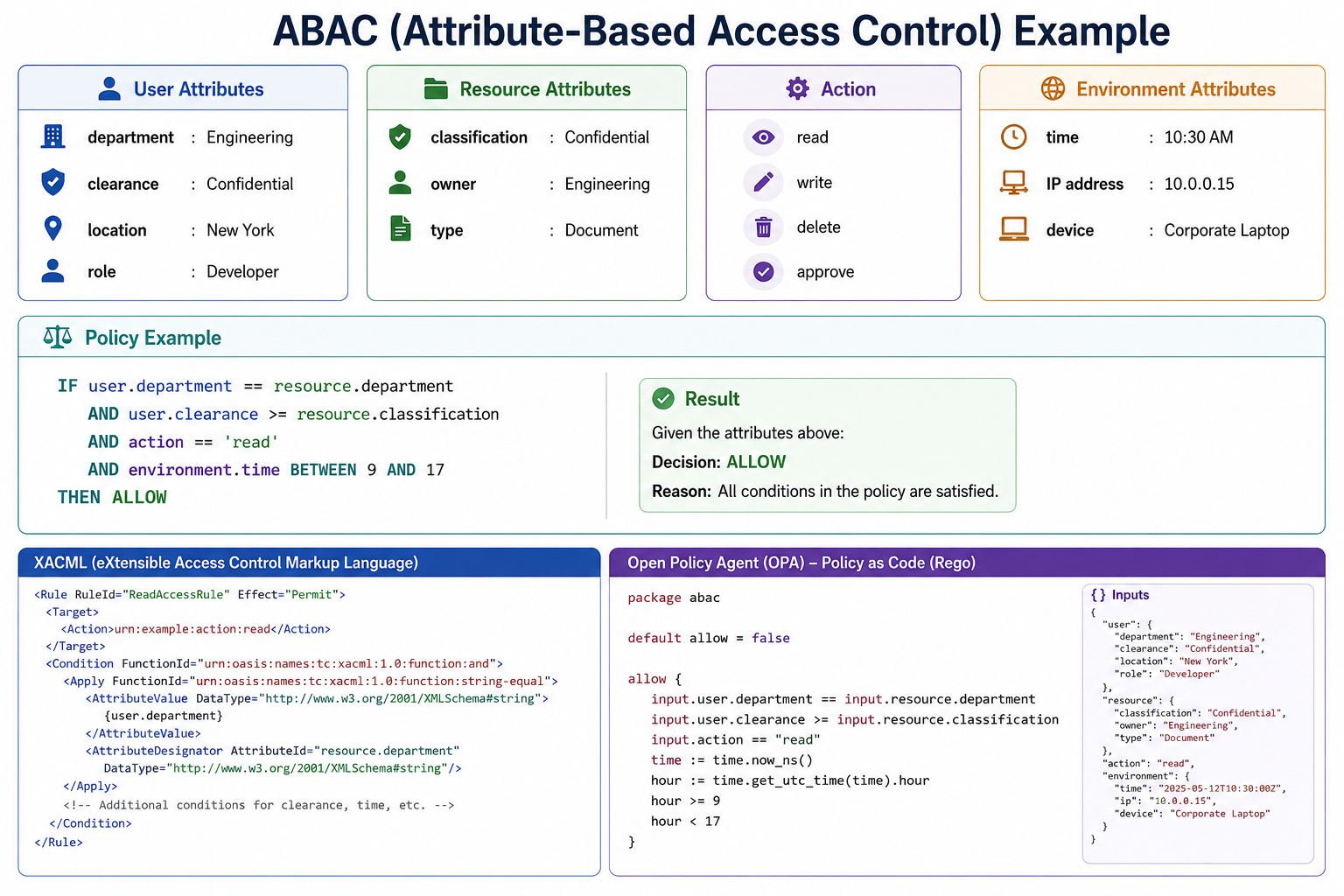
Attribute-Based Access Control (ABAC)
ABAC uses attributes of the user, resource, action, and environment to make access decisions. It is highly flexible and scalable for complex systems.
Relationship-Based Access Control (ReBAC)
ReBAC grants access based on relationships between users and resources. It is commonly used in social networks and collaborative applications.

Common Authorization Vulnerabilities
Authorization flaws are among the most common and critical security vulnerabilities. Understanding these vulnerabilities helps you prevent them.
| Vulnerability | Description | Example |
|---|---|---|
| IDOR (Insecure Direct Object Reference) | User can access resources by guessing or modifying IDs | /user/profile?id=123 -> /user/profile?id=124 |
| Horizontal Privilege Escalation | User accesses another user's data at same privilege level | User A viewing User B's orders |
| Vertical Privilege Escalation | User accesses higher-privilege functions | Regular user performing admin actions |
| Missing Function-Level Access Control | API endpoints lack permission checks | DELETE /api/user/123 accessible to any authenticated user |
To prevent IDOR vulnerabilities, always verify resource ownership or permissions before granting access. Use unguessable identifiers like UUIDs instead of sequential IDs. Never rely on client-side hiding for security controls.
Authorization Best Practices
Following these best practices ensures your authorization implementation is secure and maintainable.
- Enforce on Server Side Only: Never rely on client-side authorization. Hiding UI elements is for user experience, not security.
- Deny by Default: Start with no access, explicitly grant permissions.
- Check at Every Layer: Enforce authorization at API, service, and database layers.
- Use Principle of Least Privilege: Grant minimal permissions necessary for each role.
- Implement Defense in Depth: Multiple authorization checks provide redundancy.
- Log Authorization Failures: Monitor for potential attacks and misconfigurations.
- Use Centralized Authorization Logic: Avoid scattered permission checks throughout code.
- Regularly Audit Permissions: Review and remove unnecessary permissions.
- Use Policy-as-Code: Define authorization policies in code for version control and review, as covered in our Policy as Code guide.
Authorization vs Authentication vs Access Control
These terms are often confused but serve different purposes. Understanding the distinctions is important for designing secure systems. See our detailed authentication vs authorization guide.
| Concept | Question | Description | Timing |
|---|---|---|---|
| Authentication | Who are you? | Verifies user identity | First (login) |
| Authorization | What can you do? | Determines permissions | After authentication |
| Access Control | How is access enforced? | Mechanism to enforce authorization | During each request |
Frequently Asked Questions
- What is the difference between authentication and authorization?
Authentication verifies identity ("Who are you?"). Authorization determines permissions ("What can you do?"). Authentication happens first, then authorization. - What is RBAC?
Role-Based Access Control assigns permissions to roles, and users to roles. It is the most common authorization model because it simplifies permission management. Learn more in our RBAC guide. - What is IDOR and how do I prevent it?
Insecure Direct Object Reference occurs when users can access resources by guessing IDs. Prevent it by checking ownership and permissions for every request and using unguessable identifiers like UUIDs. - Should authorization be on client or server?
Authorization must be enforced on the server. Client-side hiding of UI elements is for user experience, not security. Attackers can bypass client-side controls. - What is the principle of least privilege?
Users should have only the minimum permissions necessary to perform their job functions. This limits damage from compromised accounts or mistakes. - What should I learn next after understanding authorization?
After mastering authorization, explore authentication mechanisms, RBAC implementation, JWT for authorization, web security fundamentals, and Policy as Code for comprehensive access control automation.
Conclusion
Authorization is a critical security control that determines what authenticated users can do. It ensures that users can only access resources and perform actions appropriate for their role or permission level. Without proper authorization, any authenticated user could access any resource, leading to data breaches and privilege escalation attacks.
Several authorization models exist: RBAC (most common), ACL (fine-grained), ABAC (flexible), and ReBAC (relationship-based). The right model depends on your application's complexity and security requirements. Authorization must be enforced on the server side at every request; never rely on client-side hiding for security.
Common authorization vulnerabilities include IDOR, privilege escalation, and missing access controls. Prevention strategies include ownership checks, deny-by-default policies, centralized authorization logic, and regular permission audits. Following the principle of least privilege reduces the impact of compromised accounts.
To deepen your understanding, explore related topics like authentication mechanisms, RBAC implementation, JWT for authorization, web security fundamentals, and security compliance. Together, these skills form a complete foundation for building secure access control systems.