
Authentication vs Authorization: What Is the Difference?
Authentication verifies who a user is, while authorization determines what they are allowed to do.
Authentication vs Authorization
Authentication and authorization are the two pillars of application security. They are often confused but serve completely different purposes. One confirms who you are, the other controls what you are allowed to do.
What Is Authentication
Authentication is the process of verifying a user's identity. It answers the question: "Who are you?" Before a system grants access to anything, it first needs to confirm that the person or application making the request is who they claim to be.
Think of authentication like showing your ID at the entrance of a building. The security guard checks your face against the photo, confirms your name, and decides whether you are who you say you are. Only after that check is passed do you get through the door.
Common authentication methods include:
- Username and password login
- Biometrics such as fingerprint scanning or Face ID
- One-time password (OTP) sent via SMS or email
- Multi-factor authentication (MFA), which combines two or more methods
- Social login via OAuth, such as "Login with Google" or "Login with GitHub"
- Hardware tokens or authenticator apps like Google Authenticator
User enters: user@email.com + password123
System verifies credentials against stored hash
Identity confirmed
When authentication fails, the server returns a 401 Unauthorized response. This tells the client that valid credentials are required before the request can proceed.
What Is Authorization
Authorization is the process of determining what a user is allowed to do. It answers the question: "What can you access?" Authorization always happens after authentication. Once the system knows who you are, it then checks whether you have permission to perform the action you are attempting.
Using the building analogy again, authorization is like the access card that lets you into specific floors or rooms. Everyone in the building has been verified at the entrance, but not everyone can walk into the server room or the executive office. Your card determines which doors open for you.
Common authorization models include:
- Role-Based Access Control (RBAC): Permissions are assigned to roles such as Admin, Editor, or Viewer. Users inherit the permissions of their assigned role.
- Attribute-Based Access Control (ABAC): Access decisions are based on attributes like country, subscription tier, or department.
- Permission-Based Access: Specific permissions such as Read, Write, and Delete are assigned directly to users or groups for individual resources.
- Access Control Lists (ACL): A list tied to a resource that specifies which users or groups can perform which actions on it.
User authenticated as: editor@email.com (Role: Editor)
Tries to delete a user account
System checks role permissions
Access Denied (Admins only)
When authorization fails, the server returns a 403 Forbidden response. Unlike 401, this does not mean the user is not logged in. It means they are logged in but do not have the required permissions for that action.
Authentication vs Authorization: Key Differences
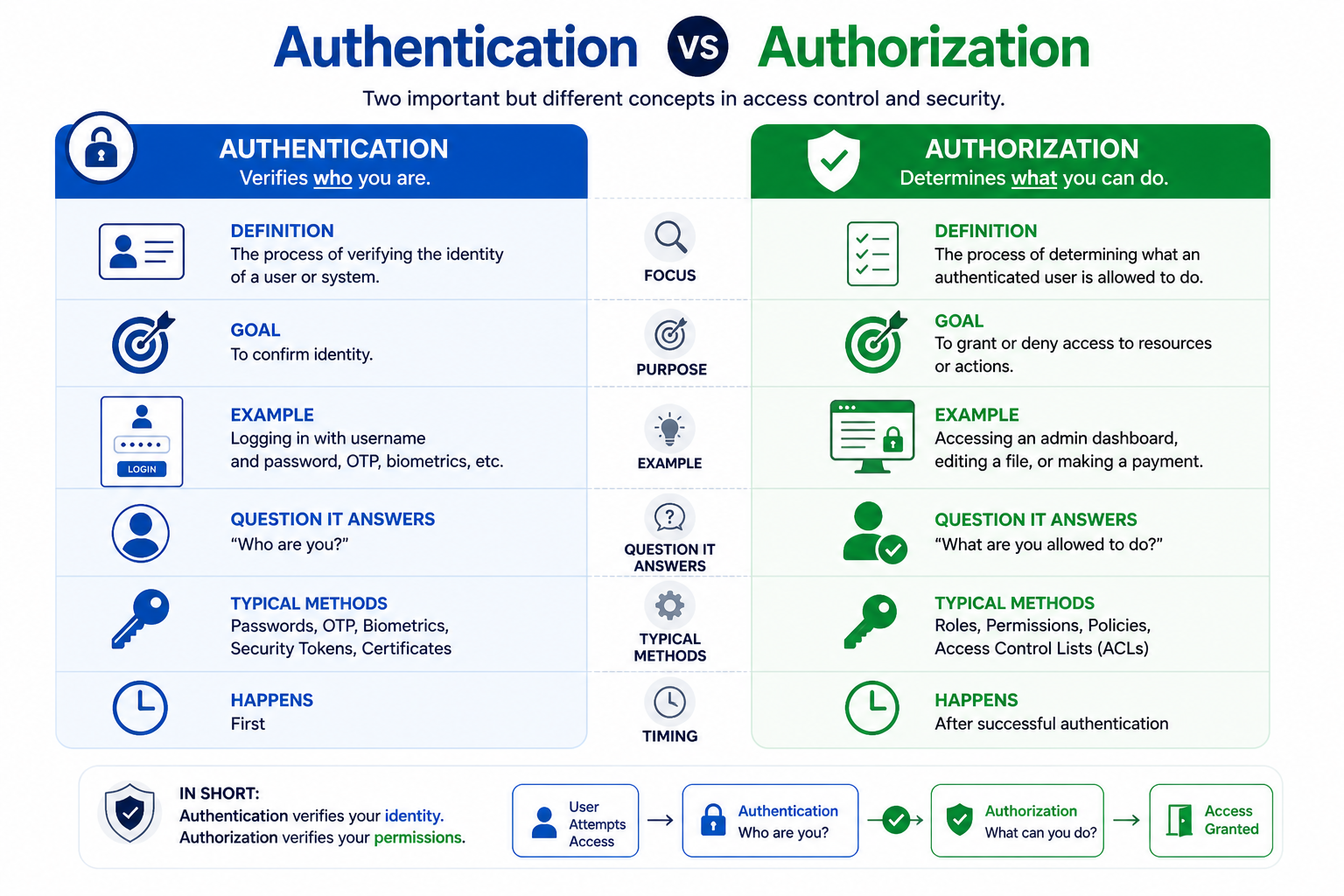
| Feature | Authentication | Authorization |
|---|---|---|
| Question | Who are you? | What can you do? |
| Order | Always first | Always after authentication |
| Data Used | Credentials (password, token, biometrics) | Roles, permissions, policies |
| Failure Response | 401 Unauthorized | 403 Forbidden |
| Tools | JWT, sessions, OAuth, SSO, MFA | RBAC, ABAC, ACL, middleware |
| Visibility to User | Login screen, biometric prompt | Usually invisible until access is denied |
The Flow: Authentication Then Authorization
In a well-designed system, authentication and authorization work together in a specific sequence. Skipping or reversing the order creates security vulnerabilities. Here is how the flow typically works:
- User submits login credentials such as an email and password
- The system verifies the credentials against stored records (authentication)
- On success, the system issues a token or creates a session
- The system loads the user's role and associated permissions (authorization data)
- The user requests a protected action, for example deleting a post
- The system checks whether the user's role permits that specific action (authorization)
- Access is granted or denied based on the result
Every subsequent request the user makes repeats step 5 through 7. The token or session carries the user's identity, and the server checks permissions on each request independently.
HTTP Status Codes for Auth Failures
Two HTTP status codes are specifically associated with authentication and authorization failures. Understanding the difference between them helps during debugging and helps clients handle errors correctly.
| Code | Meaning | When It Occurs |
|---|---|---|
| 401 Unauthorized | Not authenticated | Missing, expired, or invalid login credentials or token |
| 403 Forbidden | Not authorized | Authenticated successfully but insufficient permissions for the action |
A common mistake is returning 401 when the correct code is 403. If the user is logged in but simply lacks permission, the response should be 403, not 401. Returning 401 in that case tells the client to try logging in again, which will not solve the problem.
Real-World Examples
Authentication and authorization appear together in almost every application you use. Here are some familiar scenarios that illustrate how both work in practice:
- Email login page: Authentication. The system verifies your email address and password before letting you in.
- Admin dashboard: Authorization. Even after logging in, only users with the Admin role can access the dashboard. Others see a 403 error or are redirected away.
- Google Drive sharing: Authorization. The owner can grant "view only" or "can edit" permissions per file. Both users are authenticated, but their access levels differ.
- Bank application: Both. A PIN or biometric check authenticates you (authentication), and the app then restricts what you can do. For example, viewing your balance is allowed, but changing your registered email address requires an additional verification step (a stricter authorization rule).
- Content management system: Both. Writers can create and edit their own posts (authorization), but only editors can publish, and only admins can delete other users' content.
Common Tools and Technologies
Different layers of auth are handled by different tools. Here is a quick overview of what each one does:
| Tool or Standard | Type | Purpose |
|---|---|---|
| JWT (JSON Web Token) | Authentication | A signed token that carries user identity and is sent with each request |
| OAuth 2.0 | Authentication and Authorization | A framework for delegating access, used by social logins and third-party integrations |
| Sessions | Authentication | Server-side storage of login state, identified by a session ID in a cookie |
| SSO (Single Sign-On) | Authentication | Lets users log in once and access multiple connected systems |
| RBAC | Authorization | Assigns permissions to roles; users inherit permissions from their role |
| ABAC | Authorization | Access decisions based on user and resource attributes |
| Middleware | Authorization | Code that runs before a route handler to check permissions on every request |
Frequently Asked Questions
- Can authorization happen without authentication?
Technically yes. Some systems allow anonymous access with a limited set of permissions. For example, a public API might let unauthenticated users read data but not write it. However, for any protected resource, authentication must come first so the system knows who is making the request before deciding what they can do. - What is SSO?
Single Sign-On allows users to authenticate once and then access multiple connected systems without re-entering credentials. For example, logging into your company's identity provider gives you access to email, project management tools, and internal dashboards without separate logins for each. - What is RBAC?
Role-Based Access Control assigns permissions to roles such as Admin, User, or Moderator rather than to individual users. A user is assigned a role, and they inherit all the permissions that role carries. This makes managing access much simpler as the team grows, because you change the role's permissions in one place rather than updating each user individually. - Why does my API return 401 even though I am logged in?
A 401 usually means the token or session is missing, expired, or malformed. Check that your request includes the correct Authorization header, that the token has not expired, and that it is being signed and verified with the same secret or key on both ends. - What is the difference between OAuth and JWT?
OAuth is an authorization framework that defines how applications can request delegated access on behalf of a user. JWT is a token format used to represent claims securely. They are often used together: OAuth issues a JWT as the access token, but they solve different problems and neither is a replacement for the other.
Conclusion
Authentication confirms identity and authorization controls access. Both are essential for building secure applications, and they must always work in the correct order. Understanding the distinction helps you design proper login systems, protect API endpoints, and implement access control that reflects real user roles and permissions. To go deeper, explore OAuth, JWT, and session vs token authentication for practical implementation guidance.