
WebAuthn: Passwordless Authentication with Passkeys
WebAuthn (Web Authentication API) is a W3C standard that enables strong, phishing-resistant authentication using public-key cryptography. It allows users to authenticate with biometrics (fingerprint, Face ID), security keys (YubiKey), or Windows Hello instead of passwords.
WebAuthn: Passwordless Authentication with Passkeys
WebAuthn (Web Authentication API) is a W3C standard that enables strong, phishing-resistant authentication using public-key cryptography. It allows users to authenticate using biometrics (fingerprint, Face ID, Touch ID), security keys (YubiKey), or platform authenticators (Windows Hello, Android fingerprint) instead of passwords. WebAuthn is the core technology behind passkeys, which are rapidly becoming the future of secure authentication.
Passwords have fundamental weaknesses: they can be stolen, guessed, reused across sites, and intercepted through phishing. WebAuthn solves these problems by replacing shared secrets with cryptographic key pairs. The private key never leaves the user's device, and authentication is bound to the specific website's origin, making phishing impossible. To understand WebAuthn properly, it is helpful to be familiar with authentication mechanisms, public-key cryptography, and OAuth 2.0.
┌─────────────────────────────────────────────────────────────────────────┐
│                         WebAuthn Architecture                            │
├─────────────────────────────────────────────────────────────────────────┤
│                                                                          │
│  ┌─────────────────┐                    ┌─────────────────────────────┐ │
│  │     Browser     │                    │    Relying Party Server      │ │
│  │                 │                    │         (Website)            │ │
│  │  navigator.     │   ┌─────────────┐  │                             │ │
│  │  credentials    │◄─►│   HTTPS     │◄─►│  • Challenge generation     │ │
│  │  .create()      │   │   (fetch)   │  │  • Public key storage       │ │
│  │  .get()         │   └─────────────┘  │  • Signature verification   │ │
│  └────────┬────────┘                    └─────────────────────────────┘ │
│           │                                                            │
│           │ CTAP (USB, NFC, BLE)                                       │
│           ▼                                                            │
│  ┌─────────────────────────────────────────────────────────────────┐   │
│  │                        Authenticator                             │   │
│  │  ┌─────────────────┐    ┌─────────────────┐                     │   │
│  │  │   Platform      │    │   Roaming       │                     │   │
│  │  │  Authenticator  │    │  Authenticator  │                     │   │
│  │  │                 │    │                 │                     │   │
│  │  │ • Touch ID      │    │ • YubiKey       │                     │   │
│  │  │ • Face ID       │    │ • Google Titan  │                     │   │
│  │  │ • Windows Hello │    │ • SoloKey       │                     │   │
│  │  │ • Android       │    │ • NFC/BLE Keys  │                     │   │
│  │  └─────────────────┘    └─────────────────┘                     │   │
│  │                                                                  │   │
│  │  Secure Hardware Storage (Private Key never leaves)              │   │
│  └─────────────────────────────────────────────────────────────────┘   │
│                                                                          │
│  Key Properties:                                                         │
│  • Origin binding prevents phishing                                      │
│  • User verification (biometric/PIN) required                           │
│  • Public key stored on server, private key on device                   │
│                                                                          │
└─────────────────────────────────────────────────────────────────────────┘
What Is WebAuthn
WebAuthn (Web Authentication API) is a web standard published by the World Wide Web Consortium (W3C) and FIDO Alliance. It defines an API that allows web applications to create and use strong, attested, public key-based credentials for authenticating users. WebAuthn is a core component of the FIDO2 project and is supported by all modern browsers including Chrome, Firefox, Safari, and Edge.
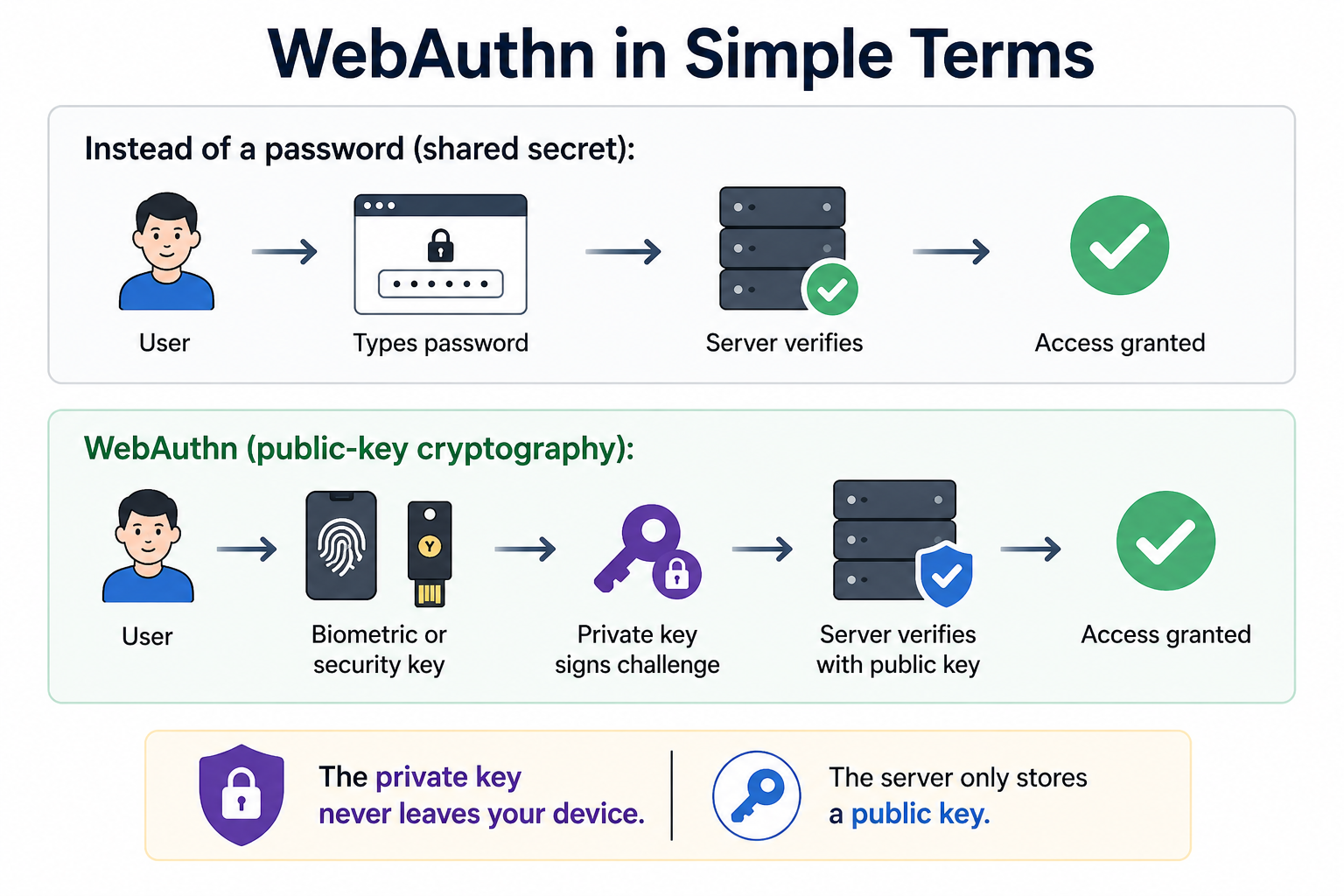
- Phishing-Resistant: Credentials are scoped to a specific website origin and cannot be used on fake sites.
- No Shared Secrets: Servers store only public keys, eliminating password database breach risks.
- User Convenience: Simple biometric or PIN verification replaces complex password requirements.
- Cross-Device Sync: Many passkey providers sync credentials across user devices via cloud services.
Why WebAuthn Matters
Passwords are the primary cause of account breaches. Phishing, credential stuffing, and database leaks compromise billions of passwords each year. WebAuthn addresses these vulnerabilities at their root.
- Phishing Protection: WebAuthn credentials are bound to a specific website's origin. A credential created for example.com cannot be used on a fake site.
- No Shared Secrets: Servers store only public keys, which are useless to attackers without the corresponding private key.
- Resistant to Password Attacks: Brute-force, credential stuffing, and password reuse attacks are impossible.
- Reduced Data Breach Impact: Even if the server's public key database is stolen, attackers cannot authenticate without the private key.
- Improved User Experience: No passwords to remember, no reset flows, no OTPs to type.
- Future-Proof Security: Built on public-key cryptography, WebAuthn is resistant to many emerging attack vectors.
WebAuthn Core Concepts
Relying Party (RP)
The Relying Party is the web application or website that wants to authenticate users using WebAuthn. It generates challenges, stores public keys, and verifies authentication assertions.
Authenticator
An authenticator is a hardware or software module that generates and stores cryptographic keys, and performs user verification. It ensures no operation is performed without user consent.
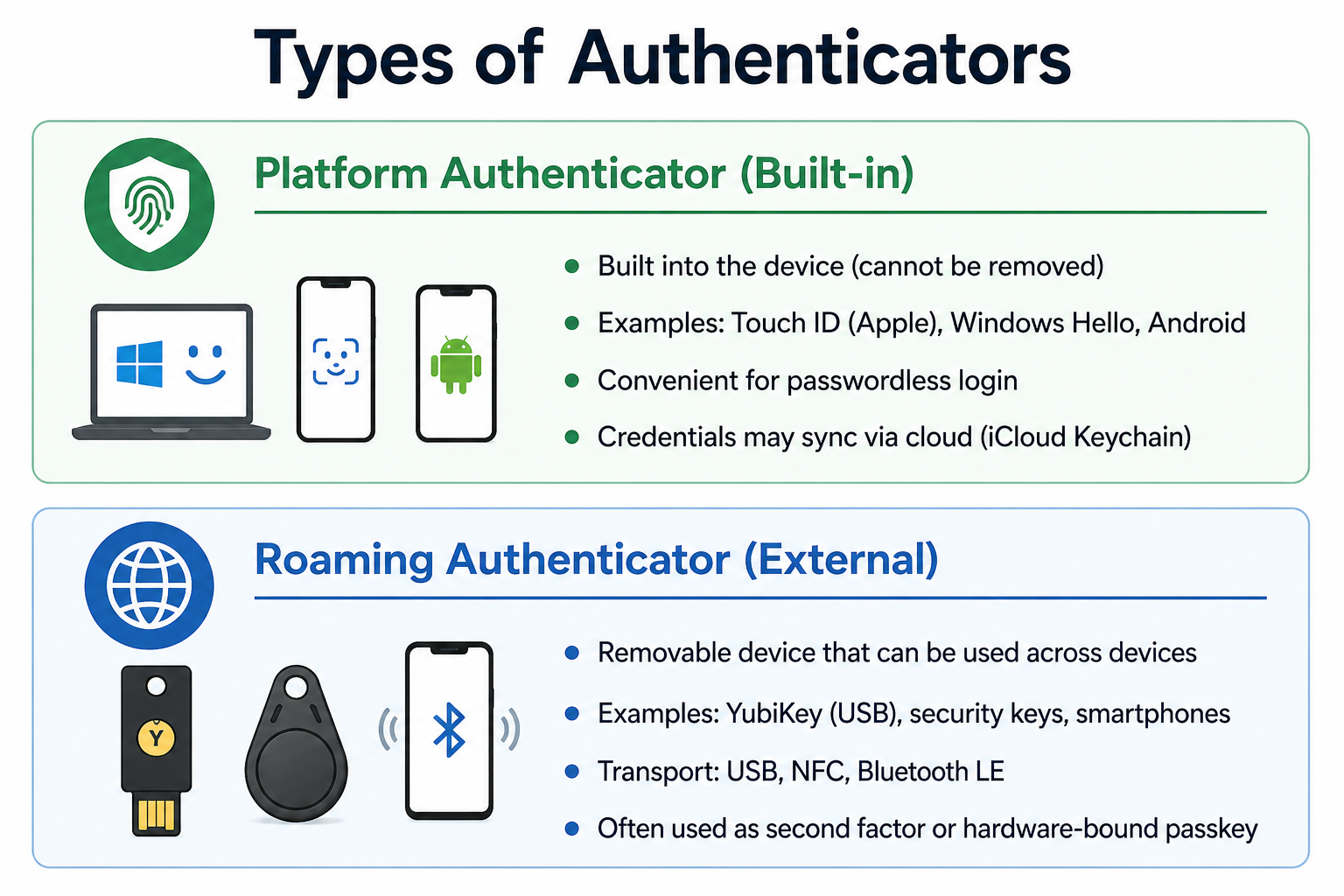
Public Key Credential
A public key credential is the cryptographic key pair generated during registration. The private key is stored securely on the authenticator. The public key is sent to the server for storage. The credential also includes a unique credential ID.
Passkeys (Discoverable Credentials)
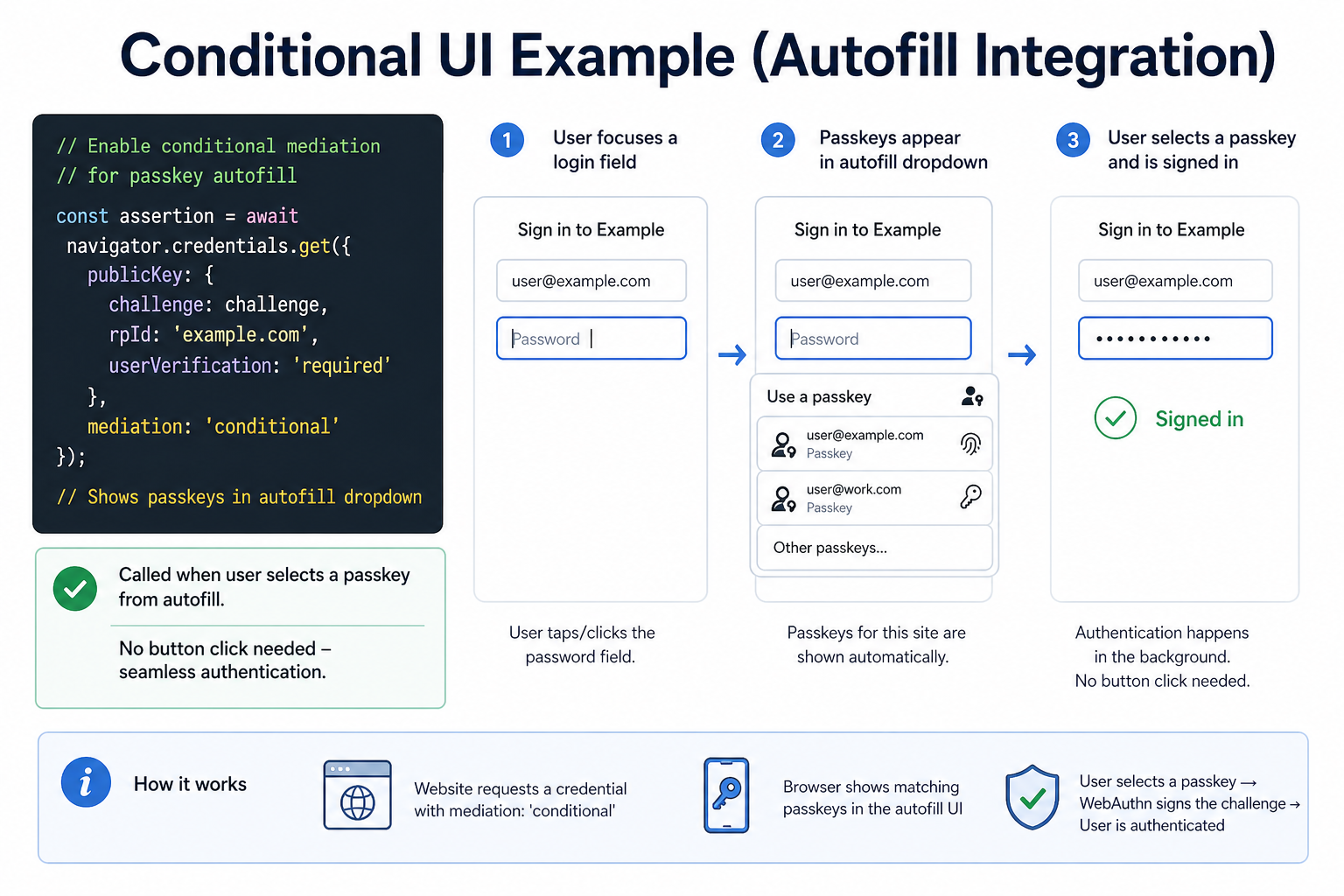
Passkeys are discoverable WebAuthn credentials that store the user identifier on the authenticator itself. This enables "usernameless" sign-in flows where users don't need to enter their username first. Passkeys can be synced across devices via cloud services (iCloud, Google Password Manager, Microsoft Account) or hardware-bound to a specific authenticator.
How WebAuthn Works
WebAuthn involves two main ceremonies: Registration (creating a credential) and Authentication (using the credential to sign in).
Registration Flow (Creating a Passkey)
User ──→ Website ──→ Server: Request registration challenge
                │
                ▼
        Server: Generate random challenge
                │
                ▼
        Website ──→ Browser: navigator.credentials.create()
                │
                ▼
        Browser ──→ Authenticator: Create key pair
                │
                ▼
        Authenticator: Prompt for biometric/PIN
                │
                ▼
        User: Verify with fingerprint or Face ID
                │
                ▼
        Authenticator: Generate key pair, store private key
                │
                ▼
        Browser ──→ Website: Return public key + credential ID
                │
                ▼
        Website ──→ Server: Verify registration
                │
                ▼
        Server: Store public key and credential ID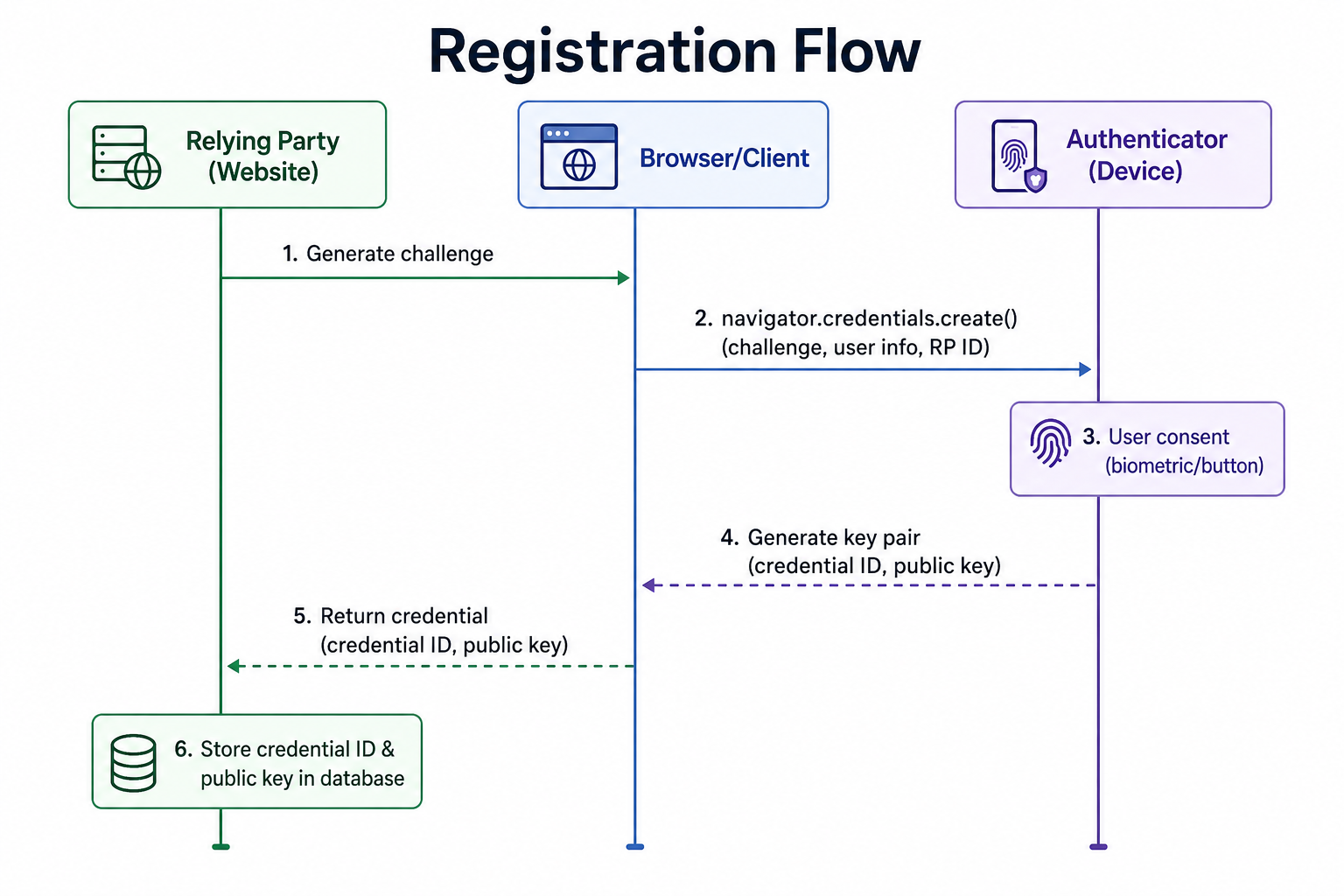
Authentication Flow (Signing In)
User ──→ Website ──→ Server: Request authentication challenge
                │
                ▼
        Server: Generate random challenge
                │
                ▼
        Website ──→ Browser: navigator.credentials.get()
                │
                ▼
        Browser ──→ Authenticator: Find matching credential
                │
                ▼
        Authenticator: Prompt for biometric/PIN
                │
                ▼
        User: Verify with fingerprint or Face ID
                │
                ▼
        Authenticator: Sign challenge with private key
                │
                ▼
        Browser ──→ Website: Return signed assertion
                │
                ▼
        Website ──→ Server: Verify signature with public key
                │
                ▼
        Server: Authentication successful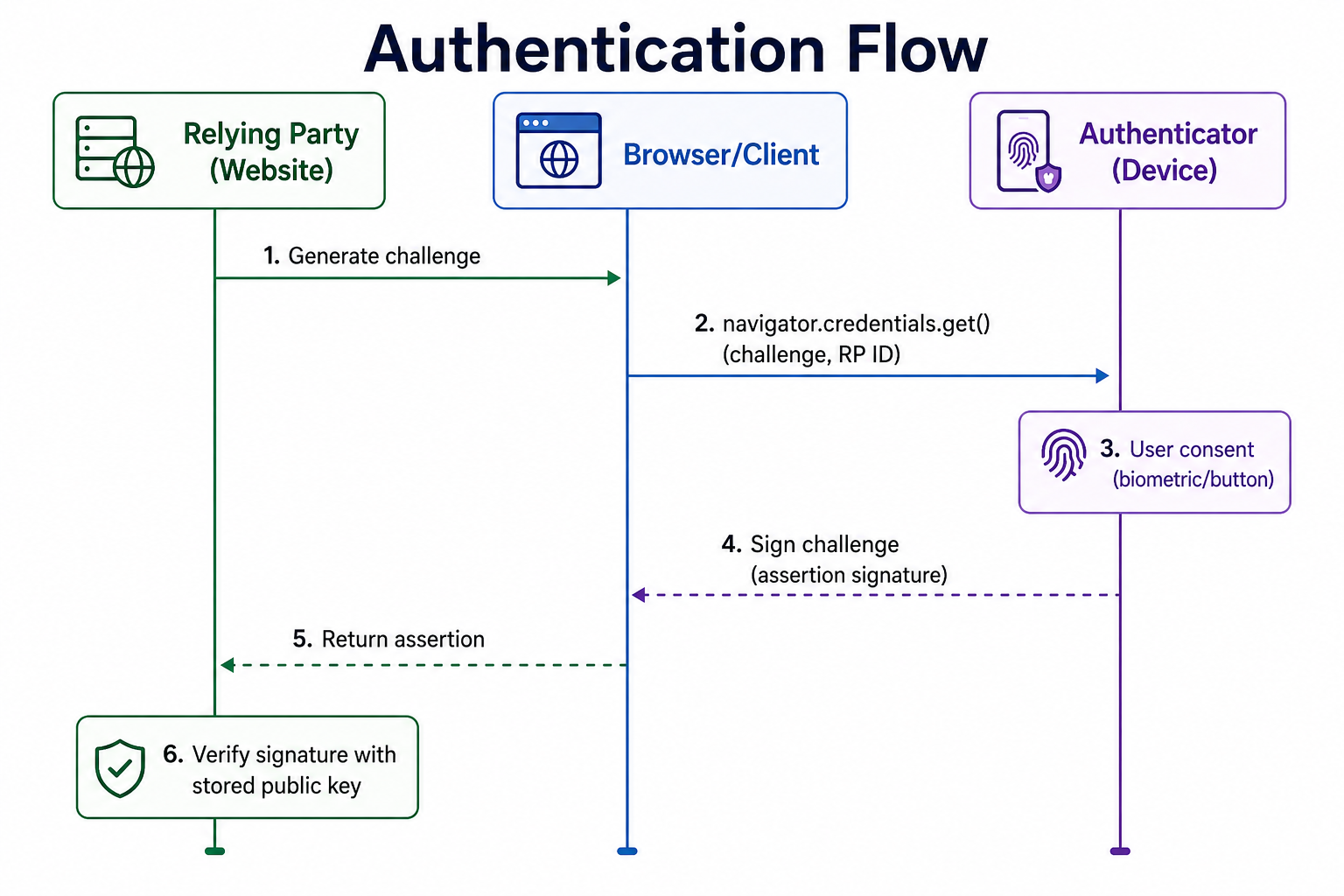
Discoverable Credentials (Passkeys) vs Non-Discoverable
| Feature | Discoverable (Passkey) | Non-Discoverable (2FA) |
|---|---|---|
| User identifier storage | Stored on authenticator | Not stored on authenticator |
| Username required? | No (usernameless) | Yes (must provide username first) |
| Use case | Passwordless login, primary authentication | Second factor for MFA |
| Sync across devices | Yes (iCloud, Google, Microsoft) | Typically hardware-bound |
| Example | iCloud Keychain passkey, Google Password Manager passkey | YubiKey as 2FA after password |
WebAuthn Browser Support and Requirements
| Browser | Supported Version |
|---|---|
| Chrome | v67+ |
| Firefox | v60+ |
| Safari | v13+ |
| Edge | v18+ |
WebAuthn requires a secure context (HTTPS or localhost). The website must use HTTPS for WebAuthn to work in production. For development, localhost is allowed without HTTPS.
WebAuthn as MFA (Two-Factor Authentication)
WebAuthn can be used as a second factor in addition to a password. Many services already support this: Google, Facebook, Twitter, GitHub, and others allow registering a security key as a second factor.
In MFA mode, WebAuthn uses non-discoverable credentials. The user first enters their username and password, then is prompted to touch their security key or use biometrics. This provides strong phishing resistance even when passwords are compromised. Works with existing password-based accounts without requiring full passwordless migration.
WebAuthn vs Passkeys
The terms are often used interchangeably, but they are not exactly the same:
- WebAuthn: The underlying W3C standard and API. It defines how browsers and authenticators communicate using public-key cryptography.
- Passkeys: A user-friendly term for discoverable WebAuthn credentials that enable passwordless, synced authentication across devices.
Common WebAuthn Mistakes to Avoid
- Not Using HTTPS in Production: WebAuthn requires secure contexts. Deploy only on HTTPS.
- Incorrect RP ID: The Relying Party ID must be the website's effective domain. It cannot include the scheme or port.
- Challenge Not Random: Challenges must be cryptographically random and at least 16 bytes. Reusing challenges creates replay vulnerabilities.
- No Fallback Authentication: Users can lose their authenticators. Always provide alternative authentication methods (recovery codes, backup passkeys).
- Ignoring User Verification: Set userVerification: 'required' to ensure the authenticator verifies the user (biometric or PIN).
- Complex UI Without Guidance: WebAuthn requires user interaction. Provide clear instructions for users who are unfamiliar with security keys or biometrics.
WebAuthn Best Practices
- Use Passkeys for Passwordless Login: Offer discoverable credentials as the primary authentication method for better user experience.
- Provide Backup Options: Always offer recovery methods. Users can lose devices or authenticators.
- Support Multiple Authenticators: Allow users to register both platform and roaming authenticators so they have a backup.
- Use Attestation Carefully: Attestation proves authenticator properties but raises privacy concerns. Use only when necessary.
- Implement Conditional UI: Use WebAuthn conditional mediation to show passkeys automatically in username fields.
- Test with Multiple Authenticators: Test with YubiKey, Windows Hello, Touch ID, and other authenticators.
Frequently Asked Questions
- Is WebAuthn the same as passkeys?
WebAuthn is the underlying API standard. Passkeys are discoverable WebAuthn credentials designed for passwordless, synced authentication across devices. - What happens if I lose my security key or device?
Register multiple authenticators (e.g., a YubiKey plus your phone's passkeys). Use cloud-synced passkeys (iCloud, Google) for cross-device recovery. Always have backup authentication methods like recovery codes. - Can I use WebAuthn on mobile apps?
WebAuthn is designed for web browsers. Native mobile apps can use platform-specific APIs but not WebAuthn directly. Hybrid apps can use WebViews. - Does WebAuthn work with iCloud Keychain?
Yes. Apple devices support passkeys that sync via iCloud Keychain. Users can create and use passkeys on Mac, iPhone, and iPad. - Do I still need a database of passwords?
With passwordless WebAuthn, you store only public keys, not passwords. You can also offer WebAuthn as an additional MFA factor alongside passwords. - What should I learn next after WebAuthn?
After mastering WebAuthn, explore passkeys implementation, FIDO2 standard, biometric authentication, and multi-factor authentication strategies for comprehensive authentication security.
WebAuthn represents a fundamental shift in web authentication, replacing vulnerable passwords with strong, phishing-resistant public-key cryptography. By leveraging built-in biometrics and security keys, WebAuthn eliminates the most common attack vectors while improving user experience. Passkeys take this further by enabling passwordless, synced authentication across devices.
Implementing WebAuthn requires understanding the two ceremonies: registration (creating credentials) and authentication (getting assertions). The API integrates with the Credential Management API, making it straightforward to add to existing applications. Support is excellent across all modern browsers, and major platforms like Apple, Google, and Microsoft have embraced passkeys as the future of authentication.