
HTTP Caching: How It Works and Why It Matters
HTTP caching stores copies of resources to avoid repeated server requests.
HTTP Caching
HTTP caching stores copies of web resources so they can be reused without downloading them from the server again. It is one of the most powerful tools for improving website speed, reducing server load, and lowering infrastructure costs, and it requires nothing more than setting the right response headers.
What Is HTTP Caching
When your browser visits a website, it downloads HTML, CSS, JavaScript, images, and fonts. Each of those resources requires a separate network request and download. HTTP caching allows the browser, and other intermediaries such as CDNs and proxy servers, to store copies of these resources locally and reuse them on future visits without making a new request to the origin server.
The server controls caching behaviour through HTTP response headers, primarily Cache-Control. These headers tell the browser how long a resource is considered fresh, whether it can be stored by shared caches, and how to check whether a stored copy is still valid. Getting these headers right is one of the highest-return optimisations available for any website.
How HTTP Caching Works
- The browser sends its first request for a resource such as
styles.css - The server responds with the file and includes caching headers in the response, such as
Cache-Control: max-age=86400 - The browser stores the file in its local cache along with the caching metadata
- On the next request for the same resource, the browser checks whether the cached copy is still within its freshness window
- If the cached copy is still fresh (a cache HIT), the browser serves it directly from local storage with no network request at all
- If the cached copy has expired (a cache MISS), the browser sends a new request to the server to get a fresh copy
- If the resource has an ETag or Last-Modified header, the browser can send a conditional request to check whether the content has changed before downloading it again
Cache-Control: max-age=86400, publicCache Hit vs Cache Miss vs Conditional Request
| Scenario | What Happens | Performance |
|---|---|---|
| Cache HIT | The cached copy is within its freshness window and is served directly from local storage without contacting the server | Fastest possible. No network request, no latency, no server load. |
| Cache MISS | No valid cached copy exists, so the browser sends a full request to the server and downloads the complete resource | Slowest. Full download required including connection overhead. |
| Conditional Request (304) | The cached copy has expired but the browser sends a conditional request using ETag or Last-Modified to check whether the content has changed | Efficient. If unchanged, the server responds with 304 Not Modified and no body, saving bandwidth while confirming freshness. |
Key Cache Control Headers
The Cache-Control header is the primary mechanism for controlling caching behaviour. It can contain one or more directives that together define exactly how a resource should be cached, by whom, and for how long. Multiple directives are combined in a single header separated by commas.
| Header or Directive | What It Does |
|---|---|
Cache-Control: max-age=N | The resource is considered fresh for N seconds from the time it was received. After that it must be revalidated or re-fetched. |
Cache-Control: no-cache | The resource can be stored in cache, but the browser must revalidate it with the server before using it on every subsequent request. Does not mean never cache. |
Cache-Control: no-store | The resource must never be stored in any cache at all. Use this for sensitive data such as banking responses or authenticated account pages. |
Cache-Control: public | The response can be cached by both the browser and shared caches such as CDNs and proxy servers. |
Cache-Control: private | The response can only be cached by the end user's browser. CDNs and shared proxies must not cache it. Use for personalised content. |
Cache-Control: must-revalidate | Once the resource expires, the browser must not serve a stale copy. It must contact the server even if offline access would otherwise be acceptable. |
Cache-Control: immutable | Tells the browser the resource will never change during its freshness window and it should not bother sending conditional revalidation requests. Ideal for versioned static assets. |
ETag | A unique identifier, usually a hash of the resource content, that allows the browser to send a conditional request asking whether the resource has changed since it was last fetched. |
Last-Modified | The date and time the resource was last changed. Used by the browser for conditional requests when no ETag is available. |
Expires | An older alternative to max-age that sets an absolute expiry date and time. Superseded by Cache-Control in modern usage but still respected by browsers. |
How Conditional Requests Work
When a cached resource expires, the browser does not always need to download the full file again. If the server included an ETag or Last-Modified header with the original response, the browser can send a conditional request to ask whether the content has changed.
Conditional request using ETag
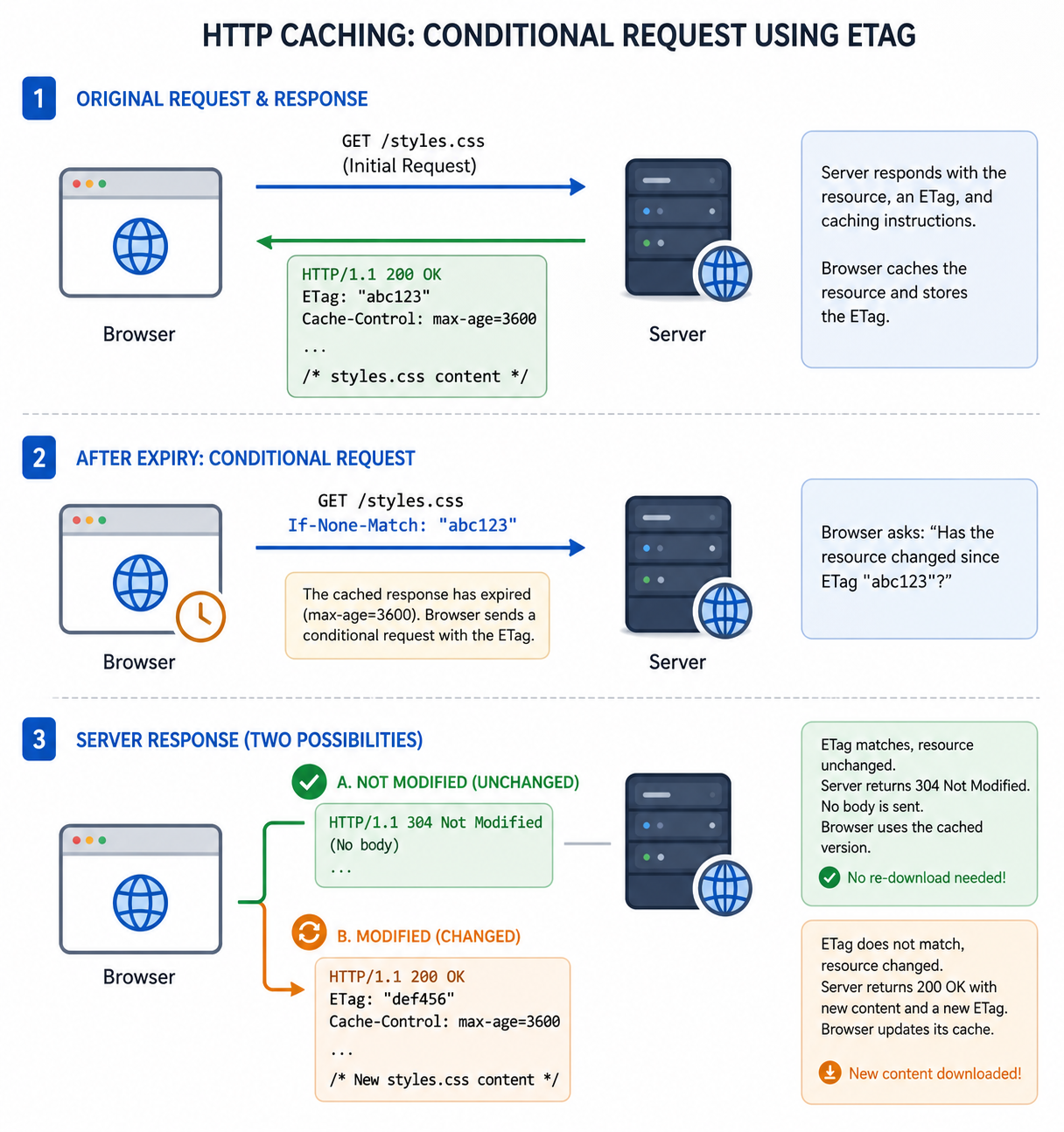
A 304 response has no body, so the browser reuses the cached file while updating its freshness information. This saves bandwidth and reduces latency compared to a full download while still confirming the content is current.
Types of Caching
HTTP caching does not happen only in the browser. Copies of resources can be stored at multiple points between the origin server and the end user, each with its own scope and purpose.
- Browser cache: Stored locally on the user's device. The fastest possible cache because there is no network involved at all. Controlled by Cache-Control headers and scoped to a single user's browser.
- CDN cache: Distributed edge servers store copies of resources at locations around the world and serve them to users from the nearest point. Dramatically reduces latency for geographically distributed audiences. See the CDN guide for details.
- Shared or proxy cache: Intermediate caches operated by ISPs, corporate networks, or forward proxies. Shared between multiple users on the same network. Resources marked
privateare not stored here. - Server-side cache: The application server caches database query results, rendered HTML, or computed responses to reduce CPU and database load. This is a separate layer from HTTP caching and is managed in application code or middleware.
Caching Best Practices
A well-designed caching strategy treats different types of resources differently based on how often they change and how critical it is to deliver the latest version immediately.
- Cache static assets aggressively: Images, fonts, and versioned CSS and JavaScript files rarely change. Set
max-ageto one year (31536000 seconds) and include theimmutabledirective so browsers do not waste requests revalidating them. - Use cache busting for versioned files: Include a content hash in the filename such as
styles.a3f92c.cssorapp.v4.js. When the file changes, the filename changes, the browser treats it as a new resource and fetches it immediately regardless of any cached copy. - Use no-store for sensitive responses: Pages containing personal data, authentication tokens, financial information, or session-specific content should never be stored in any cache. Apply
Cache-Control: no-storeto these responses. - Use no-cache with ETag for dynamic content: For pages that change occasionally but where freshness matters, combine
Cache-Control: no-cachewith anETag. The browser revalidates on every visit but only downloads the full page if the content has changed. - Set private for personalised content: Responses containing user-specific data such as a logged-in homepage or a customised dashboard should use
Cache-Control: privateso CDNs and proxy servers do not cache and serve one user's content to another.
Frequently Asked Questions
- How do I clear my browser cache?
In most browsers, press Ctrl+Shift+Delete on Windows or Command+Shift+Delete on macOS to open the clear browsing data panel. Select cached images and files and clear them. To force a fresh load of a single page without clearing the entire cache, press Ctrl+Shift+R on Windows or Command+Shift+R on macOS to perform a hard refresh, which bypasses the cache for that page and its resources. - Why does caching sometimes show outdated content?
When a cached copy has not yet reached its expiry time, the browser serves it even if newer content exists on the server. The browser has no way to know the server has updated the resource until either the TTL expires or a conditional request confirms the change. The solution is cache busting with versioned filenames for static assets, so that any update produces a new URL the browser has never cached before. - What is an ETag and how does it work?
An ETag is a unique identifier the server assigns to a specific version of a resource, typically a hash of the file contents. When the browser stores a resource with an ETag, it sends that value back to the server in anIf-None-Matchheader on subsequent requests after the cache expires. If the ETag still matches the current version, the server responds with 304 Not Modified and no body. If the content has changed and the ETag is different, the server responds with 200 and the new content. This avoids re-downloading files that have not changed. - What is the difference between no-cache and no-store?
Despite the similar names, these two directives do very different things.no-cachedoes not mean the resource is never cached. It means the cached copy must be revalidated with the server before being served. The browser can still store the resource and use ETags to confirm it is still current, avoiding a full re-download if nothing has changed.no-storemeans the resource must not be stored anywhere at all, not in the browser cache, not in a CDN, not in a proxy. Useno-storeonly for genuinely sensitive responses where storage of any kind is unacceptable. - Should I cache HTML pages?
HTML pages require more careful cache configuration than static assets. For pages that rarely change, a shortmax-ageof a few minutes combined with an ETag provides a good balance. For pages that change frequently or contain personalised content, useCache-Control: no-cachewith an ETag so the browser revalidates on every visit but avoids a full download when nothing has changed. For pages with sensitive or session-specific content, useCache-Control: no-store, privateto prevent any caching entirely.
Conclusion
HTTP caching is one of the most impactful performance tools available to web developers and requires no additional infrastructure, only correct response headers. By setting long cache durations for versioned static assets, using conditional requests for dynamic content, and preventing caching entirely for sensitive responses, you can dramatically reduce page load times, cut bandwidth costs, and lower the request volume hitting your origin server. Pair your caching strategy with a CDN for global performance gains and use proper HTTP headers across all your responses to maintain control over how every resource is stored and served.