
How the Internet Works: Data Transfer, Servers and Networks
The internet works by sending data in packets across networks using protocols like TCP/IP. This guide explains how websites load and how devices communicate.
How the Internet Works
Every time you open a website, send a message, or stream a video, your device communicates with distant servers through the internet. This communication follows a precise sequence of steps involving DNS lookups, TCP connections, packet routing, and HTTP data transfer. Understanding this process helps you build faster websites, debug network issues, and write better code.
Step-by-Step: What Happens When You Visit a Website
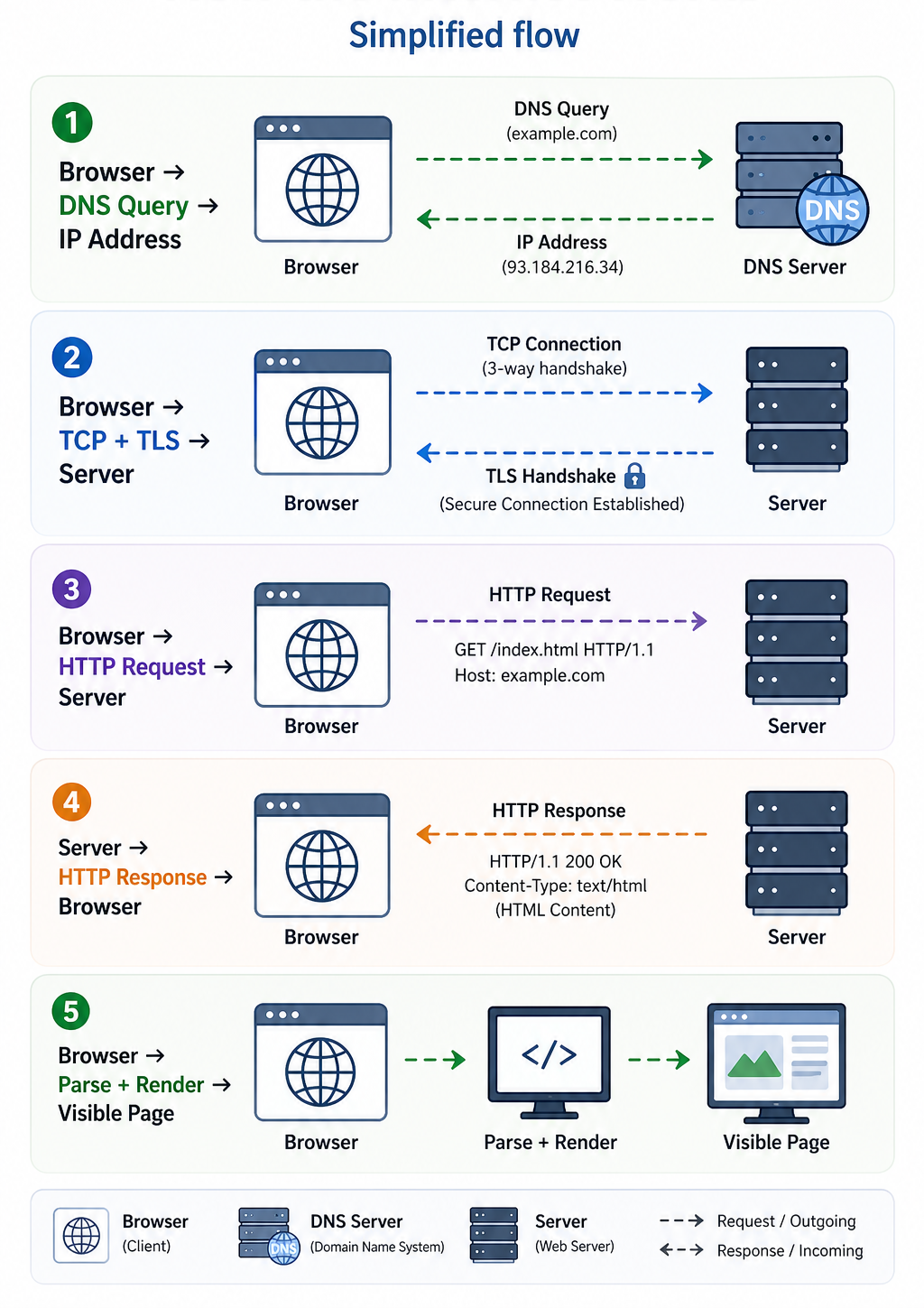
When you type https://example.com into your browser and press Enter, the following steps occur behind the scenes. Most of this happens in under a second, but each step is essential and a failure at any point disrupts the whole process.
- URL parsing: The browser reads the URL to identify three key components: the protocol (HTTPS), the domain name (example.com), and the path (/). These determine how to connect and what to ask for.
- DNS resolution: The browser asks a DNS server to translate the domain name into an IP address. The browser checks its own cache first, then the operating system cache, then queries the recursive resolver, which works through the DNS hierarchy until it finds the authoritative answer.
- TCP connection: Using the resolved IP address, the browser initiates a three-way handshake with the server, exchanging SYN, SYN-ACK, and ACK packets to establish a reliable connection before any data is transferred.
- TLS handshake: Because the URL uses HTTPS, the browser and server negotiate encryption through SSL/TLS. They agree on a cipher suite, exchange certificates, and establish shared encryption keys so that all subsequent data is protected in transit.
- HTTP request: The browser sends an HTTP GET request to the server asking for the web page at the specified path. The request includes headers such as the browser type, accepted content formats, and any relevant cookies.
- Server processing: The web server receives the request and either retrieves a static file or runs server-side code in PHP, Python, Node.js, or another language to generate the response dynamically. It may also query a database during this step.
- HTTP response: The server sends back an HTTP response containing an HTTP status code such as 200 OK, response headers including content type and caching instructions, and the HTML body of the page.
- Rendering: The browser parses the HTML to build the DOM, processes CSS to build the CSSOM, combines them into a render tree, calculates layout, and paints the final pixels on screen. JavaScript is fetched and executed where encountered.
- Additional resources: As the browser parses the HTML, it discovers linked CSS files, JavaScript files, images, and fonts and sends separate HTTP requests for each. Many of these are fetched in parallel over the same connection to reduce total load time.
Simplified flow
How Data Moves Through the Network
Data does not travel as a single continuous block across the internet. Instead, it is broken into small units called packets. Each packet contains a portion of the data, the sender's IP address, the destination IP address, a sequence number for reassembly, and error-checking information. Packets are sent independently and may take entirely different routes through the network depending on which path is fastest or least congested at the time.
When all packets arrive at the destination, they are reassembled into the original data in the correct order using the sequence numbers. If any packets are lost or corrupted in transit, the TCP protocol detects the gap and requests retransmission of the missing packets before delivering the complete data to the application above.
Routers are the devices that make this hop-by-hop forwarding possible. Each router along the path examines the destination IP address in the packet header, consults its routing table, and decides which neighbouring router to forward the packet to. This process repeats at every router until the packet reaches the destination network. A typical request to a server in another country may cross 15 to 20 routers in under 100 milliseconds.
The Role of Protocols
Protocols are standardised rules that devices follow when communicating. Without shared protocols, computers manufactured by different companies in different countries running different operating systems could not exchange data. The internet uses a layered protocol model where each layer handles a specific aspect of communication and relies on the layer below it.
| Layer | Protocol | Purpose |
|---|---|---|
| Application | HTTP/HTTPS, DNS, SMTP, FTP | Defines how applications communicate and exchange data. This is the layer users and developers interact with most directly. |
| Transport | TCP and UDP | TCP provides reliable, ordered delivery with error correction. UDP provides faster, connectionless delivery for applications that prioritise speed over guaranteed delivery. |
| Internet | IP (IPv4 and IPv6) | Handles addressing and routing, giving every device a unique address and providing the rules for forwarding packets across networks. |
| Link | Ethernet, Wi-Fi, fibre | Physically transmits data as electrical signals, light pulses, or radio waves between directly connected devices on the same local network. |
When your browser sends an HTTP request, the data passes down through all four layers on your device, travels across the network, and then passes back up through all four layers on the server. Each layer adds or removes its own header information as the data moves through, a process called encapsulation and decapsulation.
Real-World Example: Loading a Web Page
Here is a concrete example of the network activity when loading a typical web page. You can observe this yourself in any browser's Developer Tools by opening the Network tab before navigating to a page.
Loading a Web Page Sample
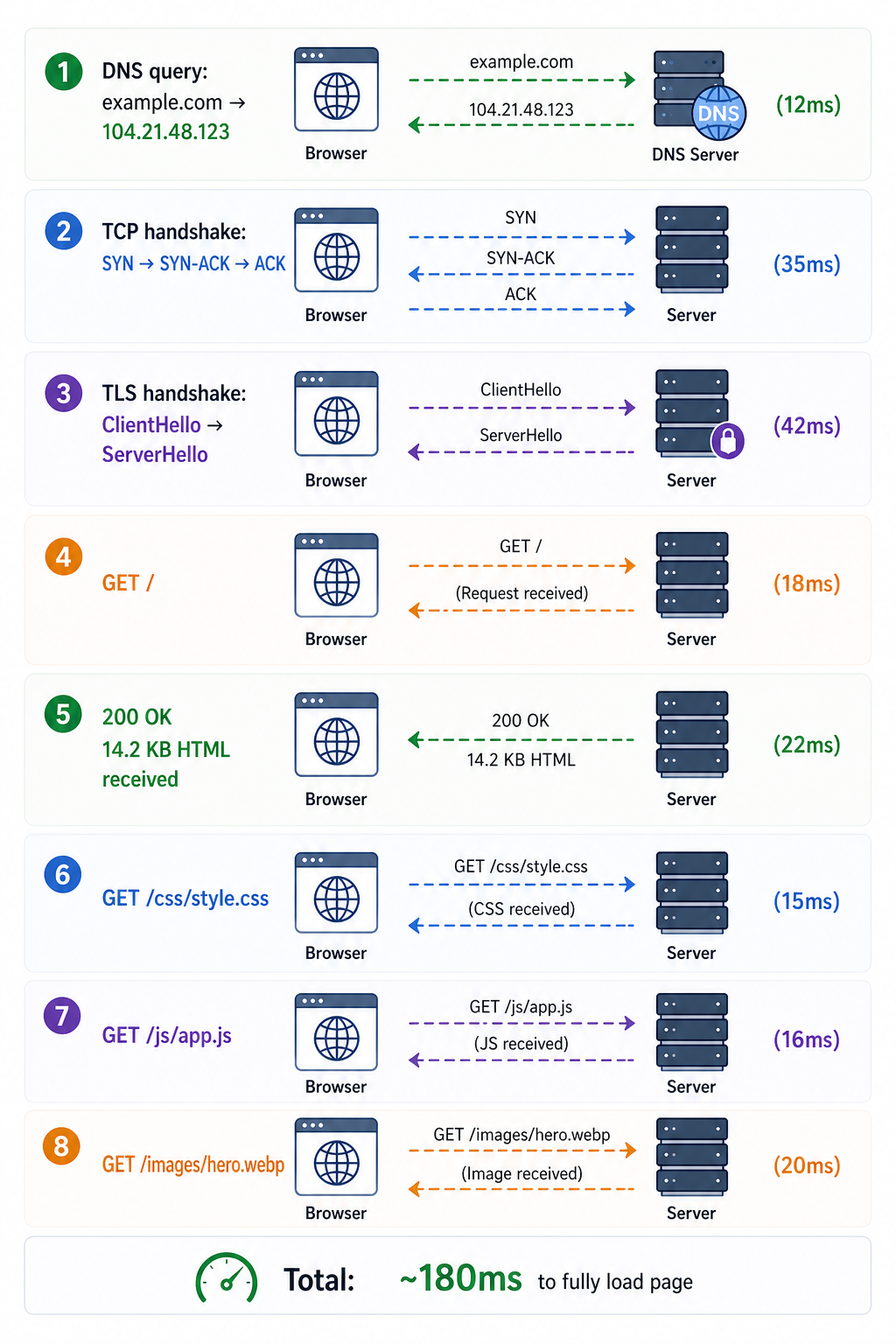
Each line represents a separate network operation with its own latency contribution. Steps 2 and 3, the TCP and TLS handshakes, happen only on the first connection to a server. Subsequent requests to the same server reuse the existing connection through HTTP keep-alive, which removes that overhead. HTTP caching can eliminate network requests entirely for resources that have not changed since the last visit, which is why pages load noticeably faster on repeat visits.
The Client-Server Model
All of the above is built on the client-server model, where one device (the client) initiates requests and another device (the server) responds with data or services. Your browser is the client. The web server hosting the website is the server. Every interaction on the web follows this request and response pattern.
A single server can handle thousands of simultaneous clients by processing each request independently. Modern web architecture often distributes this load across many servers behind a load balancer, so that no single machine becomes a bottleneck. From the client's perspective the interaction looks identical regardless of how many servers are behind the scenes.
What Can Go Wrong
Each step in the process is a potential point of failure. Understanding which component is responsible for which step makes diagnosing problems much faster.
- DNS failure: If the DNS resolver cannot translate the domain name, the browser cannot connect at all and typically shows a DNS resolution error. This can be caused by a misconfigured DNS record, an unreachable resolver, or an expired domain registration.
- TCP connection refused or timed out: If the server is not running or a firewall is blocking the port, the TCP handshake fails and the browser cannot establish a connection.
- TLS certificate errors: An expired, self-signed, or mismatched SSL certificate causes the browser to display a security warning and block the connection by default.
- HTTP errors from the server: The server may respond with a 404 Not Found if the requested resource does not exist, a 500 Internal Server Error if the application crashes, or a 503 Service Unavailable if the server is overloaded.
- Packet loss and latency: Network congestion or poor connectivity causes packets to be dropped, triggering TCP retransmissions and making the connection feel slow. High latency adds delay to every round trip, compounding across multiple requests.
- Slow rendering: Even after the HTML arrives, render-blocking CSS and JavaScript can delay when the user sees anything on screen. Optimising the critical rendering path reduces this delay.
Frequently Asked Questions
- What is the role of an ISP in this process?
Your Internet Service Provider connects your home or office network to the wider internet. When your device sends packets out, they travel first to your ISP's network. The ISP routes them onward through regional and backbone networks toward the destination server. Without an ISP providing that connection, your device has no path to reach anything outside your local network. ISPs also typically provide DNS resolvers that your devices use by default, though you can switch to a public resolver like1.1.1.1or8.8.8.8. - Why do some websites load faster than others?
Speed depends on several factors working together. Physical distance between your device and the server adds latency to every round trip. The server's processing power determines how quickly it generates responses. The number and size of resources a page requires affects how many network requests are needed. Whether caching is properly configured determines how many of those requests can be skipped on repeat visits. Websites that use a CDN serve assets from a server geographically close to you, which can reduce latency from hundreds of milliseconds to single digits. - Does every website request go through all these steps?
The first visit to a website goes through the full sequence. On subsequent visits, the browser may skip the DNS lookup using its DNS cache, reuse an existing TCP and TLS connection, and serve cached CSS, JavaScript, and image files directly from local storage without making any network requests for them. This layered caching is why returning to a previously visited site feels significantly faster than the first load. - What is the difference between a request and a response?
A request is the message your browser sends to a server asking for a specific resource, such as an HTML page, an image, or an API result. A response is the message the server sends back containing the requested data or an error code explaining why it could not fulfil the request. Every web interaction follows this request and response pattern, which forms the core of the client-server model. A single page load may involve dozens of individual request and response pairs, one for each resource the page needs. - What is HTTP/2 and how does it improve on HTTP/1.1?
HTTP/2 is a major revision of the HTTP protocol designed to reduce the latency of web page loads. HTTP/1.1 processes requests sequentially, meaning the browser must wait for one response before sending the next request on the same connection, a problem called head-of-line blocking. HTTP/2 introduces multiplexing, which allows multiple requests and responses to be in flight simultaneously over a single connection. It also compresses headers to reduce overhead and supports server push, where the server can proactively send resources the browser will need before it asks for them. Most modern browsers and web servers support HTTP/2, and it is enabled automatically for HTTPS connections on most hosting platforms.
Conclusion
The internet works through a layered system of protocols, hardware, and software that together transform a typed URL into a rendered web page in a fraction of a second. DNS resolves names to addresses, TCP establishes reliable connections, TLS secures the data in transit, HTTP transfers the content, routers forward packets across the global network, and browsers render the result into what users see on screen. Each layer has a distinct role, and a problem at any one of them produces a specific and diagnosable failure. Understanding how these components interact gives you the foundation to build faster applications, configure infrastructure correctly, and resolve connectivity problems at their source. Continue learning with the client-server model, HTTP methods, and DNS.