
HTTP Methods: GET, POST, PUT, DELETE and More
HTTP methods define the action to perform on a resource. GET retrieves data, POST sends data, PUT updates a resource, and DELETE removes it.
Http Methods
HTTP methods define what type of action a client wants to perform on a server resource. Choosing the right method is fundamental to building RESTful APIs and well-structured web applications, and it makes your API predictable, self-documenting, and easy for other developers to understand and consume.
What Are HTTP Methods
HTTP methods, also called HTTP verbs, specify the desired action to be performed on a resource identified by a URL. When a browser or application sends an HTTP request, the method tells the server whether to retrieve data, create a new record, update an existing one, delete something, or perform some other operation. The method is always the first word in the request line.
Using the correct method for each operation is not just a convention. Many tools, proxies, caches, and browsers make assumptions based on the method. GET requests are cached automatically. DELETE requests are not. Browsers warn users before re-submitting POST requests on page refresh but not for GET requests. Following HTTP semantics means all of these behaviours work as expected without any additional configuration.
The Main HTTP Methods
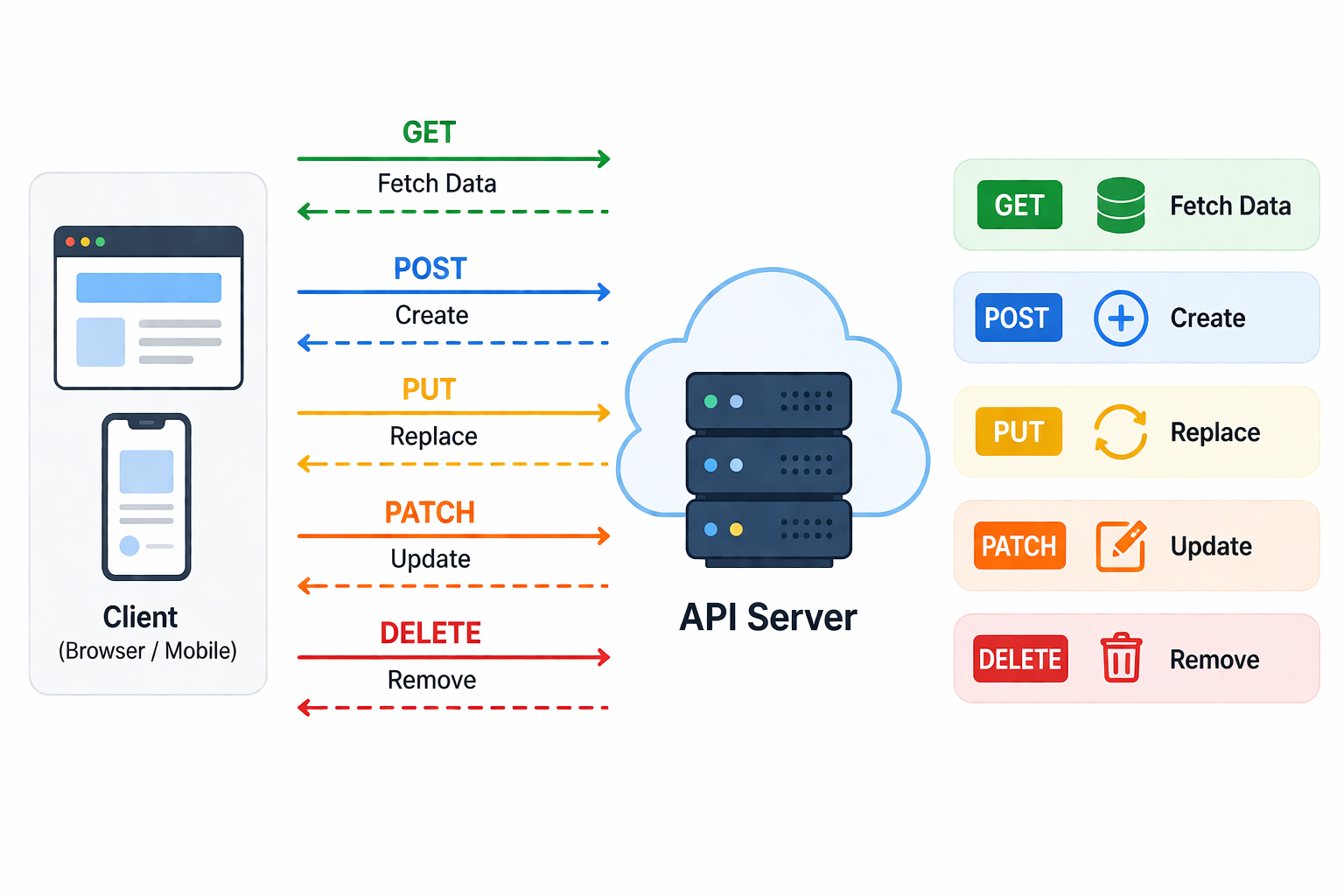
| Method | Action | Body? | Safe? | Idempotent? |
|---|---|---|---|---|
| GET | Retrieve a resource or collection | No | Yes | Yes |
| POST | Create a new resource | Yes | No | No |
| PUT | Replace a resource completely | Yes | No | Yes |
| PATCH | Partially update a resource | Yes | No | Depends on implementation |
| DELETE | Delete a resource | Optional | No | Yes |
| HEAD | Retrieve headers only, no body | No | Yes | Yes |
| OPTIONS | Return allowed methods and CORS permissions for a URL | No | Yes | Yes |
Safe means the method does not modify server state. A safe method can be called freely without side effects, which is why browsers pre-fetch GET requests and caches store them. Idempotent means calling the method multiple times produces the same result as calling it once. Idempotency is important for retry logic in unreliable networks because retrying an idempotent request is always safe.
GET
GET retrieves a resource or a list of resources from the server. It is the most commonly used method and the one browsers use for every page navigation. GET requests must never modify data on the server. If a GET request causes a side effect, it violates the safe method guarantee and breaks caching, prefetching, and other browser behaviours that rely on GET being read-only.
Parameters for filtering, sorting, or pagination are passed in the URL query string rather than in a request body. This makes GET requests bookmarkable, shareable, and cacheable by browsers and CDNs.
GET /api/users?page=1&sort=name HTTP/1.1
Host: api.example.com
Accept: application/json
POST
POST sends data to the server to create a new resource. The data is included in the request body rather than the URL. POST is not idempotent, which means submitting the same POST request twice may create two separate records. This is why browsers display a warning when you try to reload a page that was loaded via a form submission.
POST is also used for operations that do not fit neatly into the other methods, such as submitting a login form, triggering a process, or performing a complex search with a large request body that would not fit in a URL.
POST /api/users HTTP/1.1
Host: api.example.com
Content-Type: application/json

{"name": "Alice", "email": "alice@example.com"}
PUT vs PATCH
Both PUT and PATCH update existing resources, but they differ in scope. PUT replaces the entire resource with the data provided in the request body. Any fields not included in the PUT request are set to null or their default values. PATCH applies a partial update, changing only the fields explicitly included in the body and leaving everything else unchanged.
| Feature | PUT | PATCH |
|---|---|---|
| Scope of update | Replaces the entire resource with the provided data | Updates only the fields included in the request body |
| Fields not in body | Reset to null or default values | Left unchanged at their current values |
| Idempotent | Yes. Sending the same PUT request twice produces the same result. | Depends. Most implementations are idempotent but it is not guaranteed by the spec. |
| Typical use case | Replacing a full profile or configuration object | Updating a single field such as an email address or status |
| Body required | Yes, must include all fields for the resource | Yes, but only the fields being changed |
PUT /api/users/42 HTTP/1.1
Content-Type: application/json

{"name": "Alice Smith", "email": "alice@example.com", "role": "admin"}
PATCH /api/users/42 HTTP/1.1
Content-Type: application/json
{"email": "newalice@example.com"}DELETE
DELETE removes the specified resource from the server. It is idempotent because deleting a resource that has already been deleted results in the same outcome, which is that the resource no longer exists, even if the second call returns a 404 rather than a 200. A successful DELETE typically returns a 200 OK with a confirmation body, a 204 No Content with no body, or a 202 Accepted if the deletion is processed asynchronously.
DELETE /api/users/42 HTTP/1.1
Host: api.example.com
Authorization: Bearer abc123
HEAD and OPTIONS
HEAD behaves identically to GET but returns only the response headers with no body. This makes it useful for checking whether a resource exists, reading its size from Content-Length, or verifying caching headers without downloading the full content. Many download managers use HEAD to check file size before starting a download.
OPTIONS returns information about what methods and headers the server supports for a given URL. Browsers use OPTIONS automatically as a preflight request before sending cross-origin requests with custom headers or non-simple methods. The server responds with Access-Control-Allow-Methods and Access-Control-Allow-Headers to indicate what is permitted. See the CORS guide for more detail on how preflight works.
Real-World REST API Examples
| Action | Method | URL | Success Response |
|---|---|---|---|
| Get all users | GET | /api/users | 200 OK with array of users |
| Get user by ID | GET | /api/users/42 | 200 OK with user object |
| Create a new user | POST | /api/users | 201 Created with new user object |
| Replace full user record | PUT | /api/users/42 | 200 OK with updated user object |
| Update user email only | PATCH | /api/users/42 | 200 OK with updated user object |
| Delete a user | DELETE | /api/users/42 | 204 No Content |
| Check resource exists | HEAD | /api/users/42 | 200 OK with headers, no body |
| Check allowed methods | OPTIONS | /api/users | 200 OK with Allow header listing methods |
Frequently Asked Questions
- Can GET requests have a body?
Technically the HTTP specification does not prohibit a body on a GET request, but it is strongly discouraged and widely considered bad practice. Many servers, proxies, and HTTP client libraries ignore or strip the body on GET requests. Parameters for filtering and pagination should always go in the URL query string for GET requests, where they are cacheable, loggable, and shareable. - Why use DELETE instead of POST with an action parameter?
Using semantic HTTP methods makes your API self-documenting and predictable. A developer encounteringDELETE /api/users/42immediately understands the intent without reading documentation. UsingPOST /api/users/42/deleteachieves the same outcome but discards the semantic meaning built into the HTTP standard. Correct method usage also allows tools like API gateways, monitoring systems, and clients to make intelligent decisions based on the method alone. - What is idempotency and why does it matter?
An idempotent operation produces the same result whether it is performed once or many times. GET, PUT, and DELETE are idempotent. POST is not. Idempotency matters for reliability in unreliable networks. If a client sends a DELETE request and the network drops the response, the client can safely retry the request without worrying about deleting the resource twice. If a client retries a POST request, it may accidentally create a duplicate record, which is why retry logic for POST requires extra care such as idempotency keys. - When should I use POST instead of PUT for updates?
Use PUT or PATCH for updates to existing resources. POST is for creating new resources or for operations that do not map cleanly to CRUD actions. The distinction matters because PUT and PATCH signal to the server and to any intermediary infrastructure that the operation is an update to an identified resource, while POST signals the creation of a subordinate resource or a general action. Mixing them up does not break anything technically but makes your API harder to understand and maintain. - What is the difference between 200 OK and 201 Created for POST responses?
A 201 Created response indicates that the POST request succeeded and a new resource was created. The response typically includes a Location header pointing to the URL of the newly created resource, and optionally returns the new resource in the body. A 200 OK on a POST indicates the request was processed successfully but did not necessarily create a new resource, for example a login endpoint that returns a token. Using the correct status code alongside the correct method makes your API behaviour unambiguous to clients.
Conclusion
HTTP methods give meaning and structure to your API requests. Using GET for retrieval, POST for creation, PUT and PATCH for updates, and DELETE for removal follows the semantics the HTTP standard was designed around and makes your API intuitive for every developer who works with it. Understanding safe and idempotent properties helps you design retry logic, caching strategies, and error handling correctly. Explore RESTful APIs, HTTP requests and responses, and HTTP status codes for a complete picture of how HTTP communication works in practice.