
What Is the World Wide Web and How Does It Work?
The web, or World Wide Web, is a system of interconnected web pages accessed through the internet using browsers. It allows users to view websites, access information, and interact online.
WWW: World Wide Web
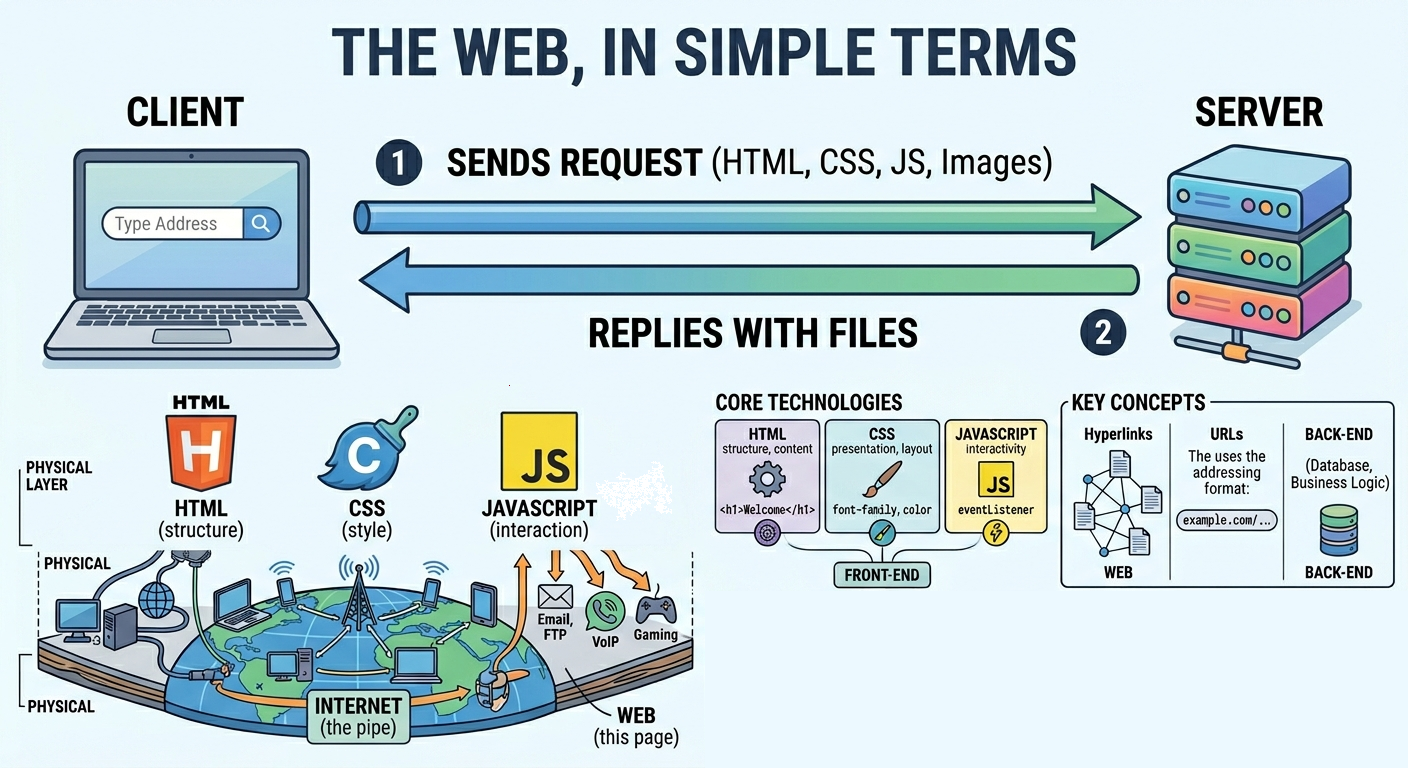
The World Wide Web, commonly called the web, is a system of interlinked documents and resources that users access through the internet using a web browser. When you type a URL into your browser's address bar, you are requesting a resource from a web server. The server sends back HTML, CSS, JavaScript, images, and other files, and the browser assembles and renders them into the visual, interactive page you see on screen.
The web is one of the most significant information systems ever created, but it is important to understand what it is and what it is not. The web is not the same as the internet. The internet is the underlying global network of connected devices, cables, and wireless links that carries data between billions of machines. The web is one of many services that run on top of that infrastructure, using it as a transport layer. Other internet services include email, file transfer via FTP, voice over IP calls, and online gaming. The web specifically uses the HTTP and HTTPS protocols to deliver content through browsers, and this distinction is what separates it from other internet services.
How the Web Works
Every interaction on the web follows a request-response cycle defined by the client-server model. The browser acts as the client, initiating every interaction by making requests. The website's server provides the data in response. This cycle happens multiple times for every page you load, once for the HTML document and once for each additional resource the page references such as stylesheets, scripts, and images.
- You type a URL such as
https://example.com/tutorialinto the browser and press Enter - The browser performs a DNS lookup to resolve the domain name into the server's IP address
- The browser establishes a TCP connection with the server on port 443 for HTTPS or port 80 for HTTP
- If HTTPS is used, a TLS handshake negotiates encryption so all subsequent data is protected in transit
- The browser sends an HTTP GET request asking for the page at the specified path
- The server processes the request, retrieves or generates the appropriate content, and sends back an HTTP response containing the HTML document
- The browser parses the HTML to build the DOM, processes CSS to build the CSSOM, combines them into a render tree, and executes any JavaScript
- The browser discovers additional resources referenced in the HTML such as stylesheets, scripts, images, and fonts, and sends separate HTTP requests to fetch each one
- The final rendered page appears on your screen, typically within a few hundred milliseconds of the initial request
Core Technologies Behind the Web
Three foundational technologies power every web page. They were defined in the early days of the web and remain the backbone of modern web development. Every browser understands them natively and every web page in the world is built on their combination.
| Technology | Purpose | Example |
|---|---|---|
| HTML | Defines the structure and content of the page. Headings, paragraphs, links, images, forms, and all other content elements are expressed in HTML. | <h1>Welcome</h1> |
| CSS | Controls visual presentation, layout, colours, fonts, spacing, and responsive behaviour across different screen sizes. | body { font-family: Georgia; color: #333; } |
| JavaScript | Adds interactivity, dynamic content updates, animations, form validation, and communication with servers without reloading the page. | document.getElementById('btn').addEventListener('click', handler) |
Together these three technologies form the front-end layer that runs in the browser. On the server side, languages like PHP, Python, Node.js, Ruby, and Go generate HTML dynamically based on user requests, database queries, and business logic. The server produces the HTML that the browser then renders using CSS and JavaScript. This division between front-end and back-end responsibilities is the architectural foundation of the web.
Key Concepts of the Web
Hyperlinks
Hyperlinks are the defining feature that gives the web its name. They connect one document to another, allowing users to navigate between pages with a single click and creating a vast interconnected network of information. When you click a link, the browser extracts the destination URL and sends a new HTTP request to fetch the linked resource. The resulting graph of billions of pages linked to one another is what is described as the "web" of documents. Without hyperlinks, each page would exist in isolation and the web as a navigable information system would not exist.
Web Pages, Websites, and Web Applications
A web page is a single HTML document accessible at a unique URL. A website is a collection of related web pages under the same domain name, sharing a common identity and navigation structure. A web application is an interactive website where users perform meaningful tasks such as managing their finances, collaborating on documents, placing orders, or communicating in real time. The boundary between a website and a web application is not always clear, but web applications typically involve user accounts, persistent data, and complex interactivity that rivals desktop software. Modern web applications are built with frameworks like React, Vue, and Angular that manage complex front-end state.
URLs and Addressing
Every resource on the web has a unique address called a URL (Uniform Resource Locator). The URL encodes everything the browser needs to locate and retrieve a resource: the protocol to use, the server to connect to, the specific resource to request, and any query parameters that modify the request. In the URL https://example.com/tutorial/what-is-the-web?lang=en, the protocol is HTTPS, the domain is example.com, the path is /tutorial/what-is-the-web, and the query string passes a language parameter. URLs are the addressing system that makes the web navigable and linkable.
Web Standards and the Open Web
The web works across billions of different devices, operating systems, and browsers because it is built on open standards maintained by international organisations. The World Wide Web Consortium (W3C), founded by Tim Berners-Lee, develops and maintains HTML, CSS, and many other web standards. ECMA International maintains the JavaScript language specification. The Internet Engineering Task Force (IETF) defines the HTTP protocol. Because these standards are open and free to implement, any browser or server can participate in the web without licensing fees, which is fundamental to why the web has grown so freely and universally.
Internet vs the Web
| Feature | Internet | Web |
|---|---|---|
| What It Is | A global network of interconnected devices, cables, and wireless infrastructure | A service and information system that runs on top of the internet |
| Core Protocol | TCP/IP, which provides the foundation for all internet communication | HTTP and HTTPS, which govern how web pages and resources are transferred |
| How It Is Accessed | Used by many different services including email, FTP, VoIP, gaming, and the web | Accessed specifically through web browsers that can render HTML, CSS, and JavaScript |
| When It Was Created | Late 1960s as ARPANET, a US Department of Defense research project | 1989 to 1991 by Tim Berners-Lee at CERN in Switzerland |
| Scope | The physical and logical infrastructure layer that carries all digital communication | One application layer built on the infrastructure, specifically for hyperlinked documents |
| Can One Exist Without the Other | Yes. The internet existed for over 20 years before the web was invented. | No. The web requires the internet as its transport layer. |
A Brief History of the Web
Tim Berners-Lee proposed the idea of the World Wide Web in 1989 while working as a software engineer at CERN in Switzerland. He identified the need for a system that would allow researchers at institutions around the world to share and navigate documents without requiring a central administrator to manage the connections. His proposal introduced three foundational technologies that still underpin the web today: HTML for structuring documents, HTTP for transferring them, and URLs for addressing them.
The first web server and web page went live on 6 August 1991. The first browsers were text-based and primitive by modern standards. Mosaic, released in 1993, was the first browser to display images inline with text and brought the web to a much wider audience. Netscape Navigator followed in 1994 and drove rapid adoption through the mid-1990s. CSS was introduced in 1996 to separate visual presentation from document structure, and JavaScript arrived in 1995 to add interactivity. These additions transformed the web from a system for sharing static academic documents into a platform for commerce, communication, and creative expression.
The web has evolved through several recognisable generations. Web 1.0 describes the era of mostly static, read-only pages produced by relatively few publishers and consumed by many readers. Web 2.0, a term that gained currency around 2004, describes the shift toward user-generated content, social networks, and interactive applications where users became participants rather than just consumers. Discussions around Web 3.0 focus on decentralisation using blockchain technology, user ownership of data, and machine-readable semantic content, though this generation is still in early development and its definition remains contested.
Frequently Asked Questions
- What is the web in simple terms?
The web is a global collection of web pages, websites, and web applications that you access through a browser. It uses the internet as its underlying transport network and HTTP as its communication protocol. When you visit any website, open a web app, or follow a link from one page to another, you are using the web. The defining features that make it the web rather than just a file system are the use of hyperlinks to connect documents and the ability to access any resource from anywhere using a URL. - Is the web the same as the internet?
No, and the distinction matters. The internet is the global network of interconnected computers, cables, wireless towers, and other physical and logical infrastructure that carries data between devices worldwide. The web is one of many services that use that infrastructure. Email, video calling, online gaming, and file transfer all use the internet but are not part of the web. The web specifically consists of HTML documents and other resources accessed through browsers using HTTP and HTTPS. - Who invented the World Wide Web?
Tim Berners-Lee invented the web while working at CERN in Switzerland. He published his initial proposal in 1989, created the first web browser and web server in 1990, and put the first publicly accessible website online on 6 August 1991. He also defined the original versions of HTML, HTTP, and the URL format. Berners-Lee deliberately made all of his inventions freely available without patents, which allowed the web to grow openly and without restriction. He went on to found the World Wide Web Consortium (W3C), which continues to oversee web standards today. - What are the main technologies used to build web pages?
Every web page is built on three client-side technologies: HTML defines the structure and content, CSS controls the visual presentation and layout, and JavaScript provides interactivity and dynamic behaviour. These run in the browser. On the server side, languages such as PHP, Python, Ruby, Node.js, and Go generate HTML dynamically in response to requests, often pulling data from databases. Protocols including HTTP, HTTPS, DNS, and TCP/IP handle the communication between browser and server. Modern web development also relies on frameworks, build tools, content delivery networks, and cloud hosting services that sit on top of these fundamentals. - Can I access the web without a browser?
Yes, though not in the way most users expect. Command-line tools likecurlandwgetcan send HTTP requests to web servers and receive the raw HTML response. Developers access web-based APIs from applications written in any programming language by making HTTP requests programmatically. Headless browsers like Playwright and Puppeteer can render pages without a visible window, which is used for automated testing and web scraping. However, none of these alternatives provides the visual rendering and interactive experience that conventional browsers deliver, which is why the browser remains the standard access point for the web for most users.
Conclusion
The World Wide Web is the most widely used and transformative service ever built on the internet. It connects billions of documents and applications through hyperlinks, delivers them to users through browsers using HTTP, and renders them with HTML, CSS, and JavaScript. It runs on open standards maintained by independent organisations, which is why it has grown freely across every device, platform, and country without requiring permission or payment. Understanding what the web is, how it differs from the internet, and how its core technologies fit together is the starting point for anyone learning web development, networking, or digital literacy. Continue with how the internet works, web browsers, and HTTP vs HTTPS to go deeper into the systems that power the web.