
Configuration Management: Automating System State and Consistency
Configuration management is the practice of automating the provisioning, configuration, and maintenance of computer systems and software. It ensures that systems are in a known, consistent state by treating configuration as code, enabling version control, repeatable deployments, and infrastructure consistency across environments.
Configuration Management: Automating System State and Consistency
Configuration management is the practice of automating the provisioning, configuration, and maintenance of computer systems, servers, and software. It ensures that systems are in a known, consistent state by defining their desired configuration in code. Instead of manually configuring servers, you write configuration files that specify how systems should be set up, then automation tools apply those configurations consistently across all environments.
Configuration management is a core practice in modern IT operations and DevOps. To understand configuration management properly, it helps to be familiar with infrastructure as code, web servers, and CI/CD pipelines.
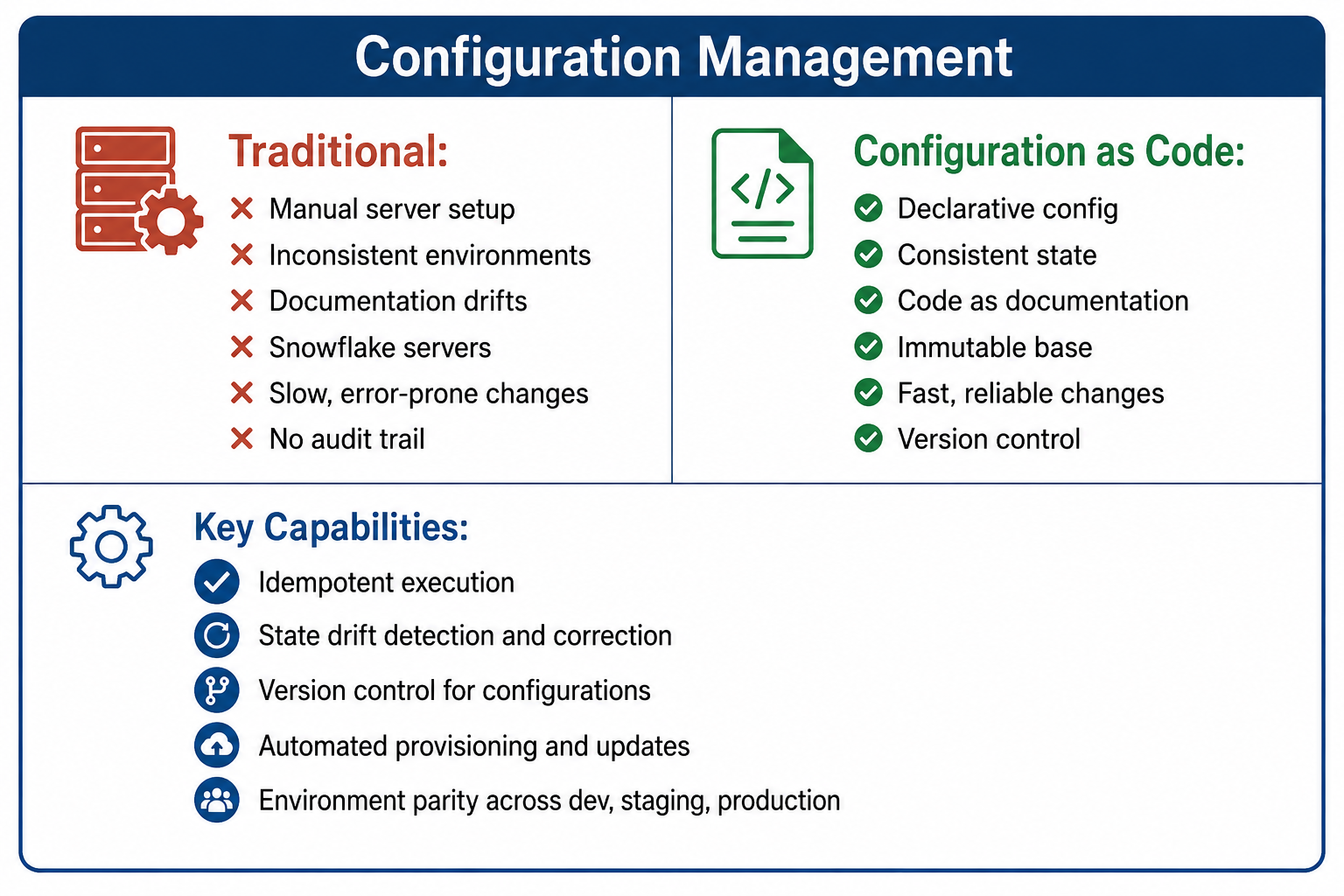
What Is Configuration Management?
Configuration management is the process of maintaining computer systems, servers, and software in a desired, consistent state. It involves defining the configuration of systems in machine-readable files, then using automation tools to apply and maintain that configuration across all managed systems.
- Desired State: A declaration of how systems should be configured, including installed packages, configuration files, running services, and user accounts.
- Idempotence: The property that applying the same configuration multiple times produces the same result without errors or unintended changes.
- Drift Detection: Identifying when actual system state diverges from desired configuration and correcting it.
- Orchestration: Coordinating configuration changes across multiple systems in a specific order.
- Inventory: Tracking all systems being managed and their current configuration status.
Why Configuration Management Matters
Manual server configuration leads to inconsistent, fragile, and unmanageable systems. Configuration management addresses these problems by bringing automation and discipline to system administration.
- Consistency Across Environments: Development, staging, and production environments are configured identically, eliminating environment-specific bugs and surprises.
- Repeatable Deployments: New servers can be provisioned and configured identically every time, reducing deployment failures and recovery time.
- Version Control for Infrastructure: All configuration changes are tracked in version control, providing audit trails, rollback capability, and change review.
- Reduced Human Error: Automated configuration eliminates mistakes from manual commands, forgotten steps, and inconsistent processes.
- Efficient Scaling: Adding a new server takes minutes instead of hours or days. Configuration management scales with your infrastructure.
- Disaster Recovery: Entire server fleets can be rebuilt from configuration definitions after a disaster, enabling fast recovery.
- Compliance and Auditing: Configuration as code provides auditable evidence of system states and changes for compliance requirements.
- Documentation as Code: Configuration files document exactly how systems are configured. No separate, outdated documentation.
Configuration Management Models
Push Model
In the push model, a central control server initiates connections to managed nodes and pushes configurations to them. The control server stores configurations and applies them on demand or on a schedule. Push models are simple to understand and work well for smaller environments.
- Advantages: Simple architecture, immediate configuration application, good for environments with trusted network connectivity.
- Disadvantages: Requires network connectivity from control server to nodes, control server is a single point of failure, less suitable for dynamic environments.
- Example Tools: Ansible (primary mode), SaltStack (push mode).
Pull Model
In the pull model, managed nodes periodically pull configurations from a central server at scheduled intervals. Nodes initiate the connection and apply configurations locally. Pull models scale better for large, dynamic environments.
- Advantages: Scales to thousands of nodes, no inbound connections required, nodes can apply configurations even if control server is temporarily unreachable.
- Disadvantages: Configuration application is not immediate, requires service on managed nodes, more complex architecture.
- Example Tools: Puppet, Chef, SaltStack (pull mode).
Declarative vs Imperative Configuration
Declarative configuration specifies the desired end state without specifying steps to achieve it. The tool determines how to reach that state. Imperative configuration specifies explicit steps or commands to run. Declarative is generally preferred because it is idempotent by design.
| Aspect | Declarative | Imperative |
|---|---|---|
| Focus | What the end state should be | What steps to execute |
| Idempotence | Built-in and automatic | Must be explicitly coded |
| Learning Curve | Easier to understand and predict | Requires procedural thinking |
| Flexibility | Limited to what tool supports | Full programming language power |
| Examples | Puppet manifests, Terraform, CloudFormation | Ansible playbooks, Chef recipes, shell scripts |
Common Configuration Management Tools
Ansible
Ansible is an agentless push-based configuration management tool using YAML for its playbooks. It connects via SSH to managed nodes and executes modules. Ansible is simple to learn and use, making it popular for getting started with configuration management. It works well for application deployment and orchestration. Agentless architecture means no software to install on managed nodes.
Puppet
Puppet is a mature pull-based configuration management tool using its own declarative language. Puppet runs as an agent on managed nodes that periodically pull configurations from a central server. It enforces desired state continuously, correcting drift automatically. Puppet scales well to large environments and has strong reporting capabilities.
Chef
Chef is a pull-based configuration management tool using Ruby-based domain-specific language for its recipes and cookbooks. Chef uses an imperative style, giving flexibility to express complex configurations. It has strong testing frameworks and integrates well with cloud infrastructure.
SaltStack
SaltStack, or Salt, supports both push and pull models using Python for its configuration. It is known for high-speed execution and scalability to tens of thousands of nodes. Salt uses a master-minion architecture with secure, encrypted communication.
| Tool | Model | Language | Agent | Learning Curve |
|---|---|---|---|---|
| Ansible | Push | YAML, Python modules | Agentless | Low |
| Puppet | Pull | Puppet DSL | Agent required | Moderate |
| Chef | Pull | Ruby DSL | Agent required | Moderate to high |
| SaltStack | Push or pull | YAML, Python | Agent optional | Moderate |
Core Configuration Management Concepts
Manifests and Playbooks
Manifests or playbooks are the configuration files that define desired system state. They specify which packages to install, which services to run, which files to manage, and what users to create. These files are stored in version control and serve as the single source of truth for system configuration.
Modules and Roles
Modules are reusable units of configuration that encapsulate related resources, such as a web server module managing Apache installation and configuration. Roles combine modules to define a server's complete purpose, such as a web server role combining the Apache module, firewall module, and monitoring module.
Facts and System Information
Configuration management tools gather facts about managed systems, including operating system, IP addresses, memory, CPU, and disk information. These facts can be used to make configurations conditional. For example, different package names on Ubuntu versus CentOS.
Templating
Templates allow dynamic generation of configuration files using variables and logic. Instead of static configuration files, templates insert system-specific values, environment names, or fact-derived settings. This eliminates duplicating similar configuration files across different systems.
Idempotence
Idempotence is the property that applying the same configuration multiple times produces the same result. If a system already matches the desired state, no changes are made. This allows safe, repeated application of configurations without causing errors or unintended changes.
┌─────────────────────────────────────────────────────────────────┐
│                   Configuration Management Workflow               │
├─────────────────────────────────────────────────────────────────┤
│                                                                  │
│  1. Define Desired State                                        │
│     Write playbooks/manifests specifying configuration          │
│                                                                  │
│  2. Store in Version Control                                    │
│     All configuration code in Git with change tracking          │
│                                                                  │
│  3. Test Configuration                                          │
│     Validate syntax, lint, test in isolated environment         │
│                                                                  │
│  4. Deploy Configuration                                        │
│     Tool connects to target systems and applies configuration   │
│                                                                  │
│  5. Verify and Enforce                                          │
│     Check for drift, continuously or periodically reapply       │
│                                                                  │
│  6. Audit and Report                                            │
│     Log changes, track compliance, maintain inventory           │
│                                                                  │
└─────────────────────────────────────────────────────────────────┘
Configuration Management Best Practices
- Treat Configurations as Code: Store all configuration files in version control. Use branches, pull requests, and code review for configuration changes just like application code.
- Use Idempotent Configurations: Always write configurations that produce the same result when applied multiple times. Test idempotence by applying configurations repeatedly.
- Separate Configuration from Data: Keep environment-specific values separate from configuration logic using variables, facts, or external data stores.
- Test Configurations: Use tools like Test Kitchen, molecule, or linters to test configurations before applying to production. Test idempotence, syntax, and desired outcomes.
- Break Down Complexity: Use modules and roles to organize configurations. Keep components small, focused, and reusable. Avoid monolithic, single-file configurations.
- Use Idempotent Modules Only: Many configuration management tools have community modules. Verify they are idempotent and well-maintained before using them.
- Manage Secrets Separately: Never store passwords, API keys, or certificates in configuration files. Use secret management tools like HashiCorp Vault, AWS Secrets Manager, or encrypted data bags.
- Regularly Apply Configurations: Run configuration management on a schedule, not only during initial setup. This corrects drift from manual changes or external factors.
- Implement Dry Runs: Use dry-run or check modes to preview what changes will be made before applying them. This prevents surprises in production.
- Monitor Configuration Compliance: Track which systems are compliant with desired configuration and which have drifted. Report on compliance status regularly.
Configuration Drift Management
Configuration drift occurs when actual system state diverges from desired configuration. Drift happens due to manual changes, software updates, security incidents, or incomplete deployments. Without management, drift leads to environment inconsistencies and hard-to-debug issues.
- Detection: Configuration management tools can detect drift by comparing actual state to desired state and reporting differences.
- Prevention: The best prevention is eliminating manual changes. All changes go through configuration management.
- Correction: Idempotent configurations automatically correct many forms of drift when reapplied. Some tools offer continuous enforcement.
- Alerting: Configure alerts when drift is detected, especially on critical systems, so you can investigate the cause.
- Immutable Infrastructure: Replacing servers instead of modifying them eliminates drift entirely but requires different workflows.
Configuration Management Anti-Patterns
- Configuration Snowflakes: Unique, manually configured servers that cannot be reproduced. Every server should be defined in code and reproducible.
- Golden Images without Management: Using pre-built images without ongoing configuration management leads to image sprawl and hidden drift.
- Overly Complex Configurations: Massive, monolithic configurations are hard to understand, test, and maintain. Break them down.
- Hardcoding Values: Environment-specific values embedded in configuration code prevent reuse across environments and require code changes for simple updates.
- No Testing: Applying untested configurations to production is risky. Test idempotence, correctness, and edge cases.
- Ignoring Idempotence: Configurations that are not idempotent cause errors or duplicate changes when reapplied. Always verify idempotence.
- Storing Secrets in Code: Secrets in version control are exposed to everyone with repository access and remain in history forever.
- Manual Overrides: Applying changes manually outside configuration management creates drift. All changes go through configuration management.
Configuration Management and Continuous Delivery
Configuration management integrates tightly with CI/CD pipelines. Pipeline stages validate configuration, test changes, then apply them to environments. This automation ensures configuration changes are reliable and auditable.
- Syntax Validation: CI pipeline validates configuration syntax immediately on commit.
- Unit Testing: Automated tests verify configuration logic and expected outcomes.
- Integration Testing: Deploy to a test environment and verify functionality.
- Dry Run: Preview changes before production application.
- Apply Configuration: Deploy approved configuration changes to production.
- Post-Deployment Validation: Verify systems are in desired state after application.
This workflow is detailed in our CI/CD pipelines guide.
Configuration Management and Orchestration
Configuration management focuses on maintaining individual systems in a desired state. Orchestration coordinates actions across multiple systems or sequences. They are complementary practices.
- Configuration Management: Ensures each server has correct packages, files, and services. Typically idempotent and convergent.
- Orchestration: Coordinates rolling updates across a fleet, ensures dependencies run in correct order, manages multi-system state changes.
- Combined Use: Many tools include both capabilities. Ansible is often used for orchestration. Puppet and Chef primarily focus on configuration management.
Configuration Management for Different Environments
Development Environment
Developers run configuration management locally, often with virtual machines or containers. Environment parity with production is the goal. Local testing catches configuration issues early.
Staging Environment
Staging mirrors production configuration. Automated tests run against staging before production deployment. Configuration management ensures staging accurately represents production.
Production Environment
Production configurations enforce consistency across all servers. Changes go through automated pipelines with approval gates. Monitoring tracks configuration compliance.
Configuration Management and Containers
Containers change some configuration management practices. Container images encapsulate application dependencies, potentially reducing need for server-level configuration management. However, configuration management remains valuable for orchestrating container infrastructure.
- Image Building: Configuration management can build container images, ensuring consistent base images.
- Orchestration Configuration: Tools like Ansible manage Kubernetes clusters or container hosts.
- Hybrid Approaches: Many organizations use configuration management for hosts and orchestration tools for containers.
- Immutable Containers: Configuration inside containers is baked into images and not modified at runtime, eliminating some configuration management needs.
Learn more in our containerization guide.
Measuring Configuration Management Success
- Deployment Frequency: How often can you safely deploy configuration changes? Higher frequency indicates better automation.
- Mean Time to Recover: How quickly can you recover from configuration-related failures or rebuild servers after disaster?
- Environment Consistency: Percentage of systems that match desired state. Target close to 100 percent.
- Change Success Rate: Proportion of configuration changes that succeed without causing incidents.
- Manual Intervention Rate: How often do you need to manually fix configuration issues? Lower is better.
- Provisioning Time: Time from request to ready-to-use server. Target minutes, not days.
Level 1: Manual
- Manual server configuration
- No version control
- Inconsistent environments
- Slow, error-prone changes

Level 2: Scripted
- Basic automation scripts
- Some version control
- Partially consistent
- Still significant manual work

Level 3: Managed
- Configuration management tools
- Version control all configs
- Consistent environments
- Automated provisioning

Level 4: Optimized
- Continuous enforcement
- No configuration drift
- Integrated with CI/CD
- Infrastructure as code
- Immutable where practical
Frequently Asked Questions
- What is the difference between configuration management and infrastructure as code?
Infrastructure as Code provisions infrastructure resources like virtual machines, networks, and storage. Configuration management configures software and services on those provisioned systems. They are complementary. Many use IaC for cloud resources and configuration management for configuring those resources, though tools increasingly handle both. - Should I use Ansible, Puppet, or Chef?
Choose based on your needs. Ansible is simplest to learn, agentless, and good for smaller environments and application deployment. Puppet scales well with pull model and strong reporting, good for large traditional environments. Chef offers flexibility with Ruby and strong testing framework. Start with Ansible unless you have specific needs for others. - Do I need configuration management if I use containers?
Likely yes. Containers simplify application configuration but you still need to configure container hosts, orchestration platforms, and supporting infrastructure. Configuration management can also build container images. Many organizations use both configuration management and containers. - What is idempotence and why does it matter?
Idempotence means applying the same configuration multiple times produces the same result. If a system already matches desired state, no changes are made. Idempotence allows safe, repeated configuration application without causing errors or unintended changes. It is essential for automated configuration management. - How do I handle secrets in configuration management?
Never store secrets in configuration code. Use secret management tools like HashiCorp Vault, AWS Secrets Manager, Azure Key Vault, or GCP Secret Manager. Configuration management tools can retrieve secrets at runtime. Some tools have built-in encrypted data bags or vaults, but external secret managers are generally preferred. - What should I learn next after configuration management?
After mastering configuration management, explore Infrastructure as Code, CI/CD pipelines, containerization, orchestration patterns, immutable infrastructure, and Policy as Code for governance automation.