
Performance Testing: Evaluating System Speed, Scalability, and Stability
Performance testing is the practice of evaluating how a system performs under expected and peak workloads. It includes load testing, stress testing, endurance testing, and spike testing to identify bottlenecks and ensure reliability.
Performance Testing: Evaluating System Speed, Scalability, and Stability
Performance testing is the practice of evaluating how a software system performs under expected and peak workloads. It measures responsiveness, throughput, stability, and scalability to ensure the system meets performance requirements. Unlike functional testing which verifies correctness, performance testing answers questions like: How many concurrent users can the system handle? What is the response time under load? Does the system degrade gracefully or crash under stress? Where are the bottlenecks (CPU, memory, database, network)?
To understand performance testing properly, it helps to be familiar with capacity planning, system design, and observability.
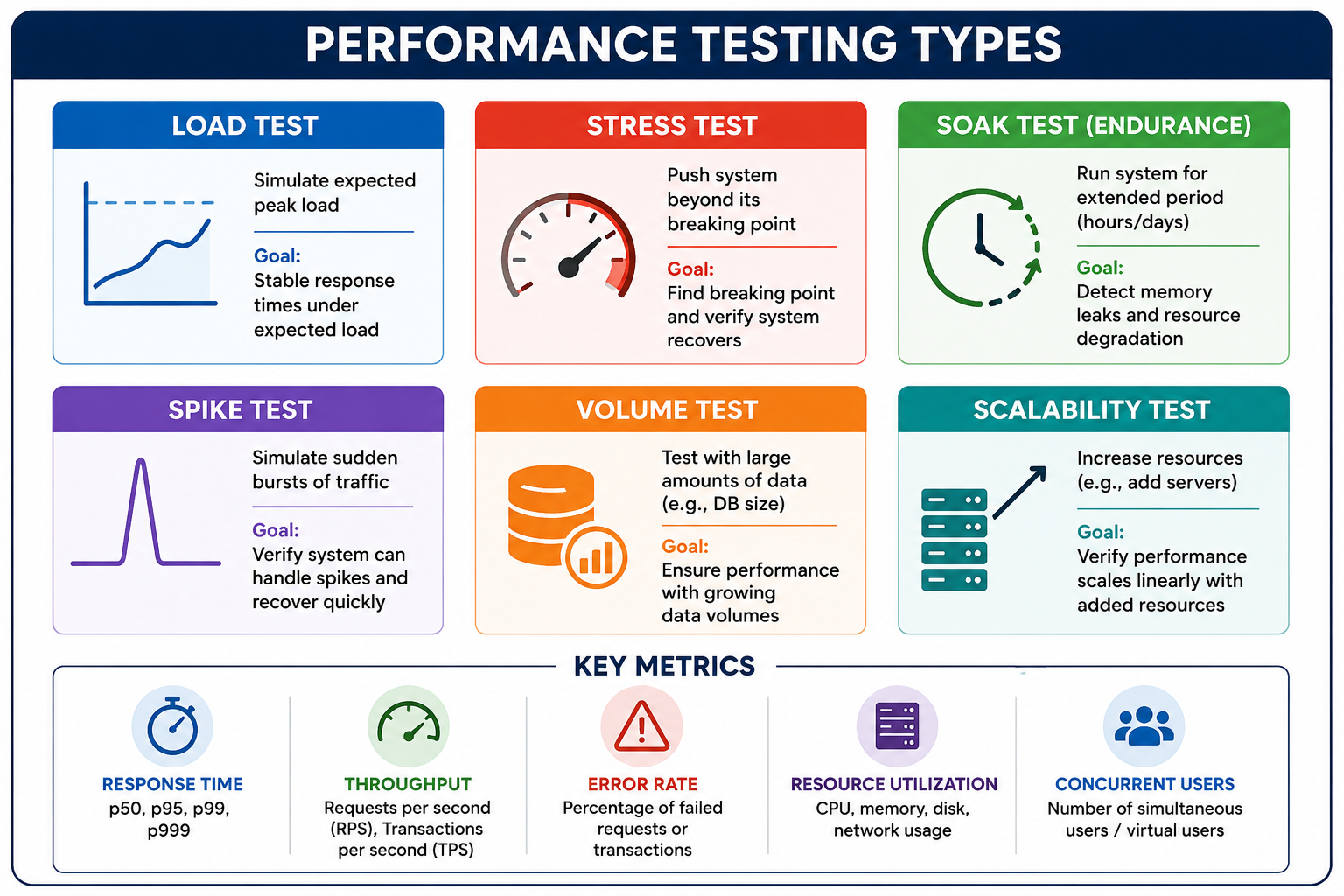
What Is Performance Testing?
Performance testing is a non-functional testing technique that determines how a system performs under various load conditions. It measures responsiveness, stability, scalability, and resource usage. Performance testing identifies bottlenecks before they impact users in production. It provides data for capacity planning (how many servers needed?). It validates that service level agreements (SLAs) are met.
- Response Time: Time from sending request to receiving response (latency). Measured in milliseconds or seconds. Critical percentiles: p50 (median), p95, p99 (tail latency).
- Throughput: Number of requests processed per unit time (requests per second, transactions per second). Indicates system capacity.
- Error Rate: Percentage of requests that fail under load (timeouts, 5xx errors). Acceptable error rate is typically zero for well-behaved systems under expected load.
- Concurrent Users: Number of simultaneous active users. Different from total registered users.
- Resource Utilization: CPU, memory, disk I/O, network bandwidth usage during test.
Why Performance Testing Matters
Poor performance costs money (lost revenue, frustrated users, damage to brand reputation). Performance testing prevents these outcomes.
- User Experience: Slow websites lose customers (Amazon found 100ms delay cost 1 percent of sales). Google: slower load times reduce search volume. Mobile users are even less tolerant of delays.
- Revenue Protection: Black Friday, Cyber Monday sales. E-commerce sites crash under peak load. News sites overwhelmed during major events.
- Bottleneck Identification: Find issues before they hit production: slow database queries, inefficient code, resource contention, cache misses.
- Capacity Planning: Data for right-sizing infrastructure. Determine how many servers needed for expected traffic. Avoid over-provisioning (wasting money) or under-provisioning (outages).
- SLA Validation: Prove system meets contractual performance requirements. Many SLAs include response time guarantees (e.g., p99 < 200ms).
- Regression Detection: Performance tests in CI/CD catch regressions early. New code that slows down system fails the build.
| Aspect | Functional Testing | Performance Testing |
|---|---|---|
| Goal | Correctness | Speed, scalability |
| Focus | Does it work? | How fast? How many? |
| Test Data | Small, specific | Large, realistic |
| Environment | Dev/QA, small | Production-like, large |
| Duration | Seconds to minutes | Minutes to days |
| Metrics | Pass/fail | Response times, throughput |
| Users | Single | Hundreds/thousands |
| Tools | JUnit, pytest | JMeter, k6, Gatling |
Types of Performance Tests
Load Testing
Simulates expected user load to verify system meets performance targets under normal conditions. Tests typical usage patterns, peak hour traffic. Answers: Does response time meet SLA? Is error rate acceptable? Validate system capacity.
Stress Testing
Pushes system beyond its breaking point to see how it fails. Identifies the maximum capacity and failure behavior (graceful degradation vs crash). Tests recovery after overload. Important for chaos engineering.
Soak Testing (Endurance)
Runs system under sustained load for extended periods (hours or days). Detects memory leaks, resource exhaustion, database connection leaks, log rotation issues, and time-based problems.
Spike Testing
Simulates sudden, dramatic increase in load (e.g., viral event, flash sale). Tests if auto-scaling works, if request queuing behaves properly, and if system recovers after spike.
Scalability Testing
Measures how system performance changes as resources are added. Tests horizontal scaling (adding more servers) and vertical scaling (bigger servers). Goal: linear or near-linear scaling.
Test type selection guide:| Goal | Test Type |
|---|---|
| Verify system under expected peak load | Load testing |
| Find maximum capacity (breaking point) | Stress testing |
| Detect memory leaks over time | Soak testing |
| Test auto-scaling response | Spike testing |
| Validate horizontal scaling efficiency | Scalability testing |
| Simulate Black Friday traffic | Load + Spike |
Performance Testing Process
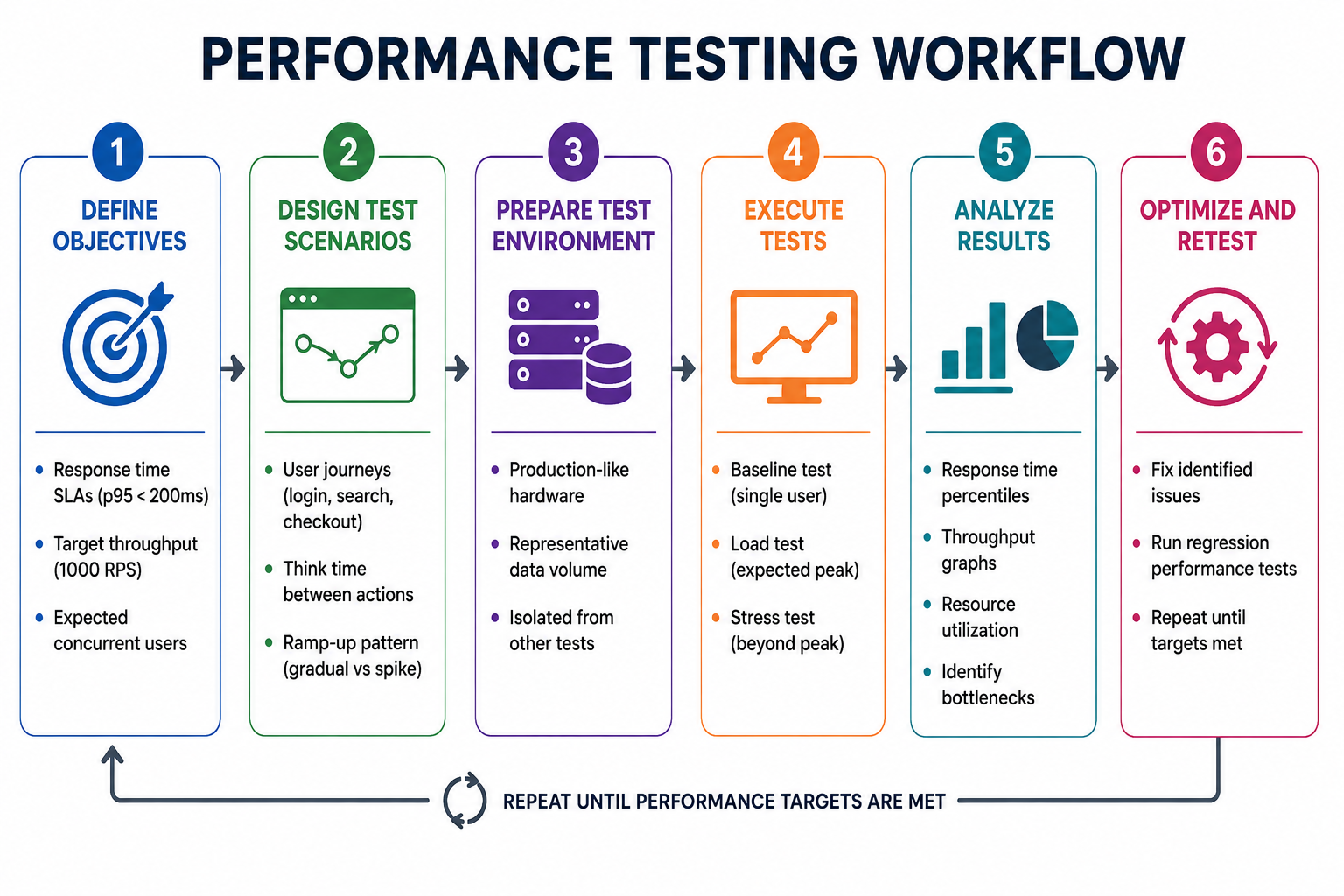
Performance Testing Metrics
| Metric | Description | Typical Target |
|---|---|---|
| Average Response Time | Mean latency across all requests | Less useful, hides outliers |
| p50 (Median) | 50 percent of requests faster than this | < 100ms |
| p95 | 95 percent of requests faster than this | < 200ms |
| p99 | 99 percent of requests faster than this | < 500ms |
| p999 | 99.9 percent of requests faster than this | < 1s |
| Throughput (RPS) | Requests per second | Varies by application |
| Error Rate | Percentage of failed requests | < 0.1 percent |
| Metric Pattern | Likely Bottleneck |
|---|---|
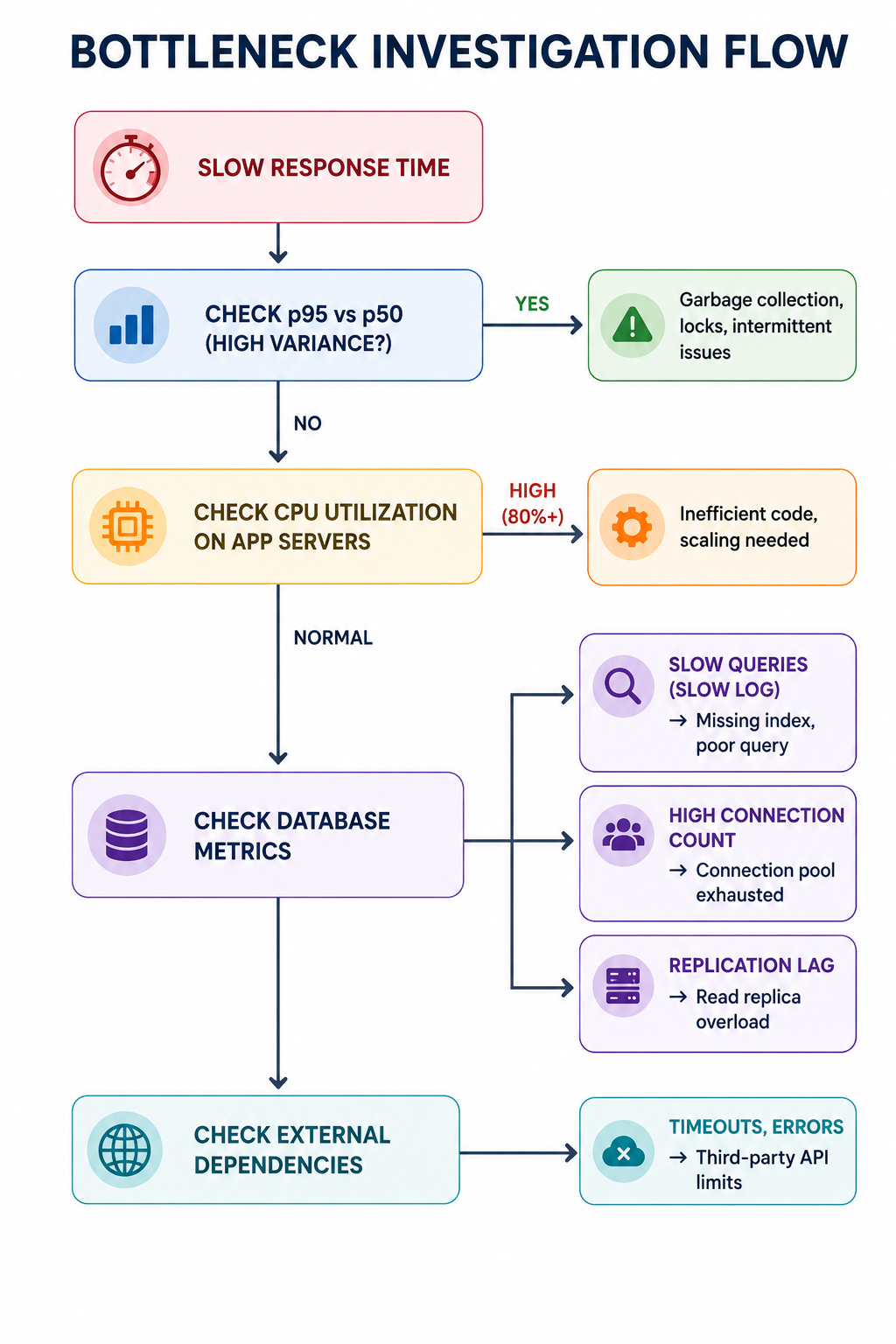
| High p95 but low average | Garbage collection pauses |
| Increasing error rate as load grows | Database connection pool exhaustion |
| Throughput plateauing | Single-threaded bottleneck |
| Response time grows linearly with users | Database query without index |
| Memory usage grows over time | Memory leak (soak test) |
| High CPU but low throughput | Inefficient code, contention |
| High I/O wait | Disk bottleneck |
Performance Testing Tools
| Tool | Type | Strengths | Best For |
|---|---|---|---|
| JMeter | Open source, Java | Feature-rich, protocols, distributed | Traditional web apps, heavy load |
| k6 | Open source, Go/JS | Developer-friendly, scriptable, CI/CD | API testing, modern DevOps |
| Gatling | Open source, Scala | High performance, async, reports | Scala shops, high concurrency |
| Locust | Open source, Python | Python-based, distributed, easy | Python teams, simple scenarios |
| Artillery | Open source, Node.js | Cloud-friendly, HTTP/WebSocket | Real-time, IoT, microservices |
| Tsung | Open source, Erlang | High concurrency, distributed | Large-scale (millions of users) |
import http from 'k6/http';
import { sleep, check } from 'k6';

export const options = {
    stages: [
        { duration: '30s', target: 50 },   // Ramp up
        { duration: '1m', target: 100 },   // Peak
        { duration: '10s', target: 0 },    // Ramp down
    ],
    thresholds: {
        http_req_duration: ['p(95)<200', 'p(99)<500'],
        http_req_failed: ['rate<0.01'],
    },
};

export default function () {
    const res = http.get('https://test-api.example.com/health');
    check(res, { 'status is 200': (r) => r.status === 200 });
    sleep(1);
}
Performance Testing Anti-Patterns
- Testing on Inadequate Environment: Dev machines, shared test environments, smaller database. Results not representative of production. Use production-like hardware, data volume, network topology.
- Not Establishing Baseline: Cannot measure improvement without baseline. Run single-user test first. Compare changes against baseline.
- Ignoring Think Time: Simulating users clicking as fast as possible overloads system unrealistically. Model realistic user pauses (think time) between actions.
- Only Testing Average Response Time: Average hides outliers (p99 could be terrible while average looks fine). Use percentiles (p95, p99, p999).
- Not Testing Failure Conditions: Only testing happy path misses degradation under partial failure. Test database failover, dependency timeouts, resource exhaustion.
- One-Time Testing (Not Continuous): Performance degrades over time with new code. Run performance tests in CI/CD pipeline (nightly, per-release).
[X] Testing on underpowered hardware
[X] No baseline established
[X] No think time (too aggressive)
[X] Only average response time (no percentiles)
[X] Not testing error scenarios
[X] One-time tests (not continuous)
[X] Testing only during office hours (ignore nightly batch)

[✓] Production-like environment
[✓] Baseline + improvement tracking
[✓] Realistic think time (2-10 seconds)
[✓] Track p95, p99, p999
[✓] Error injection (timeouts, failures)
[✓] CI/CD integration
[✓] Test during expected peak and off-peak
Performance Testing Best Practices
- Use Production-Like Environment: Hardware specs (CPU, memory, disk), network topology (latency, bandwidth), data volume (database size similar). Staging environment should mirror production as closely as possible.
- Establish Baselines: Run tests after each significant release to detect regressions. Compare against previous results (performance trending). Set thresholds for acceptable degradation (e.g., no more than 10 percent increase in p99).
- Test Realistic User Journeys: Model common user paths (login, search, purchase). Include edge cases (heavy users, bots). Consider think time between actions (2-10 seconds).
- Monitor During Test: Collect server-side metrics (CPU, memory, disk I/O, network). Correlate client-side response time with resource utilization. Identify bottleneck component.
- Automate Performance Tests in CI/CD: Run smoke performance tests on every PR (short duration, low load). Run full suite nightly or per release. Fail build if performance regressions exceed threshold.
- Test from Multiple Geographic Locations: CDN effectiveness, network latency impact, regional differences. Use cloud-based load generators in multiple regions.
| Frequency | Test Type | Duration |
|---|---|---|
| Per commit (sanity) | Smoke test (10 concurrent users) | 2 minutes |
| Nightly | Load test (expected peak) | 30 minutes |
| Weekly | Stress test (breakpoint) | 1 hour |
| Monthly | Soak test | 8 hours |
| Pre-release | Full regression suite | 4 hours |
| Quarterly | Scalability test | 2 hours |
Analyzing Performance Test Results
- Response Time Percentiles: Check if p95, p99 meet SLAs. Investigate high p99 (tail latency). Look for outliers (garbage collection, lock contention).
- Throughput vs Load Graph: Throughput should increase with load until saturation. Plateau indicates bottleneck. Sudden drop may indicate system failure.
- Error Rate: Should be near zero until system overloaded. Increasing error rate may indicate resource exhaustion.
- Resource Utilization Correlation: High CPU but low throughput = inefficiency. High memory with growth over time = memory leak. High I/O wait = disk bottleneck.
- Bottleneck Identification (Common Patterns): Database connection pool: errors increase as connections exhausted. Thread pool: response time spikes due to queuing. Cache: hit ratio drops under load.
Frequently Asked Questions
- How many concurrent users should I test for?
Based on expected peak traffic, historical data, business projections. Formula: concurrent users = (hourly visitors × average visit duration in seconds) / 3600. For spikes (sales), multiply by 2-5x. - What is the difference between load testing and stress testing?
Load testing verifies performance under expected load. Stress testing pushes beyond breaking point to find maximum capacity and failure behavior. Load test: "Does it work at 1000 users?" Stress test: "What happens at 2000 users?" - How long should a soak test run?
Minimum 8 hours (covers memory leak detection). Better 24-72 hours for thorough leak detection, garbage collection behavior, log rotation, database temp table cleanup. For mission-critical systems, 7 days. - Can I performance test in production?
Yes (but carefully). Use canary, blue-green, dark launch to limit impact. Monitor in real-time with automatic rollback. Isolate test users (beta, internal). Useful for realistic network, data volume, CDN testing. - What is a good response time?
Depends on application. API: p95 < 100-200ms. Web page: < 2 seconds. File upload: < 5 seconds. Real-time: < 50ms. Set SLAs based on user expectations and business requirements. - What should I learn next after performance testing?
After mastering performance testing, explore application profiling for bottlenecks, database query optimization, caching for performance, auto-scaling configuration, and capacity planning.