
Network Security: Protecting Your Infrastructure from Threats
Network security encompasses the policies, practices, and technologies used to protect the integrity, confidentiality, and accessibility of computer networks and data. It includes measures like firewalls, intrusion detection systems, VPNs, network segmentation, and access controls to defend against unauthorized access and cyber threats.
Network Security: Protecting Your Infrastructure from Threats
Network security encompasses the policies, practices, and technologies used to protect the integrity, confidentiality, and accessibility of computer networks and data. It involves both hardware and software solutions that work together to prevent unauthorized access, misuse, modification, or denial of a computer network and its resources.
As organizations increasingly rely on network connectivity for operations, network security has become critical. To understand network security properly, it helps to be familiar with IP addressing, TCP/IP model, firewalls, and VPNs.
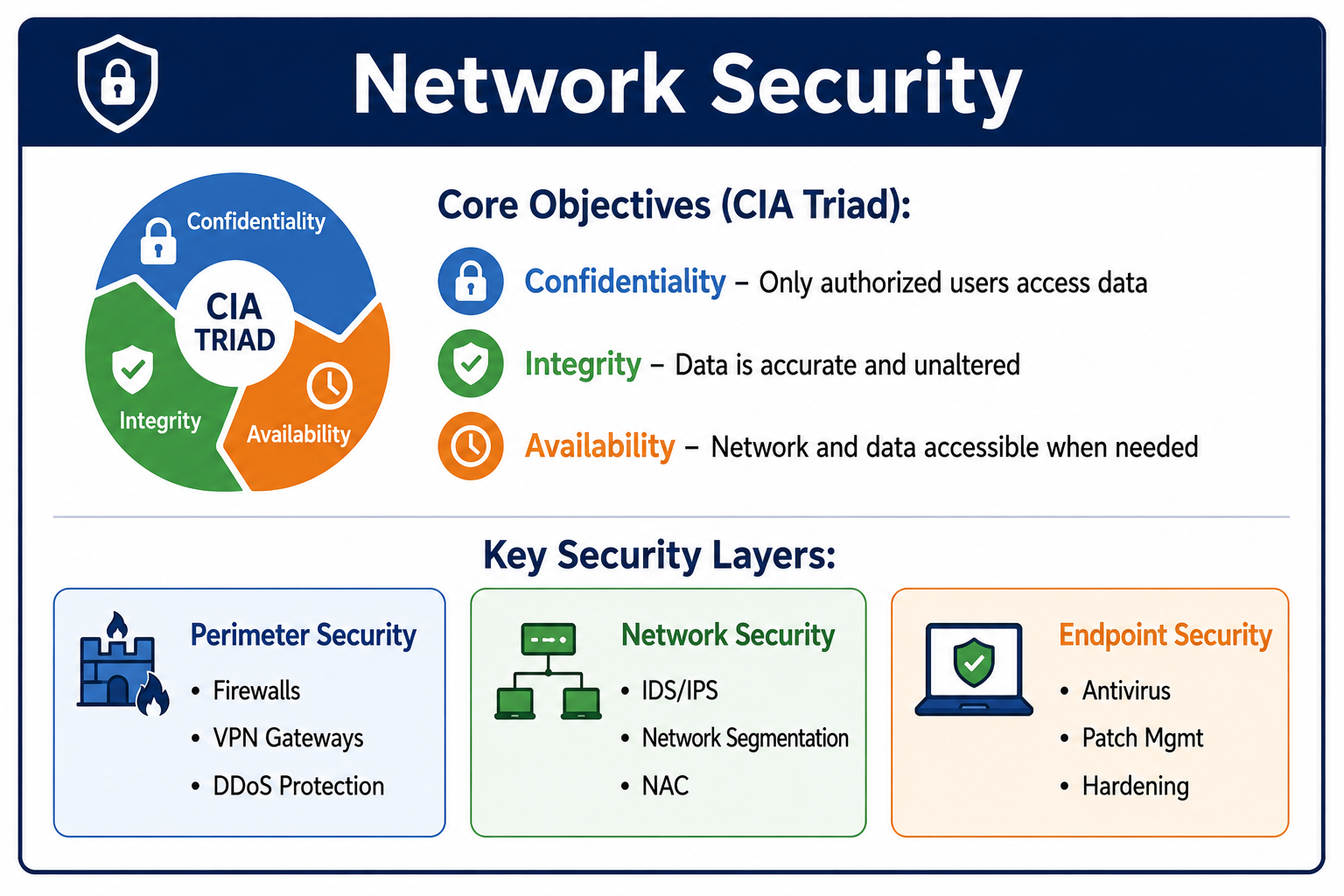
What Is Network Security?
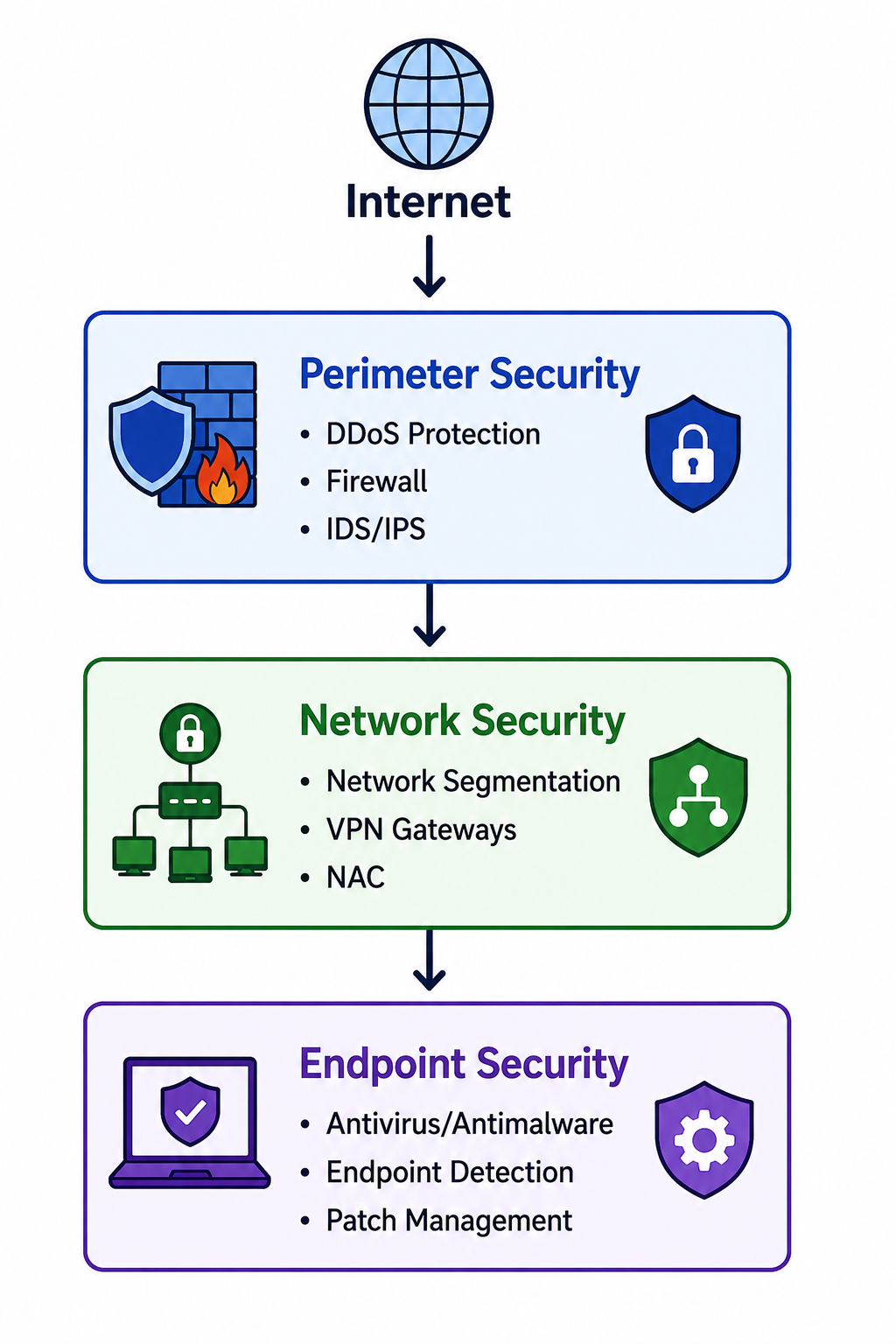
Network security is the practice of protecting computer networks from intruders, whether targeted attackers or opportunistic malware. It combines multiple layers of defenses at the edge and within the network. Each layer implements policies and controls to protect network resources and the data that travels across them.
- Confidentiality: Ensuring that data is accessible only to authorized parties through encryption and access controls.
- Integrity: Guaranteeing that data has not been altered during transmission using checksums, hashing, and digital signatures.
- Availability: Ensuring that network resources and data are accessible when needed through redundancy, DDoS protection, and disaster recovery.
- Authentication: Verifying the identity of users and devices attempting to access network resources.
- Authorization: Determining what authenticated users and devices are allowed to do on the network, covered in our authorization guide.
- Non-Repudiation: Ensuring that actions cannot be denied later through logging and digital signatures.
Why Network Security Matters
Network security is essential for protecting organizational assets and maintaining trust. Without proper network security, organizations face significant risks.
- Data Breach Prevention: Network security stops attackers from stealing sensitive data like customer information, intellectual property, and financial records.
- Regulatory Compliance: Regulations like GDPR, HIPAA, PCI DSS, and SOX require specific network security controls. Non-compliance results in fines and legal liability.
- Business Continuity: Network attacks like ransomware and DDoS can halt operations. Security measures prevent or minimize disruption.
- Reputation Protection: Security breaches damage customer trust and brand reputation. Recovery from reputation damage takes years.
- Financial Protection: Breaches cost organizations millions in response, legal fees, regulatory fines, and lost revenue.
- Legal Protection: Organizations have a duty to protect customer and partner data. Failure to do so results in lawsuits and legal liability.
Types of Network Threats
Malware and Ransomware
Malware is malicious software designed to damage or exploit network devices. Ransomware encrypts data and demands payment for decryption. Worms self-propagate across networks without user interaction. Trojans disguise themselves as legitimate software. Network security controls like firewalls and IDS detect and block malware.
Denial of Service Attacks
DoS and DDoS attacks flood network resources with traffic, making them unavailable to legitimate users. DDoS attacks use multiple compromised devices, botnets, to overwhelm targets. Network security includes DDoS protection, rate limiting, and traffic filtering to mitigate these attacks.
Man-in-the-Middle Attacks
MITM attacks occur when an attacker intercepts communication between two parties. The attacker can eavesdrop, modify, or inject data. Encryption through TLS, IPsec, and VPNs prevents MITM attacks. Network security also includes certificate validation and secure routing protocols.
Packet Sniffing
Sniffing captures network traffic to extract sensitive information like passwords or credit card numbers. Unencrypted networks are vulnerable to sniffing. Network security uses encryption, network segmentation, and switch security to prevent sniffing.
Phishing and Social Engineering
Phishing attacks trick users into revealing credentials or installing malware. While often delivered via email, network security can help through DNS filtering, email gateways, and web filtering to block known malicious sites.
Insider Threats
Insiders with legitimate access, whether malicious or negligent, pose significant risks. Network security controls include access controls, user behavior monitoring, network segmentation limiting access, and data loss prevention systems.
| Threat Type | Description | Primary Defense |
|---|---|---|
| Malware | Malicious software damaging systems | Antivirus, IDS, email filtering |
| DDoS | Overwhelming traffic exhausting resources | DDoS protection, rate limiting |
| MITM | Intercepting communication between parties | Encryption, certificate validation |
| Sniffing | Capturing and reading network traffic | Encryption, network segmentation |
| Insider Threat | Authorized users causing harm | Access controls, monitoring, segmentation
Network Security Controls
Firewalls
Firewalls monitor and control incoming and outgoing network traffic based on predetermined security rules. They establish a barrier between trusted internal networks and untrusted external networks like the internet. Firewalls can be hardware appliances, software applications, or cloud-based services. This is covered in detail in our firewall guide.
- Packet Filtering: Examines packet headers and allows or blocks based on IP addresses, ports, and protocols.
- Stateful Inspection: Tracks active connections and makes decisions based on connection state.
- Next-Generation Firewall: Adds deep packet inspection, application awareness, and intrusion prevention.
- Web Application Firewall: Specifically protects web applications from attacks like SQL injection and XSS, covered in our web security guide.
Intrusion Detection and Prevention Systems
IDS monitors network traffic for suspicious activity and alerts administrators. IPS goes further by actively blocking detected threats. Both use signature-based detection for known attacks and anomaly-based detection for unusual behavior patterns.
Virtual Private Networks
VPNs create encrypted tunnels over public networks, allowing secure remote access. They protect data in transit and hide IP addresses. VPNs are essential for remote workers and connecting branch offices securely. Learn more in our VPN guide.
Network Access Control
NAC ensures that only compliant, authenticated devices can access the network. It checks device posture, such as antivirus status and patch level, before granting access. NAC can quarantine non-compliant devices for remediation.
Network Segmentation
Segmentation divides a network into smaller, isolated segments. If one segment is compromised, the attacker cannot easily move to other segments. VLANs and subnetting implement segmentation. Critical systems like payment processing should be on separate segments.
DDoS Protection
DDoS protection detects and mitigates volumetric attacks. It can be cloud-based, absorbing and filtering traffic before it reaches the target, or on-premises, using specialized appliances. Modern protection uses behavioral analysis to distinguish legitimate traffic from attacks.
Email and Web Security Gateways
Email gateways filter spam, phishing, and malicious attachments. Web gateways block access to malicious or inappropriate websites. Both use threat intelligence, content filtering, and link analysis to protect users from threats delivered through these channels.
Network Security Protocols
IPsec
IPsec secures IP communications by authenticating and encrypting each IP packet. It operates at the network layer, protecting all traffic between hosts or networks. IPsec supports two modes: transport mode for host-to-host and tunnel mode for network-to-network VPNs.
TLS and SSL
TLS encrypts data at the transport layer, most commonly for HTTPS, but also for other protocols. It provides encryption, authentication, and integrity. TLS is fundamental to web security, as explained in our SSL/TLS guide.
SSH
SSH provides secure remote access to network devices. It encrypts all traffic between client and server, preventing eavesdropping and session hijacking. SSH replaces insecure protocols like Telnet and Rlogin for remote administration.
SNMPv3
SNMPv3 provides secure network management with authentication and encryption. Earlier SNMP versions sent community strings in plain text, posing security risks. SNMPv3 addresses these with user-based security models.
HTTPS
HTTP over TLS encrypts web traffic between browsers and servers. It protects sensitive data like login credentials and payment information. All modern web applications should use HTTPS exclusively. Learn more in our HTTP vs HTTPS guide.
Network Security for Remote Work
Remote work has expanded the network perimeter. Traditional security relied on protecting a corporate network boundary, but remote workers access resources from home networks beyond organizational control.
- VPN Mandate: All remote connections to corporate resources must go through VPN with multi-factor authentication.
- Zero Trust Network Access: Replaces VPN with application-level access controls, granting only necessary access to specific applications.
- Secure Web Gateways: Cloud-based gateways protect remote users regardless of location, filtering web traffic and enforcing security policies.
- Endpoint Compliance: Enforce that remote devices meet security standards like encryption, patching, and antivirus before network access.
- Cloud Access Security Broker: Monitors and controls access to cloud applications from any location.
Zero Trust Network Security
Zero trust is a security model that assumes no user or device is trusted by default, even inside the network perimeter. It requires continuous verification of every access request.
- Never Trust, Always Verify: Every access request is fully authenticated, authorized, and encrypted before granting access.
- Least Privilege Access: Users get only the access they need, not broad network access. Access is revoked when no longer needed.
- Microsegmentation: The network is divided into very small segments, limiting lateral movement if a breach occurs.
- Continuous Monitoring: All network traffic is logged and analyzed for suspicious behavior in real-time.
- Multi-Factor Authentication: MFA is required for all access, not just remote access. Learn more in our authentication guide.
Network Security Best Practices
- Implement Defense in Depth: Use multiple layers of security controls. No single control is perfect. Combine firewalls, IDS, antivirus, and access controls.
- Regularly Update and Patch: Keep all network devices, servers, and endpoint systems updated with security patches. Unpatched vulnerabilities are a leading attack vector.
- Use Strong Authentication: Implement multi-factor authentication for all network access, especially privileged accounts and remote access.
- Segment the Network: Separate critical systems from general user traffic. Place different trust levels in different network segments.
- Monitor Network Traffic: Deploy IDS/IPS and log analysis. You cannot respond to attacks you do not see. Establish baselines to detect anomalies.
- Encrypt Network Traffic: Encrypt all sensitive data in transit, both internally and externally. Assume network links can be monitored.
- Manage Access Privileges: Apply least privilege principle. Regularly review and revoke unnecessary access. Document access control policies.
- Develop Incident Response Capability: Have a plan for when security fails. Test the plan regularly. Know who to contact and what to do.
- Conduct Regular Security Assessments: Perform vulnerability scans and penetration tests. Regular assessments should identify weaknesses before attackers do.
- Train Users: Users are often the weakest link. Provide regular security awareness training on phishing, password hygiene, and reporting suspicious activity.
Network Security Anti-Patterns
- Flat Network: No network segmentation allows attackers to move laterally after a single breach. Always segment by trust level and function.
- Default Credentials: Leaving default usernames and passwords on network devices is a common and easily exploited vulnerability.
- Overly Permissive Firewall Rules: Firewalls configured to allow all traffic or broad ranges of ports negate their value. Follow least privilege principle.
- Unencrypted Legacy Protocols: Protocols like Telnet, FTP, and HTTP send credentials and data in plain text, easily intercepted. Replace with SSH, SFTP, and HTTPS.
- Weak Password Policies: Simple passwords without multi-factor authentication are easily compromised.
- No Logging or Monitoring: Without logs, you cannot detect breaches. Without monitoring, you cannot respond quickly.
- Complexity Without Security Value: Overly complex configurations introduce misconfiguration risks. Keep security controls as simple as possible while effective.
Configuration Best Practices:

1. Default Deny - Block all traffic by default, allow only what is needed
2. Least Privilege - Grant minimal necessary access
3. Segregation - Separate different trust levels
4. Logging - Log all security-relevant events
5. Redundancy - No single point of security failure
6. Updates - Keep all security controls current
7. Testing - Regularly test security controls
8. Documentation - Document all security configurations
Network Security Monitoring
Monitoring is essential for detecting and responding to security incidents. Security Information and Event Management systems aggregate and analyze logs from network devices, servers, and applications.
- Log Collection: Collect logs from firewalls, routers, switches, IDS/IPS, servers, and applications. Centralized log storage enables correlation and analysis.
- Alerting: Configure alerts for suspicious patterns like multiple failed logins, port scans, traffic spikes, or known attack signatures.
- Baselining: Establish normal network behavior patterns to identify anomalies. What is normal for your network may differ from others.
- Threat Intelligence: Subscribe to threat intelligence feeds providing indicators of compromise for known attackers and malware.
- Regular Review: Security monitoring is not set-and-forget. Regularly review alerts, update rules, and tune to reduce false positives.
Cloud Network Security
Cloud environments require adapted network security approaches. The shared responsibility model means providers secure the cloud infrastructure, and customers secure their use of it.
- Security Groups: Virtual firewalls controlling traffic to cloud resources. Act like host-based firewalls at the instance level.
- Network Access Control Lists: Stateless firewall rules at the subnet level. Provide additional control but are less flexible than security groups.
- Cloud WAF: Protects cloud-hosted web applications from common attacks. Integrates with cloud load balancers and CDNs.
- Virtual Private Cloud: Logically isolated network segment within a cloud provider. Enables network segmentation and control.
- Cloud NAT: Allows private cloud resources to access the internet while remaining unreachable from it. Hides internal IP addresses.
- Cloud DDoS Protection: Cloud providers offer built-in DDoS mitigation, but may require specific configuration for full protection.
Network Security and Compliance
Many regulatory frameworks require specific network security controls. Understanding these requirements is essential for compliance.
- PCI DSS: Requires firewalls, secure configurations, encryption of cardholder data in transit, and network segmentation for payment systems.
- HIPAA: Requires access controls, audit logs, encryption of protected health information in transit, and protection against unauthorized access.
- GDPR: Requires appropriate security measures for personal data, including encryption where appropriate, and breach notification procedures.
- ISO 27001: Comprehensive framework including network security controls, monitoring, access control, and incident management.
- NIST Cybersecurity Framework: Provides guidelines for identifying, protecting, detecting, responding to, and recovering from security incidents.
Frequently Asked Questions
- What is the difference between network security and information security?
Network security focuses on protecting the network infrastructure and data in transit. Information security is broader, covering all aspects of protecting information, including physical security, application security, and data at rest. Network security is a subset of information security. - Do I need a firewall if I have nothing sensitive on my network?
Yes. Every network connected to the internet needs a firewall. Attackers can compromise devices for botnets, launch attacks from your network, or use your resources for cryptocurrency mining. A firewall is essential protection even without sensitive data. - What is the difference between IDS and IPS?
IDS detects and alerts on suspicious activity but does not block it. IPS actively blocks detected threats. IPS is generally preferred for inline protection, but IDS provides detection without risk of blocking legitimate traffic. Many modern systems combine both capabilities. - Is antivirus enough for network security?
No. Antivirus is only one layer. Modern threats bypass traditional antivirus. Network security requires firewalls, IDS/IPS, access controls, network segmentation, encryption, user training, and regular updates. Antivirus alone is insufficient for any network security strategy. - What is the difference between WEP, WPA, WPA2, and WPA3?
These are Wi-Fi security protocols. WEP is obsolete and insecure. WPA improved but has vulnerabilities. WPA2 is widely used with AES encryption, though vulnerable to KRACK attacks. WPA3 is the current standard with stronger encryption and protection against brute-force attacks. Always use WPA2 or WPA3. - What should I learn next after network security?
After mastering network security, explore firewall configuration, VPN implementation, zero trust architecture, security compliance standards, penetration testing, and incident response planning.