
Entity Relationship Diagram (ERD): Visual Database Design
An Entity Relationship Diagram (ERD) is a visual representation of a database structure. It shows entities as rectangles, attributes as ovals, and relationships as diamonds or connecting lines with cardinality indicators.
Entity Relationship Diagram (ERD): Visual Database Design
An Entity Relationship Diagram (ERD) is a visual representation of the relationships between entities in a database. It is a blueprint for database design, showing how data is structured and how different pieces of information relate to each other. ERDs are essential tools for database designers, developers, and stakeholders to communicate and understand complex data structures before any code is written.
ERDs bridge the gap between business requirements and technical implementation. They help identify missing entities, clarify relationships, and uncover design flaws early when they are cheap to fix. To understand ERDs properly, it is helpful to be familiar with database basics, relational database design, and database normalization.
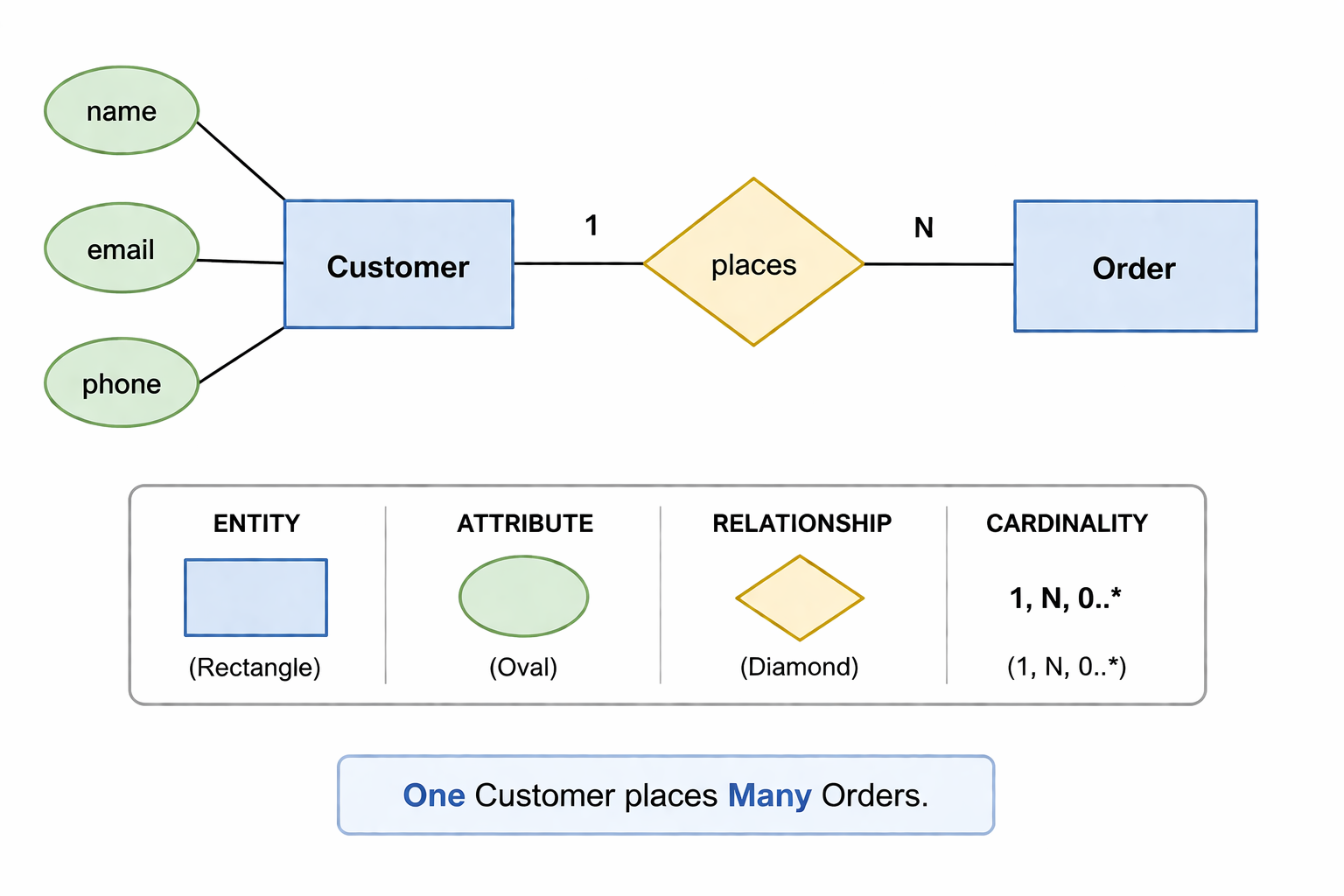
What Is an Entity Relationship Diagram
An Entity Relationship Diagram is a visual modeling technique used to represent the logical structure of a database. It was introduced by Peter Chen in 1976 and remains the standard for conceptual database design. ERDs show the entities (things) in a system, the attributes (properties) of those entities, and the relationships between them.
- Entity: A real-world object or concept (e.g., Customer, Product, Order). Represented as a rectangle.
- Attribute: A property or characteristic of an entity (e.g., name, email, price). Represented as an oval.
- Relationship: An association between entities (e.g., Customer places Order). Represented as a diamond.
- Cardinality: The number of instances of one entity that can be associated with another (e.g., one-to-many, many-to-many).
- Primary Key: An attribute that uniquely identifies an entity instance (underlined in the diagram).
- Foreign Key: An attribute that references the primary key of another entity.
Why ERDs Matter
ERDs are the foundation of good database design. They provide a common language for business stakeholders, data architects, and developers to discuss and refine data requirements.
- Visual Communication: Diagrams are easier to understand than thousands of lines of SQL. Stakeholders can validate requirements visually.
- Early Error Detection: Design flaws are much cheaper to fix on a whiteboard than after tables are created and populated with data.
- Documentation: ERDs serve as living documentation of database structure for current and future team members.
- Consistency: A shared visual model ensures everyone has the same understanding of data relationships.
- Migration Planning: ERDs help plan database changes and understand the impact of schema modifications.
- Training: New team members can quickly understand the data model by reviewing ERDs.
ERD Components in Detail
Entities
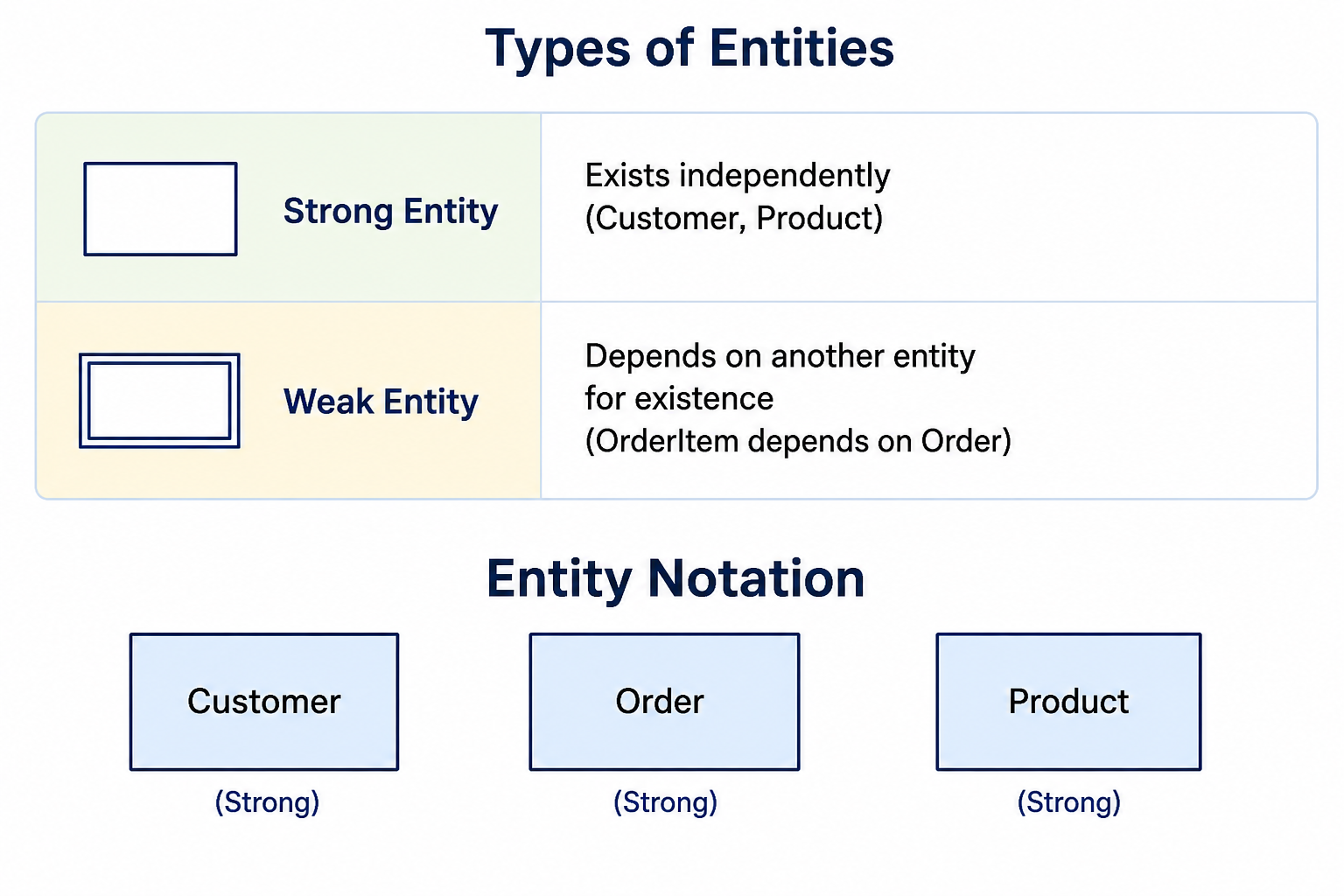
An entity represents a real-world object or concept that has an independent existence and needs to be stored in the database. Entities are typically nouns and become tables in the physical database.
Attributes
Attributes are properties that describe an entity. They become columns in the database table.
Simple Attribute: Cannot be divided (age, price)
Composite Attribute: Can be divided (address into street, city, zip)
Derived Attribute: Calculated from other attributes (age from birth_date)
Multi-valued Attribute: Can have multiple values (phone_numbers)

Entity with attributes:
        ┌──────────────┐
   name │              │ phone
───────→│   Customer   │←───────
        │              │
        └──────────────┘
              │
              │ email
              ▼
           (email)
Relationships
Relationships describe how entities are associated with each other. They have names that are typically verbs.
    Customer                Order
   ┌─────────┐             ┌─────────┐
   │         │             │         │
   │         │──── places ──→│         │
   │         │             │         │
   └─────────┘             └─────────┘
Cardinality and Modality
Cardinality specifies how many instances of one entity can be associated with instances of another entity. Modality specifies whether the relationship is required or optional.
Zero or One (0..1)     ──○┴──
Exactly One (1)         ──||──
Zero or Many (0..*)     ──○<─
One or Many (1..*)      ──|<─

Modality (optionality):
○ = Optional (can be zero)
| = Mandatory (must be at least one)

Examples:
Customer ──||── places ──○<── Order
(One Customer can place zero or many Orders)
(One Order belongs to exactly one Customer)
Types of Relationships
One-to-One (1:1)
One instance of Entity A is associated with exactly one instance of Entity B, and vice versa.
┌──────────┐     ┌──────────┐
│  User    │─────│ Profile  │
└──────────┘     └──────────┘

Each User has exactly one Profile.
Each Profile belongs to exactly one User.

Implementation: Foreign key in either table or separate table.
One-to-Many (1:N)
One instance of Entity A is associated with many instances of Entity B. Each instance of Entity B is associated with exactly one instance of Entity A. This is the most common relationship type.
┌──────────┐     ┌──────────┐
│ Customer │─────│  Order   │
└──────────┘     └──────────┘

One Customer can have many Orders.
Each Order belongs to exactly one Customer.

Implementation: Foreign key in the many-side table (orders.customer_id).
Many-to-Many (M:N)
Many instances of Entity A are associated with many instances of Entity B. This requires a junction table (associative entity) to implement.
┌──────────┐     ┌──────────┐     ┌──────────┐
│ Student  │─────│Enrollment│─────│ Course   │
└──────────┘     └──────────┘     └──────────┘

Many Students can take many Courses.
Many Courses can have many Students.

Implementation: Junction table enrollments(student_id, course_id).
ERD Notation Styles
| Notation | One-to-Many | Many-to-Many | Description |
|---|---|---|---|
| Crow's Foot | Customer ──|<─ Order | Student ──|<─ Enrollment ──|<─ Course | Most popular, intuitive, widely supported |
| Chen | Customer ◁─□─ Order | Student ◁─□─ Enrollment ◁─□─ Course | Original notation, uses diamonds for relationships |
| UML | Customer 1 ── 0..* Order | Student * ── * Course (with association class) | Used in software engineering, class diagrams |
Creating an ERD Step by Step
Step 1: Identify Entities
List all the nouns in your business requirements that represent things you need to track. For an e-commerce system: Customer, Product, Order, Category, Supplier, Payment.
Step 2: Identify Relationships
Determine how entities relate to each other. Ask questions: What actions do entities perform on other entities? Customer places Order. Order contains Product. Product belongs to Category.
Step 3: Determine Cardinality
For each relationship, determine the cardinality. How many orders can a customer have? Many. How many customers can an order have? One. This is a one-to-many relationship.
Step 4: Identify Attributes
For each entity, list its properties. Customer has name, email, phone. Order has order_date, total_amount, status.
Step 5: Identify Primary Keys
Determine which attribute uniquely identifies each entity instance. For Customer, customer_id. For Order, order_id.
Step 6: Draw the Diagram
Create the visual representation using rectangles for entities, diamonds for relationships, and ovals for attributes.
                    ┌─────────────────────────────────────┐
                    │           Customer                   │
                    │─────────────────────────────────────│
                    │ PK │ customer_id                     │
                    │    │ name                            │
                    │    │ email                           │
                    │    │ phone                           │
                    └─────────────────┬───────────────────┘
                                      │
                                      │ 1
                                      │
                                      │ places
                                      │
                                      │ N
                    ┌─────────────────▼───────────────────┐
                    │             Order                    │
                    │─────────────────────────────────────│
                    │ PK │ order_id                        │
                    │ FK │ customer_id                     │
                    │    │ order_date                      │
                    │    │ total_amount                    │
                    └─────────────────┬───────────────────┘
                                      │
                                      │ 1
                                      │
                                      │ contains
                                      │
                                      │ N
                    ┌─────────────────▼───────────────────┐
                    │          OrderItem                   │
                    │─────────────────────────────────────│
                    │ PK │ order_id                        │
                    │ PK │ product_id                      │
                    │    │ quantity                        │
                    │    │ unit_price                      │
                    └─────────────────┬───────────────────┘
                                      │
                                      │ N
                                      │
                                      │ references
                                      │
                                      │ 1
                    ┌─────────────────▼───────────────────┐
                    │            Product                   │
                    │─────────────────────────────────────│
                    │ PK │ product_id                      │
                    │ FK │ category_id                     │
                    │    │ name                            │
                    │    │ price                           │
                    └─────────────────────────────────────┘
Common ERD Mistakes to Avoid
- Missing Relationships: Forgetting to define relationships between entities that actually exist in the business logic.
- Incorrect Cardinality: Misidentifying one-to-many as many-to-many or vice versa leads to wrong database structures.
- Using Entities as Attributes: Treating related entities as simple attributes instead of separate entities.
- Ignoring Weak Entities: Not identifying entities that depend on others for existence (like OrderItem depends on Order).
- Overcomplicating: Including too much detail makes diagrams unreadable. Create multiple diagrams for different audiences.
- No Primary Keys: Every entity needs a primary key defined in the ERD.
ERD Tools and Software
| Tool | Platform | Best For |
|---|---|---|
| draw.io | Web, desktop | Free, easy to use, good for quick diagrams |
| Lucidchart | Web | Professional diagrams, collaboration, templates |
| dbdiagram.io | Web | Code-based ERD creation using DSL, exports to SQL |
| MySQL Workbench | Windows, macOS, Linux | Reverse engineering, forward engineering to MySQL | pgModeler | Windows, macOS, Linux | PostgreSQL-specific, advanced features |
| Vertabelo | Web | Multi-database support, collaboration |
From ERD to Database Schema
Converting an ERD to actual database tables follows simple mapping rules.
Entity → Table
Attribute → Column
Primary Key → PRIMARY KEY constraint
Composite Attribute → Multiple columns
Multi-valued Attribute → Separate table
Relationship (1:N) → Foreign key in the many-side table
Relationship (M:N) → Junction table with foreign keys to both entities
Frequently Asked Questions
- What is the difference between an ERD and a database schema?
An ERD is a conceptual or logical model that focuses on entities and relationships independent of any specific database technology. A database schema is a physical model that includes implementation details like data types, indexes, and constraints for a specific database system. - What is the difference between a weak entity and a strong entity?
A strong entity exists independently and has its own primary key. A weak entity depends on another entity for its existence and uses the foreign key of the parent entity as part of its primary key. Example: OrderItem depends on Order. - What is a recursive relationship?
A recursive relationship exists when an entity relates to itself. Example: Employee has a manager who is also an Employee. This is represented as a relationship from the entity back to itself. - What is the difference between logical and physical ERD?
Logical ERD shows entities, attributes, and relationships without implementation details. Physical ERD includes data types, primary keys, foreign keys, indexes, and other database-specific details. - Should I create an ERD for every project?
Yes, for any project with more than a few tables. ERDs help clarify requirements, communicate design, and catch issues early. For very simple projects, a quick sketch may suffice. - What should I learn next after ERDs?
After mastering ERDs, explore relational database design, database normalization, data modeling, and SQL implementation for complete database design mastery.