
Relational Database Design: Principles and Best Practices
Relational database design involves organizing data into tables, defining relationships between them using primary and foreign keys, and applying constraints to ensure data integrity.
Relational Database Design: Principles and Best Practices
Relational database design is the process of organizing data into structured tables, defining relationships between them, and applying constraints to ensure data integrity. A well-designed database is the foundation of any reliable application. Poor design leads to data inconsistencies, slow queries, difficult maintenance, and bugs that are hard to track down. Good design, on the other hand, makes your application faster, easier to maintain, and more scalable.
The relational model was introduced by Edgar F. Codd in 1970 and remains the dominant approach for data storage in modern applications. It organizes data into tables (relations) with rows (tuples) and columns (attributes). Tables are connected through relationships defined by keys, and constraints enforce rules about what data is valid. To understand relational database design properly, it is helpful to be familiar with database basics, SQL fundamentals, and database normalization.
Relational database design overview

What Is Relational Database Design
Relational database design is the process of defining the structure of a relational database. It involves identifying the entities (things) that need to be stored, determining their attributes (properties), and specifying how entities relate to each other. The output of this process is a database schema that serves as a blueprint for creating the actual database.
- Entity: A real-world object or concept (e.g., Customer, Product, Order).
- Attribute: A property of an entity (e.g., Customer has name, email, phone).
- Table: A collection of related rows representing instances of an entity.
- Row (Record): A single instance of an entity.
- Column (Field): A single attribute of the entity.
- Primary Key: A unique identifier for each row.
- Foreign Key: A reference to a primary key in another table.
Why Relational Database Design Matters
A well-designed database is not an accident. It is the result of careful planning and adherence to proven principles. The benefits of good design extend throughout the entire life of an application.
- Data Integrity: Properly defined constraints prevent invalid data from entering the database. For example, a foreign key constraint ensures that every order references an existing customer.
- No Redundancy: Good design stores each piece of data only once. This saves storage and prevents update anomalies where the same data is updated in some places but not others.
- Query Performance: A well-structured database allows the query optimizer to choose efficient execution plans. Indexes can be added where they help most.
- Easier Maintenance: When the structure is logical and documented, developers can understand and modify it without fear of breaking something unexpected.
- Scalability: A normalized design is easier to partition, shard, or replicate when the application grows beyond a single server.
- Application Flexibility: Changes to business requirements are easier to accommodate when the database design is clean and modular.
Core Components of Relational Design
Tables
A table is the fundamental building block of a relational database. Each table represents an entity or a relationship between entities. Tables consist of rows and columns, similar to a spreadsheet, but with strict rules about data types and constraints.
Example table structure

Primary Keys
A primary key is a column or set of columns that uniquely identifies each row in a table. Primary keys must be unique and cannot contain NULL values. Every table should have a primary key.
- Surrogate Key: An artificial key with no business meaning, typically an auto-incrementing integer or UUID. Most common and recommended for most tables.
- Natural Key: A key that has business meaning, such as an email address or product code. Natural keys can change over time, which is problematic.
- Composite Key: A primary key made up of two or more columns. Used when no single column uniquely identifies a row.
-- Surrogate key (auto-incrementing integer)
CREATE TABLE customers (
    customer_id INT PRIMARY KEY AUTO_INCREMENT,
    name VARCHAR(100)
);

-- UUID as primary key
CREATE TABLE products (
    product_id CHAR(36) PRIMARY KEY,
    name VARCHAR(200)
);

-- Composite primary key (order_items table)
CREATE TABLE order_items (
    order_id INT,
    product_id INT,
    quantity INT,
    PRIMARY KEY (order_id, product_id)
);
Foreign Keys
A foreign key is a column or set of columns that references the primary key of another table. Foreign keys create relationships between tables and enforce referential integrity, ensuring that a value in one table exists in another.
CREATE TABLE orders (
    order_id INT PRIMARY KEY,
    customer_id INT,
    order_date DATE,
    FOREIGN KEY (customer_id) REFERENCES customers(customer_id)
);
Constraints
Constraints are rules that data must follow. They enforce data integrity at the database level, preventing invalid data from being inserted or updated.
| Constraint | Purpose | Example |
|---|---|---|
| NOT NULL | Column cannot be empty | email VARCHAR(255) NOT NULL |
| UNIQUE | All values in column must be different | email VARCHAR(255) UNIQUE | CHECK | Values must satisfy a condition | age INT CHECK (age >= 0) |
| DEFAULT | Provides a default value when none is specified | status VARCHAR(20) DEFAULT 'active' |
| FOREIGN KEY | Value must exist in another table | customer_id INT REFERENCES customers(id) |
Types of Relationships
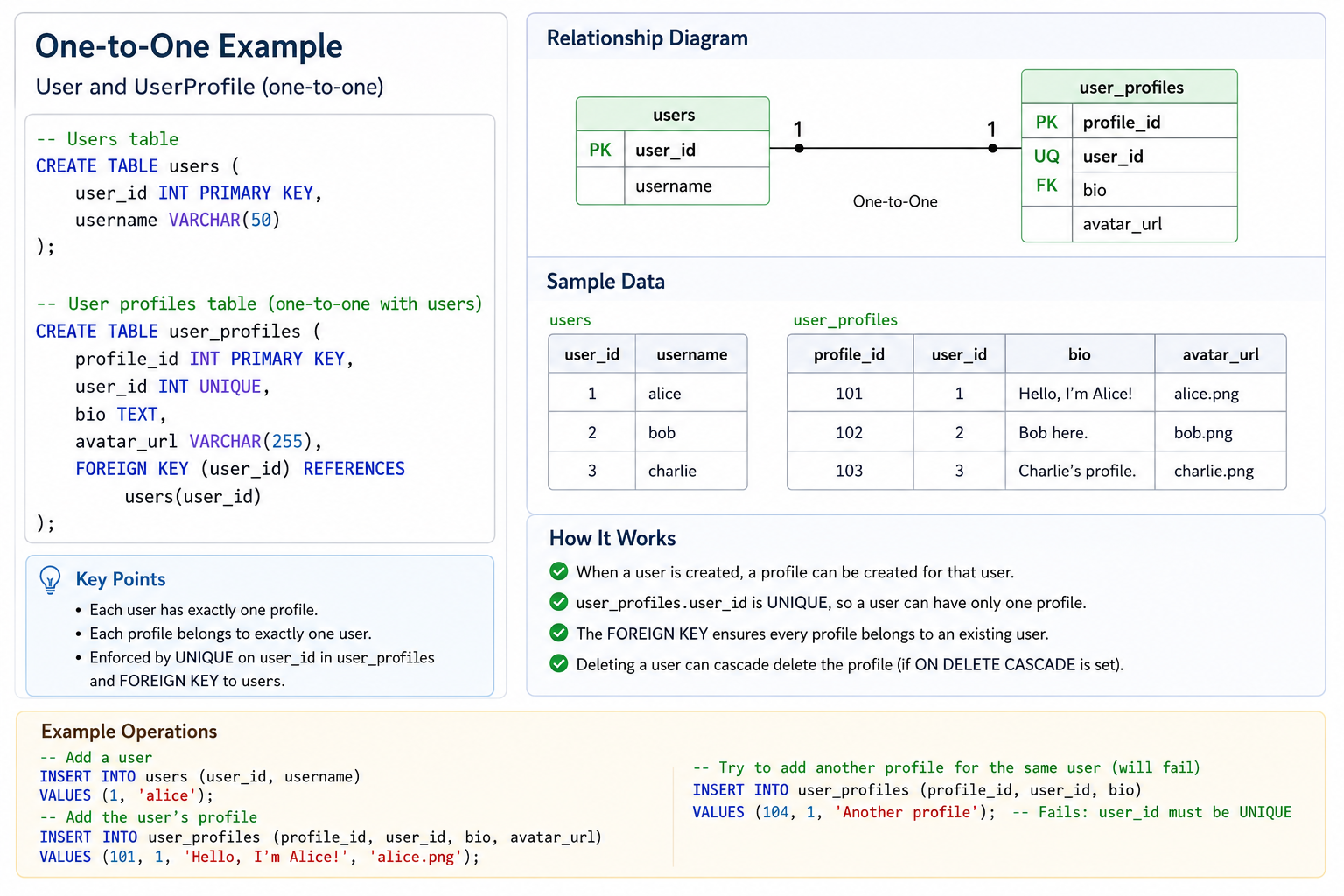
One-to-One (1:1)
A one-to-one relationship exists when one record in Table A is related to exactly one record in Table B, and vice versa. This is relatively rare and is often used to split a table for security or performance reasons.
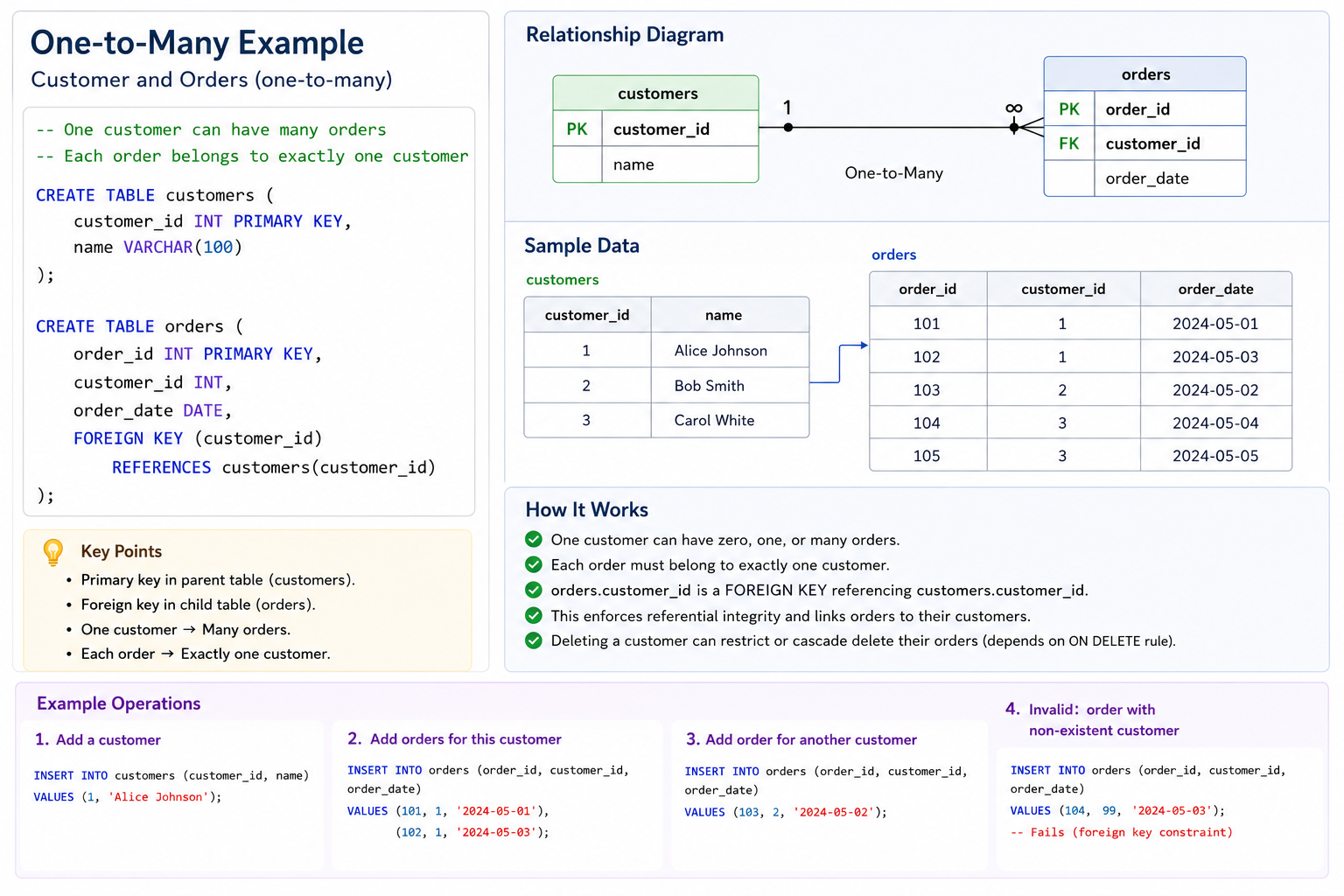
One-to-Many (1:N)
A one-to-many relationship is the most common relationship type. One record in Table A can be related to many records in Table B, but each record in Table B relates to only one record in Table A.
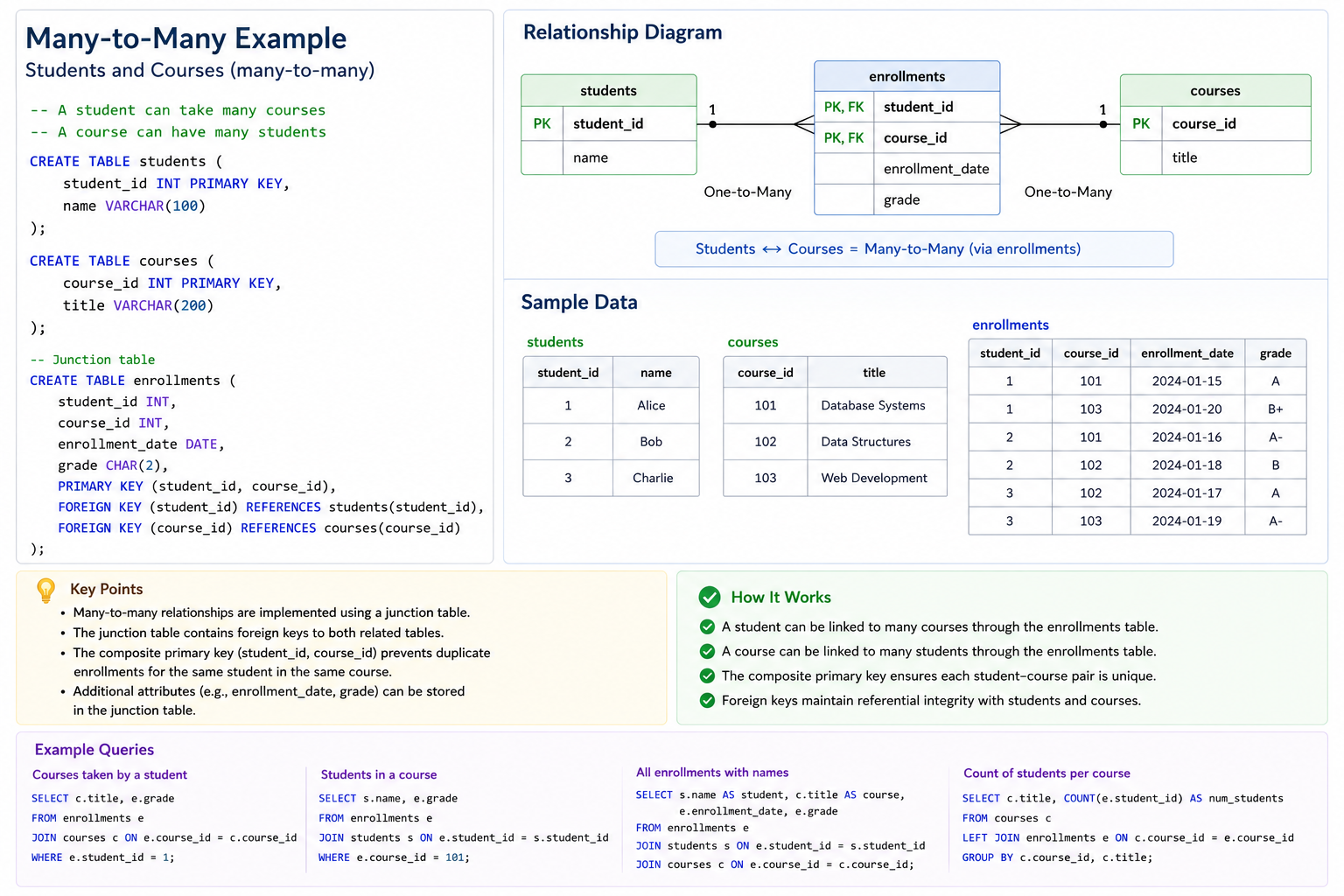
Many-to-Many (M:N)
A many-to-many relationship exists when many records in Table A can relate to many records in Table B. This requires a junction table (also called an associative table or join table) to store the relationships.
Referential Integrity
Referential integrity ensures that relationships between tables remain consistent. When a foreign key references a primary key, the database guarantees that the referenced row exists. Actions can be defined for what happens when a referenced row is updated or deleted.
-- ON DELETE CASCADE: Delete child rows when parent is deleted
FOREIGN KEY (customer_id) REFERENCES customers(id) ON DELETE CASCADE

-- ON DELETE SET NULL: Set foreign key to NULL when parent is deleted
FOREIGN KEY (customer_id) REFERENCES customers(id) ON DELETE SET NULL

-- ON DELETE RESTRICT: Prevent deletion if child rows exist (default)
FOREIGN KEY (customer_id) REFERENCES customers(id) ON DELETE RESTRICT

-- ON UPDATE CASCADE: Update foreign key when parent key changes
FOREIGN KEY (customer_id) REFERENCES customers(id) ON UPDATE CASCADE
Data Types Best Practices
| Data Type | When to Use | What to Avoid |
|---|---|---|
| INT/BIGINT | IDs, counts, quantities | Phone numbers, ZIP codes (use VARCHAR) |
| DECIMAL | Currency, exact calculations | FLOAT/DOUBLE for money (precision issues) |
| VARCHAR | Names, emails, addresses, variable-length text | CHAR for variable-length (wastes space) |
| TEXT | Long descriptions, comments, JSON | VARCHAR for very long text (has length limits) |
| DATE/DATETIME | Dates, timestamps, creation times | VARCHAR for dates (cannot use date functions) |
| BOOLEAN | Yes/no flags, status indicators | INT with 0/1 (works but less clear) |
Common Relational Design Mistakes to Avoid
- Using Natural Keys That Change: Emails, usernames, and other attributes that can change should not be primary keys. Use surrogate keys instead.
- Missing Foreign Keys: Relationships defined only in documentation, not in the database, lead to orphaned records and data inconsistency.
- Over-using NULL: Excessive NULL values indicate design problems. Consider splitting tables or using defaults.
- Storing Multiple Values in One Column: Comma-separated lists violate first normal form and make querying difficult.
- Incorrect Data Types: Using VARCHAR for dates, INT for phone numbers, or FLOAT for money causes problems.
- No Indexes on Foreign Keys: Foreign key columns should be indexed for join performance.
Relational Design Best Practices
- Use Surrogate Primary Keys: Auto-incrementing integers or UUIDs are stable, simple, and never change.
- Name Tables as Plural Nouns: Use customers, products, orders (not customer, product, order).
- Name Columns Descriptively: Use customer_id instead of just id. Use created_at instead of date.
- Always Define Foreign Keys: Let the database enforce relationships. Do not rely on application logic alone.
- Index Foreign Keys: Foreign key columns are used in JOINs and should be indexed for performance.
- Document Your Schema: Use comments to explain the purpose of tables and columns.
- Normalize to 3NF by Default: Start with Third Normal Form. Denormalize only when you have a measured performance reason.
Frequently Asked Questions
- What is the difference between a primary key and a unique key?
A primary key uniquely identifies each row and cannot be NULL. A table can have only one primary key. A unique key also enforces uniqueness but can have NULL values (depending on database), and a table can have multiple unique keys. - When should I use a surrogate key vs a natural key?
Use surrogate keys (auto-increment integers or UUIDs) for most tables. They never change and are simple to work with. Use natural keys only when the key is truly immutable and has business meaning (e.g., ISO country codes). - What is the difference between INNER JOIN and LEFT JOIN?
INNER JOIN returns only rows with matches in both tables. LEFT JOIN returns all rows from the left table, with NULL for right table columns when no match exists. - Why should I use foreign keys?
Foreign keys enforce referential integrity at the database level, preventing orphaned records and ensuring data consistency. They cannot be bypassed by application bugs. - What is the difference between CHAR and VARCHAR?
CHAR is fixed-length and pads with spaces. VARCHAR is variable-length and stores only the actual characters. Use VARCHAR for most text; use CHAR only for fixed-length codes like ISO country codes. - What should I learn next after relational database design?
After mastering relational design, explore database normalization, database indexing, SQL optimization, and data modeling for complete database mastery.