
Database Basics: A Beginner Guide to Data Storage
A database is a structured system used to store, manage, and retrieve data efficiently. It organizes data into tables with rows and columns and is used by applications to persist and query information.
Database Basics: A Beginner's Guide
A database is a structured system used to store, manage, and retrieve data efficiently. It is the backbone of almost every modern application, from simple websites to complex enterprise systems. Whether you are logging into a social media account, searching for a product, or making an online purchase, a database is working behind the scenes to store and retrieve your information.
Databases organize data in a way that makes it easy to access, update, and manage. They provide features like data integrity, security, concurrent access, and backup recovery. To understand databases properly, it is helpful to be familiar with concepts like SQL basics, data modeling, database normalization, and database indexing.
What Is a Database
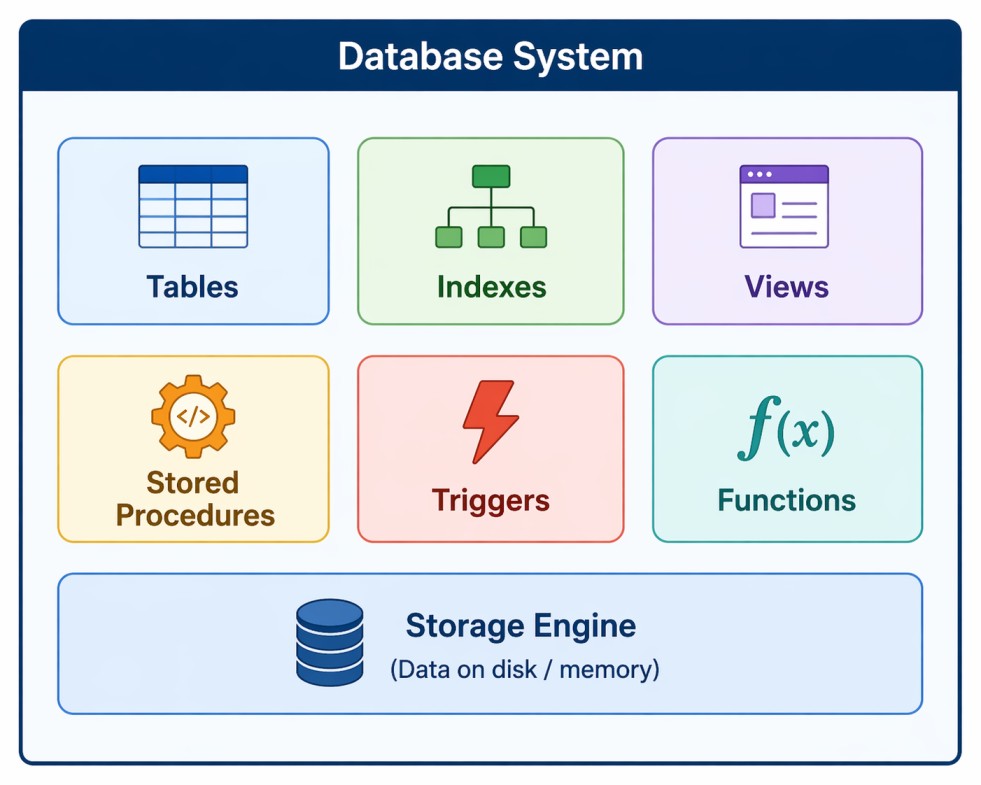
A database is an organized collection of structured data stored electronically. It allows you to store, retrieve, update, and delete data efficiently. Databases are managed by Database Management Systems (DBMS), which provide interfaces for interacting with the data.
- Structured Data: Data is organized in a predefined format (tables, rows, columns).
- Efficient Access: Databases are optimized for fast data retrieval and manipulation.
- Data Integrity: Rules ensure data accuracy and consistency.
- Concurrent Access: Multiple users can access data simultaneously without conflicts.
- Security: Access controls protect sensitive information.
- Persistence: Data survives application restarts and system failures.
Database concept diagram
Why Databases Matter
Databases are essential because they provide a reliable, efficient way to manage data. Without databases, applications would struggle with data persistence, concurrent access, and data integrity.
- Data Persistence: Data is stored permanently and survives application restarts.
- Fast Retrieval: Indexes and query optimizers ensure quick data access.
- Data Integrity: Constraints and relationships prevent invalid data.
- Concurrency Control: Multiple users can work simultaneously without conflicts.
- Security: User authentication and authorization protect sensitive data.
- Backup and Recovery: Data can be restored in case of failures.
- Scalability: Databases can grow to handle millions of records.
Types of Databases
Databases come in different types, each suited for specific use cases. The choice of database depends on your data structure, scalability needs, and query patterns.
| Type | Description | Examples | Best For |
|---|---|---|---|
| Relational (SQL) | Organizes data in tables with predefined schemas and relationships | MySQL, PostgreSQL, SQLite, Oracle, SQL Server | Applications with structured data, complex queries, ACID compliance | Document (NoSQL) | Stores data as JSON-like documents with flexible schemas | MongoDB, CouchDB, Firestore | Content management, catalogs, user profiles |
| Key-Value (NoSQL) | Simple key-value pairs for high-speed lookups | Redis, DynamoDB, Memcached | Caching, session storage, real-time data | Graph (NoSQL) | Optimized for storing relationships between entities | Neo4j, Amazon Neptune, ArangoDB | Social networks, recommendation engines, fraud detection |
| Column-Family (NoSQL) | Stores data in columns rather than rows | Cassandra, HBase, Bigtable | Time-series data, analytics, large-scale writes |
Relational Database Structure
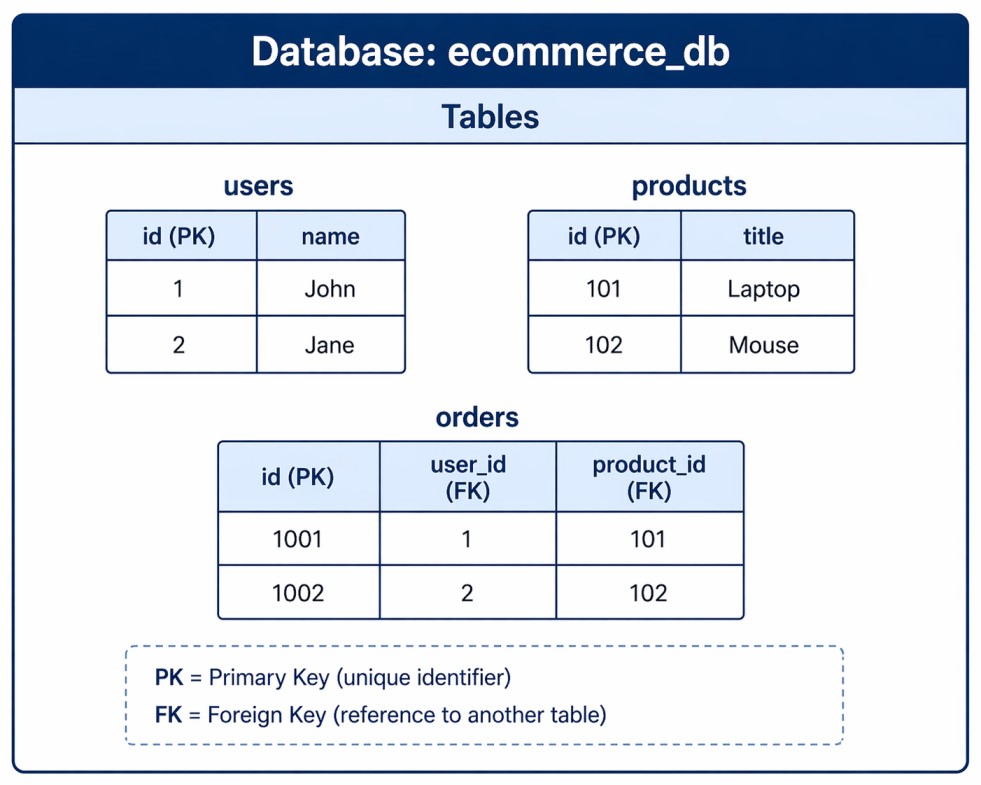
Relational databases organize data into tables. Each table represents an entity (like users, products, orders), and relationships link tables together.
Database structure example
Tables, Rows, and Columns
- Table: A collection of related data organized in rows and columns. Similar to a spreadsheet.
- Row (Record): A single entry in a table. Represents one instance of the entity.
- Column (Field): A single attribute of the entity. Defines the type of data stored.
- Primary Key: A unique identifier for each row in a table. Cannot be null or duplicate.
- Foreign Key: A column that references the primary key of another table, creating relationships.
SQL Basics
SQL (Structured Query Language) is the standard language for interacting with relational databases. It allows you to create, read, update, and delete data.
-- CREATE TABLE (define structure)
CREATE TABLE users (
    id INT PRIMARY KEY AUTO_INCREMENT,
    name VARCHAR(100) NOT NULL,
    email VARCHAR(255) UNIQUE NOT NULL,
    created_at TIMESTAMP DEFAULT CURRENT_TIMESTAMP
);

-- INSERT (add data)
INSERT INTO users (name, email) VALUES ('John Doe', 'john@example.com');

-- SELECT (read data)
SELECT * FROM users WHERE id = 1;
SELECT name, email FROM users WHERE email LIKE '%@example.com';

-- UPDATE (modify data)
UPDATE users SET name = 'Jane Doe' WHERE id = 1;

-- DELETE (remove data)
DELETE FROM users WHERE id = 1;

-- JOIN (combine tables)
SELECT u.name, o.id FROM users u JOIN orders o ON u.id = o.user_id;
Database Relationships
Relationships define how tables connect to each other. They ensure data integrity and enable complex queries across multiple tables.
- One-to-One (1:1): One record in Table A relates to exactly one record in Table B. Example: user and user_profile.
- One-to-Many (1:N): One record in Table A relates to many records in Table B. Example: user and orders (one user has many orders).
- Many-to-Many (M:N): Many records in Table A relate to many records in Table B. Requires a junction table. Example: students and courses.
-- One-to-Many: User has many orders
CREATE TABLE users (
    id INT PRIMARY KEY
);

CREATE TABLE orders (
    id INT PRIMARY KEY,
    user_id INT,
    FOREIGN KEY (user_id) REFERENCES users(id)
);

-- Many-to-Many: Students and Courses (junction table)
CREATE TABLE students (id INT PRIMARY KEY);
CREATE TABLE courses (id INT PRIMARY KEY);
CREATE TABLE enrollments (
    student_id INT,
    course_id INT,
    PRIMARY KEY (student_id, course_id),
    FOREIGN KEY (student_id) REFERENCES students(id),
    FOREIGN KEY (course_id) REFERENCES courses(id)
);
ACID Properties
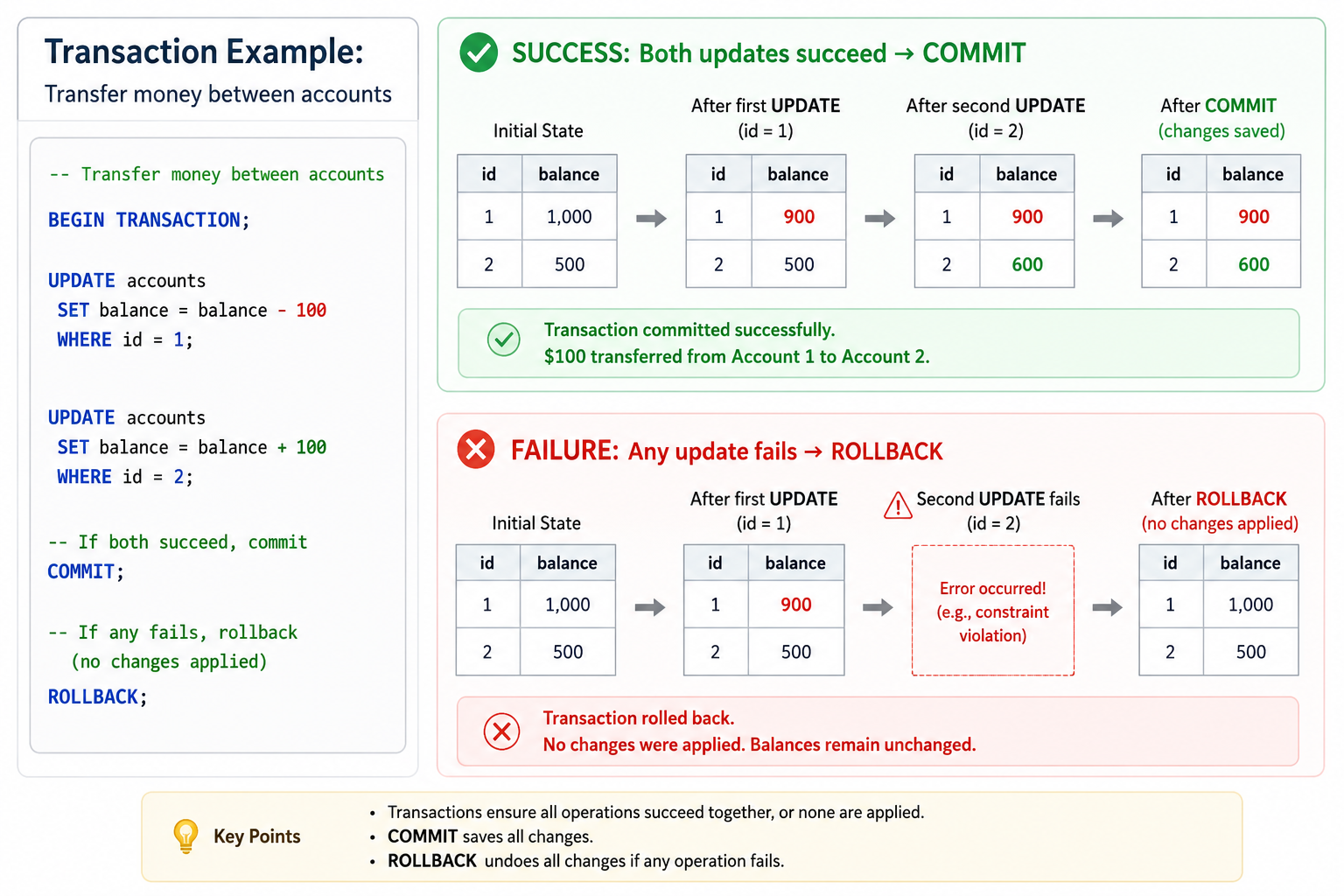
ACID is a set of properties that guarantee reliable processing of database transactions. They ensure data integrity even in the event of errors or system failures.
- Atomicity: Transactions are all-or-nothing. Either all changes are applied, or none are.
- Consistency: Transactions bring the database from one valid state to another, maintaining all rules and constraints.
- Isolation: Concurrent transactions do not interfere with each other. Each transaction appears to run alone.
- Durability: Once a transaction is committed, it remains permanent even after system failure.
Database Indexing
Indexes are data structures that improve the speed of data retrieval operations. They work like a book index, allowing the database to find rows without scanning every row.
- Primary Key Index: Automatically created for primary keys. Fastest lookup.
- Unique Index: Ensures column values are unique while speeding up searches.
- Composite Index: Index on multiple columns for queries that filter on multiple fields.
- Trade-off: Indexes speed up reads but slow down writes (INSERT, UPDATE, DELETE).
-- Single column index
CREATE INDEX idx_users_email ON users(email);

-- Composite index (order matters)
CREATE INDEX idx_orders_status_date ON orders(status, created_at);

-- Unique index
CREATE UNIQUE INDEX idx_users_email_unique ON users(email);

-- Drop index
DROP INDEX idx_users_email ON users;
Database Normalization
Normalization is the process of organizing data to reduce redundancy and improve data integrity. It involves splitting data into multiple related tables.
- First Normal Form (1NF): Eliminate repeating groups; each cell contains atomic values.
- Second Normal Form (2NF): Remove partial dependencies on composite primary keys.
- Third Normal Form (3NF): Remove transitive dependencies (non-key depends on non-key).
- Denormalization: Intentional addition of redundancy to improve read performance.
-- UNNORMALIZED (repeating groups)
Orders: order_id, customer_name, product1, product2, product3

-- FIRST NORMAL FORM (separate rows)
Orders: order_id, customer_name, product_name

-- SECOND NORMAL FORM (remove partial dependencies)
Orders: order_id, customer_id
Customers: customer_id, customer_name
Order_Items: order_id, product_id

-- THIRD NORMAL FORM (remove transitive dependencies)
Orders: order_id, customer_id
Customers: customer_id, customer_name
Order_Items: order_id, product_id
Products: product_id, product_name, category_id
Categories: category_id, category_name
Common Database Operations (CRUD)
CRUD is an acronym for the four basic operations performed on database records: Create, Read, Update, Delete.
- Create (INSERT): Add new records to a table.
- Read (SELECT): Retrieve records from a table.
- Update (UPDATE): Modify existing records.
- Delete (DELETE): Remove records from a table.
-- CREATE
INSERT INTO products (name, price) VALUES ('Laptop', 999.99);

-- READ
SELECT * FROM products WHERE price > 500;
SELECT COUNT(*) FROM products;

-- UPDATE
UPDATE products SET price = 899.99 WHERE id = 1;

-- DELETE
DELETE FROM products WHERE discontinued = true;
Common Database Mistakes to Avoid
Even experienced developers make database mistakes. Being aware of these common pitfalls helps you design better databases.
- Missing Indexes: Queries become slow as data grows. Index foreign keys and frequently filtered columns.
- Over-Indexing: Too many indexes slow down writes. Index only what you need.
- Poor Data Types: Using VARCHAR for dates or INT for phone numbers causes issues. Use appropriate types.
- No Normalization: Data redundancy leads to inconsistencies and update anomalies.
- Over-Normalization: Too many joins hurt performance. Balance normalization with read performance.
- No Foreign Keys: Missing referential integrity allows orphaned records.
- Storing Binary Data: Large files in database cause performance issues. Use file storage.
- No Backup Strategy: Data loss is inevitable without proper backups.
Frequently Asked Questions
- What is the difference between SQL and NoSQL?
SQL databases use structured schemas, tables, and relationships. They are good for complex queries and ACID compliance. NoSQL databases have flexible schemas and are designed for horizontal scaling, high velocity, and varied data structures. - What is a primary key?
A primary key is a unique identifier for each row in a table. It cannot be NULL and must be unique. Tables can have only one primary key. - What is a foreign key?
A foreign key is a column that references the primary key of another table. It creates relationships between tables and enforces referential integrity. - What is the difference between DELETE and TRUNCATE?
DELETE removes rows one by one and can be rolled back. TRUNCATE removes all rows instantly and cannot be rolled back. TRUNCATE is faster but less flexible. - What is the difference between INNER JOIN and LEFT JOIN?
INNER JOIN returns only rows with matches in both tables. LEFT JOIN returns all rows from the left table, with NULL for unmatched right table rows. - What should I learn next after database basics?
After mastering database fundamentals, explore SQL basics for querying, database normalization for schema design, database indexing for performance, and database ORM for application integration.
Conclusion
Databases are the foundation of modern applications, providing structured, reliable, and efficient data storage. Understanding database fundamentals, tables, relationships, SQL, and ACID properties is essential for any developer. The choice between SQL and NoSQL depends on your specific use case, data structure, and scalability requirements.
Good database design starts with proper normalization to eliminate redundancy, followed by strategic indexing for performance. Foreign keys maintain data integrity, and transactions ensure consistency even during failures. Regular backups protect against data loss, and monitoring helps identify performance bottlenecks.
Whether you are building a simple blog or a complex enterprise system, database knowledge is indispensable. Start with relational databases like PostgreSQL or MySQL, learn SQL thoroughly, and then explore NoSQL options as your needs evolve.
To deepen your understanding, explore related topics like SQL basics for query writing, database normalization for schema design, database indexing for performance optimization, and database ORM for application integration. Together, these skills form a complete foundation for building data-driven applications.