
Advanced SQL: Joins, Subqueries, and Window Functions
Advanced SQL covers complex querying techniques like INNER JOIN, LEFT JOIN, RIGHT JOIN, FULL OUTER JOIN, correlated subqueries, EXISTS, and window functions like ROW_NUMBER, RANK, and LAG.
Advanced SQL: Joins, Subqueries, and Window Functions
Basic SQL commands like SELECT, INSERT, UPDATE, and DELETE are essential, but they only scratch the surface of what SQL can do. Advanced SQL techniques allow you to answer complex business questions, analyze data across multiple tables, and perform sophisticated calculations that would be impossible with basic queries alone. Mastering these techniques separates casual SQL users from those who can truly leverage the power of relational databases.
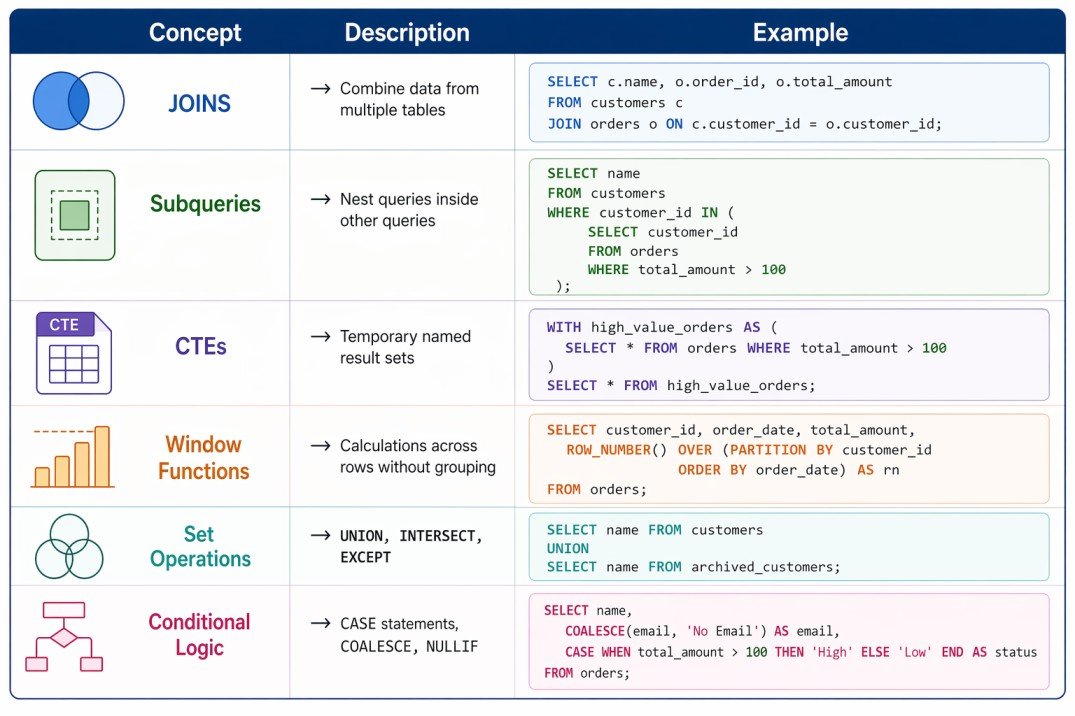
Advanced SQL includes different types of joins for combining data from multiple tables, subqueries for nesting queries inside other queries, common table expressions for breaking down complex logic, and window functions for performing calculations across sets of rows. To understand these concepts properly, it is helpful to be familiar with SQL basics, database normalization, and relational database design.
Advanced SQL concepts overview
SQL Joins in Depth
Joins are used to combine rows from two or more tables based on a related column. Understanding the different types of joins and when to use each is essential for working with normalized databases.
INNER JOIN
INNER JOIN returns only rows that have matching values in both tables. If a row in the left table has no match in the right table, it is excluded from the result. This is the most common type of join.
SELECT customers.name, orders.order_date, orders.total
FROM customers
INNER JOIN orders ON customers.id = orders.customer_id;

-- Result: Only customers who have placed orders
-- Customers without orders are excluded
LEFT JOIN (LEFT OUTER JOIN)
LEFT JOIN returns all rows from the left table, and matching rows from the right table. If there is no match, NULL values are returned for the right table columns.
SELECT customers.name, orders.order_date, orders.total
FROM customers
LEFT JOIN orders ON customers.id = orders.customer_id;

-- Result: All customers, with order data if they have orders
-- Customers without orders show NULL for order columns
RIGHT JOIN (RIGHT OUTER JOIN)
RIGHT JOIN returns all rows from the right table, and matching rows from the left table. This is less common than LEFT JOIN because the same result can often be achieved by swapping table order.
SELECT customers.name, orders.order_date, orders.total
FROM customers
RIGHT JOIN orders ON customers.id = orders.customer_id;

-- Result: All orders, with customer data if available
FULL OUTER JOIN
FULL OUTER JOIN returns all rows from both tables, with NULLs where there is no match. This is useful for finding records that exist in one table but not the other.
SELECT customers.name, orders.order_date, orders.total
FROM customers
FULL OUTER JOIN orders ON customers.id = orders.customer_id;

-- Result: All customers AND all orders
-- Missing matches show NULL on the other side
CROSS JOIN
CROSS JOIN returns the Cartesian product of both tables, matching every row in the left table with every row in the right table. Use with caution as it can produce very large result sets.
SELECT sizes.size, colors.color
FROM sizes
CROSS JOIN colors;

-- Result: Every size combined with every color
-- 5 sizes × 10 colors = 50 rows
SELF JOIN
A SELF JOIN is when a table is joined with itself. This is useful for hierarchical data like employee-manager relationships.
SELECT e.name AS employee, m.name AS manager
FROM employees e
LEFT JOIN employees m ON e.manager_id = m.id;

-- Result: Each employee with their manager's nameINNER JOIN → Only matching rows from both tables
LEFT JOIN → All rows from left + matching rows from right
RIGHT JOIN → All rows from right + matching rows from left
FULL JOIN → All rows from both tables
CROSS JOIN → Cartesian product (every row × every row)
SELF JOIN → Join a table to itselfSubqueries
A subquery is a query nested inside another query. Subqueries can be used in SELECT, FROM, WHERE, and HAVING clauses. They are powerful for answering questions that require multiple steps.
Subquery in WHERE Clause
Use subqueries in WHERE to filter based on results from another query.
-- Find products with price above average
SELECT name, price
FROM products
WHERE price > (SELECT AVG(price) FROM products);

-- Find customers who have placed orders
SELECT name
FROM customers
WHERE id IN (SELECT DISTINCT customer_id FROM orders);
Subquery in SELECT Clause
Scalar subqueries return a single value and can be used as a column expression.
SELECT
    name,
    (SELECT COUNT(*) FROM orders WHERE customer_id = customers.id) AS order_count
FROM customers;
Subquery in FROM Clause (Derived Table)
Subqueries in FROM act as temporary tables that you can query further.
SELECT category, avg_price
FROM (
    SELECT category, AVG(price) AS avg_price
    FROM products
    GROUP BY category
) AS category_stats
WHERE avg_price > 100;
Correlated Subqueries
A correlated subquery references columns from the outer query. It is executed once for each row processed by the outer query.
-- Find products with price above their category average
SELECT name, category, price
FROM products p1
WHERE price > (
    SELECT AVG(price)
    FROM products p2
    WHERE p2.category = p1.category
);
EXISTS and NOT EXISTS
EXISTS checks for the existence of rows in a subquery. It is often more efficient than IN for large datasets.
-- Find customers who have placed at least one order
SELECT name
FROM customers c
WHERE EXISTS (
    SELECT 1 FROM orders o WHERE o.customer_id = c.id
);

-- Find customers who have never placed an order
SELECT name
FROM customers c
WHERE NOT EXISTS (
    SELECT 1 FROM orders o WHERE o.customer_id = c.id
);
Common Table Expressions (CTEs)
A Common Table Expression (CTE) is a temporary named result set that you can reference within a SELECT, INSERT, UPDATE, or DELETE statement. CTEs make complex queries more readable and can be recursive.
WITH high_value_orders AS (
    SELECT customer_id, SUM(total) as total_spent
    FROM orders
    WHERE total > 1000
    GROUP BY customer_id
)
SELECT c.name, h.total_spent
FROM customers c
JOIN high_value_orders h ON c.id = h.customer_id
ORDER BY h.total_spent DESC;
Recursive CTEs
Recursive CTEs reference themselves, allowing you to traverse hierarchical data like organizational charts or bill of materials.
WITH RECURSIVE employee_tree AS (
    -- Anchor member: start with CEO
    SELECT id, name, manager_id, 1 AS level
    FROM employees
    WHERE manager_id IS NULL

    UNION ALL

    -- Recursive member: find direct reports
    SELECT e.id, e.name, e.manager_id, et.level + 1
    FROM employees e
    JOIN employee_tree et ON e.manager_id = et.id
)
SELECT * FROM employee_tree ORDER BY level, name;
Window Functions
Window functions perform calculations across a set of rows that are related to the current row, without collapsing them into a single output row. This is one of the most powerful features in modern SQL.
ROW_NUMBER()
Assigns a unique sequential number to each row within a partition.
SELECT
    name,
    department,
    salary,
    ROW_NUMBER() OVER (PARTITION BY department ORDER BY salary DESC) AS rank_in_dept
FROM employees;

-- Result: Each employee gets a rank within their department
RANK() and DENSE_RANK()
RANK() assigns the same rank to ties, leaving gaps. DENSE_RANK() assigns the same rank to ties without gaps.
SELECT
    name,
    salary,
    RANK() OVER (ORDER BY salary DESC) AS rank_with_gaps,
    DENSE_RANK() OVER (ORDER BY salary DESC) AS rank_no_gaps
FROM employees;

-- If two people have same salary, both get rank 2, next gets 4 (RANK) or 3 (DENSE_RANK)
LAG() and LEAD()
LAG() accesses data from a previous row. LEAD() accesses data from a following row.
SELECT
    date,
    sales,
    LAG(sales, 1) OVER (ORDER BY date) AS previous_day_sales,
    sales - LAG(sales, 1) OVER (ORDER BY date) AS daily_change
FROM daily_sales;

-- Compare each day's sales with the previous day
SUM() and AVG() as Window Functions
Aggregate functions can be used as window functions to calculate running totals or moving averages.
SELECT
    date,
    sales,
    SUM(sales) OVER (ORDER BY date) AS running_total,
    AVG(sales) OVER (ORDER BY date ROWS BETWEEN 6 PRECEDING AND CURRENT ROW) AS moving_avg_7day
FROM daily_sales
ORDER BY date;
PARTITION BY
PARTITION BY divides the result set into groups. Window functions reset for each partition.
SELECT
    department,
    name,
    salary,
    AVG(salary) OVER (PARTITION BY department) AS dept_avg,
    salary - AVG(salary) OVER (PARTITION BY department) AS diff_from_dept_avg
FROM employees;
Set Operations
Set operations combine results from multiple queries. They work on entire result sets, not individual columns.
-- UNION: Combine results, remove duplicates
SELECT name FROM customers
UNION
SELECT name FROM suppliers;

-- UNION ALL: Combine results, keep duplicates (faster)
SELECT name FROM customers
UNION ALL
SELECT name FROM suppliers;

-- INTERSECT: Return rows that exist in both queries
SELECT customer_id FROM orders
INTERSECT
SELECT customer_id FROM payments;

-- EXCEPT (or MINUS): Return rows from first query not in second
SELECT customer_id FROM customers
EXCEPT
SELECT customer_id FROM orders;
Conditional Logic
CASE Statement
CASE allows conditional logic in SQL, similar to if-then-else in programming languages.
SELECT
    name,
    price,
    CASE
        WHEN price < 50 THEN 'Budget'
        WHEN price < 100 THEN 'Standard'
        WHEN price < 200 THEN 'Premium'
        ELSE 'Luxury'
    END AS price_category
FROM products;

-- Conditional aggregation
SELECT
    SUM(CASE WHEN status = 'completed' THEN total ELSE 0 END) AS completed_revenue,
    SUM(CASE WHEN status = 'pending' THEN total ELSE 0 END) AS pending_revenue
FROM orders;
COALESCE and NULLIF
COALESCE returns the first non-NULL value. NULLIF returns NULL if two values are equal.
-- COALESCE: Provide default values for NULL
SELECT name, COALESCE(phone, 'No phone') AS contact_number FROM customers;

-- NULLIF: Prevent division by zero
SELECT product_id, sales / NULLIF(returns, 0) AS return_rate FROM products;
Advanced Grouping
GROUP BY with ROLLUP and CUBE
ROLLUP and CUBE generate subtotals and grand totals in the same query.
-- ROLLUP: Generates subtotals for hierarchy
SELECT
    department,
    job_title,
    SUM(salary) AS total_salary
FROM employees
GROUP BY ROLLUP(department, job_title);

-- CUBE: Generates all possible combinations of subtotals
SELECT
    department,
    job_title,
    SUM(salary) AS total_salary
FROM employees
GROUP BY CUBE(department, job_title);
HAVING vs WHERE
WHERE filters rows before grouping. HAVING filters groups after aggregation.
-- WHERE: Filter individual orders before grouping
SELECT customer_id, COUNT(*) AS order_count
FROM orders
WHERE order_date > '2024-01-01'
GROUP BY customer_id;

-- HAVING: Filter groups after aggregation
SELECT customer_id, COUNT(*) AS order_count
FROM orders
GROUP BY customer_id
HAVING COUNT(*) > 5;
Common Advanced SQL Mistakes to Avoid
- Using IN with large subqueries: For large datasets, EXISTS is often more efficient than IN.
- Forgetting to handle NULL: NULL comparisons use IS NULL, not = NULL. NULLs affect JOINs and aggregations.
- Non-sargable WHERE clauses: Functions on columns (WHERE YEAR(date) = 2024) prevent index usage. Use range conditions instead.
- Overusing subqueries: Sometimes a JOIN is more readable and performant than a subquery.
- Ignoring query plans: Always use EXPLAIN to understand how your complex queries execute.
Frequently Asked Questions
- What is the difference between WHERE and HAVING?
WHERE filters rows before grouping and aggregation. HAVING filters groups after aggregation. Use WHERE for individual row conditions, HAVING for conditions on aggregated results like COUNT(*) > 5. - When should I use EXISTS vs IN?
EXISTS is generally more efficient for large datasets because it stops processing after finding the first match. IN is fine for small, static lists. Use EXISTS for correlated subqueries and large result sets. - What is the difference between UNION and UNION ALL?
UNION removes duplicate rows from the combined result. UNION ALL keeps all rows, including duplicates. UNION ALL is faster because it does not perform duplicate checking. - What is a correlated subquery?
A correlated subquery references columns from the outer query. It is executed once for each row processed by the outer query, which can make it slower than non-correlated subqueries. - What is the difference between RANK and DENSE_RANK?
RANK leaves gaps after ties (1,2,2,4). DENSE_RANK does not leave gaps (1,2,2,3). Choose based on whether you want consecutive ranks. - What should I learn next after advanced SQL?
After mastering advanced SQL, explore SQL query optimization, database indexing, database performance tuning, and data warehousing concepts for complete database mastery.