
Refactoring: Improving Code Structure Without Changing Behavior
Refactoring is the disciplined process of restructuring existing computer code without changing its external behavior. It improves non-functional attributes like readability, maintainability, and extensibility.
Refactoring: Improving Code Structure Without Changing Behavior
Refactoring is the disciplined process of restructuring existing computer code without changing its external behavior. It involves applying small, behavior-preserving transformations to improve code readability, reduce complexity, and make the code easier to maintain and extend. Unlike rewriting or optimizing, refactoring does not add new features or improve performance directly; its goal is to improve the design of existing code. Regular refactoring keeps codebases healthy, reduces technical debt, and enables faster feature development.
To understand refactoring properly, it helps to be familiar with object-oriented programming principles, design patterns, and software testing.
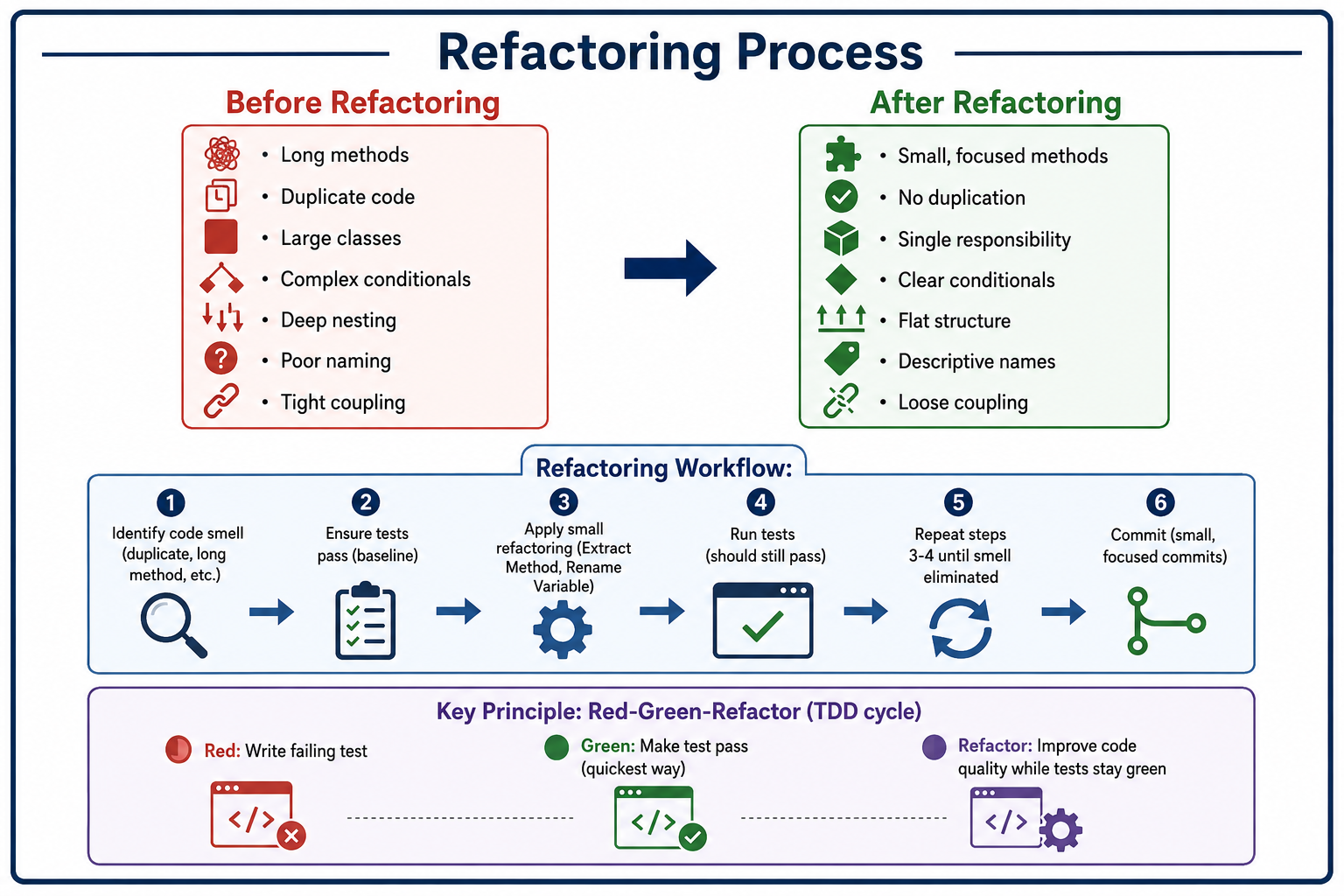
What Is Refactoring?
Refactoring is the process of changing a software system's internal structure without altering its external behavior. It is a disciplined way to clean up code that minimizes the risk of introducing bugs. Each refactoring is a small, behavior-preserving transformation (e.g., Extract Method, Rename Variable). After applying a series of refactorings, the code becomes cleaner, more readable, and easier to maintain, while still passing all existing tests. Refactoring is not rewriting (which starts from scratch) or optimizing (which changes behavior for performance). It is an essential practice in agile and test-driven development (TDD).
- Behavior-Preserving: External behavior remains identical (same inputs produce same outputs). Tests should still pass after refactoring.
- Small Steps: Each refactoring is a tiny change (2-5 minutes). Risk of introducing bugs is low.
- Test-Driven: Relies on comprehensive test suite to verify correctness. Refactoring without tests is dangerous (cannot detect behavior changes).
- Continuous: Refactoring should be done continuously, not as separate phase. Improve code as you work on features (boy scout rule: leave code cleaner than you found it).
Why Refactoring Matters
Code degrades over time (software rot). Without refactoring, technical debt accumulates, making changes slower and riskier.
- Reduces Technical Debt: Technical debt is the implied cost of additional rework caused by choosing easy (quick) solution instead of better approach. Refactoring pays down technical debt.
- Improves Readability: Clean code is easier to understand, reducing onboarding time for new developers. Clear naming, small methods, and good structure reduce cognitive load.
- Makes Changes Easier: Well-structured code is easier to modify (adding features, fixing bugs). Less time spent deciphering confusing code.
- Reduces Bug Risk: Duplicate code means fixing same bug in multiple places. Complex conditionals hide edge cases. Refactoring simplifies logic.
- Enables Faster Development: In short term, refactoring takes time. In long term, clean code speeds up feature development.
| Smell | Description | Refactoring |
|---|---|---|
| Long Method | Method too long (> 20 lines) | Extract Method |
| Large Class | Class with too many fields/methods | Extract Class |
| Duplicate Code | Same code in multiple places | Extract Method, Pull Up |
| Long Parameter List | Many parameters (> 4) | Introduce Parameter Object |
| Conditional Complexity | Complex if-else or switch (many branches) | Replace Conditional with Polymorphism |
| Primitive Obsession | Using primitives for domain concepts (phone number, money) | Replace Primitive with Object |
| Data Clumps | Same group of fields together | Extract Class |
| Shotgun Surgery | One change requires many small changes across classes | Move Method, Move Field |
| Feature Envy | Method uses more of another class's data than its own | Move Method |
Common Refactoring Techniques
Extract Method
Take a code fragment (10-20 lines) and turn it into a separate method. Benefits: reduces duplication, improves readability, and smaller methods are easier to test.
// Before
void printOwing(double amount) {
    printBanner();
    System.out.println("name: " + name);
    System.out.println("amount: " + amount);
}

// After
void printOwing(double amount) {
    printBanner();
    printDetails(amount);
}

void printDetails(double amount) {
    System.out.println("name: " + name);
    System.out.println("amount: " + amount);
}
Rename Variable / Method / Class
Change names to clearly reveal purpose. Names should answer: what does it do? (methods), what does it store? (variables), what is it? (classes). Good names reduce need for comments.
Replace Conditional with Polymorphism
Replace type-checking conditionals with object-oriented polymorphism. Instead of switch on type, create subclasses with specialized behavior.
// Before
class Bird {
    String type;
    double getSpeed() {
        if (type.equals("european")) return getBaseSpeed();
        if (type.equals("african")) return getBaseSpeed() - getLoadFactor() * numberOfCoconuts;
        if (type.equals("norwegian")) return getBaseSpeed() - getNailCount();
        throw new RuntimeException("Unknown bird");
    }
}

// After
abstract class Bird {
    abstract double getSpeed();
}
class European extends Bird {
    double getSpeed() { return getBaseSpeed(); }
}
class African extends Bird {
    double getSpeed() { return getBaseSpeed() - getLoadFactor() * numberOfCoconuts; }
}
class Norwegian extends Bird {
    double getSpeed() { return getBaseSpeed() - getNailCount(); }
}
Extract Class
Split a large class into smaller classes with single responsibility. A class should have one reason to change (Single Responsibility Principle).
Introduce Parameter Object
Replace long parameter lists with an object. Parameters that often appear together suggest a new abstraction.
// Before
void createUser(String firstName, String lastName, String email, String phone, String address) { ... }

// After
class UserInfo {
    String firstName, lastName, email, phone, address;
}
void createUser(UserInfo info) { ... }
Inline Method
Replace a method call with the method body when the method is too trivial (e.g., one line) or causes unnecessary indirection.
Split Temporary Variable
Use separate variables for different purposes instead of reusing a single variable. Each variable should have one responsibility.
// Before
double temp = 2 * (height + width);
System.out.println(temp);
temp = height * width;
System.out.println(temp);

// After
double perimeter = 2 * (height + width);
System.out.println(perimeter);
double area = height * width;
System.out.println(area);
Refactoring Anti-Patterns
- Refactoring Without Tests: Cannot verify behavior preservation. Risk of introducing bugs is high. Always have comprehensive test suite before refactoring.
- Big Bang Refactoring: Attempting to refactor entire system at once (weeks of work, massive merge conflicts). Refactor incrementally (small steps, per feature).
- Refactoring for Perfection (Over-Engineering): Making code over-engineered for anticipated but not yet needed changes. Premature abstraction increases complexity. Refactor when you need it (YAGNI).
- Changing Behavior During Refactoring: Fixing bugs or adding features while refactoring. Mixing behavior changes with structural changes makes debugging difficult. Separate refactoring from feature work (separate commits).
- No Continuous Refactoring (Big Cleanup Later): Letting code rot for months, then huge cleanup effort is risky. Refactor continuously (boy scout rule).
Before Refactoring:
□ Comprehensive test suite exists (unit, integration)
□ All tests pass (baseline)
□ Code is committed (version control)
□ Understand the code you are refactoring

During Refactoring:
□ Apply one small refactoring at a time
□ Run tests after each step (should stay green)
□ Commit after each successful refactoring (small commits)
□ Use IDE automated refactoring tools (safe)
□ No behavior changes (no bug fixes, no features)

After Refactoring:
□ All tests still pass
□ Code review for readability
□ Update documentation if needed
□ Monitor for performance regression (rare, but possible)
Refactoring Best Practices
- Refactor Continuously (Boy Scout Rule): Leave code cleaner than you found it. Spend 5-10 minutes refactoring when you touch a file. Prevents accumulation of technical debt.
- Use IDE Refactoring Tools: Modern IDEs (IntelliJ, VS Code, Eclipse) have automated refactorings (Extract Method, Rename, Inline). They are safer than manual edits (automatically update references). Use them.
- Refactor During Code Review: Suggest refactoring improvements in pull requests. Discuss better names, extract methods, reduce duplication. Refactor before merging.
- Refactor Before Adding Features: Clean up code before extending (makes new feature easier to add). Reduce technical debt that would make feature harder.
- Pair Programming for Complex Refactorings: Two developers can catch mistakes faster. Discuss design decisions in real time. Use driver-navigator pattern.
- Keep Commits Small and Focused: Commit after each small refactoring (e.g., Extract Method). Small commits easier to revert if something goes wrong. Message: "Refactor: extract validateEmail method".
| Scenario | Refactoring Techniques |
|---|---|
| Adding new feature to hard-to-change code | Refactor first (Extract Method, Rename Variable, Simplify Conditional) |
| Duplicate logic across multiple methods | Extract Method, Pull Up |
| Large class doing too much | Extract Class, Extract Subclass |
| Long parameter list | Introduce Parameter Object |
| Complex conditional (nested if-else) | Replace Conditional with Polymorphism |
| Magic numbers (literal constants) | Replace Magic Number with Constant |
| Inconsistent naming | Rename Method, Rename Variable |
| God class with many dependencies | Extract Class, Move Method |
| Switch on type code | Replace Conditional with Polymorphism |
Refactoring and Technical Debt
Technical debt is the implied cost of future rework caused by choosing quick solutions over better design. Types of technical debt: deliberate (we know we should refactor later) and inadvertent (code rot over time). Refactoring pays down technical debt (principal). Interest on debt is the extra effort required to work with messy code. If debt is too high, consider rewriting instead of refactoring (but refactoring is usually cheaper).
                Deliberate                     Inadvertent
─────────────────────────────────────────────────────────────────────────────
Prudent      "We'll ship now, refactor     "We don't know good design"
             later" (planned debt)          (lack of experience)

Reckless     "No time for design, just      "We wrote spaghetti code"
             hack it"                       (no discipline)

Managing debt:
  • Track debt in issue tracker (tickets per refactoring)
  • Allocate 20 percent of sprint time to refactoring
  • Refactor before adding features in high-debt areas
Refactoring and Testing
Tests are essential for safe refactoring. Without tests, you cannot know if you changed behavior. Characteristics of test suite needed:
- Fast: Run tests after each small refactoring (under 10 seconds). Long test suite discourages frequent runs.
- Comprehensive: High coverage (80+ percent) covers most code paths. Edge cases and error conditions covered.
- Deterministic: No flaky tests (random failures). CI tests must be reliable.
Characterization Tests (legacy code with no tests):
  • Capture current behavior (record inputs and outputs)
  • Generate test suite that verifies current behavior
  • Refactor with safety net

Approval Tests (Golden Master):
  • Run code, capture output (approved file)
  • After refactoring, compare output (should match)
  • Diff reveals unintended behavior changes

Parameterized Tests:
  • Test many inputs for same behavior
  • Ensures refactoring doesn't break edge cases

Example-based Tests:
  • Test typical scenarios (happy path)
  • Test edge cases (boundaries, empty, null)
  • Test error cases
Frequently Asked Questions
- What is the difference between refactoring and rewriting?
Refactoring changes internal structure without altering behavior (small steps, tests pass throughout). Rewriting discards existing code and starts from scratch (higher risk, longer time). Prefer refactoring for most cases; rewriting for hopeless codebases. - How often should I refactor?
Continuously, as part of development workflow. Refactor when you see code smell (duplication, long method, poor naming). Refactor before adding new features. Allocate 10-20 percent of time for cleanup. - Can I refactor without tests?
Dangerous but possible with extreme caution (small steps, manual verification). For legacy code, write characterization tests first, then refactor. Better to add tests first. - What is the difference between refactoring and code review?
Code review is human inspection of code changes (quality assurance). Refactoring is code transformation technique. Code review can suggest refactorings, and refactoring makes code review easier (cleaner code). - When should I stop refactoring?
When code is clean enough for current needs (not perfect). When diminishing returns (refactoring complex code may be risky). When you risk breaking tight deadlines. Boy scout rule: leave it better than you found it, not perfect. - What should I learn next after refactoring?
After mastering refactoring, explore design patterns for clean structure, SOLID principles, clean code practices (naming, comments, formatting), test-driven development (TDD), and working with legacy code (characterization tests, seams).