
Database Caching: How It Works and Why It Matters
Database caching stores frequently accessed data in memory to reduce repeated database queries. It improves performance, lowers latency, and helps scale applications by reducing the load on the database.
Database Caching: Accelerating Data Access
Database caching is one of the most effective strategies for improving application performance and reducing database load. By storing frequently accessed data in a fast, temporary storage layer, caching reduces the number of database queries, decreases response times, and allows applications to scale to handle millions of users. When implemented correctly, database caching can reduce query latency from hundreds of milliseconds to microseconds.
Caching is essential for modern applications because databases, even when optimized, are often the slowest component in the request chain. Network latency, disk I/O, and query execution time all contribute to delays. A well-designed cache sits between your application and database, serving repeated requests from memory instead of executing expensive database queries. To understand database caching properly, it is helpful to be familiar with concepts like database indexing, SQL optimization, Redis, and Memcached.
What Is Database Caching
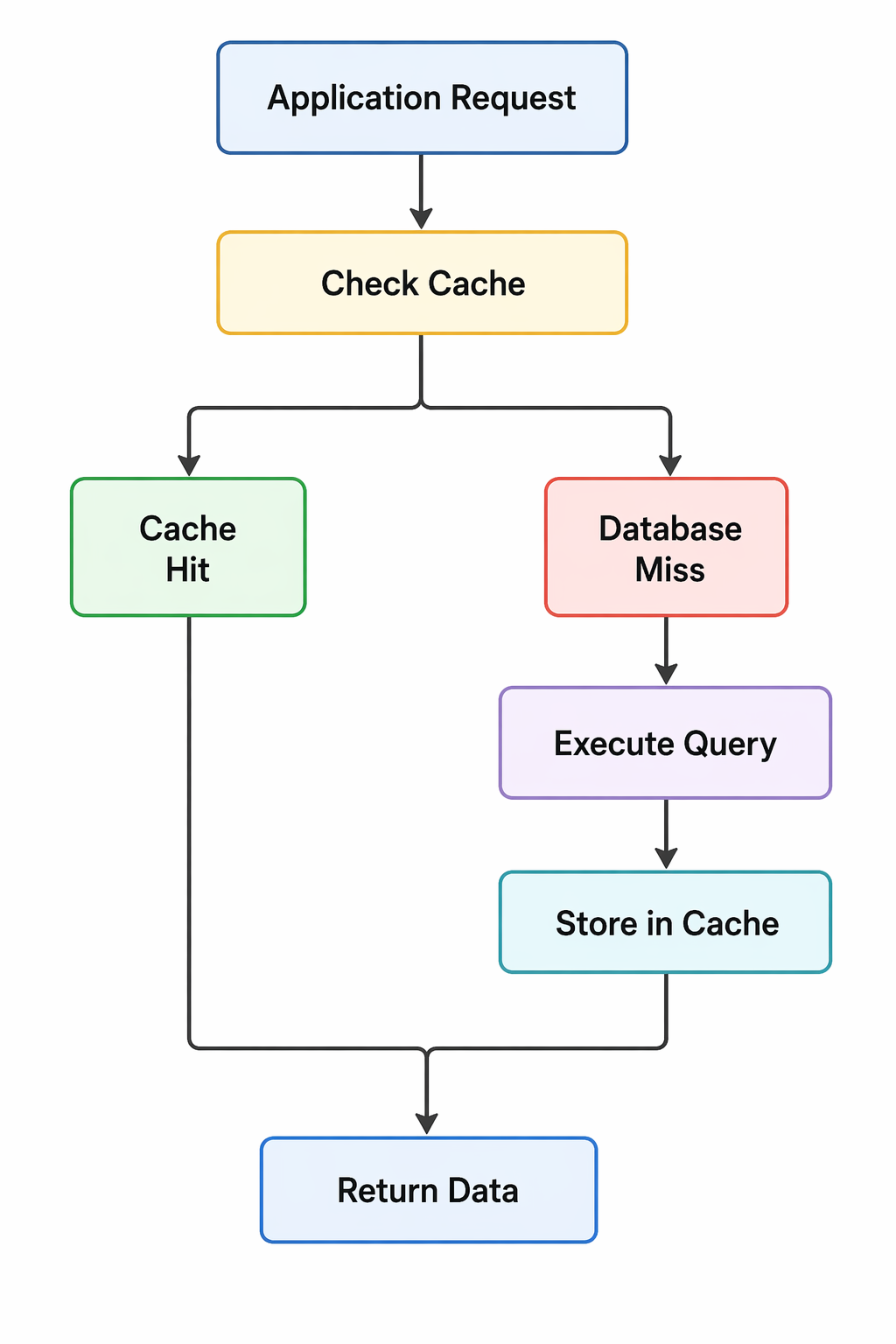
Database caching is the process of storing query results or frequently accessed data in a temporary storage layer, typically in memory, to serve future requests without querying the database. The cache acts as a buffer between your application and the database, intercepting read requests and returning cached results when available.
- In-Memory Storage: Caches store data in RAM, which is orders of magnitude faster than disk-based storage.
- Transient Nature: Cached data is temporary and can be evicted when it becomes stale or when memory is needed.
- Transparent Layer: The application checks the cache before querying the database, making caching transparent to the database itself.
- Performance Multiplier: A properly configured cache can handle thousands of requests per second with microsecond latency.
- Cost Reduction: Caching reduces database load, allowing you to run fewer database instances and save infrastructure costs.
Basic caching flow
Why Database Caching Matters
As applications grow, database load becomes a primary bottleneck. Caching addresses this challenge by reducing the number of queries hitting the database and improving response times.
- Reduced Latency: Memory access is measured in microseconds, while disk-based database queries take milliseconds or seconds.
- Lower Database Load: Caching reduces the number of queries executed, freeing database resources for write operations and complex queries.
- Improved Scalability: A cache can handle read-heavy workloads more efficiently than scaling databases vertically or horizontally.
- Better User Experience: Faster response times lead to higher user satisfaction and engagement.
- Cost Efficiency: Reducing database load can lower infrastructure costs and delay expensive database upgrades.
- Handling Traffic Spikes: Caches absorb traffic spikes that would otherwise overwhelm the database.
- Geographic Distribution: Caches can be distributed globally to serve users from nearby locations.
Caching Strategies
Different caching strategies suit different use cases. Choosing the right strategy depends on your data access patterns, consistency requirements, and performance goals.
| Strategy | Description | Best For |
|---|---|---|
| Cache-Aside | Application manages cache. Checks cache first, then database on miss. | Read-heavy workloads with moderate consistency requirements |
| Read-Through | Cache sits between application and database. Handles misses transparently. | Applications wanting simple integration with caching logic abstracted |
| Write-Through | Writes go through cache to database. Cache stays consistent with database. | Write-heavy workloads requiring strong consistency |
| Write-Back | Writes go to cache only. Database updated asynchronously. | High-write throughput with tolerance for potential data loss |
| Write-Around | Writes bypass cache. Cache is populated only on reads. | Preventing cache pollution from write-heavy operations |
Cache-Aside Strategy (Lazy Loading)
Cache-aside is the most common caching pattern. The application is responsible for reading from and writing to the cache. On a cache miss, the application fetches from the database and stores the result in the cache for future requests.
import redis
import json

class UserService:
    def __init__(self):
        self.redis_client = redis.Redis(host='localhost', port=6379, decode_responses=True)
        self.cache_ttl = 3600  # 1 hour

    def get_user(self, user_id):
        # Try to get from cache
        cache_key = f"user:{user_id}"
        cached_user = self.redis_client.get(cache_key)

        if cached_user:
            print(f"Cache hit for user {user_id}")
            return json.loads(cached_user)

        # Cache miss - query database
        print(f"Cache miss for user {user_id}")
        user = self.database.query("SELECT * FROM users WHERE id = %s", user_id)

        if user:
            # Store in cache
            self.redis_client.setex(
                cache_key,
                self.cache_ttl,
                json.dumps(user)
            )

        return user

    def update_user(self, user_id, data):
        # Update database
        self.database.execute("UPDATE users SET ... WHERE id = %s", user_id)

        # Invalidate cache
        self.redis_client.delete(f"user:{user_id}")
Read-Through Strategy
In read-through caching, the cache sits between the application and the database. When a cache miss occurs, the cache automatically loads data from the database and stores it before returning it to the application.
@Service
public class UserService {

    @Autowired
    private UserRepository userRepository;

    @Cacheable(value = "users", key = "#id")
    public User getUser(Long id) {
        // This method is only called on cache miss
        // Spring automatically handles cache storage
        return userRepository.findById(id).orElse(null);
    }

    @CacheEvict(value = "users", key = "#user.id")
    public User updateUser(User user) {
        // Evicts cache entry when user is updated
        return userRepository.save(user);
    }
}
Popular Caching Solutions
Several mature caching solutions are available, each with different strengths and use cases.
| Solution | Type | Strengths | Use Cases |
|---|---|---|---|
| Redis | In-memory data store | Rich data structures, persistence, replication, Lua scripting | Session storage, rate limiting, leaderboards, queues, caching |
| Memcached | Simple key-value cache | Ultra-fast, simple, highly scalable | Simple query result caching, object caching |
| Database Query Cache | Built-in database caching | No additional infrastructure, automatic | Simple applications, moderate read loads |
| CDN (Content Delivery Network) | Geographically distributed cache | Serves static content globally, reduces origin load | Images, CSS, JavaScript, static assets |
| Application-Level Cache | In-memory within application | No network overhead, very fast | Local caching, configuration data, reference data |
Redis for Database Caching
Redis is the most popular caching solution for modern applications. It provides sub-millisecond latency, supports complex data structures, and offers persistence options for critical caches.
// Node.js with Redis
const redis = require('redis');
const client = redis.createClient();

async function getProduct(productId) {
    const cacheKey = `product:${productId}`;

    // Check cache
    const cached = await client.get(cacheKey);
    if (cached) {
        return JSON.parse(cached);
    }

    // Database query
    const product = await db.query(
        'SELECT * FROM products WHERE id = ?',
        [productId]
    );

    if (product) {
        // Store in cache with 1 hour TTL
        await client.setEx(
            cacheKey,
            3600,
            JSON.stringify(product)
        );
    }

    return product;
}

// Cache complex queries with aggregation
async function getPopularProducts() {
    const cacheKey = 'popular_products';
    const cached = await client.get(cacheKey);

    if (cached) {
        return JSON.parse(cached);
    }

    const products = await db.query(`
        SELECT p.*, COUNT(o.id) as order_count
        FROM products p
        LEFT JOIN orders o ON p.id = o.product_id
        GROUP BY p.id
        ORDER BY order_count DESC
        LIMIT 10
    `);

    await client.setEx(cacheKey, 300, JSON.stringify(products));
    return products;
}
Cache Invalidation Strategies
Cache invalidation is one of the hardest problems in computer science. Choosing the right invalidation strategy ensures data consistency while maintaining performance.
- Time-To-Live (TTL): Cache entries expire after a fixed duration. Simple but may serve stale data.
- Write-Through: Update cache and database together. Ensures consistency but adds write latency.
- Write-Behind: Update cache immediately, update database asynchronously. Fast writes but potential for data loss.
- Explicit Eviction: Remove cache entries when data changes. Requires careful management of dependencies.
- Pattern-Based Invalidation: Invalidate groups of keys using patterns (e.g., user:*).
- Versioning: Use version keys to invalidate entire cache segments.
// TTL-based invalidation
await client.setEx('user:123', 300, JSON.stringify(user));

// Write-through pattern
async function updateUser(userId, data) {
    // Update database
    await db.update('users', data, { id: userId });

    // Update cache
    await client.set(`user:${userId}`, JSON.stringify(data));
}

// Pattern-based invalidation
async function invalidateUserCache(userId) {
    // Delete specific user
    await client.del(`user:${userId}`);

    // Delete all users list caches
    const keys = await client.keys('users:list:*');
    if (keys.length) {
        await client.del(keys);
    }
}

// Version-based invalidation
const CACHE_VERSION = 'v2';
async function getProduct(id) {
    const key = `${CACHE_VERSION}:product:${id}`;
    return await client.get(key);
}
Caching at Different Layers
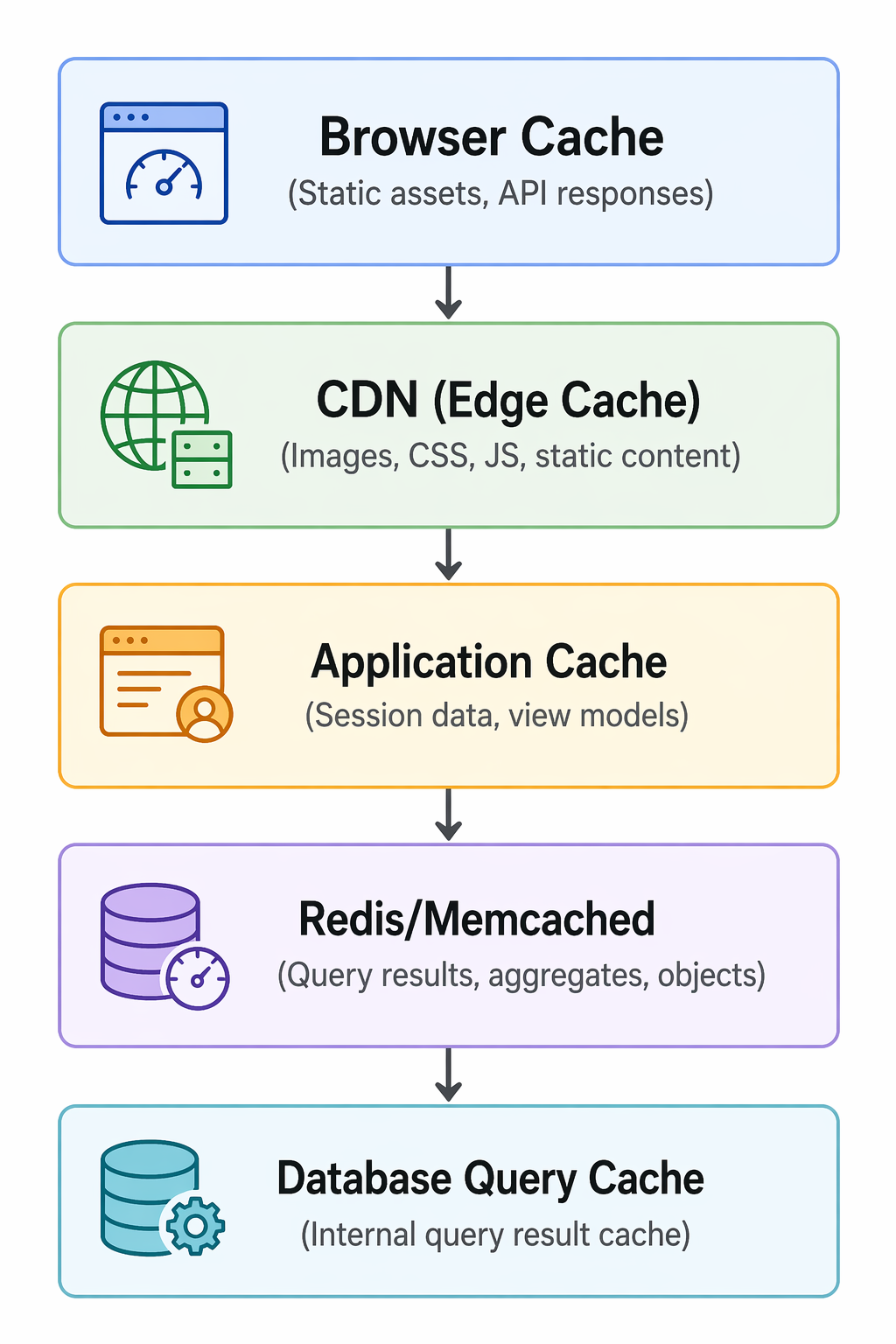
Effective caching strategies cache data at multiple layers, from the browser to the database. Each layer serves a different purpose.
Multi-layer caching architecture
Cache Warming
Cache warming is the practice of pre-populating the cache with frequently accessed data before it is requested. This prevents cache misses during peak traffic and ensures consistent performance.
// On application startup
async function warmCache() {
    console.log('Warming cache...');

    // Pre-load popular products
    const popularProducts = await db.query(`
        SELECT id FROM products
        WHERE is_featured = true
        LIMIT 100
    `);

    for (const product of popularProducts) {
        await getProduct(product.id);
    }

    // Pre-load user session data
    const activeUsers = await db.query(`
        SELECT id FROM users
        WHERE last_login > DATE_SUB(NOW(), INTERVAL 1 DAY)
    `);

    for (const user of activeUsers) {
        await getUser(user.id);
    }

    console.log('Cache warmed');
}

// Scheduled cache refresh
setInterval(async () => {
    // Refresh popular products cache every hour
    await refreshPopularProducts();
}, 3600000);
Cache Penetration Prevention
Cache penetration occurs when requests for non-existent data bypass the cache and hit the database repeatedly. This can overwhelm the database during attacks or heavy traffic.
// Bloom filter approach
const bloomFilter = new BloomFilter();

async function getUser(id) {
    // Check if ID might exist (Bloom filter)
    if (!bloomFilter.mightContain(id)) {
        return null;  // ID definitely doesn't exist
    }

    // Cache-aside lookup
    const cached = await client.get(`user:${id}`);
    if (cached) {
        return JSON.parse(cached);
    }

    const user = await db.query('SELECT * FROM users WHERE id = ?', [id]);

    if (user) {
        await client.setEx(`user:${id}`, 3600, JSON.stringify(user));
    } else {
        // Cache empty result to prevent repeated queries
        await client.setEx(`user:${id}:null`, 300, 'null');
    }

    return user;
}

// Null value caching
async function getProduct(id) {
    const cached = await client.get(`product:${id}`);

    if (cached === 'null') {
        return null;  // Known non-existent
    }

    if (cached) {
        return JSON.parse(cached);
    }

    const product = await db.query('SELECT * FROM products WHERE id = ?', [id]);

    if (product) {
        await client.setEx(`product:${id}`, 3600, JSON.stringify(product));
    } else {
        // Cache null for short duration
        await client.setEx(`product:${id}`, 60, 'null');
    }

    return product;
}
Cache Stampede Prevention
Cache stampede occurs when many requests simultaneously miss the cache (due to expiration) and all try to regenerate the same data, overwhelming the database.
// Mutex/lock approach
async function getExpensiveData(key) {
    const lockKey = `lock:${key}`;

    // Try to get from cache
    let data = await client.get(key);

    if (data === null) {
        // Try to acquire lock
        const lockAcquired = await client.setnx(lockKey, 'locked', 'EX', 5);

        if (lockAcquired) {
            // Only one request regenerates data
            data = await regenerateData();
            await client.setEx(key, 3600, JSON.stringify(data));
            await client.del(lockKey);
        } else {
            // Wait for other request to regenerate
            await sleep(100);
            return getExpensiveData(key);
        }
    }

    return JSON.parse(data);
}

// Stale-while-revalidate pattern
async function getProduct(id) {
    const cacheKey = `product:${id}`;
    const cached = await client.get(cacheKey);

    if (cached) {
        const { data, expiresAt } = JSON.parse(cached);

        // If near expiry, refresh in background
        if (Date.now() > expiresAt - 60000) {
            // Trigger async refresh
            refreshProductCache(id);
        }

        return data;
    }

    // Cache miss - synchronous refresh
    const product = await db.query('SELECT * FROM products WHERE id = ?', [id]);
    await client.setEx(cacheKey, 3600, JSON.stringify({
        data: product,
        expiresAt: Date.now() + 3600000
    }));

    return product;
}
Database Query Caching
Many databases have built-in query caching that stores the results of SELECT queries. While convenient, query caching has limitations and is being phased out in modern databases like MySQL 8.0.
-- MySQL query cache (deprecated in MySQL 8.0)
-- Enable query cache (MySQL 5.7)
SET GLOBAL query_cache_size = 1000000;
SET GLOBAL query_cache_type = 1;

-- Cache hits only for identical, deterministic queries
SELECT * FROM users WHERE id = 123;  -- Cached
SELECT * FROM users WHERE id = 123;  -- Cache hit

-- Not cached due to function
SELECT * FROM users WHERE created_at > NOW();  -- Not cached

-- Better approach: Application-level caching with Redis
-- More control, works across databases, supports invalidation
Common Caching Mistakes to Avoid
Even experienced developers make caching mistakes. Being aware of these common pitfalls helps you build effective caching strategies.
- Caching Too Much: Storing large objects or too many keys consumes memory and may cause eviction of frequently accessed data.
- No Expiration Policy: Caches without TTL grow indefinitely and serve stale data.
- Caching Write-Heavy Data: Frequently updated data leads to cache churn and invalidation overhead.
- Ignoring Cache Penetration: Missing handling for non-existent keys can overwhelm databases during attacks.
- Inconsistent Invalidation: Updating data without invalidating related cache keys leads to stale reads.
- Cache Dependency Chains: Complex dependencies between cache keys make invalidation difficult to manage.
- Not Monitoring Cache Hit Rates: Without monitoring, you won't know if your caching is effective.
- Over-Caching Large Objects: Storing large objects in memory reduces effective cache size and may cause evictions.
Monitoring Cache Performance
Effective caching requires continuous monitoring to ensure it is delivering the expected benefits and to identify issues early.
# Redis monitoring commands
redis-cli INFO stats
# hit_ratio: 0.85  (85% of requests served from cache)
# evicted_keys: 12345 (number of keys evicted)
# expired_keys: 6789 (keys that expired)

redis-cli INFO memory
# used_memory_human: 1.5G (memory usage)
# maxmemory_human: 2.0G (configured limit)

# Application-level monitoring
cache_hits = 8500
cache_misses = 1500
hit_rate = 85%

# Track slow database queries to identify missing cache opportunities
SELECT * FROM slow_log WHERE query_time > 1;

# Alert on hit rate drops
if hit_rate < 0.70:
    alert("Cache hit rate below 70%")
Frequently Asked Questions
- What is the difference between Redis and Memcached?
Redis supports rich data structures (strings, hashes, lists, sets, sorted sets), persistence, replication, and transactions. Memcached is a simple key-value store optimized for speed and simplicity. Choose Redis for complex caching needs, Memcached for simple, high-throughput caching. - When should I use database caching?
Use caching for frequently accessed, infrequently changing data. Good candidates include user profiles, product catalogs, session data, and aggregated reports. Avoid caching frequently updated data or data with low read-to-write ratios. - What is cache invalidation and why is it hard?
Cache invalidation is ensuring cached data stays consistent with the source database. It is challenging because you must track all cached copies of data, update them when the source changes, and handle concurrent updates. The classic "two hard problems in computer science" quote includes cache invalidation for good reason. - What is a cache hit ratio and what should it be?
Cache hit ratio is the percentage of requests served from cache. A good hit ratio depends on your workload. For read-heavy applications, aim for 80-95%. Lower ratios indicate ineffective caching or rapidly changing data. - What should I learn next after understanding database caching?
After mastering caching fundamentals, explore Redis in depth, database sharding for scaling writes, load balancing for distributing traffic, and CDN for edge caching. Also study performance monitoring to measure caching effectiveness.
Conclusion
Database caching is a fundamental technique for building high-performance, scalable applications. By storing frequently accessed data in fast, in-memory storage, caching reduces database load, decreases response times, and enables applications to handle millions of users. The right caching strategy depends on your data access patterns, consistency requirements, and performance goals.
Implementing caching requires careful consideration of cache invalidation, expiration policies, and handling edge cases like cache penetration and stampede. While caching adds complexity, the performance gains are often dramatic. A well-designed cache can reduce database queries by 80-95% and cut response times from hundreds of milliseconds to microseconds.
Start with simple cache-aside patterns, monitor hit rates, and gradually optimize. Use established solutions like Redis or Memcached rather than building your own. As your application grows, consider multi-layer caching strategies that combine browser caching, CDN, application-level caching, and database query caching for comprehensive performance optimization.
To deepen your understanding, explore related topics like Redis for advanced caching patterns, database optimization for complementary performance improvements, load balancing for distributing traffic, and performance monitoring for tracking effectiveness. Together, these skills form a complete foundation for building fast, scalable applications.