
Database Partitioning: Splitting Large Tables for Performance
Database partitioning divides a large table into smaller, more manageable pieces called partitions. It improves query performance by allowing the database to scan only relevant partitions and simplifies data archival and deletion.
Database Partitioning: Splitting Large Tables for Performance
Database partitioning is the process of dividing a large table into smaller, more manageable pieces called partitions, while still treating it as a single logical table. Each partition is stored separately and can be managed independently, but queries see the table as one unified structure. Partitioning is essential for very large databases where a single table contains millions or billions of rows, making queries slow and maintenance difficult.
Without partitioning, operations like deleting old data require scanning the entire table or deleting rows one by one, which is slow and generates massive transaction logs. With partitioning, you can drop an entire partition in milliseconds, archive old data efficiently, and query only relevant partitions. To understand partitioning properly, it is helpful to be familiar with database indexing, database performance tuning, and SQL optimization.
What Is Database Partitioning
Database partitioning splits a large table into smaller physical pieces called partitions. Each partition is stored separately, but the table appears as a single logical entity to applications and queries. The database uses the partition key to determine which partition(s) to access for each query.
Partitioning concept diagram
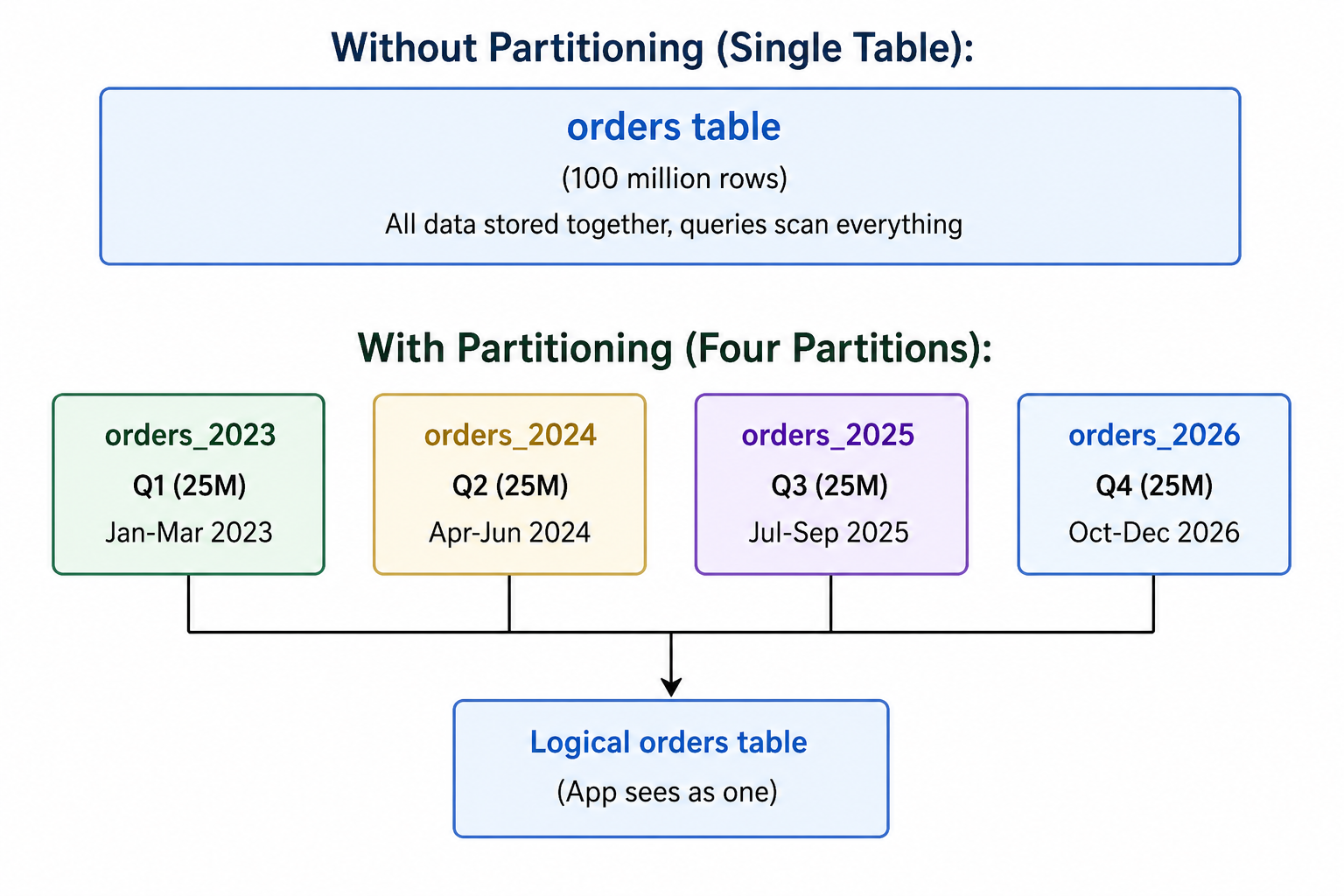
- Partition: A physical piece of a partitioned table.
- Partition Key: The column used to determine which partition a row belongs to.
- Partition Pruning: The database scans only relevant partitions based on the query WHERE clause.
- Partition Elimination: Another term for partition pruning.
Why Database Partitioning Matters
As tables grow to millions or billions of rows, performance degrades and maintenance becomes difficult. Partitioning addresses these challenges by breaking large tables into smaller, more manageable pieces.
- Improved Query Performance: Partition pruning scans only relevant partitions, reducing I/O and execution time.
- Faster Data Deletion: Drop or truncate entire partitions instantly instead of deleting rows one by one.
- Easier Data Archiving: Detach old partitions and archive them without affecting active data.
- Parallel Processing: Some databases can scan partitions in parallel for better performance.
- Better Index Management: Each partition can have its own indexes, which are smaller and more efficient.
- Reduced Maintenance Cost: Operations like VACUUM, REINDEX, and ANALYZE can run on individual partitions.
Types of Partitioning
| Partition Type | Description | Best For |
|---|---|---|
| Range Partitioning | Divides data based on a range of values (e.g., dates, numeric ranges) | Time-series data, historical data, logs |
| List Partitioning | Divides data based on a list of discrete values (e.g., regions, categories) | Data grouped by category, region, status | Hash Partitioning | Distributes data evenly using a hash function on the partition key | Load balancing, when no natural range or list exists |
| Key Partitioning | Similar to hash but uses MySQL's internal hashing function | MySQL-specific, even distribution |
1. Range Partitioning
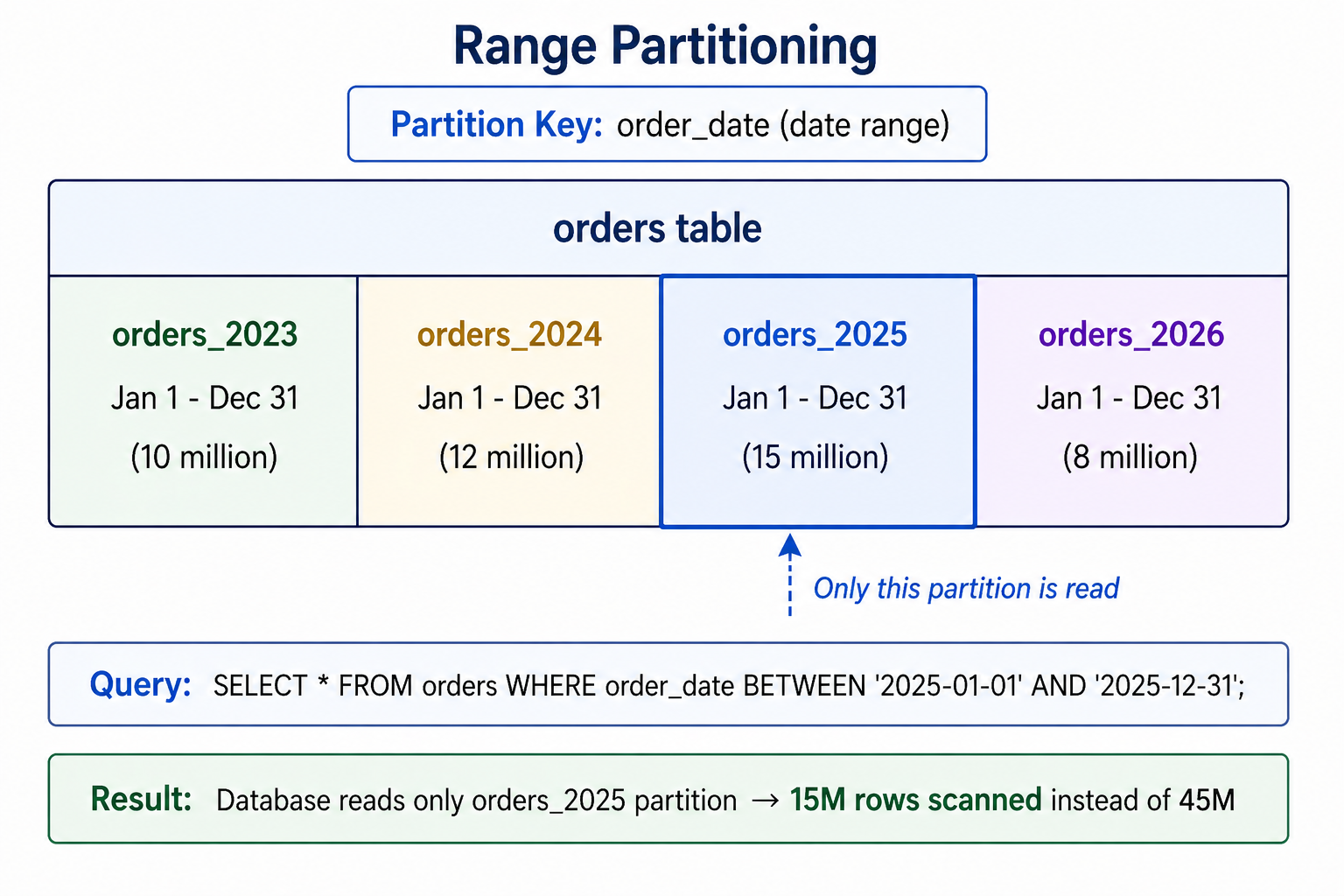
Range partitioning divides data based on a continuous range of values. It is the most common partitioning type, especially for time-series data like sales orders, logs, or sensor readings.
CREATE TABLE orders (
    order_id INT NOT NULL,
    customer_id INT NOT NULL,
    order_date DATE NOT NULL,
    total DECIMAL(10,2)
)
PARTITION BY RANGE (YEAR(order_date)) (
    PARTITION p2022 VALUES LESS THAN (2023),
    PARTITION p2023 VALUES LESS THAN (2024),
    PARTITION p2024 VALUES LESS THAN (2025),
    PARTITION p2025 VALUES LESS THAN (2026),
    PARTITION p_future VALUES LESS THAN MAXVALUE
);CREATE TABLE orders (
order_id INT NOT NULL,
customer_id INT NOT NULL,
order_date DATE NOT NULL,
total DECIMAL(10,2)
) PARTITION BY RANGE (order_date);
CREATE TABLE orders_2023 PARTITION OF orders
FOR VALUES FROM ('2023-01-01') TO ('2024-01-01');
CREATE TABLE orders_2024 PARTITION OF orders
FOR VALUES FROM ('2024-01-01') TO ('2025-01-01');
CREATE TABLE orders_2025 PARTITION OF orders
FOR VALUES FROM ('2025-01-01') TO ('2026-01-01');2. List Partitioning
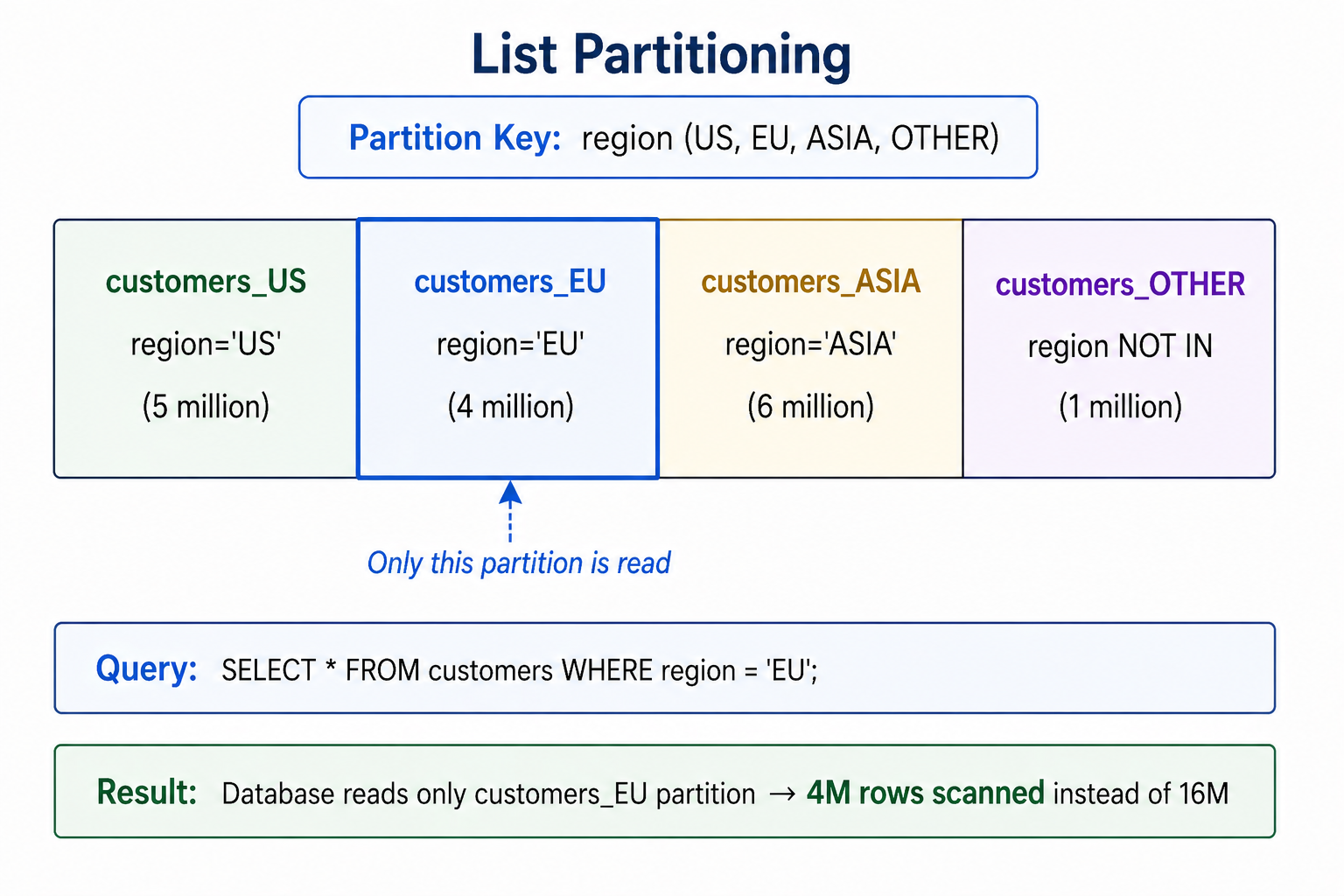
List partitioning divides data based on a discrete list of values. It is ideal for columns with a known set of acceptable values, such as region, status, or category.
CREATE TABLE customers (
    customer_id INT NOT NULL,
    name VARCHAR(100),
    region VARCHAR(10)
)
PARTITION BY LIST COLUMNS(region) (
    PARTITION p_us VALUES IN ('US', 'USA', 'United States'),
    PARTITION p_eu VALUES IN ('UK', 'DE', 'FR', 'ES', 'IT'),
    PARTITION p_asia VALUES IN ('IN', 'CN', 'JP', 'KR'),
    PARTITION p_other VALUES IN (DEFAULT)
);
3. Hash Partitioning
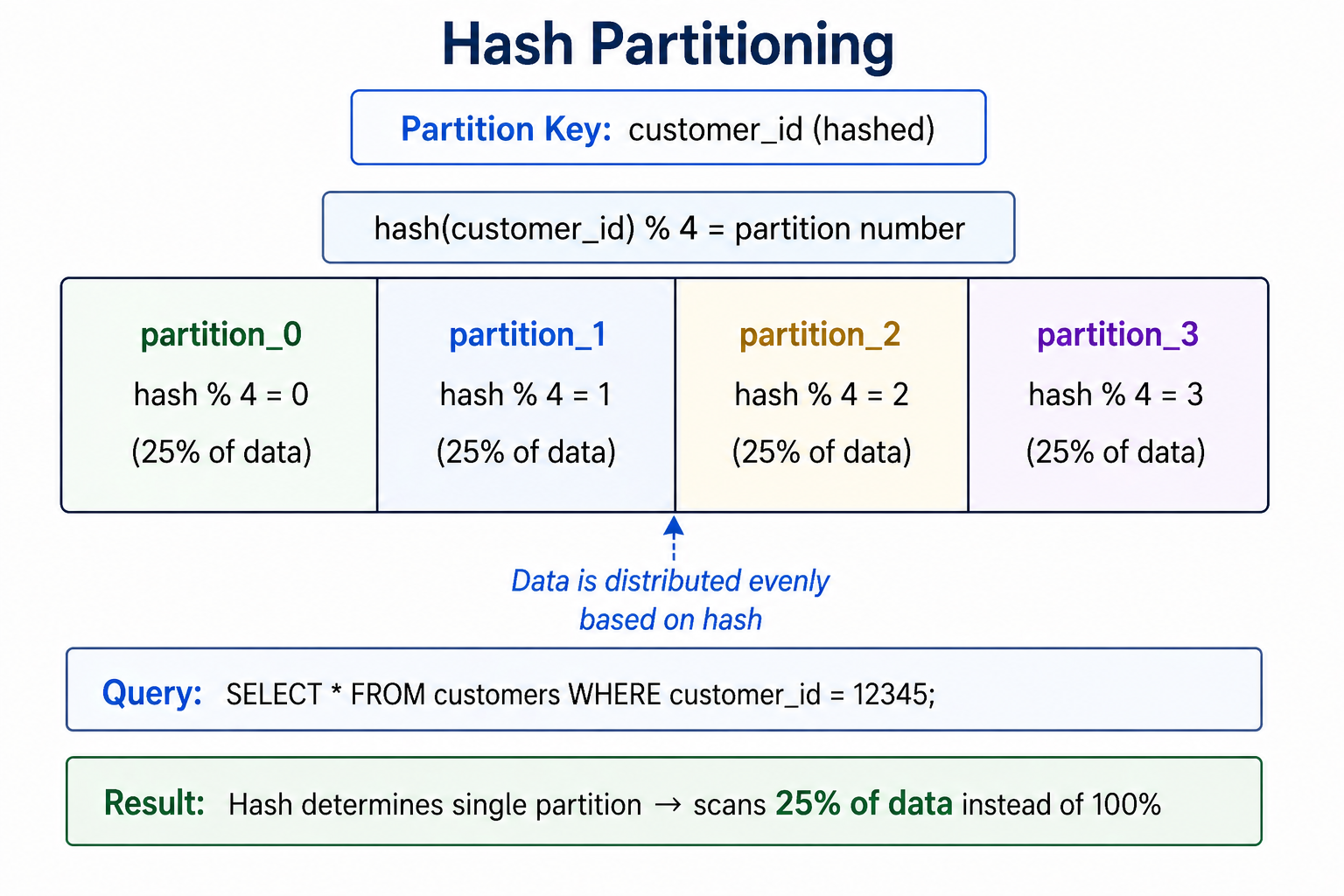
Hash partitioning distributes data evenly across a specified number of partitions using a hash function. It is useful when you have no natural range or list and want to evenly distribute data for load balancing.
CREATE TABLE customers (
    customer_id INT NOT NULL,
    name VARCHAR(100),
    email VARCHAR(255)
)
PARTITION BY HASH(customer_id)
PARTITIONS 4;
Partition Pruning
Partition pruning is the optimization where the database only scans partitions that match the query's WHERE clause. This is the primary performance benefit of partitioning. The database analyzes the query and eliminates partitions that cannot contain relevant data.
Table orders partitioned by order_date (yearly partitions: 2023, 2024, 2025, 2026)

Query 1: SELECT * FROM orders WHERE order_date = '2025-06-15';
→ Prunes to: scans only orders_2025 partition

Query 2: SELECT * FROM orders WHERE order_date BETWEEN '2024-01-01' AND '2024-12-31';
→ Prunes to: scans only orders_2024 partition

Query 3: SELECT * FROM orders WHERE order_date < '2024-01-01';
→ Prunes to: scans orders_2023 partition

Query 4: SELECT * FROM orders WHERE customer_id = 12345;
→ Cannot prune (partition key not in WHERE) → scans ALL partitions

Key insight: Always include the partition key in WHERE clauses for optimal performance.
Managing Partitions
Adding a New Partition
-- MySQL: Add new partition for future data
ALTER TABLE orders REORGANIZE PARTITION p_future INTO (
    PARTITION p2026 VALUES LESS THAN (2027),
    PARTITION p_future VALUES LESS THAN MAXVALUE
);

-- PostgreSQL: Attach a new partition
CREATE TABLE orders_2026 PARTITION OF orders
    FOR VALUES FROM ('2026-01-01') TO ('2027-01-01');
Dropping a Partition (Fastest Delete)
-- Dropping a partition is much faster than DELETE
-- MySQL: Drop partition (removes data instantly)
ALTER TABLE orders DROP PARTITION p2022;

-- PostgreSQL: Detach partition (remove from table)
ALTER TABLE orders DETACH PARTITION orders_2022;
DROP TABLE orders_2022;
Truncating a Partition
-- MySQL: Truncate partition (remove all data, keep structure)
ALTER TABLE orders TRUNCATE PARTITION p2023;
Viewing Partition Information
-- MySQL: Show partition info
SELECT * FROM INFORMATION_SCHEMA.PARTITIONS
WHERE TABLE_NAME = 'orders';

-- PostgreSQL: Show partition info
SELECT tablename, partitiontablename, partitionrange
FROM pg_partitions WHERE tablename = 'orders';
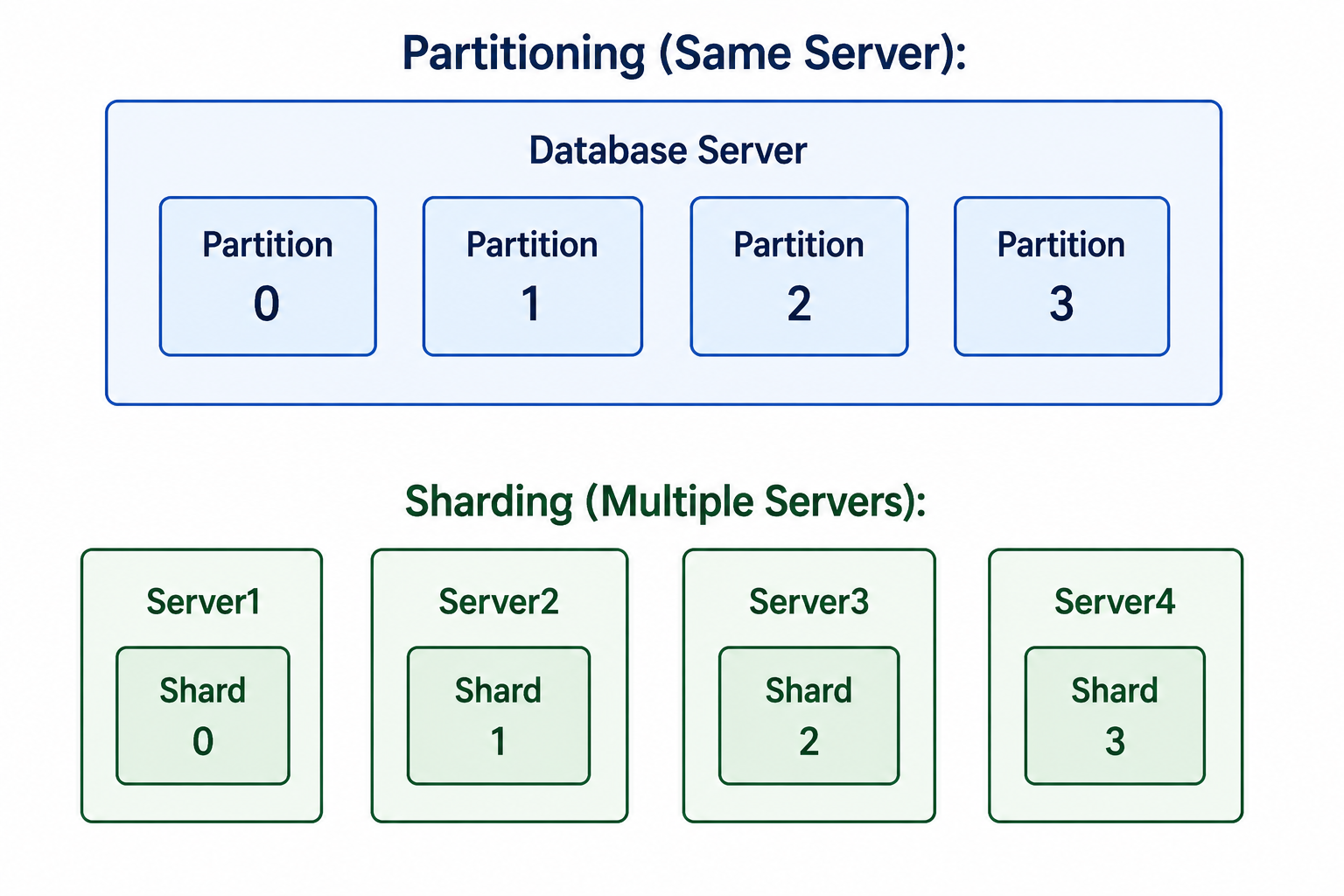
Partitioning vs Sharding vs Indexing
| Technique | Description | Use Case |
|---|---|---|
| Partitioning | Split table within same database server | Manage large tables, improve query performance, fast data deletion |
| Sharding | Split data across multiple database servers | Horizontal scaling beyond single server capacity |
| Indexing | Create data structures for fast lookups | Speed up specific queries, enforce uniqueness |
Partitioning vs Sharding visual comparison
When to Use Partitioning
- Large Tables: Tables with millions or billions of rows where queries are slowing down.
- Time-Series Data: Data that naturally partitions by date (logs, events, orders, sensor data).
- Old Data Deletion: When you frequently delete old data and need fast deletion by dropping partitions.
- Data Archiving: When you need to archive old data and detach partitions for backup.
- Parallel Processing: When you can process partitions in parallel for better performance.
- Maintenance Windows: When you need to perform maintenance on individual partitions to reduce downtime.
When NOT to Use Partitioning
- Small Tables: Tables under 1 million rows may not benefit from partitioning overhead.
- Queries Without Partition Key: If queries rarely include the partition key, partitioning may not help.
- Frequent Cross-Partition Queries: Queries that scan multiple partitions may be slower than scanning a single large table.
- High Write Workloads: Partitioning adds overhead to INSERT/UPDATE operations (determining partition).
- Limited Partition Support: Not all databases support all types of partitioning with all features.
Common Partitioning Mistakes to Avoid
- Partitioning on the Wrong Column: Choose a partition key that is frequently used in WHERE clauses. Partitioning on rarely-used columns provides no benefit.
- Too Few Partitions: Very few partitions (e.g., 2-4) may not provide significant performance gains.
- Too Many Partitions: Hundreds of partitions can cause overhead in partition management and query planning.
- Queries Without Partition Key: If most queries do not filter on partition key, you will scan all partitions.
- Forgetting Partition Maintenance: Add new partitions before old ones fill up. Drop old partitions to free space.
- Using Partitioning Instead of Indexing: Partitioning is not a replacement for proper indexing. Use both together.
Partitioning Best Practices
- Choose Partition Key Wisely: Select a column that is frequently used in WHERE clauses for your most important queries.
- Balance Partitions Evenly: Avoid partitions with vastly different sizes. Use hash partitioning for even distribution.
- Test with Real Data Volume: Partitioning benefits appear at scale. Test with production-like data volume.
- Monitor Partition Usage: Track which partitions are accessed frequently and which are not.
- Automate Partition Management: Schedule jobs to add future partitions and drop old partitions.
- Combine with Indexing: Create indexes on each partition for maximum performance.
- Document Partitioning Strategy: Document why and how you partitioned for future maintainers.
-- Scheduled event to add next year's partition
CREATE EVENT add_year_partition
ON SCHEDULE EVERY 1 YEAR
STARTS '2026-01-01 00:00:00'
DO
BEGIN
    DECLARE next_year INT;
    SET next_year = YEAR(CURDATE()) + 1;
    SET @sql = CONCAT(
        'ALTER TABLE orders REORGANIZE PARTITION p_future INTO (',
        'PARTITION p', next_year, ' VALUES LESS THAN (', next_year + 1, '),',
        'PARTITION p_future VALUES LESS THAN MAXVALUE)'
    );
    PREPARE stmt FROM @sql;
    EXECUTE stmt;
    DEALLOCATE PREPARE stmt;
END;
Frequently Asked Questions
- What is the difference between partitioning and sharding?
Partitioning splits a table within the same database server. Sharding splits data across multiple database servers. Partitioning is for managing large tables; sharding is for scaling beyond a single server. - Can I partition an existing table?
Yes, but it requires rebuilding the table. In MySQL, use `ALTER TABLE ... PARTITION BY`. In PostgreSQL, you need to create a partitioned table and migrate data. - Does partitioning replace indexes?
No. Partitioning and indexing work together. Partitioning reduces the amount of data scanned; indexes speed up lookups within partitions. Use both for best performance. - How many partitions should I create?
Depends on your data. For range partitioning by date, 12-24 partitions (monthly) or 4-6 partitions (quarterly) is common. For hash partitioning, use the number of CPU cores or a multiple thereof. - Do all databases support partitioning?
Major databases (PostgreSQL 10+, MySQL 5.1+, Oracle, SQL Server) support partitioning, but syntax and features vary. Check your database documentation. - What should I learn next after database partitioning?
After mastering partitioning, explore database sharding, advanced indexing, query optimization, and database performance tuning for complete scalability mastery.
Database partitioning is a powerful technique for managing very large tables. By splitting a table into smaller physical pieces, partitioning improves query performance through partition pruning, enables instant deletion of old data by dropping partitions, and simplifies maintenance by allowing operations on individual partitions.
Choose the right partitioning type based on your data access patterns. Use range partitioning for time-series data, list partitioning for categorical data, and hash partitioning for even distribution. Always include the partition key in WHERE clauses to benefit from partition pruning. Combine partitioning with proper indexing for maximum performance. To deepen your understanding, explore related topics like database sharding, advanced indexing, query optimization, and database performance tuning for complete large-scale database management.